Smart Home How-To Guides & Tutorials
Smart home how-to guides covering device setup, network configuration, integration, and troubleshooting for all skill levels.
Blog posts
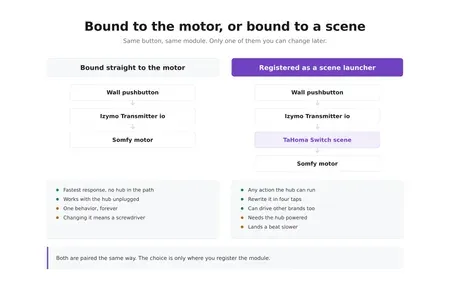
A wired pushbutton in the garage now runs a TaHoma scene instead...
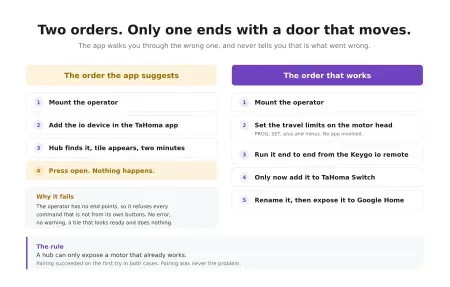
A garage operator pairs with a TaHoma Switch in minutes, and that...

Explore Somfy's top 10 smart home solutions that offer enhanced security and...

Pine64's PineVoice is a $50 RISC-V smart speaker with open firmware, local...

Commercial smart sprinkler controllers want a subscription and a cloud account to...
Products
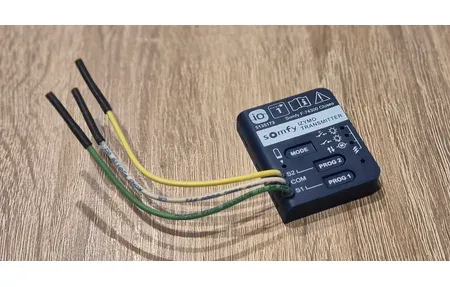
The Somfy Izymo Transmitter io turns a wired wall switch into an...

TP-Link AC1200 WiFi Extender RE315 provides 1.2Gbps dual-band signal boost covering up...
Smart Home Setup and Configuration Guides
How-to guides give step-by-step help for setting up smart home tech. They cover device choice, setup, network config, automation, and tuning. Users of all skill levels can build working smart home systems with these guides.
Device Installation Procedures
Good device setup means knowing the specs, network needs, and best placement. Guides show how to connect devices, install apps, and set key options. Whether you add one smart bulb or a full security system, each device type has its own steps. Follow the maker's tips to keep your warranty and get things working well.
Configuration Best Practices
Start with network planning. Make sure you have enough bandwidth and coverage for all devices. Group devices by room or type for easier control. Set network security to block outside access. Use permissions so only trusted users can change key settings. Knowing how devices and platforms link helps you build a system that works across brands and protocols.
Troubleshooting and Optimization
Good guides cover common problems like lost connections, failed routines, and device conflicts. Learning a clear process for finding and fixing issues helps you solve things on your own. This keeps your system running well over time.
Advanced Implementation for Long-term Success
After basic setup, deeper skills help your system thrive. Learn about rules that depend on conditions, multi-device tasks, and cross-platform links. Good guides show you not just how to set things up, but why certain methods work best for your goals. Clear steps speed up the process and cut errors. Your system stays reliable as your needs change over months and years.
The knowledge from how-to guides builds over time. Each win becomes a base for harder tasks. Good record-keeping helps you maintain your system, fix issues, and adapt to new tech. Learning through guides pays off across the life of your smart home.
Start today with guides that match your skill level. Whether it is your first device or a complex multi-brand setup, guides give you the know-how to succeed. Clear steps mean faster work and fewer mistakes. Begin simple, grow your skills, and expand as you gain experience. Time spent learning delivers steady value for years of smooth smart home use.
Good how-to guides break big tasks into small steps anyone can follow. Video and text formats suit different learning styles. Community forums extend official guides with real-world tips and workarounds. Regular guide updates keep pace with new tech. The best guides warn about common mistakes: wrong fit, low power, and bad placement. Screenshots and part lists ensure you have everything before you start. Every finished project builds skills for bigger future installs.
Read the maker's docs before starting any install. Each device has its own power, network, temp, and fit needs. Checking specs first prevents costly errors. Many devices need clear space from metal, other wireless gear, or thick walls. Know these rules before buying so your home layout works for good signals.
Network readiness is the base of any smart home install. Before adding devices, check that your WiFi can handle the extra load. Old routers may drop connections with many devices at once. WiFi 6 routers or mesh WiFi systems give strong coverage and enough bandwidth for dozens of devices. Test signal strength in each room. This shows where you might need extra gear for steady links to your smart devices.
Good records matter more as your system grows. Write down device models, install dates, passwords, and settings. This helps you fix issues fast and gives support teams what they need. Take photos of wiring before closing walls. A simple list of all devices, their spots, and network details helps you spot overlap or conflicts early. These habits seem slow at first but save huge time when fixing issues months later.
Pro install services help with complex projects. Mistakes could damage gear or cause safety issues. Licensed electricians know local codes and can safely wire in devices. For big setups or low-tech users, pro help ensures things work from day one. Many retailers offer installs or can point you to qualified pros.
Break complex projects into small phases that build on each other. Start with one device. Learn how it connects and talks to others. Then move to harder setups with multiple brands. Finishing early wins confirms your network and skills before you spend more time and money.
Test every function right after each install. Do not wait weeks to find problems. Note what works and what needs more tuning while the setup is fresh. Build simple test routines before complex ones. This teaches how triggers and actions work in your system.
Before buying new devices, check that they fit your current setup. Make sure they use the same protocols and platforms. Makers publish fit guides that show what works together and what needs extra bridges or hubs. Checking fit first saves money and avoids gear that sits unused.
Regular reviews keep your smart home running smoothly. Test routines you have not used in a while. They might break after updates. Check network speed now and then to catch slowdowns early. Back up your automation rules and settings. This protects you from data loss if a device fails or you need to rebuild from scratch.
Learn from how your system actually performs. Note which routines help daily life and which you never use. Track which products stay reliable and which cause trouble. Over time, this builds knowledge that helps you make better choices as you grow your setup.
Join forums and user groups to speed up your learning. Share wins and setbacks to help others and benefit from their know-how. User reviews often give more real-world info than marketing pages. Many groups create fixes for known product limits that extend what devices can do.
Budget smart for smart home projects. Invest first in solid networking gear. This pays off as you add devices. Buying many cheap devices often leads to fit issues and poor reliability. Research product life spans to avoid gear that makers may drop. Bundle deals from one brand often save money and ensure smooth fit. Spread purchases over months to learn each product well before adding more.
Security is key in any smart home build. Change default passwords right after install. Turn on two-factor login on control accounts. Put smart home devices on their own network segment, separate from personal data. Update firmware often to patch security holes. Know the risks of cloud-based devices before using them for safety-critical tasks.
Voice control adds reach beyond phone apps and switches. Set wake words that do not fire during normal talk. Use clear device names that are easy to say. Group devices by room for quick bulk control. Teach family members the right command phrases. This builds voice control trust and cuts failed attempts.
Smart energy management saves real money when done well. Smart plugs cut phantom power from TVs and computers. Schedule lights and heat to match when rooms are in use. Track power with smart meters to find savings. Compare energy bills before and after to confirm which devices deliver on their promises.
Adjust your smart home by season for best results. Auto lighting schedules shift with sunset times as seasons change. Climate control routines run heat and AC at peak efficiency for each season. Place outdoor sensors where snow and sun will not mess up motion detection or temp readings. Plan for storms with battery backup or generator links.
Troubleshooting is a must-have skill for long-term smart home health. Start with the simple checks: power and network. Test one device at a time to pin down the source. Write down what fixed the problem. Many issues repeat, so notes pay off over time.
Scaling up needs planning so you do not hit limits. Hubs have max device counts. At some point, you need a bigger hub or a second one. Dozens of wireless cameras streaming at once strain bandwidth. Plan for these caps before they become problems. Add pieces bit by bit rather than doing a full home automation install all at once.
Your smart home should make daily life better, not harder. Flawed routines create more work than manual control. Good control apps show key features up front and hide deep settings. Train family members on how things work. Review your setup from time to time. Drop routines that add no value. Keep things lean and focused.
Long-term success means keeping things both strong and simple. Complex setups get hard to fix as time passes. Simple logic is more reliable and easier for family to grasp. Choose brands with a good track record of long support. These things matter more than the newest features that may not last.