Leviton Decora Smart Dimmers and Wi-Fi Switches
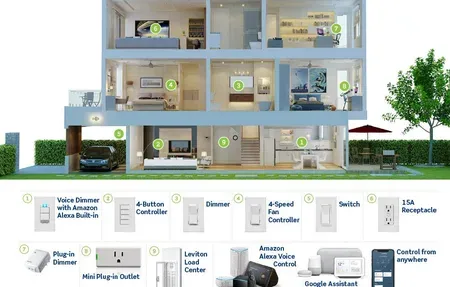
Leviton Decora Smart dimmers and switches connect directly to Wi-Fi, no hub needed. Compatible with Alexa, Google Home, and Apple HomeKit.
Products
Leviton D26HD Decora Smart Wi-Fi dimmer: no hub needed, works with Alexa,...
Leviton has manufactured electrical wiring devices in the US since 1906. The Decora Smart line extends that heritage into smart home territory with Wi-Fi dimmers, switches, and outlets that work without a hub or bridge. If you've been putting off smart lighting because the setup looked complicated, Leviton's approach, scan a QR code, connect to Wi-Fi, done, is probably the least fussy option in the market today.
What separates Leviton Decora Smart products from cheaper alternatives is native multi-protocol support. The D26HD dimmer, for example, connects directly to Alexa, Google Home, and Apple HomeKit, all three platforms from the same device, with no additional hardware. HomeKit integration is local, meaning automations and voice commands work without an internet connection when your HomePod or Apple TV is on the same network. That's a real differentiator. Most budget Wi-Fi dimmers (Kasa, Tapo) skip HomeKit entirely.
Why Choose Leviton Decora Smart
Overview
Leviton targets homeowners who want in-wall smart controls that blend with their existing wiring setup rather than puck-style plug-in devices or aftermarket smart bulbs. The Decora form factor, that wide rocker plate you see on most US light switches installed after the 1990s, means a Leviton Decora Smart switch fits the same wallplate as your existing non-smart switches. Visual consistency across a room with six switches actually matters once you're replacing them one by one.
The 3-year warranty is another genuine advantage. Budget smart dimmer brands (and quite a few recognizable names) cover their products for one year, sometimes two. Leviton's three-year coverage reflects both the company's confidence in the hardware and the fact that these devices are wired into your home's electrical system, if something fails at year two, you want to know you're covered without buying a replacement out of pocket.
The neutral wire requirement is the most common installation obstacle and worth knowing before you buy. Homes built after 1990 typically have neutral wires in wall boxes. Older two-wire switch loops (hot and switched hot only, no neutral) require electrical modification or a different switch model to work with Decora Smart dimmers. If your home is pre-1990, check the box before ordering.
Leviton D26HD Dimmer Switch
The D26HD is the current flagship Decora Smart dimmer. It handles dimmable LED bulbs up to 150W equivalent and incandescent or halogen loads up to 600W. Single-pole or 3-way compatible, 3-way installations need the DD0SR passive remote at the secondary switch position. Only one D26HD is needed per circuit; the remote end uses a passive DD0SR which requires no neutral wire.
Setup uses the My Leviton app. Scan the QR code printed on the switch body, connect to your 2.4 GHz Wi-Fi network, then add to HomeKit via the Home app using the HomeKit setup code also printed on the switch. The entire process takes under 10 minutes once the switch is wired. No account creation is required for HomeKit-only use, the switch registers directly with your Home app.
The My Leviton app supports scheduling, away mode (randomized on/off to simulate occupancy), and scene creation across multiple Leviton devices. The interface is functional rather than polished, it doesn't match the visual quality of the Kasa or Philips Hue apps, but it works reliably and local HomeKit control means a Leviton cloud outage doesn't affect your everyday lighting automations.
One practical detail worth noting: the D26HD holds its dim level through power outages. When power restores, it returns to the last set brightness level rather than defaulting to 100%. For bedrooms set to 20% night lighting, this prevents the jarring full-brightness surprise after a breaker trips.
Compatible Bulb Types
The D26HD works with dimmable LED, dimmable CFL, incandescent, and halogen bulbs. Non-dimmable LED and CFL bulbs will flicker or hum when used with any dimmer, that's a bulb limitation, not a switch defect. Leviton publishes a compatibility list on their website with tested LED bulbs from brands including Sylvania, GE, Philips, and Cree. If you're buying new LEDs for a room you're converting to smart lighting, checking that list first saves a frustrating return trip.
LED bulb compatibility is the area where cheap dimmers most often fail. Cut-off dimming (lights turn off before the slider reaches zero) and flicker at low percentages are common with incompatible LED-dimmer combinations. Leviton's compatibility testing is more thorough than most budget alternatives.
Leviton vs Competing Smart Dimmers
Kasa and Tapo make comparable Wi-Fi dimmers in the USD 35-45 range, roughly USD 15-20 less than the D26HD. The tradeoff is no Apple HomeKit support. If you're outside the Apple ecosystem and don't plan to use HomeKit, Kasa KD130 is a reasonable alternative at lower cost.
Lutron Caseta is the premium option. The ClearConnect RF protocol it uses is more interference-resistant than Wi-Fi and Lutron's reliability reputation is genuinely stronger. The catch is the required Smart Bridge (USD 80 standalone) and a per-switch cost that makes it more expensive than Leviton. For homeowners who've experienced Wi-Fi dimmer reliability issues or want a system with the longest track record in smart lighting, Caseta justifies the premium. For most HomeKit users who want hub-free convenience, the D26HD hits the right balance.
Installation Notes
All Decora Smart Wi-Fi devices require a 2.4 GHz Wi-Fi network. They don't support 5 GHz. Most dual-band routers broadcast both frequencies; if yours uses a single combined SSID, check your router's settings to confirm 2.4 GHz is available during setup.
Installation takes 15-20 minutes with a screwdriver and non-contact voltage tester. The wiring connections are labeled on the switch body: Hot (black), Neutral (white), Load (red or black from the fixture). The included Decora wallplate snaps on after the switch is secured. If you're comfortable changing a standard light switch, this isn't a harder job.
Leviton's Decora Smart line offers a practical choice between budget Wi-Fi dimmers and premium Lutron systems. If you're in the Apple ecosystem and want local HomeKit control without a bridge, the D26HD is the most direct path to that setup at a reasonable price.