Automation Scheduling & Time-Based Control
Smart home scheduling, time-based automation, recurring routines, and timer controls for automating devices and scenes on specific schedules.
Blog posts
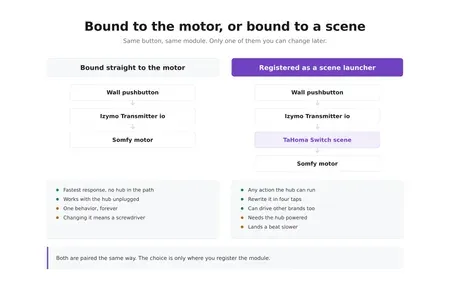
A wired pushbutton in the garage now runs a TaHoma scene instead...

Commercial smart sprinkler controllers want a subscription and a cloud account to...
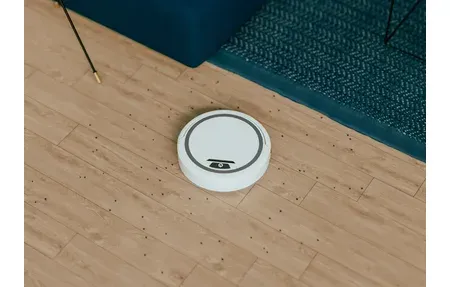
Mammotion's Luba 3 AWD promises to end the perimeter-wire era with RTK...
Products

Samsung AX90 removes 99.97% of allergens with a true HEPA three-stage filtration...
The Sonoff D1 Smart Dimmer Switch controls dimmable lights via Wi-Fi and...
Aqara Motion Sensor P1 review: Zigbee 3.0, 170-degree detection, adjustable sensitivity, works...
Sonoff SNZB-04 Zigbee door and window sensor: instant open/close alerts, 2-year battery,...
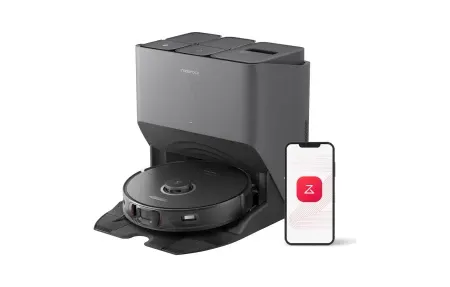
Roborock S8 Pro Ultra pairs 6 000 Pa suction with a self-washing...

The K20+ Pro functions as a advanced motion sensor designed specifically for...

Aqara Presence Sensor FP3 (Global) transforms smart home security with advanced mmWave...

The Huawei Watch offers advanced health tracking, fitness features, and smart connectivity...
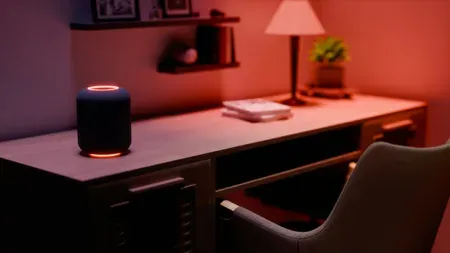
Control your appliances, monitor energy usage, and save power effortlessly with the...
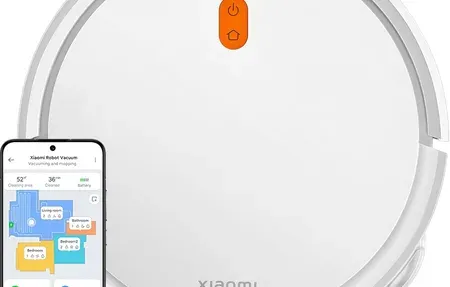
The Xiaomi Robot Vacuum E5 with efficient cleaning features, app control, and...

Flagship robot vacuum and mop that self-empties, washes, dries pads and obeys...

IKEA BILRESA dual button remote controls lights and scenes via Matter. Works...

Control any lamp or small appliance with IKEA GRILLPLATS smart plug. Monitors...

IKEA KAJPLATS decorative smart bulb brings white spectrum dimming and Matter support...

Control up to 500 lights with faster automations and spatial scenes on...
Smart Home Scheduling and Automation
Smart home scheduling runs your devices at set times, on repeat, or by calendar events. This cuts out manual control and builds steady daily habits that boost comfort, energy efficiency, and safety in your home.
Schedules run routines at the right time or on a loop. This means less manual work and more consistent results for comfort and security. With home automation schedules and timers, your home adjusts on its own to meet your needs.
Schedule Types and Applications
Daily schedules manage morning routines like adjusting thermostats and turning on lights. Weekly schedules optimize energy usage with different settings for weekdays and weekends. Seasonal schedules adapt smart home behavior to changing weather and daylight patterns.
Timer and Countdown Functions
Timers provide temporary device control, turning devices off after specified durations. Countdown functions prevent devices from running indefinitely while enabling automatic shutoff without manual intervention or voice commands.
Advanced Scheduling Scenarios
Combining schedules with conditions like location, weather, and device status creates sophisticated automation. Examples include adjusting climate based on occupancy schedules, lighting that adapts to sunset times, and security systems that respond to daily routine patterns. Time-based routines bring steady comfort, safety, and savings with no manual effort. Smart schedules adjust to changing weather, habits, and seasons throughout the year. They learn from your patterns. Sunrise-based schedules shift on their own as days get longer or shorter. No manual updates needed. Convenience and energy savings work side by side.
Routines react to whether people are home or away. Different settings kick in based on your location and activity. Seasonal shifts tune heating and cooling to real weather and daylight hours. This cuts waste while keeping rooms comfortable. Learning systems watch your habits over time and suggest better routines. Vacation modes take over when you travel. They stop energy waste and keep security active while you are gone.
Smart Scheduling for Household Management
Weekend and weekday schedules can differ to match your real life. Multi-zone control lets rooms run on their own plans. Bedrooms, living areas, and work spaces each follow their own timing. Integration with weather data adjusts settings based on the forecast. Time-based control cuts energy consumption while keeping rooms safe and cozy. You save money and reduce your impact on the planet.
Smart scheduling turns manual home control into a hands-off system. It learns your unique habits over time. Good schedules react to who is home, the weather, daylight, and your routine. They do not rely on fixed times alone. Override modes and vacation settings handle the exceptions. Over months, the system gets better at giving you comfort and savings.
Start with simple daily routines. Then add weekly and seasonal ones as you learn. Automate the devices you use most: lights, the thermostat, and security. Add more rules as your system grows. Test schedules well before counting on them. Check timing on all devices and adjust based on real results. Over time, your home learns and responds on its own.
Good schedules match your natural daily flow from morning to late night. Geofencing triggers different modes based on whether anyone is home. Sunrise and sunset timing shifts on its own across the year. Learning tools track your habits over days and weeks and adjust controls to match. Vacation modes take over while you travel, keeping security active and cutting energy waste. As your system grows, scheduling handles complex multi-device actions that would be impossible to run by hand. Use scheduling as your core strategy to save energy, boost safety, and adapt to your life.
Practical Scheduling Implementation Strategies
Good scheduling starts with knowing your daily patterns. Most homes do best by starting with morning and evening routines. A morning routine might raise lights slowly 30 minutes before wake time, warm the house, and prep your smart speaker with the daily news. Evening routines dim lights step by step, lower the temp for sleep, and turn on security. These basic routines give you instant value and build trust in your system.
Weekdays and weekends need different plans in most homes. Weekday mornings move faster for work and school. Weekend mornings can take their time. Separate schedules stop you from waking too early on days off. Many platforms handle this on their own with day-of-week rules. Vacation modes turn off normal routines in an empty home. They cut heat, cooling, and lights while keeping locks and random light patterns active.
Weather-based scheduling reacts to real conditions, not fixed dates. A rainy spring night gets different yard lights than a dry one. A sudden cold snap starts the heater before you feel the chill. Linking local weather data to your system creates routines that adapt in real time. This works best in places with changing weather.
Location-based scheduling uses geofencing to know who is home. When you leave for work, the system enters away mode. Heat and cooling drop to low levels. Security cameras turn on. When you return, comfort mode kicks back in with warm temps and welcome lights. Homes with many people use smart geofence logic. The system knows if anyone is still home or if the whole family is out. Different responses trigger based on full or partial emptiness.
Advanced Scheduling Capabilities and Optimization
Conditional scheduling goes beyond time triggers. It uses device state, room conditions, and system status to decide what to do. Instead of turning on yard lights at sunset, the system might check if anyone is home first. Motion sensors can trigger lights only when movement is found. If enough natural light remains, the lights stay off. These multi-factor checks create smart reactions to real conditions. Test all logic well to catch edge cases that pop up over the year.
Learning systems are the future of home scheduling. They watch your real habits and suggest better routines. Modern platforms track when you arrive home and what temperatures you like. Over time, they learn that you want warmer rooms on cold mornings. They start the heater before you wake up. Machine learning works best when it starts simple and adds complexity only when clear patterns emerge. Give it time and it gets better without you having to program each detail.
Vacation mode needs special care. Long trips need different logic than daily routines. Keep lights running in random patterns to make the home look lived-in. Smart scheduling turns on different rooms at varied times. Heat and cooling can drop a lot, but do not cut too much. Frozen pipes or mold in damp climates are real risks. The best vacation schedules balance saving energy with protecting your property. Test your away-mode setup before you travel.
Start by tracking your real patterns, not guessing. Note when family members wake, come home, and go to bed over a few weeks. Find the steady patterns worth putting on autopilot. Schedules that force unnatural rhythms get dropped fast. Good schedules match how your family really lives. Start small and grow as you trust the system.
Scheduling works best when it fits your natural routine. New users often try to control every device at all times. This leads to problems when plans change on the fly. Instead, focus on high-impact tasks that truly help. Morning lights that slowly brighten help you wake up. Evening routines that dim lights and lower temps set up good sleep.
Energy savings through scheduling can cut heating, cooling, and lighting costs a lot. Thermostat schedules that ease off during empty or sleeping hours can cut energy use by twenty to thirty percent per year. Smart plug schedules stop standby power drain from TVs, PCs, and kitchen gear during long absences. Lighting that follows room use and daylight stops waste from lights left on in empty rooms.
Smart scheduling boosts climate control and security beyond basic light timers. Random lighting schedules change times by small amounts each day. This looks more real than fixed patterns that a burglar might spot. Lights that move from room to room mimic natural life in the house. Door locks that arm at bedtime and outdoor lights that turn on at dusk add layers of safety.
Seasons change, so your schedules should too. Winter heating wastes power in mild spring weather if left unchanged. Fixed outdoor light times drift from actual sunset as months pass. Summer watering routines risk flooding in rainy fall. Check and update your schedules each quarter.
Troubleshooting schedule conflicts takes a step-by-step approach. Two schedules on one device can clash if a later one overrides the first. Manual changes often hold until the next scheduled event, not right away. Cloud-based schedules may fail during internet outages. Hub-based systems keep working offline. Keep your schedule list clean and organized as you add more rules.
Advanced users can explore schedule templates from the community. Many platforms have forums where people share proven setups for work-from-home, pet care, and security needs. Using these as a starting point is faster than building from scratch. Community tips include lessons from many homes. Joining these groups gives you ongoing help as your system gets more advanced.