August Smart Lock 1st Gen with Connect: Retrofit Deadbolt Review
Product Details
🏭 Manufacturer: August
🆔 Model Number: AUG-SL01-K01-G0X
🔧 Usage: Indoor Use
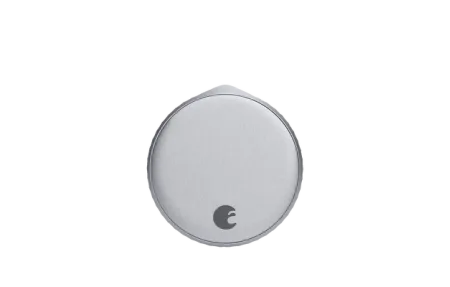
Back in 2013, August put the first mainstream deadbolt retrofit on the market, and the August Smart Lock 1st Gen with Connect (model AUG-SL01-K01-G0X) is that original design. It set the pattern the whole line still uses: mount on the interior thumb turn, keep your existing keys, bolt smart access on top. This review looks at the 1st Gen sold as a bundle with the August Connect Wi-Fi bridge, the two-piece setup that gives a Bluetooth-only lock remote access over Wi-Fi.
It's a discontinued product now. August's current lineup has moved to built-in Wi-Fi. But the 1st Gen with Connect still shows up on secondary markets, and plenty of units are still in daily use. If you're deciding whether to keep one, buy one used, or upgrade, here's what you need to know.
How the 1st Gen and Connect Work Together
The 1st Gen lock itself uses Bluetooth only. On its own, you can lock and unlock it when your phone is within about 30 feet. That's useful at the front door, not much else.
The August Connect bridge changes that. It's a small plug-in device that goes near the door, connects to your Wi-Fi, and acts as a relay between the lock and August's cloud. With Connect online, you get full remote access - lock and unlock from anywhere, get push alerts when the door opens, and check status without being home. The bridge is what makes this a full smart lock rather than a Bluetooth gadget.
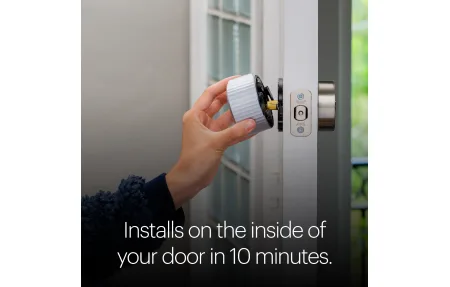
The bundle pairs both devices together. Setup takes 10-15 minutes. You install the lock first using one of the included thumb turn adapters, then plug in Connect and link it to your Wi-Fi through the August app.
What the App Lets You Do
Once everything is set up, the August app handles all the core features you'd expect:
- Lock and unlock from anywhere with the Connect bridge online
- View a timestamped activity log of every lock event
- Create guest access keys with expiration dates and time restrictions
- Set auto-lock to engage after 30 seconds to 30 minutes
- Get push alerts when someone locks or unlocks the door
Auto-Unlock uses geofencing and Bluetooth together. The app detects when you're close to home, then confirms your phone is near the lock via Bluetooth before unlocking. This two-step approach prevents false unlocks when you drive past your house.
Guest keys are time-limited and expire on their own. You set a window - specific days, specific hours - and the key stops working after that. You don't have to remember to revoke access manually.
Voice Control Options
With the Connect bridge active, you get three voice assistant options. Amazon Alexa handles locking, unlocking with a PIN, and status checks. Google Assistant works similarly. Apple HomeKit is available too, putting the lock in the Home app with full Siri support and HomeKit automations. If your iPhone leaves the house, you can set an automation to lock the door behind you.
Voice unlocking via Alexa requires a four-digit PIN by default. That's not August being annoying - it's a deliberate safety measure so a guest or delivery person can't just say "Alexa, unlock the door."
Build and Installation
The 1st Gen is physically larger than later August models. It's a round unit that clamps over the deadbolt thumb turn using a set of included adapters. Most standard American deadbolts are compatible. The lock uses 4 AA batteries rated for about 3 months of typical use - notably shorter than later generations. August added a low-battery alert to the app, so you get a warning before it dies.
The install is non-invasive. No drilling, no door modifications, no exterior changes. The whole thing comes off in minutes if you need to move or reinstall it. That makes it practical for renters who want smart features without leaving hardware behind.
Where This Lock Falls Short
The two-device setup is the main limitation. The Connect bridge needs a power outlet near the door and a stable Wi-Fi connection. If the bridge loses power or Wi-Fi drops, remote access stops until it reconnects. Later August models and competitors like the Schlage Encode Plus have Wi-Fi built into the lock itself, removing this dependency entirely.
Battery life at 3 months is shorter than the August Pro or most current-generation smart locks. If you're using the lock heavily - many guest access events, auto-unlock triggers - you'll hit that limit faster. Lithium AA batteries extend life in cold weather.
The 1st Gen also doesn't have DoorSense, the door-position sensor that August added in later models. You can tell if the deadbolt is thrown, but not whether the door is actually closed. Auto-lock will engage on schedule regardless of door position.
August 1st Gen vs. Upgrade Options
August's own 4th Gen Wi-Fi Smart Lock is the direct upgrade path. It has built-in Wi-Fi (no bridge needed), a smaller and lighter form factor, DoorSense, and better battery life. If you're buying new, start there.
The 1st Gen with Connect still makes sense if you already own one and it's working reliably, or if you find a used bundle at a significant discount and don't need DoorSense. The core features - remote access, guest keys, voice control, auto-lock - all work correctly. The app still supports it as of early 2026.
Who the 1st Gen Is For
Buy the 1st Gen bundle in one situation: you already own it, or you find a used kit cheap, the Connect bridge is in the box, and you don't need DoorSense. In that spot it still earns its keep. Remote access works, the app is clean, and Alexa, Google Assistant, and HomeKit all respond as advertised. Your keys and exterior hardware never change, which is the whole reason renters liked it.
Skip it if you're buying new. The tradeoff that matters most is the two-piece design: kill power to the Connect bridge and your remote access goes with it. Add roughly three-month battery cycles on 4 AA cells and no DoorSense, so auto-lock throws the bolt whether or not the door is actually shut. Those are real annoyances, not dealbreakers.
My take? For a discontinued lock the 1st Gen holds up better than most abandoned smart-home gear. But if you're spending money today, the 4th Gen drops the bridge entirely and adds the sensor this one never had, and it fits most of the same doors.
Frequently Asked Questions
Does the August Smart Lock 1st Gen need the Connect bridge for remote access?
Yes. Unlike later August models, the 1st Gen lock uses Bluetooth only. The August Connect Wi-Fi bridge plugs into a wall outlet near the door and acts as a relay. Without it, you can only control the lock when your phone is within Bluetooth range, roughly 30 feet. The bundle includes the Connect, so remote access works right out of the box.
Is the August Smart Lock 1st Gen still supported by August?
August discontinued the 1st Gen model and no longer sells it new. The August app still supports it as of early 2026, but August recommends upgrading to the 4th Gen Wi-Fi Smart Lock for built-in Wi-Fi, a smaller form factor, and longer-term app support. Used 1st Gen units still function correctly with an active Connect bridge.
What voice assistants work with the August 1st Gen Smart Lock?
The 1st Gen lock works with Amazon Alexa for voice locking and status checks, Google Assistant, and Apple HomeKit via the August Connect bridge. HomeKit lets you use Siri and the Apple Home app. All three require the Connect bridge to be plugged in and online. Voice unlocking with Alexa requires a PIN for security.
Can I still use my existing keys with the August Smart Lock 1st Gen?
Yes. This is August's core design philosophy. The lock mounts on the interior thumb turn of your existing deadbolt. Your exterior hardware, cylinder, and physical keys stay in place and work normally. The smart layer adds on top, it doesn't replace anything. Renters especially benefit from this - you can remove the lock without changing the door.