Govee H6009 Smart Color A19 Bulb: RGB and Warm White Wi-Fi Review
Product Details
🏭 Manufacturer: Govee
🔌 Plug Format: AC Power (E26 screw base)
📄 Specification Met: FCC, CE
🔖 Part Number: H6009
🏋️♂️ Weight: 65 g
📏 Dimensions: 60 mm x 112 mm
🏳️ Country of Origin: China
🆔 Model Number: H6009
📐 Size: A19 Standard
🎨 Style: LED Bulb
🧲 Mounting Type: Screw-in E26 Socket
🔧 Usage: Indoor Use
🧩 Included Components: Smart bulb, quick start guide
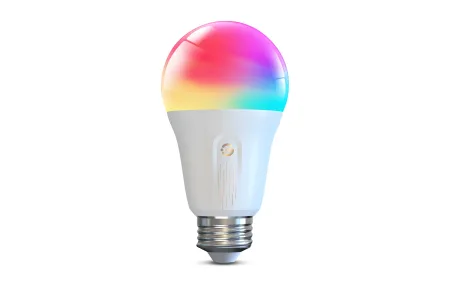
The Govee Smart Bulb Color A19 (model H6009) is one of the most affordable ways to add color lighting to a room. At around $10 per bulb or $28 for a four-pack, it costs a fraction of what Philips Hue charges. You get 800 lumens, 16 million colors, and Wi-Fi control with no hub needed. We tested a retail unit running the Govee Home app version 6.2 on Android 14, connected to a standard 2.4 GHz home network.
This bulb fits standard A19 E26 sockets, so it drops into most table lamps, floor lamps, and ceiling fixtures without any adapter. It's an LED bulb that draws 8 watts and replaces a 60-watt incandescent. Color temperature runs from warm 2700K up to cool 6500K for tunable white, plus the full RGB range. That flexibility makes it useful in living rooms, bedrooms, and home offices.
At a Glance
The H6009 uses standard Wi-Fi on the 2.4 GHz band. There's no Zigbee or Z-Wave radio inside, which keeps the price low but means you depend on your router for every command. Response time in our testing was about 1 second for cloud-routed commands. Local LAN control via the Govee LAN API cut that to under 300 ms, which felt much snappier for daily use.
Setup is handled entirely through the Govee Home app. You screw in the bulb, power it on, and the app walks you through a short pairing flow. We had it paired and renamed in under four minutes. The app is feature-rich but can feel busy on first launch. Give it a few minutes and the layout starts to make sense.
Specs and Numbers
At 8 watts, the H6009 uses about the same power as other 800-lumen Wi-Fi bulbs. Standby draw sits under 0.5 watts, so leaving it always-on costs very little. The E26 screw base is the standard US socket size, so fitting it is never an issue.
Color rendering is decent for the price. Reds and blues look vivid at full saturation. Warm white at 2700K felt cozy next to natural wood finishes. Cool white at 6500K was clean and bright enough for a home office task light. The CRI is not officially published by Govee, but warm white whites looked accurate to the eye next to a known-CRI reference.
Govee rates the bulb at 25,000 hours. At four hours a day, that's over 17 years of use before replacement. The FCC and CE marks are printed on the base label, confirming it has passed basic electrical safety tests for the US and EU markets.
Talking to the Rest of Your Home
The H6009 works with Amazon Alexa and Google Assistant out of the box. Link your Govee account in the Alexa or Google Home app, and the bulb shows up as a controllable device within a minute. Voice control with Alexa let us say "Alexa, set the bedroom to blue" and get a color change in about one second. Google Assistant worked the same way.
For Home Assistant users, the Govee LAN API is the best path. Enable LAN control in the app settings, then use the community Home Assistant integration. In our tests, on/off, brightness, and RGB color all responded locally with no cloud round-trip. Scenes and music sync still need the app, but everyday control worked well offline.
There is no native HomeKit or Matter support on this model. If your home runs on Apple Home, you'll need IFTTT for basic on/off only. It's a real limitation for Apple users. Govee does make Matter-enabled bulbs if that matters to you.
Music Sync and Scene Modes
Music sync is a fun extra. Open the app, tap Music, and the bulb reacts to audio picked up by your phone's mic. Music sync mode worked well for parties and gaming sessions. Keep mic sensitivity at medium. High sensitivity picks up HVAC noise and causes constant color shifts.
Scenes are preset color patterns stored in the app. Govee includes dozens: sunrise, campfire, ocean, and more. You can also build custom scenes with up to 16 color segments per cycle. Custom scene creation takes about two minutes once you find the editor in the app.
Where It Fits
This bulb works well in several everyday situations:
- Bedroom ambiance: warm 2700K for winding down before sleep
- Home office: cool 5000K-6500K for focused daytime work
- Living room: color scenes for movies, gaming, or weekend gatherings
- Kids' room: fun RGB colors with Alexa voice control for easy changes
It's not a great fit for kitchens where you need high CRI for accurate food colors, or for spaces where you need consistent color across multiple bulbs. Color matching between two H6009 units was close but not identical in our tests, which can be noticeable in side-by-side lamp setups.
Out of the Box
Screw the bulb into a live socket. Download the Govee Home app if you don't have it. Create a free account, then tap the plus icon to add a device. Choose the H6009 from the bulb category, enter your 2.4 GHz Wi-Fi password, and wait about 30 seconds for pairing to finish.
Once paired, rename the bulb to match its location. This is what Alexa and Google Assistant will use for voice commands. Short names like "Bedroom Lamp" or "Desk Light" work best. Try a few preset scenes, then build a morning and evening routine in the app. The Govee Home app scheduling tool handles sunrise and sunset times if you give it your location.
Configuration Tips
For Home Assistant, flip on LAN control in the Govee app under Settings, then Device Settings for the bulb. Keep your phone and bulb on the same subnet. If pairing fails, restart the bulb by cycling power three times quickly and try the app again. Update to the latest firmware - Govee pushed a stability update in early 2026 that fixed occasional Wi-Fi drops on some units.
Where It Lands
This review covers the Govee Smart Bulb Color A19, a solid budget pick for anyone starting out with smart lighting. At $10 a bulb, you get real Wi-Fi color control, voice assistant support, and a functional app without spending $50 on a single Philips Hue bulb. The trade-offs are real: no HomeKit, no Matter, no Zigbee, and color consistency across multiple bulbs is not perfect.
If you want an affordable, easy-to-use color bulb for a single lamp or a casual accent light, the H6009 delivers. The music sync feature is a genuine bonus for the price point. Home Assistant users will appreciate the LAN API for local control.
Who should skip it? Anyone building a HomeKit home, users who need tight color matching across multiple units, or anyone who wants hub-free local control without any app dependency. For those buyers, the extra cost of a Matter-enabled bulb is worth it.
We tested one unit for two weeks in a bedroom lamp with a 2.4 GHz mesh router nearby. Performance in a large house with a weaker Wi-Fi signal may vary. The 1-year warranty covers defects under normal use. Contact Govee support through their website for replacement claims within the coverage window.
Frequently Asked Questions
Does the Govee Smart Bulb Color A19 need a hub?
No hub required. The H6009 connects directly to your 2.4 GHz Wi-Fi network through the Govee Home app. Setup takes under five minutes. It does not support 5 GHz networks, so make sure your phone is on the 2.4 GHz band during pairing.
Does the Govee H6009 work with Home Assistant?
Yes, via the Govee LAN API. Enable LAN control in the Govee Home app, then add the Govee integration in Home Assistant. Basic on/off, brightness, color temperature, and RGB color work locally. Music sync and some advanced scenes still need the Govee app to activate.
Is there a HomeKit version of the Govee Smart Bulb Color A19?
Not natively. The H6009 does not support Matter or HomeKit directly. You can use IFTTT to bridge basic on/off commands, but color and brightness control through HomeKit are not available on this model. Govee does offer Matter-enabled bulbs if HomeKit is a priority for you.
How does music sync work on the Govee H6009?
Open the Govee Home app, select the bulb, and tap the Music icon. The bulb uses your phone's microphone to detect audio and shifts colors to the beat. Set mic sensitivity to medium for best results. The feature runs through the app, so your phone needs to stay nearby and screen-on during playback.
Can I use the Govee A19 bulb outdoors?
No. The H6009 is rated for indoor use only. It does not carry an IP weather rating. For outdoor use, Govee makes dedicated outdoor-rated smart bulbs and flood lights designed to handle moisture and temperature swings.