IKEA BILRESA Smart Remote Control: Dual Button Matter

Product Details
🏭 Manufacturer: IKEA
🔌 Plug Format: Battery (2x AAA)
📄 Specification Met: CE, FCC, UKCA, Matter
🔖 Part Number: 806.178.76
🏋️♂️ Weight: 38 g
📏 Dimensions: 75 mm x 50 mm x 25 mm
🏳️ Country of Origin: China
🆔 Model Number: BILRESA E2489
📐 Size: 75 x 50 x 25 mm
🎨 Style: Handheld remote
🧲 Mounting Type: Wall Mount, Handheld
🔧 Usage: Indoor Use
🧩 Included Components: BILRESA remote with removable magnetic back plate, quick start guide with Matter pairing code
🔋 Batteries Required: Yes
Getting to Know It
The IKEA BILRESA is a dual button wireless remote that controls smart lights, groups, and scenes using the Matter standard. Priced at $6.99 on ikea.com/us as of October 2026 (it launched in December 2025 at $7.99, and IKEA's Baltic sites list it around EUR 6), it is one of the most affordable Matter-certified controllers available. This one has not passed through our hands, so everything below comes from IKEA's own documentation and from what owners report, and the places where that leaves a gap are named rather than filled in.
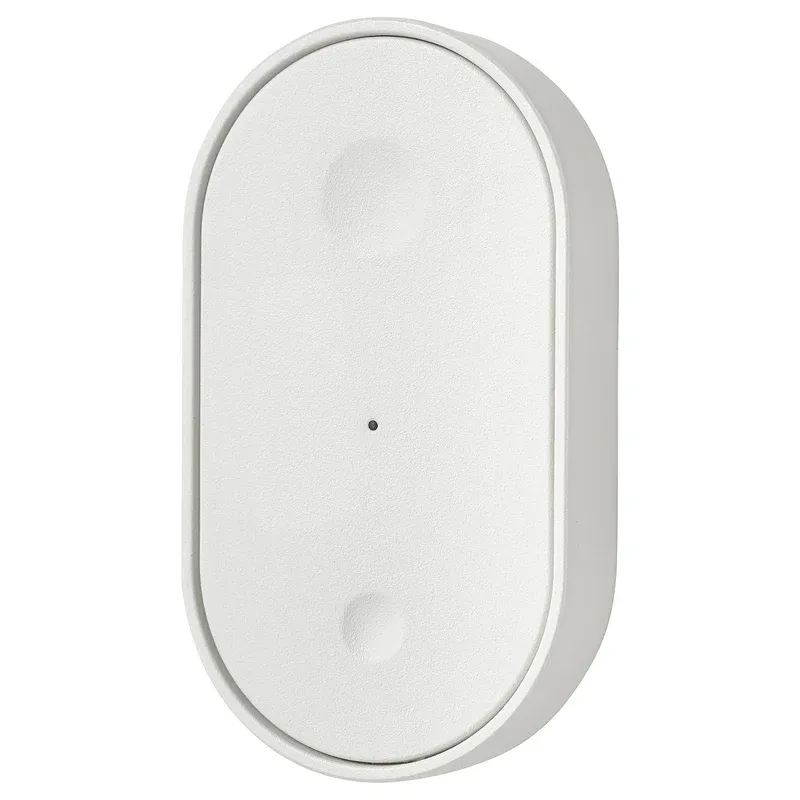
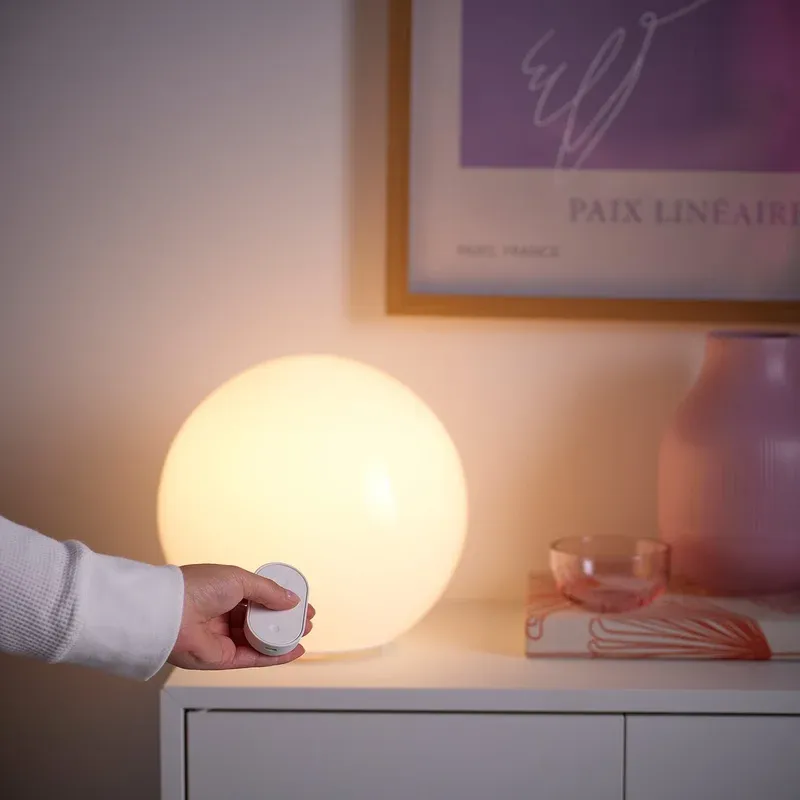
Controlling lights via a physical button feels more natural than opening an app for every scene change. BILRESA has two large, easy-to-press buttons. Each button can be programmed independently for on/off, dimming, color temperature changes, or scene activation in the IKEA Home Smart app. The flat rectangular body fits comfortably in hand. The back plate is magnetic and comes off the remote, so it can be fixed to a wall or a piece of furniture and the remote snaps back onto it; IKEA's US listing counts the box contents as one remote, with the Matter pairing code on the leaflet and under that plate.
The remote uses Matter over Thread for connectivity. This means it joins the same open ecosystem as Apple HomeKit, Google Home, Amazon Alexa, Samsung SmartThings, and Homey. You do not need a separate proprietary bridge for each platform. Matter ensures the device works with any compatible hub you already own. BILRESA can also pair directly with IKEA smart light sources without any hub, using a simplified local connection mode for basic on/off and dimming.
What Is Inside
BILRESA measures approximately 75 x 50 x 25 mm and weighs 38 g. The body is ABS plastic with a clean matte white finish that wipes clean. The two rounded buttons have a light, crisp tactile feel that distinguishes between press and hold without ambiguity.
Power comes from two AAA batteries. IKEA recommends LADDA rechargeable HR03 1.2V cells, sold separately, and does not publish a runtime figure. Treat any battery life number you see for this remote with suspicion, including ours: a Thread end device that sleeps between presses is dominated by how often it wakes, which depends on your automations rather than on the hardware. What can be said is structural. A remote that takes standard AAA cells, and rechargeable ones at that, has no sealed battery to strand it in three years.
Thread radio operates at 2.4 GHz using the IEEE 802.15.4 standard. All communication uses AES-CCM encryption required by the Matter specification; the CSA record certifies the remote (model E2489) against Matter 1.3 as a Thread sleepy end device. As a battery-powered device, BILRESA acts as a Thread end device rather than a router, so it does not extend the Thread mesh for other devices. A nearby powered Thread node helps maintain a fast connection.
The remote supports single press, double press and hold actions on each button. This gives you six assignable actions from two physical buttons, allowing independent control of several scenes, groups, or devices from a single remote. How many of the six your platform exposes is another matter, covered below.
Compatibility and Control
BILRESA pairs to any Thread Border Router that supports Matter commissioning. IKEA DIRIGERA is the natural choice for users already in the IKEA ecosystem. Other compatible border routers include Apple HomePod mini, Apple TV 4K 3rd gen, Google Nest Hub 2nd gen, and Amazon Echo 4th gen.
Commissioning follows the standard Matter flow: scan the QR code on the device into whichever ecosystem holds your border router. In the IKEA Home Smart app each button gets assigned independently, so a top button on a full brightness scene and a bottom button on a warm dim scene is the usual first setup. Apple Home exposes it as a button device with press and hold actions available in automations.
Home Assistant users can add BILRESA through the Matter integration after pairing to a Thread Border Router. The remote appears as button entities with separate triggers for each action. Automations in Home Assistant can use these triggers to control any connected device, not just lights, which is the point of buying a generic Matter button rather than a light-branded one. A hold action can just as easily drive a fan or a smart plug as a bulb.
Direct pairing without a hub
For simple setups, BILRESA can pair directly to IKEA smart light sources without any hub or app. To use this mode, put the lights in pairing mode and hold the button on the remote. This creates a direct link where the remote controls those lights locally. You lose app control, automations, and cross-platform integration, but gain a fully self-contained setup that works even when your network is down.
Six commands, not two
Each of the two buttons answers to a short press, a double press and a long press, which exposes six separate commands in Apple Home, SmartThings, Home Assistant and the IKEA app. Alexa is the weak platform here: owner reviews on IKEA's own listing and the Matter Alpha review both report that Amazon's Matter support covers the single press and little else, and Google Home had no proper smart-button support at all as of early 2026. A long press is the one worth assigning carefully: it is the only action you can reach without looking at the remote.
In Daily Use
BILRESA is most useful in rooms where you want one-touch scene control without reaching for your phone.
- Put the remote by the bed to switch between reading light and sleep mode with one press
- Mount it near the sofa to toggle between bright TV viewing and dim ambient scenes
- Place it at the front door to activate a welcome home scene when you arrive
- Use hold actions for less frequent tasks like setting all-off for bedtime or activating a good morning routine
- In a home office, assign one button to focus mode lighting and another to relaxed lighting for meetings
The flat form and magnetic back plate make BILRESA easy to grab and replace. It does not require a permanent location and can move between rooms as your needs change.
From Box to First Use
Setup requires a Thread Border Router on the same Wi-Fi network as your smart home app. Open your hub app and start a new device pairing. Scan the QR code on the back of BILRESA or enter the numeric pairing code. The hub discovers the device in about 60 seconds. Once added, go to device settings to assign actions to each button press and hold.
Fix the magnetic back plate in a spot you reach naturally, such as near a light switch or beside the bed. Pull the remote off the plate when you want to use it handheld, then snap it back in place after.
Tips for best results
Keep action assignments simple at first. Assign one button to on/bright and the other to off/dim. After using the remote for a few days, expand to scenes. Give each scene a descriptive name in the app so you can identify which button does what without testing it. If responses feel slow, ensure a powered Thread device is nearby to support the mesh.
So, Is It for You
BILRESA offers genuine smart home value at $6.99. The Matter standard means it works across every major platform without locking you into one ecosystem. The dual button layout is simple and practical, and the tactile feel is better than many remotes at this price point.
The main requirement is a Thread Border Router for full smart home features. For anyone who already owns DIRIGERA, a HomePod mini, or a Google Nest Hub 2nd gen, BILRESA is an easy and cost-effective way to add physical button control to any room. For basic lamp control without a hub, the direct pairing mode provides a no-frills alternative that works out of the box.
One caveat that has nothing to do with the hardware. At $6.99 the remote is not the commitment; the border router is. Buy this because you already have one, not as a reason to acquire one. On that footing, and going by the specification and the price, BILRESA is among the most sensible ways to put physical button control in a room without unlocking your phone.
Frequently Asked Questions
Does IKEA BILRESA need a hub to control lights?
BILRESA can control compatible IKEA smart lights directly without any hub using a simple direct pairing mode. For automation, scenes, app control, and integration with Apple HomeKit, Google Home, or Alexa, you need a Thread Border Router such as the IKEA DIRIGERA hub.
What battery does IKEA BILRESA use?
BILRESA uses 2 x AAA batteries. IKEA recommends LADDA rechargeable HR03 AAA 1.2V batteries, which are sold separately. Using rechargeables reduces running costs and makes the remote more sustainable over its lifetime.
How many devices can IKEA BILRESA control at once?
BILRESA can control a single device, a group of devices, or a preset scene in one press. When paired with the IKEA Home Smart app via DIRIGERA, you can assign each button to any scene or group you have set up, giving you flexible control over entire rooms.
Is IKEA BILRESA compatible with Apple HomeKit?
Yes. BILRESA uses the Matter standard and works with Apple HomeKit, Google Home, Amazon Alexa, Samsung SmartThings, and Homey. You need a Thread Border Router in your setup for the Matter over Thread connection to function.
Can IKEA BILRESA work with Home Assistant?
Yes. BILRESA integrates with Home Assistant through the Matter integration. After commissioning to a Thread Border Router, the remote appears as a button device with press and hold actions that can trigger any automation you set up in Home Assistant.