Roborock S8 Pro Ultra Vacuum & Mop: Advanced Robot Smart

As an Amazon Associate we earn from qualifying purchases. Disclosure.
Check Price on Amazon →Product Details
🏭 Manufacturer: Roborock
🔌 Plug Format: US
📄 Specification Met: CE, FCC, RoHS
🔖 Part Number: S8PU02
🏋️♂️ Weight: 10.6 lbs (robot only; 31.1 lbs with dock)
📏 Dimensions: 13.9 x 13.8 x 3.8 in
🏳️ Country of Origin: China
🆔 Model Number: S8PU02
📐 Size: One Size
🎨 Style: Pro Ultra
🧲 Mounting Type: Freestanding
🔧 Usage: Vacuuming and Mopping Floors
🧩 Included Components: Robot Vacuum, Mop, Dock, Water Tank, Dust Bag, Power Cord
🔋 Batteries Included: Yes
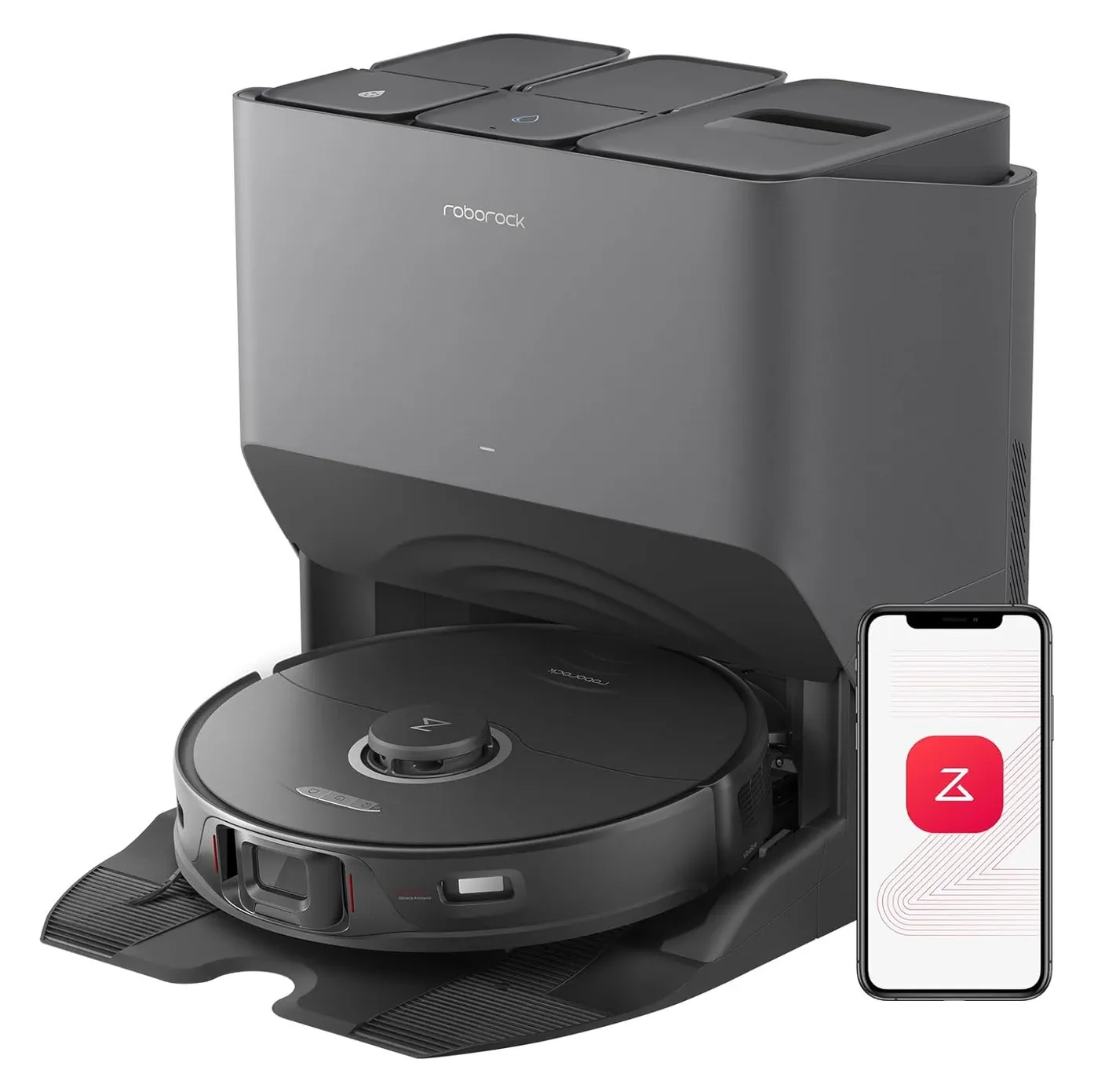
The Roborock S8 Pro Ultra robot vacuum cleans your floors without much help from you. It vacuums and mops at the same time. It has 6,000 Pa of suction. That's strong enough to pull grit from carpet seams. The sonic mop vibrates 3,000 times a minute. It scrubs hard floors as it moves. The robot maps your home on its own. It uses LiDAR to do this. The map builds up fast. It's very accurate. Smart sensors help it avoid toys and cables. Even in low light, it finds its way. When it's done, it goes back to the dock. The dock empties the dustbin, washes the mop pad, dries it, and refills the water. You don't have to touch any of it.
Where It Stands in October 2026
The S8 Pro Ultra launched in early 2023 at $1,599.99. As of October 20, 2026, Roborock's US store no longer lists it, and Amazon's own listing reads "Currently unavailable". Third-party sellers and refurbishers still move units; a price tracker shows new third-party listings bottoming out near $580 in September 2025, and certified refurbished units around $520-620. So this is a clearance-and-refurb buy now, not a current flagship. Roborock's S-line successors are the S8 MaxV Ultra (10,000 Pa, hot-water mop washing, Matter) and the 2025 Saros 10 and 10R. RTINGS rates the Saros 10R above both S8 models for obstacle avoidance and mopping, while giving the S8s the edge on pet hair thanks to the twin rubber rollers. If you find an S8 Pro Ultra at roughly a third of its launch price, the hardware below still earns it. At anything near $1,000, buy the newer model.
Effortless Daily Cleaning
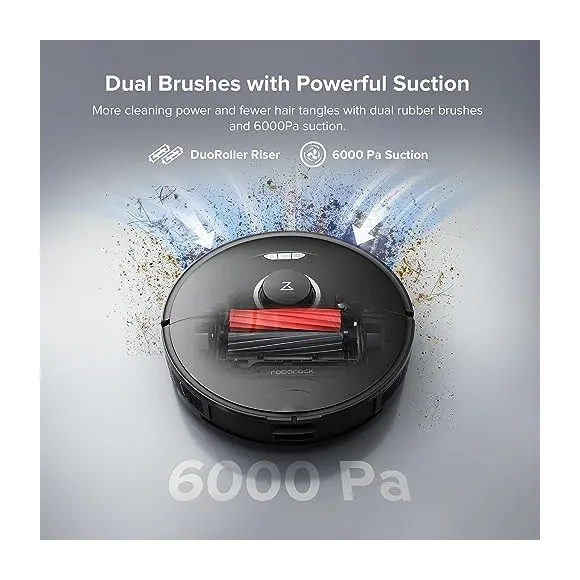
The 6,000 Pa HyperForce motor is very powerful. It lifts sand from thick carpet. It's gentle on hardwood too. Two rubber rollers sweep up pet hair. They don't tangle. The sonic mop scrubs 3,000 times per minute. It removes dried marks with ease. Roborock rates the battery at up to 180 minutes in Quiet mode. That's enough for most homes. When the robot reaches carpet, it lifts the mop pad on its own. The VibraRise 2.0 system handles that. Rugs stay dry. You don't need to remove the pad before cleaning carpeted areas.
Quick-View Advantages
- RockDock Ultra handles emptying, washing, drying, and refilling on its own.
- Reactive 3D structured-light sensors recognize 42 object types, by Roborock's count, with no camera on board.
- DuoRoller brushes spin in opposite directions to cut hair tangles.
- Works with Alexa, Google Assistant, and Siri Shortcuts for voice control.
Deep Look at Cleaning Tech
Two thick rubber rollers grip the floor tightly. They shake loose crumbs that bristle brushes miss. The dual brush and mop combo covers a wide strip on tile. It scrubs stuck-on food without dragging dirty water. In Balanced mode, the spec sheet puts noise at 68.5 dB. That's about as loud as a shower. You can still have a conversation while it runs.
RockDock Ultra: Cleaning Made Simple
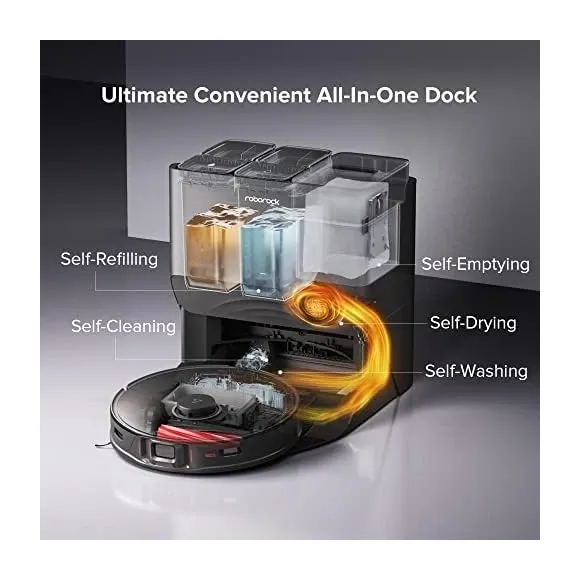
The auto-wash dock does most of the work for you. After each wash it blows warm air over the mop pad; you pick a 2, 3 or 4 hour drying cycle in the app. Roborock doesn't publish the air temperature, and this dock has no hot-water wash (that arrived with the S8 MaxV Ultra). Warm air is enough to stop mildew from forming. The dock holds a 2.5-liter dust bag. It stores weeks of debris. Two water tanks, roughly 3 liters clean and 2.5 liters dirty, keep the two apart. Dirty water never goes back on your floor. Even the dock base gets rinsed. You don't have to wipe any puddles.
Smart Mapping and Voice Control
LiDAR builds a 3D map after the first run. The advanced room-labeling feature lets you name each room in the app. Set no-mop zones under rugs. Schedule the kitchen to clean at dawn. The robot also works with voice assistants. Just say "Alexa, vacuum under the table" and it starts. You can trigger spot cleans from anywhere. The Roborock app gives you full control from your phone. One thing to be clear about: Matter never came to this model. Roborock's 2025 Matter rollout covered the S8 MaxV Ultra, the Saros line and the Qrevo line, and the S8 Pro Ultra wasn't on it. The way to wire it into the rest of your smart home is the official Home Assistant integration, covered below.
Maintenance Tips
The dock handles most of the cleaning work. But a few monthly checks help a lot.
Monthly tasks:
- Rinse the dock's drain tray with warm water
- Wipe the charging contacts with a dry cloth
Side brush care:
- Check for hair tangles each week
- Snip or pull them away by hand
Filter upkeep:
- Tap the HEPA filter clean every few weeks
- Replace it every six months
Mop pad:
- Lasts about three months with daily use
- Replacement packs come in sets of three
Real-World Results
Pet owners: The rubber rollers lift fur without snarls. You save a lot of scissor time each week.
Busy parents: The mop pad dries before bedtime. There's no damp cloth smell left behind.
Run time: Roborock's rating is up to 180 minutes, and that's the Quiet-mode number. Balanced or Max on thick rugs will come in well under it; none of the reviews we checked timed it independently.
Noise level: It rarely gets louder than normal conversation. Movie nights stay uninterrupted.
Key Specs in Plain Language
The robot has a 200 ml water tank and a 350 ml dustbin. Both are topped up or emptied on their own through the dock. The robot alone is 4.8 kg (10.6 lbs) and measures 353 x 350 x 96.5 mm; with the dock, Amazon lists the set at 31.1 lbs. Once placed, you rarely need to move it. Recharging takes under six hours. The 5,200 mAh battery can be replaced down the road if needed.
How It Compares to Other Premium Robot Vacuums
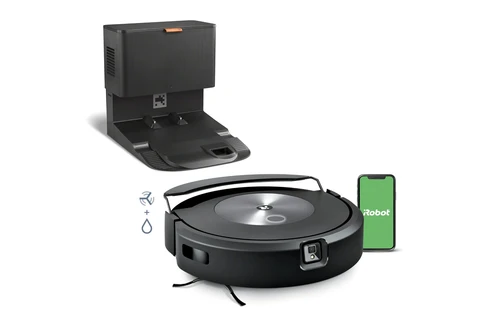
vs. iRobot Roomba Combo j9+: The Roomba avoids pet waste with its camera system. It works well with Alexa. But Roborock's LiDAR mapping is more precise. The RockDock Ultra is also more thorough. It rinses its own base. The HyperForce motor beats the Roomba on thick carpets. Roborock wins on cleaning power and dock features.
vs. Dreame X40 Ultra: Both have premium docks. Both empty, wash, and dry on their own. The Dreame uses a heated wash cycle and is rated at 12,000 Pa, double the S8 Pro Ultra. That's a real edge for mop cleaning and deep carpet. Roborock's app is easier to live with. Choose Dreame if heated washing is a must. Choose Roborock for a more mature overall system, or if the price gap is wide.
vs. Samsung Bespoke Jet Bot Combo AI: Samsung leans on an AI camera for object detection. It's good for homes with scattered toys. But Roborock's dual rubber rollers beat Samsung's single brush on pet hair. Mopping is also more consistent. Roborock wins for pet owners. Samsung wins for homes with small children.
vs. its own successors: The S8 MaxV Ultra (2024) adds 10,000 Pa, a hot-water mop wash, an extending side brush and mop, and Matter. RTINGS prefers it outright. The Saros 10R (2025) drops the LiDAR turret so it fits under lower furniture, climbs taller thresholds and mops better. Both cost more than a clearance S8 Pro Ultra, and both lose to it on one thing only: the twin brushrolls on pet hair.
Why the price is justified: The RockDock Ultra isn't just a dustbin emptier. It's a full laundry system for mop pads. Warm-air drying stops mildew. Separate water tanks stop dirty water from spreading. These features save time and hassle over three to five years.
Troubleshooting common issues:
Robot loses suction:
- Empty the dustbin right away
- Check the HEPA filter for clogs
- Look for hair wrapped around the wheels
- Do a factory reset if problems continue
Mop leaves streaks:
- Check the water level in the dock
- Make sure the mop pad sits flush
- Use distilled water to avoid mineral buildup
- Run a second pass on tough spots
Robot gets stuck:
- Clear toys and cables from the floor
- Make sure the dock sits on hard flooring
- Re-run the initial map if the robot seems lost
- Add no-go zones for problem areas
- Update the firmware for better mapping
App won't connect:
- Check that your phone and robot use the same 2.4GHz network
- Restart the app and your router
- Check that your phone's location access is on
Dock makes noise:
- Whirring and clicking are normal during cleaning and drying
- If noise is very loud, check for debris in the drain
- Make sure the dock sits on a flat, level surface
Smart Home Setup
The S8 Pro Ultra works well with your other smart devices.
- Create a "leaving home" routine that starts the robot
- Say "OK Google, vacuum the living room" for a spot clean
- Set a daily 2 PM schedule while you're at work
- Use it with smart blinds or an air purifier in the same routine
- Say "Alexa, tell Roborock to start cleaning" from any Echo device
- Build a "bedtime" routine that docks the robot and secures the home
- Control it from your car using the Alexa app
- Say "Alexa, vacuum the bedroom" to clean a specific room
- Link it with smart locks for automatic cleaning after the door locks
Apple HomeKit control isn't available. Matter was the route Roborock chose for Apple Home, and this model never got the Matter firmware. If Apple Home matters to you, the S8 MaxV Ultra or a Saros is the one to buy.
Home Assistant Integration
The S8 Pro Ultra is covered by the official Roborock integration in Home Assistant, which has shipped in core since 2023.5 and lists the whole S series as fully supported. Setup is a login with your Roborock account email plus a verification code; Home Assistant then discovers the robot through Roborock's cloud and switches to local control on your LAN over TCP port 58867. Two things stay on the cloud no matter what: map data and routines. The robot also needs to reach Roborock's servers at all; cut its internet and it blocks its own local API until it can phone home again.
What you get as entities, per the integration docs:
- A vacuum entity for start, pause, dock and fan speed, plus per-room cleaning once segments are mapped
- A live map image entity
- Selects for mop mode, mop intensity, the active map and the dock's empty mode
- Sensors for consumable life (filter, brushes, sensors), cleaning stats, clean and dirty water box status and dock errors
- Switches for dust emptying and mop washing and drying, with a mop-drying binary sensor
- Child lock, LED, do-not-disturb and volume controls
Want fully offline? That means rooting the robot and running Valetudo, which is out of warranty and out of scope here. For a ranked look at which robots behave best under Home Assistant, see our best robot vacuums for Home Assistant guide.
Warranty and Long-Term Value
In the US, Roborock's own warranty page gives new products a 1-year limited warranty; certified refurbished units bought from Roborock get six months. EU and Australian buyers get two years. Wear items like pads, bags, and filters are not included. Replacement parts are affordable and still listed. Don't count on resale value: with the list price at $1,599.99 and refurbished units changing hands at $520-620 in 2025, a used S8 Pro Ultra is worth about a third of what it cost new.
Cost over five years:
The launch price no longer applies, so this uses $650 for the robot and dock, which is where third-party new and certified refurbished listings sat in late 2025. Adjust if you pay more.
Initial cost: $650-700
- Robot and dock: about $650
- Extra mop pads: $30-50
Year 1 costs:
- Mop pads (4 sets at $30): $120
- HEPA filters (2 at $25): $50
- Dust bags (8 at $5): $40
- Distilled water: $20
- Power use: $4.30
- Total first year: about $924
Years 2 to 5 annual costs:
- Mop pads: $120-150
- Filters: $50
- Dust bags: $40-50
- Distilled water: $20
- Power: $4.30
- About $234 per year
5-year total: roughly $1,860 Monthly cost: about $31
Compare that to a professional cleaning service at $150-300 per month. Over five years, that's $9,000 to $18,000. The robot pays for itself quickly.
If you value your time at $20 per hour and the robot saves you four hours per month, that's $960 per year. Over five years, that's $4,800 in time savings. The robot costs about $1,860 over five years. Your net gain is close to $3,000.
Full Setup Guide
Getting started takes under ten minutes. Plug in the dock, scan the QR code in the Roborock app, and the robot maps your rooms on its first run. Renters don't need to drill anything.
Before you start:
- Pick a spot for the dock on hard flooring
- Leave 1.5 feet of space around the dock
- Make sure your router is within 30 feet
- Clear toys, cables, and socks from the floor
Physical setup:
- Remove all packaging from the robot and dock
- Insert both water tanks and check the seals
- Add the dust bag to the dock
- Attach the mop pad to the robot
- Plug in the dock and place the robot on it to charge
App and Wi-Fi:
- Download the Roborock app
- Create an account
- Tap "Add Device" and select "S8 Pro Ultra"
- Scan the QR code on the robot's base
- Choose your 2.4GHz Wi-Fi and enter the password
- Wait 30-60 seconds for the connection to complete
First mapping run:
- Open all doors you want cleaned
- Close doors to areas you want excluded
- Tap "Start" in the app
- Wait while the robot scans the full floor
- Name each room once the map is done
First real clean:
- Set no-mop zones if needed
- Choose your water level and suction setting
- Schedule daily cleans in the app
- Tap "Clean" to begin your first session
Feature breakdown:
6,000 Pa suction: This is very powerful. It lifts sand and grit that regular vacuums miss. It's built for thick carpets where hair gets pressed in deep. In practice, it cleans faster and the battery lasts longer.
Sonic mop at 3,000 strokes per minute: The mop pad vibrates 50 times per second. It works like a human hand scrubbing. It removes dried juice, sauce, and sticky spills without chemical cleaners.
Reactive 3D sensors and object avoidance: Structured light, not a camera. Roborock says it recognizes 42 object types, including toys, socks, and cables. It works in low light. The object avoidance system sometimes misses dark objects on dark floors. It does not detect pet waste like camera systems such as the Roomba j-series do.
Rubber rollers vs. bristle brushes: Rubber rollers tangle less. They grip hard floors and carpet edges better. They last longer. They're easier to clean. The trade-off is that they work less well on very thick commercial carpet.
VibraRise 2.0 mop lifting: When the robot finds carpet, the mop lifts on its own. This mop lifting feature prevents water damage to rugs. The carpet boost mode also ramps suction up automatically on pile surfaces. It drops back down on hard floors. You don't need to set anything up.
RockDock Ultra functions:
- Empties the dustbin into the dock's 2.5L bag
- Washes the mop pad with clean water
- Drains dirty water away
- Dries the pad with warm air, on a 2, 3 or 4 hour cycle you pick in the app
- Rinses the dock base underneath
- Refills the robot's water tank
- Stores weeks of debris in the dust bag
- Sends alerts when maintenance is needed
The warm-air drying step is key. It stops the musty smell that other self-emptying docks get.
Head-to-head numbers:
Published suction ratings:
- Roborock S8 Pro Ultra: 6,000 Pa
- Roborock S8 MaxV Ultra: 10,000 Pa
- Dreame X40 Ultra: 12,000 Pa
- iRobot Roomba Combo j9+ and Samsung Jet Bot: no Pa figure published by either maker
Pa numbers are lab maximums at the inlet, not a cleaning score, which is why iRobot refuses to quote one. Treat anything above about 5,000 Pa as plenty for carpet and judge the rest on brushes and mop design.
Battery (maker's rating):
- S8 Pro Ultra: up to 180 min, 5,200 mAh, under 6 hours to recharge
- Saros 10: larger battery and longer Quiet-mode runtime than the S8 MaxV Ultra, per Mashable's comparison
The Right Buyer
It works best in multi-level homes (stores 4 floor maps), pet households (rubber rollers resist hair tangles), busy apartments (68.5 dB in Balanced mode), and with allergy sufferers who need daily mopping. The E12-class HEPA filter traps fine dust and pollen.
Best for:
- Multi-pet homes that want hands-free cleaning
- Hardwood and tile homes with some carpet
- Busy people in 2,000 to 4,000 sq ft homes
- Anyone who values their time
- Allergy sufferers who need daily mopping
- Home Assistant users who want dock and consumable entities without extra hardware
- Bargain hunters who find a refurbished unit well under $700
Consider other options if:
- Your budget is under $400
- Your whole home is deep-pile carpet
- Your floor is covered in small objects all the time
- You prefer local-only control with no cloud
- You want Apple Home or Matter, which this model will never get
- You already have a professional cleaner
Final Verdict
The Roborock S8 Pro Ultra is a top-tier floor cleaning robot. It vacuums and mops at the same time. The dock handles almost all the upkeep. You barely have to think about it. The 6,000 Pa motor is strong on all floor types. The sonic mop removes dried-on messes. The LiDAR map is precise and fast.
It cost $1,599.99 new in 2023, and at that price the newer S8 MaxV Ultra or Saros 10R is the better buy. At the $520-650 that refurbished and third-party listings asked in late 2025, it's a different proposition: flagship hardware for mid-range money. It saves you time every single day. Over five years, the time savings alone are worth more than the cost. The dock sets this model apart from cheaper options. It doesn't just empty the dustbin. It washes, dries, and refills everything. That means your floors stay clean and your robot stays ready.
If your home has pets, hard floors, or busy people coming and going, this robot fits your life well. It runs quietly in the background. It keeps your floors fresh. You'll notice the difference within the first week.
Frequently Asked Questions
Does the Roborock S8 Pro Ultra require a subscription?
No. There's no subscription and no paid tier in the Roborock app. Mapping, scheduling, room cleaning and voice control all come with the robot. The app does need a Roborock cloud account and an internet connection to set up and to fetch maps, so it isn't a local-only product.
How often do you need to refill the water tank?
The water tank holds 200 ml. Most homes refill it every 1-3 cleaning cycles. The dock alerts you when it's low. For scheduled daily cleans on a small home, you might refill every 2-3 days. Larger homes may need daily refilling during active cleaning seasons.
Can the S8 Pro Ultra handle both carpet and hardwood?
Yes. The VibraRise 2.0 system automatically lifts the mop pad when it detects carpet. The rubber rollers and 6,000 Pa suction work on both surfaces. Sonic vibration at 3,000 strokes per minute cleans hardwood thoroughly without leaving excess water.
Is Matter support available now?
No, and it isn't coming. Roborock's Matter firmware rollout on March 31, 2025 covered the S8 MaxV Ultra, Saros 10, 10R and Z70, and the Qrevo Curv, Edge and Master, with the S8 Max Ultra and Qrevo Slim added later. The S8 Pro Ultra was never on the list. It works with Alexa, Google Home and Siri Shortcuts, and with Home Assistant through the official Roborock integration, but not with Apple Home.
How long does the battery last on a single charge?
Roborock rates the 5,200 mAh battery at up to 180 minutes, which is the Quiet-mode figure. Balanced and Max modes drain it faster, and Roborock doesn't publish per-mode numbers. A full recharge takes under six hours on the spec sheet. The battery is a replaceable part if it fades after a few years.
Video Review
As an Amazon Associate we earn from qualifying purchases. Disclosure.
Check Price on Amazon →