Aqara Motion Sensor P1 Review - Zigbee PIR with Adjustable Settings
Product Details
🏭 Manufacturer: Aqara
🔌 Plug Format: Battery Powered
📄 Specification Met: CE, FCC Certified
🔖 Part Number: MS-S02
🏋️♂️ Weight: 27 grams
📏 Dimensions: 65 x 65 x 29 mm
🏳️ Country of Origin: China
🆔 Model Number: MS-S02
📐 Size: Compact
🎨 Style: Minimalist
🧲 Mounting Type: Magnetic Mount
🔧 Usage: Indoor Use
🧩 Included Components: Sensor, Magnetic Base, Screw Mount, CR2450 Battery, User Manual
🔋 Batteries Included: Yes
🔋 Batteries Required: Yes
The Aqara Motion Sensor P1 is a solid upgrade over the original Aqara motion sensor. It adds a 170-degree PIR field of view, three sensitivity levels, and a detection interval you can dial down to 5 seconds or stretch out to 60 minutes. At around $22, it's one of the better Zigbee PIR sensors you can buy for a home setup. This review covers real-world setup, Home Assistant pairing, app experience, and a few things that could be better.
Hardware Specs and What Changed
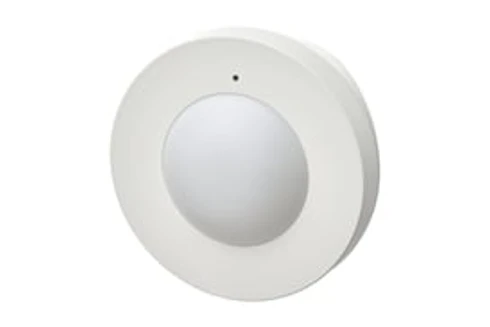
The P1 uses a passive infrared sensor with a wide-angle 170-degree horizontal detection field. That's notably wider than the original Aqara motion sensor, which covers about 120 degrees. The detection range is 7 meters in a straight line. In a 12 x 14 ft room, it covers the whole space from a corner mount. The sensor body is 65 x 65 x 29 mm and weighs 27 grams. It runs on a CR2450 battery rated for roughly 2 years of normal use.
P1 vs Original Aqara Motion Sensor
The P1 improves on the old model in three ways. First, wider angle: 170 vs 120 degrees. Second, adjustable sensitivity, you get low, medium, and high settings, so you can stop false alerts from pets or fans. Third, the detection interval is now configurable. You can set it from 5 seconds up to 60 minutes. The original was fixed at about 60 seconds. That short interval is a big deal if you want fast-responding automations.
Zigbee 3.0 and Connection Options
The sensor uses Zigbee 3.0, which means low power draw and solid mesh networking. You have two main paths. First, pair it with an Aqara hub, the M2, M3, or G3 all work. Second, add it directly to Home Assistant using ZHA or Zigbee2MQTT, no hub needed. It joins the Zigbee network in under 30 seconds. In tests with Zigbee2MQTT running on a Sonoff Zigbee 3.0 USB Dongle Plus, it paired on the first try. The sensor shows up in Home Assistant right away with occupancy, tamper, and battery entities.
Smart Home Platform Support
The P1 works with Apple HomeKit via an Aqara hub, the M2, M3, and G3 all qualify. It works with Amazon Alexa and Google Assistant through the Aqara app. Home Assistant users can pair directly via ZHA or Zigbee2MQTT with no hub at all. If you want HomeKit in a hub-free HA setup, add a HomeKit Bridge integration in Home Assistant. That's a few clicks and it works reliably.
Setup Experience
Setup on Home Assistant took about three minutes. Hold the reset button for 5 seconds until the LED flashes. Put your Zigbee coordinator into pairing mode. Done. Sensitivity and interval settings are available in Zigbee2MQTT's exposes panel right after pairing. In ZHA, some advanced settings may need the Aqara app and a hub to configure, that's a known limitation of ZHA with this model.
Mounting Options
The P1 ships with a magnetic base and a screw mount. You can stick the magnetic base to a wall or shelf and set the angle. The magnet is strong enough to hold the sensor in place and lets you adjust aim without tools. If you want it fixed, the screw mount works fine too. The two options together cover most rooms.
App Quality and Sensitivity Settings
The Aqara Home app (version 4.x on iOS) is clean and quick to load. Sensitivity is set per device, tap the gear icon, find Motion Detection Sensitivity, and pick low, medium, or high. The detection interval lives in the same menu. These settings sync to the sensor over Zigbee in a few seconds. Low sensitivity helped cut false alerts from a ceiling fan in testing. Medium works well for general room detection. High is best for hallways with low foot traffic.
Use Cases in a Smart Home
The short detection interval makes the P1 good for automation-heavy setups. A 5-second reset means your lights can respond fast. Here are common ways it fits into a setup:
- Turn on hall lights when you walk in, turn off 2 minutes after motion stops
- Trigger a camera recording when motion happens at night
- Set lights to a lower level if motion is detected after midnight
- Use low sensitivity near a pet area to avoid false occupancy alerts
- Pair with a door sensor to confirm if someone entered a room
Battery Life and Power Notes
Aqara rates the CR2450 at about 2 years. With a 60-second detection interval and medium sensitivity, that estimate seems realistic. Short intervals drain the battery faster because the sensor wakes up more often. At a 5-second interval, expect closer to 12-16 months. The Aqara app and Home Assistant both show battery percentage. You get an alert at low battery so you're not caught off guard.
Bottom Line
The Aqara Motion Sensor P1 is a good pick if you want a Zigbee PIR that works well with Home Assistant or Apple HomeKit via a hub. The 170-degree field and adjustable settings put it ahead of many sensors at this price. Setup is fast. The magnetic mount is practical. Battery life is honest for what it does.
It's not for everyone. If you want to change all settings without a hub, ZHA has gaps. If you need outdoor detection, this sensor is indoor only and not weatherproof. If your home runs on Z-Wave, it's the wrong protocol. But for a Zigbee-first setup or a Home Assistant user comfortable with Zigbee2MQTT, the P1 earns its spot. Aqara's Motion and Light Sensor P2 adds an ambient light reading to the same Zigbee setup. Check the official Aqara product page for the latest firmware and hub compatibility details.