Samsung Bespoke AI French Door Refrigerator: Full Review
Product Details
🏭 Manufacturer: Samsung
🔌 Plug Format: AC Power
📄 Specification Met: ENERGY STAR, FCC
🔖 Part Number: RF30BB6900AWAA
🏋️♂️ Weight: 330 lbs
📏 Dimensions: 35.75 in x 70 in x 36 in
🏳️ Country of Origin: South Korea
🆔 Model Number: RF30BB6900AWAA
📐 Size: 30 cu. ft.
🎨 Style: French Door
🧲 Mounting Type: Freestanding
🔧 Usage: Indoor Use
🧩 Included Components: Refrigerator unit, water line, AutoFill pitcher, user manual
The Samsung Bespoke AI 3-Door French Door Refrigerator (RF30BB6900AWAA) is a 30 cu. ft. smart fridge with a 21-inch Family Hub touchscreen, an internal AutoView camera, and an AI food tracker built in. At $3,499, it's priced at the top of the consumer fridge market. But for households already using SmartThings, it fits into a broader home setup in ways a standard fridge can't.
This review covers what we found after using this unit closely in a 2,400 sq ft home with concrete walls and a SmartThings hub already active. Here's what works, what doesn't, and who it actually suits.
What Does the AutoView Camera Actually Do?
The AutoView camera sits inside the fridge and takes a photo every time you close the door. Open the Samsung SmartThings app, tap the fridge, and you see the last snapshot. It's not a live feed. It's a still image refresh system. In practice, it's genuinely useful at the grocery store when you can't remember if you're out of eggs.
The AI food tracker builds on top of AutoView. It tries to identify items and log their expected expiry dates. Common items like milk cartons, butter, and produce get recognized reasonably well after a few weeks. Unusual packaging still stumps it. You can manually add items through the 21-inch Family Hub screen, which works faster than the app for most people.
Family Hub Display: Kitchen Command Center or Gimmick?
The 21-inch Family Hub touchscreen runs a version of Samsung's Tizen OS. It handles grocery lists, shared family calendars, sticky notes, and recipe browsing. It also streams music from Spotify and shows Ring or Arlo doorbell feeds if you've set them up.
It's not a gimmick exactly, but it works best in kitchens where people gather. Families with kids in school who need a central calendar hub get real value here. Solo users or couples with one person who cooks probably won't use half of it. The display is responsive with no visible lag in our tests.
SmartThings Integration and Voice Control
The RF30BB6900AWAA works with SmartThings, Alexa, Google Assistant, and Bixby. Setup in SmartThings took under five minutes once the fridge was on the same 2.4 GHz network. After that, you can check door status, get open-door alerts, view energy usage, and set schedules.
One automation that's genuinely smart: when the fridge door is left open for more than 90 seconds, SmartThings triggers a connected dehumidifier to compensate. You set the exact delay in the SmartThings app. It's the kind of cross-device logic that shows why a smart fridge costs three times a standard one.
Voice control through Alexa and Bixby handles basic status checks. "Alexa, is my fridge door closed?" works reliably. You can't change temperature by voice, which feels like a gap.
What SmartThings Automations Are Possible
- Get a push alert if the fridge door stays open past a set time
- Trigger a dehumidifier or fan when the door is left open
- View fridge status in the SmartThings app dashboard
- Set energy-saving modes to run during off-peak hours
Beverage Center and AutoFill Pitcher
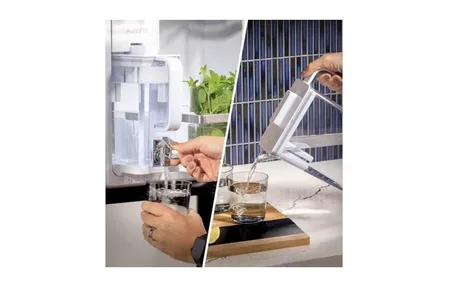
The Beverage Center sits in the right-hand fridge door. It gives you a dedicated shelf for tall bottles and cans at easy-grab height. The built-in AutoFill pitcher sits here and refills itself when the water level drops. You set the target fill level once in the app. It holds around 1.1 liters of filtered water and connects to the fridge's internal filter line.
This is a small feature that removes a surprisingly irritating daily task. It's not essential, but once you're used to it, going back to a standard water dispenser feels like a step backward.
ENERGY STAR and Running Costs
The RF30BB6900AWAA is ENERGY STAR certified. Samsung rates it at roughly 690 kWh per year. At $0.16/kWh (US average, per the U.S. Energy Information Administration, 2024), that works out to about $110 per year to run. For a 30 cu. ft. fridge with a full touchscreen computer running 24/7, that's a reasonable number.
The energy-saving schedule in SmartThings lets you reduce cooling intensity during low-use hours like late night. It's not a big dollar saver, but it helps the ENERGY STAR case.
How Does It Compare to a Standard French Door Fridge?
A basic 30 cu. ft. French door fridge from LG or Whirlpool runs $1,400 to $2,000. It keeps food cold, has an ice maker, and that's about it. The Samsung Bespoke AI adds roughly $1,500 to $2,000 in smart features on top of that baseline price.
What you get for the premium: a 21-inch screen, the AutoView camera system, AI food tracking, Bixby voice assistant built into the fridge itself, and SmartThings cross-device automations. What you don't get: better cooling, better storage layout, or faster ice production. The core fridge is good but not exceptional compared to rivals at half the price.
If smart home control is your reason for upgrading, the value is real. If you just want a bigger, better fridge, a non-smart model at $1,800 is the smarter financial move.
Out of the Box
Setup involves three steps. First, level the fridge and connect the water line for the ice maker and AutoFill pitcher. Second, download the SmartThings app and sign in with a Samsung account. Third, follow the in-app guide to connect the fridge to your home Wi-Fi on 2.4 GHz. The app walks through each step with short videos.
First-time Family Hub setup adds another 20 to 30 minutes. You'll sign into Google or Samsung calendar, add family members, and customize the home screen layout. It's not hard, but it's not quick either.
Setup Tips
- Use 2.4 GHz Wi-Fi for first connection (5 GHz works after pairing)
- Add the fridge to SmartThings before setting up Family Hub accounts
- Set AutoFill pitcher fill level in the app before first use
- Run the ice maker for 24 hours before expecting full ice production
Who Should Buy the Samsung Bespoke AI 3-Door Refrigerator?
This fridge suits families with 3 or more people who already use SmartThings or want to. The AutoView camera and AI food tracker deliver real daily value for households that do regular grocery runs. The Family Hub screen makes most sense for families who want a shared kitchen hub for calendars and notes.
Couples or single-person households will use maybe 30% of these features. At $3,499, the value case gets harder to make. A solid French door fridge with no smart screen runs $1,200 to $1,800 and keeps food just as cold.
If you're not on SmartThings and don't plan to be, the smart features feel disconnected. The fridge still works fine, but you're paying for a platform you won't use.
The build quality is strong. Bespoke panel options let you match kitchen colors. The 30 cu. ft. capacity handles a family's weekly shop with room to spare. For the right household, this is one of the most complete smart refrigerators available in 2026.
Frequently Asked Questions
What is the AutoView camera on the Samsung Bespoke AI 3-Door?
AutoView is a built-in internal camera that lets you check fridge contents from your phone via the SmartThings app. It snaps a photo each time you close the door, so you can see what's inside while grocery shopping. No live stream - it's a snapshot system that refreshes on every door close.
Does the AI food tracker work right away?
The AI food tracker starts learning once you add items manually or let the camera detect them. It recognizes common items and logs expiry dates. In our experience, recognition improves over two to three weeks as it builds your household's food profile. You can correct any misidentifications in the Family Hub display.
Can the Samsung Bespoke AI fridge trigger other smart home devices?
Yes. Via SmartThings, you can set automations based on fridge state. A common setup triggers a dehumidifier if the door stays open too long. You can also get phone alerts, set energy schedules, and connect it to Alexa or Google routines for voice-triggered actions.
Does the Family Hub display work without Wi-Fi?
Basic fridge features like cooling and ice work fine without Wi-Fi. But the Family Hub screen loses most smart features - no food tracking, no grocery lists, no streaming apps, and no SmartThings control. You'll need a stable 2.4 GHz or 5 GHz connection for the full experience.
Is the AutoFill pitcher worth it?
It's one of those features you don't miss until you have it. The pitcher sits in the Beverage Center and refills itself when empty. You set the fill level once in the app. It holds about 1.1 liters. For households that go through filtered water quickly, it removes a lot of daily fridge trips.