Philips Hue - The Ultimate Guide to Smart Home Lighting

This post may contain affiliate links. As an Amazon Associate we earn from qualifying purchases. Disclosure.
Transform your living space with Philips Hue and discover how smart lighting can improve your home's efficiency and comfort.
Philips Hue is a smart lighting system that uses LED bulbs, a Bridge hub, and a mobile app to give you full control over brightness, colors, and schedules. It works with Alexa, Google Assistant, and HomeKit, and supports automation through motion sensors, scenes, and entertainment sync.
Bottom line: Philips Hue is the most mature smart lighting system available, offering color-adjustable LED bulbs, a Bridge hub, and deep integration with Alexa, Google Assistant, and HomeKit. Start with a starter kit, expand with sensors and light strips, and automate scenes through the Hue app or Home Assistant.
Smart homes are no longer just futuristic concepts-they're today's reality. One of the most impactful upgrades you can make is to implement intelligent lighting. In this article, we present Philips Hue: The Ultimate Guide to Smart Lighting, an in-depth walkthrough to help you understand and master this powerful lighting system. Whether you're just beginning or enhancing your existing setup, this guide covers everything you need to know.
I'll say it plainly: Hue is overpriced per bulb. I own the Bridge, a Hue Go and five bulbs, and I'd still pay the premium in rooms where light quality matters. The Bridge running local Zigbee is, by design, sturdier than a Wi-Fi bulb that leans on your router and a vendor cloud, and that reliability is worth real money in the rooms you use every day.

Why Is Philips Hue Leading the Smart Lighting Revolution?
The name Philips Hue has become synonymous with premium, reliable smart lighting. But what sets it apart from the rest? From color-adjustable LED bulbs to advanced automation features, Philips Hue is built for flexibility, energy savings, and smooth control through mobile apps or smart home assistants. To understand how smart lighting like Philips Hue compares to traditional lighting options, see our smart lights vs traditional lighting breakdown for a comprehensive view of the advantages Philips Hue offers over conventional bulbs.
The authoritative reference is CSA Matter specification, worth a look before you buy.
Advantages of Using Philips Hue in Your Home
Choosing Philips Hue isn't just about light-it's about improving your lifestyle. Here's why many homeowners make the switch:
- Lower Energy Bills: Thanks to efficient LED technology, Philips Hue uses less power than standard bulbs.
- Total Lighting Control: Whether you use voice commands or mobile apps, controlling brightness and colors is simple and intuitive.
- Customized Ambiance: With over 16 million colors to choose from, you can easily match the mood to the moment.
- Extended Lifespan: These bulbs are made to last, reducing the need for frequent replacements.
How Do You Get Started with Philips Hue Step-by-Step?
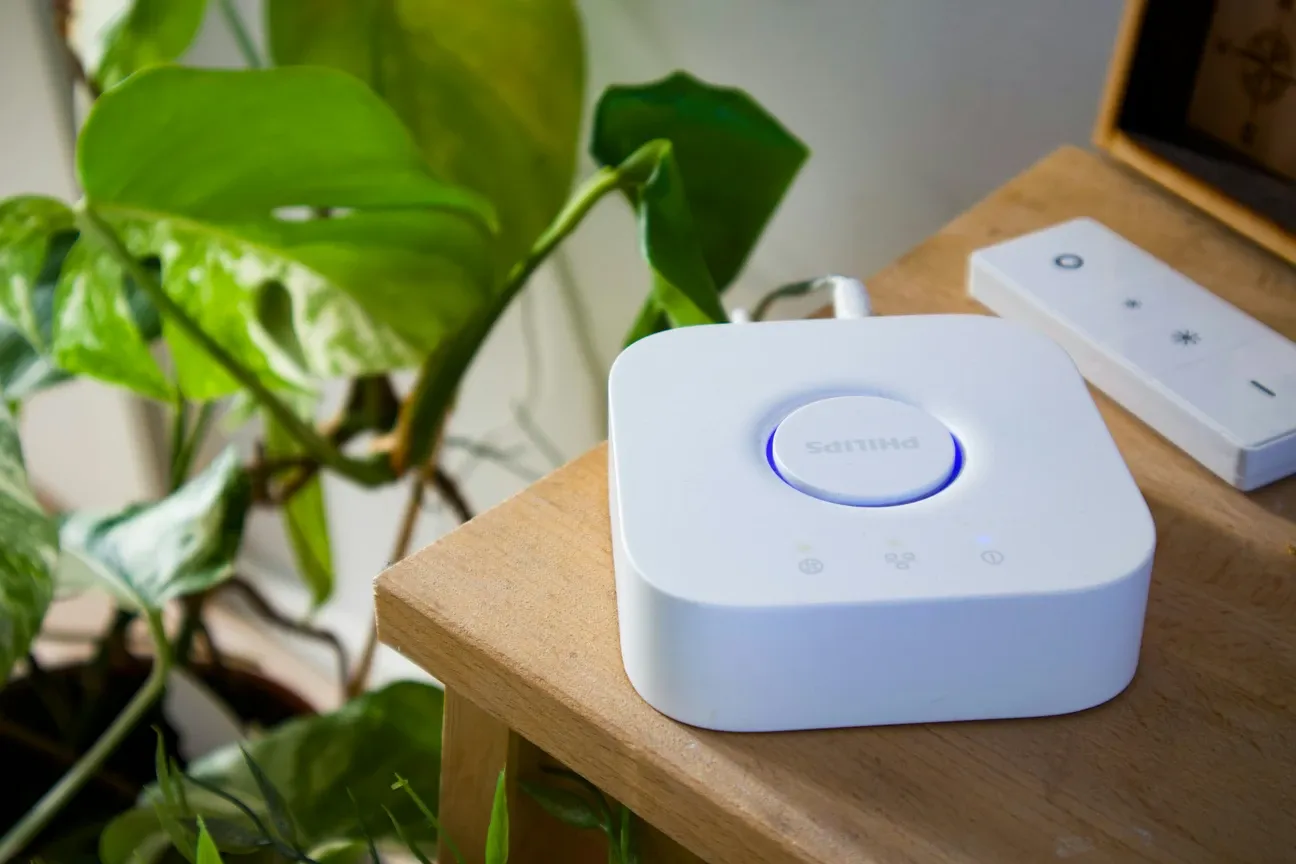
If you're new to the world of smart lighting, don't worry. Setting up your Philips Hue system is a breeze. Most starter kits come with the essentials, including smart bulbs and the Hue Bridge, which connects the bulbs to your home network. A Bridge is optional for a handful of Bluetooth bulbs: Philips lets you pair up to 10 lights to one phone without it, but you give up Apple Home, custom scenes and schedules, and remote access. Past that, the Bridge (50 lights and 12 accessories, $79.99 at Philips' US store) is the sensible route.
Whether you're outfitting a new home or upgrading an existing one, the Philips Hue system offers one of the easiest installation experiences available with its streamlined setup process.
How to Set Up Philips Hue
- Download the Hue App: Available on Android and iOS platforms, this app is your control center.
- Plug in the Hue Bridge: Connect it to your router using the supplied Ethernet cable.
- Install the Smart Bulbs: Replace your current bulbs with Hue-compatible ones.
- Launch the App: Follow the prompts to detect your Hue Bridge and pair the bulbs.
- Create Lighting Zones: Assign names to rooms, apply schedules, and explore scene presets.
Voice Assistant Integration
Philips Hue works easily with major voice assistants. Both assistants can control your Hue lights, but each has different strengths when it comes to smart home integration.
Physical Control Options
Beyond voice and app control, you can enhance your Hue setup with physical remote controls. The IKEA BILRESA scroll wheel remote is a Matter-over-Thread remote that controls up to 3 groups of 10 devices each and costs about $9.99 in the US, according to IKEA's listings. It needs a Thread border router, and at least one owner reports the wheel does almost nothing in Home Assistant, so check that before you plan a Hue setup around it. The Philips Hue Smart Button offers a dedicated Hue control solution for scenes and brightness adjustment. For vintage aesthetic preferences, the Tuya Wi-Fi Filament Light offers vintage Edison-style smart bulbs that integrate with your broader smart lighting setup, providing atmospheric accent lighting while maintaining full smart home automation capabilities.
Alternative Smart Bulb Options for Hue Users
While Philips Hue dominates the premium market, budget-conscious users might explore complementary options like Tapo smart bulbs for affordable RGB lighting, LIFX options for decorative accent bulbs, or the Govee Smart Ceiling Light for alternative ambient lighting without requiring Hue infrastructure.
The closest like-for-like alternative is IKEA, since TRADFRI is Zigbee as well and costs a fraction per bulb. The catch is the gateway, not the light: our IKEA TRADFRI and Home Assistant guide covers what you give up going that way and when skipping IKEA's own hub is the better move.
What Is the Philips Hue Bridge Pro?
The Philips Hue Bridge Pro is the newest hub in the Hue family. Philips lists it at $149.99 in the US, against $79.99 for the standard Bridge, and rates it for 150+ lights and 50+ accessories (the standard Bridge: 50 lights, 12 accessories). It stores up to 500 scenes and adds MotionAware. It works with your existing Hue bulbs and scenes, so you don't have to start over. Philips lets you connect it over Wi-Fi or Ethernet, but recommends the cable for stability. Both bridges support Matter through a software update. Buyer ratings on Philips' own page were only 3.5 out of 5 from 13 reviews at the time of writing, with some reviewers reporting reliability problems, so read them before you buy.
Who Should Consider Bridge Pro
- Households with many rooms and lights
- People who rely on complex schedules, zones, and dynamic scenes
- Home theater fans with many lights in Hue Sync entertainment areas (the standard Bridge supports Hue Sync too, so this is about scale, not access)
- Pros and remodels that want a solid, expandable backbone
How to Add or Upgrade
- Connect the Bridge Pro to your router and power it on.
- Open the Hue app and tap Add bridge; follow the on-screen steps.
- Follow the pairing prompts. The app may ask you to press the button on the bridge.
- Move rooms and lights from your current bridge, or add them fresh.
- Re-link voice assistants (Amazon Alexa, Google Assistant, Apple HomeKit) and any smart home platforms you use.
- Update firmware, then test your scenes and automations.
Tip: Philips publishes step-by-step migration instructions at philips-hue.com/support/bridgepro. Keep your current bridge online until everything is moved and tested. Label the new bridge in the app so it's easy to identify later. If you're starting from scratch, remember to install the Philips Hue Bridge first and then add lights. Philips' pitch for faster automations and Spatial Scenes on the Pro has its own page.
How Do You Unlock the Full Potential of Smart Lighting?
Once installed, Philips Hue opens the door to endless customization and smart home integration.
Voice Assistant Compatibility
Easily pair your Hue system with assistants like Amazon Alexa, Google Assistant, or Apple HomeKit. With simple voice commands, you can turn lights on, dim them, or change colors-no switches required.
Create the Perfect Lighting Scene
Tailor each room to your lifestyle with predefined or custom scenes. Want a relaxing glow for movie night? Or crisp white lights for working from home? Philips Hue has you covered.
Smart Home Integration
Make your smart lighting even smarter by syncing it with other devices like:
- Smart plugs such as the Tapo Smart Plug P125M for Matter-compatible outlet control
- Motion sensors
- Smart thermostats
These integrations enhance automation. For instance, motion sensors can trigger lights when you enter a room, boosting both security and convenience. The Hue Secure video doorbell goes a step further, since it can flash chosen Hue lights when someone rings, though Philips says that light chime needs a Hue Bridge.
How Does Philips Hue Help with Energy Efficiency and Sustainability?
One of the top benefits of Philips Hue is its commitment to eco-friendliness. The LED technology inside each bulb consumes far less power than traditional lighting, and with automation, you reduce waste even further.
Pro Tips for Reducing Power Usage
- Dim Instead of Brighten: Use lower light levels in the evenings or during low-activity periods.
- Automate Schedules: Ensure lights are off when rooms are empty.
- Smart Motion Sensors: Avoid leaving lights on unintentionally with motion-activated controls.

How Do You Enhance Your Living Space with Philips Hue?
Smart lighting is more than a trend-it's a smarter way to live. With Philips Hue: The Ultimate Guide to Smart Lighting, you now have the tools to create a comfortable, cost-efficient, and highly customizable home environment.
Whether you're automating a single room or your entire home, Philips Hue delivers unmatched flexibility, control, and ambiance. Embrace the future of lighting today.
How Do You Explore Beyond the Basics with Philips Hue?
Once you've set up the core components, it's time to explore the wider Philips Hue ecosystem. Beyond bulbs, Hue offers a broad range of smart lighting products including light strips, outdoor fixtures, lamps, and even gradient lighting panels. These additions allow you to extend smart lighting into your garden, bathroom, kitchen, or any space you want to improve with ambiance and automation.
Advanced Automation Possibilities
Integrating Philips Hue with services like IFTTT or SmartThings opens up advanced automation scenarios. For example, you can create routines where lights flash red if your security system detects a breach or gradually brighten your bedroom lights in the morning as an alternative to a traditional alarm clock. If you run Home Assistant, its Hue integration talks to the V2 (square) bridge locally and gets state changes pushed instantly; the old round V1 bridge is no longer supported by Signify and is polled, with limits, per the Home Assistant docs.
Sync Lighting with Media
A standout feature of Philips Hue is its ability to sync with your entertainment. By using the free Hue Sync desktop app for Windows and Mac or a Hue Play HDMI Sync Box for TVs, your lights can react to music, movies, and games in real-time. This transforms your living room into a dynamic entertainment hub and adds another layer of immersion to your favorite content. Setup starts with an entertainment area in the Hue app. The Hue Play Wall Washer is built for that job, pushing color gradients onto the wall behind a TV.
For budget-conscious users seeking Wi-Fi-only smart lighting without a hub requirement, alternative options offer affordable entry points with full RGB color support and integration with Alexa and Google Assistant. These deliver dependable performance at a fraction of the cost, making them ideal for room-by-room smart lighting upgrades.
Philips Hue is not only about light-it's about lifestyle. As your smart lighting needs grow, so does the ecosystem, giving you unmatched control and creativity.
Curious about the underlying standard? It is documented at Matter connectivity standard documentation. Official support and manuals live at Philips Hue official site.
Frequently Asked Questions
How do I set up Philips Hue smart lights?
Download the Hue app on Android or iOS, connect the Hue Bridge to your Wi-Fi router via Ethernet cable, replace your current bulbs with Hue-compatible ones, launch the app to detect the Bridge and pair bulbs, then create lighting zones and scene presets. Most starter kits include the Bridge and several bulbs to get started.
Do I need a Philips Hue Bridge for smart lighting?
Not strictly. Hue Bluetooth bulbs pair straight to the Hue app, but only 10 lights per controlling phone, with basic timers and no Apple Home or custom scenes, according to Philips. For full automation, scenes, remote access, and more than 10 lights you need a Bridge. The standard Hue Bridge handles up to 50 lights and 12 accessories. The Bridge Pro raises that to 150+ lights and 50+ accessories for larger homes. Connect the Bridge to your router, then pair bulbs through the Hue app.
Does Philips Hue work with Alexa and Google Assistant?
Yes, Philips Hue works with Amazon Alexa, Google Assistant, and Apple Home. Both the Hue Bridge and the Bridge Pro also support Matter through a software update, so Hue lights can show up in other Matter apps. You can control lights with voice commands to turn them on, dim them, or change colors. The Hue system also integrates with SmartThings, IFTTT, and Home Assistant for advanced automations.
How does Philips Hue save energy compared to regular bulbs?
Philips Hue uses LED technology that consumes significantly less power than traditional incandescent bulbs. Automation features like schedules, motion sensor triggers, and dimming reduce waste further by ensuring lights only run when needed and at appropriate brightness levels. The extended bulb lifespan also reduces replacement frequency.
Can I sync Philips Hue lights with movies and music?
Yes, using the free Hue Sync desktop app for Windows and Mac or a Hue Play HDMI Sync Box for TVs, your Hue lights react to music, movies, and games in real time. Both need a Hue Bridge and an entertainment area set up in the Hue app. The Bridge Pro's larger light capacity helps big setups, but the standard Bridge also supports Hue Sync.
Sources & References
- Philips Hue - Bridge, Smart hub philips-hue.com
- Philips Hue - What Philips Hue Can Do philips-hue.com
- Home Assistant - Philips Hue integration home-assistant.io