Which Smart Speaker Ecosystem Should You Actually Buy?

This post may contain affiliate links. As an Amazon Associate we earn from qualifying purchases. Disclosure.
Smart speakers from Amazon, Google, and Apple work differently for home control. Here are guides, skill recommendations, and comparisons to help you use yours better.
Quick take: Smart speakers are how most people actually interact with their smart home daily, faster than opening an app for actions you repeat ten times a day. Alexa supports the broadest device ecosystem and works with thousands of certified products across every category. Google's assistant, now moving from Google Assistant to Gemini for Home, integrates tightly with Android, Google Calendar, and Chromecast. Siri via HomePod handles HomeKit devices best. All three listen only for a wake word locally, audio doesn't reach the cloud until after the trigger fires. Hardware mute buttons give you a physical guarantee when you want complete silence.
What this guide covers (vs. our other smart speaker hub): This is the daily-use, comparison, and tips hub, Alexa vs Google vs Siri, voice control patterns, skills and routines, and getting more out of speakers you already own. Looking to buy your first smart speaker with reviews, ecosystem fit, and budget guidance? Read the smart speaker reviews and buying guide instead. Two complementary angles: choose there, optimize here.
Smart speakers are the interface layer for a large portion of smart home control. You can operate lights, thermostats, plugs, and locks through an app, but voice commands are faster for the actions you repeat daily. The market has consolidated around three voice assistants, Alexa, Google Assistant, and Siri, each embedded in hardware designed to live in your home permanently.
Choosing one isn't just about which speaker sounds better. It's about which assistant integrates with the other devices you own or plan to own, which platform your household will actually use, and how much you care about privacy. This guide covers all three platforms compared side by side, with practical tips for setup and daily use.
Why Does Alexa Have the Broadest Device Compatibility?
Amazon Alexa supports more third-party smart home devices than any other voice assistant. The Works with Alexa certification covers thousands of products across every category: lights, locks, cameras, thermostats, vacuums, and more. If you're building a mixed-brand smart home and want one voice interface to control all of it, Alexa is the safe choice.
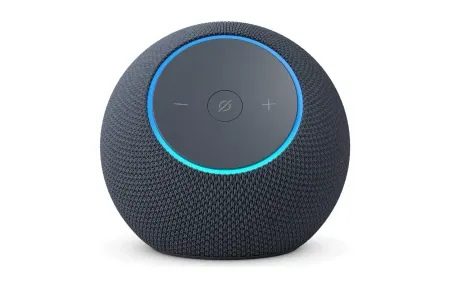
The Echo lineup covers every use case. Echo Dot for a small room or kitchen. Echo for main living spaces. Echo Studio if audio quality matters. Echo Show for a display that handles video calls and security camera feeds. All run the same Alexa software and pair with the same devices. Amazon's newer devices, the Echo Dot Max ($99.99 at launch), Echo Studio ($219.99), Echo Show 8 and Echo Show 11, all have a Zigbee, Matter, and Thread hub built in, and Amazon shipped them with Alexa+ Early Access at launch.
Skills extend what Alexa can do beyond built-in commands. The Matter smart home standard from CSA-IoT is also influencing how Alexa integrates with third-party devices, Matter-compatible products work with Alexa, Google, and HomeKit simultaneously without brand-specific skills. Alexa's skill catalog covers sleep sounds, guided meditations, news briefings, language learning, and custom device integrations. Most are free. The useful ones are narrower than the total count suggests, but the selection for practical daily routines is genuinely solid.
Alexa's Routines feature handles multi-step automations triggered by time, voice phrase, or sensor state. A morning routine might turn on lights, read the weather, start your coffee maker, and play a news briefing with a single command. That's genuinely useful, not just impressive at a demo.
What Makes Google's Assistant Strong at Contextual Intelligence?
Google Assistant has handled follow-up questions and conversational context better than Alexa on natural language tasks, and Google is now replacing it with Gemini for Home, which shipped on the new Google Home Speaker in June 2026 and is reaching older speakers over time. Ask "what's the weather?" and then "will I need an umbrella?", Google understands the second question refers to weather without repeating the subject. Alexa treats each command more independently.
The Google lineup is smaller than Echo's. Google has discontinued the Nest Mini and Nest Audio, and the $99.99 Google Home Speaker replaces both of them. It is Matter-certified and has a Thread border router built in. For a display, there's the Nest Hub. Gemini Live conversations require a Google Home Premium plan, and the speaker comes with a six-month trial of the Standard tier. The Google Home app ties them together and handles smart home automations through its Routines feature.
Google Home's automation capability is more limited than Alexa's at the conditional level. Simple schedule-based routines work well. Complex multi-condition automations work better on Alexa or Home Assistant.
Where Google Assistant genuinely wins: search quality. When you ask a factual question, Google's search index delivers faster and more accurate answers than Alexa's responses. For household use, weather, unit conversions, recipe questions, setting reminders, Google is sharp.
Why Is Siri and HomePod the Privacy-First Option?
Apple's HomePod and HomePod mini process some requests on-device rather than sending them to a cloud server. Apple's Siri privacy page explains that your device indicates in Siri settings whether a request is processed locally, that audio isn't stored unless you opt in, and that Siri data isn't sold or used for marketing profiles. That matters if you're concerned about voice data being stored and analyzed. The tradeoff: Siri is more limited in third-party integrations, and HomePod requires an Apple device (an iPhone or iPad) to set up.
HomeKit's Matter support is strong and improving. As more devices ship with Matter compatibility, Siri's integration limitations matter less, you can add a Matter device to HomeKit without the manufacturer needing a specific Siri integration.
The HomePod's audio quality is genuinely excellent for a smart speaker. The full-size HomePod ($349 after Apple's June 2026 price increase) uses an S7 chip for computational audio. If music quality is your primary use case alongside smart home control, it's the one to look at, since Macworld rates its sound as significantly better than the mini's. The HomePod mini now costs $129, and the HomePod mini 2 ($149, ships October 30) adds an S10 chip, Wi-Fi 6E, and Thread.
How Do Alexa, Google Assistant, and Siri Compare Directly?
When all three platforms are compared across the dimensions that matter for daily smart home use:
- Device compatibility: Alexa leads with the most certified third-party products. Google is second. Siri/HomeKit has grown but still lags for niche device categories.
- Automation depth: Alexa Routines offer the most conditional logic without requiring a separate hub. Google Routines handle basics well. Siri Shortcuts require more manual configuration but can be deeply customized.
- Natural language: Google Assistant wins on conversational follow-ups and factual queries. Alexa is more consistent for smart home commands. Siri can be inconsistent on third-party device commands.
- Privacy: Apple's on-device processing is the clear winner. Google has improved but still routes most processing to cloud servers. Amazon has the most data collection of the three.
- Audio quality: The full-size HomePod and Echo Studio are the audio-first options. The compact speakers (HomePod mini, Echo Dot, Google Home Speaker) are fine for voice and background music
- Cost of entry: The Echo Dot is the cheapest way in. The Google Home Speaker is $99.99. The HomePod mini is $129, or $149 for the new HomePod mini 2.
No single platform wins every category. The right choice depends on your existing devices and what you prioritize.

What Smart Speaker Setup Tips Actually Make a Difference?
Most people place their smart speaker on a shelf and never return to the settings. That's leaving most of the value on the table. These tips apply regardless of which platform you're using.
Wake word placement matters. Position your speaker away from TVs and other audio sources. The wake word "Alexa" in a TV commercial will trigger your Echo. Keep the speaker 6 feet or more from any audio source you can't mute when not in use.
Multi-Room Audio Groups
Multi-room audio setup. All three platforms support multi-room audio groups. Create an "everywhere" group with all your speakers and trigger it for whole-home music with one command. This is significantly better than playing music from a single speaker.
Voice profiles prevent other people in your household from accessing personal information through your speaker. Both Alexa and Google support multiple voice profiles that distinguish who's speaking and return personalized responses accordingly.
Brief mode on Alexa cuts the "OK, turning on the lights" confirmations and just does the action silently. After the first month of use, confirmations become annoying. Turn brief mode on via the Alexa app Settings > Voice Responses.
Do Not Disturb scheduling prevents announcements from interrupting sleep. All three platforms support scheduled quiet hours. Configure these before you forget, getting paged at 2 AM by a delivery notification is a bad experience you can prevent in 30 seconds.
What Alexa Skills Are Worth Installing?
The skills ecosystem is where Alexa's third-party openness shows most clearly. Most people never explore beyond the pre-installed defaults. These categories of skills hold up over long-term use:
- Sleep sounds: White noise, rain, brown noise for better sleep without a dedicated device
- Smart home device extensions: Skills from manufacturers like Ecobee, Nest (via Google), and August unlock features beyond what the native integration offers
- Grocery and to-do list integrations: Any.do, Todoist, and OurGroceries all have solid Alexa skills for voice-driven list management
- Flash briefings: Configure a morning briefing from NPR, BBC, or your local news source that plays automatically during your morning routine
- Fitness and health: Guided stretching, 7-minute workout, sleep tracking check-ins
Skills are free to enable in the Alexa app. Disable the ones you don't use, a cluttered skills list makes voice discovery slower.
What Google Routines Are Worth Building?
Google Home's Routines aren't as deep as Alexa's but cover most household needs. The most useful automations are time-triggered:
- Good morning: Turn on kitchen lights, play a news briefing, announce the day's weather and calendar events
- Bedtime: Dim all lights, lock the front door (if you have a supported smart lock), set the thermostat back, play sleep sounds
- I'm home: Turn on lights in the main living area, set the thermostat to comfort temperature, start your chosen playlist
- I'm leaving: Turn off all lights, lock the front door, set the thermostat to an energy-saving setpoint
Routines triggered by "Hey Google, good morning" save 30 to 60 seconds of manual device adjustment every day. Over a year, that adds up.

What Can Smart Speakers Still Not Do Well?
After years of improvements, there are honest limitations worth knowing before you commit to a platform.
Complex multi-step voice commands often fail. "Turn off all the lights except the bedroom" works. "Turn off all the lights except the bedroom and living room" sometimes doesn't. Commands that require holding multiple conditions in context trip up all three assistants. For complex scenes, use app buttons or physical switches.
Whisper mode on Alexa recognizes when you're speaking quietly and responds at low volume. It works well. But if you're in a loud environment, cooking, music playing, wake word detection drops significantly. None of the smart speakers perform well in noisy conditions.
Finally, all three platforms require working internet for most commands. Local processing is limited. If your internet goes down, your smart speaker becomes mostly useless. Home Assistant users have solved this with local voice processing, but that's a more advanced setup that requires its own hardware.
The guides in this section cover setup optimization, the best Alexa skills, head-to-head platform comparisons, and how to use smart speakers for home entertainment beyond music playback.
How Do You Choose Between Smart Speaker Ecosystems?
If you're starting from scratch, buy one Echo or one Nest device and live with it for a month before committing to an ecosystem. The practical differences show up in daily friction, not spec sheets.
If your household has a mix of Android and iPhone users, Google Home or Alexa both support cross-platform families. HomeKit works across iOS devices but requires Apple hardware to administer.
If you already own smart home devices, check which voice assistants they support before buying speakers. Most devices list Alexa, Google, and/or HomeKit compatibility in their specs. Buying a speaker for an assistant your devices don't support creates integration work that shouldn't be necessary.
Frequently Asked Questions
Which smart speaker platform is best for smart home control?
It depends which ecosystem you're already in, and there isn't a wrong answer among the top three. Amazon Echo has the broadest device compatibility, which matters most if you're buying mixed brands or adding unusual categories like robot lawn mowers or pet feeders. Google's speakers make the most sense if your household uses Google Workspace, Google Calendar, Android, or Chromecast; the integration is noticeably tighter, and Gemini for Home is replacing Google Assistant on them. Apple HomePod pairs best with HomeKit and offers the strongest on-device privacy processing, but HomeKit's device catalog is smaller than Alexa's by an order of magnitude. My practical recommendation: start with an Amazon Echo Dot unless you're deep in Apple or Google already. The breadth of Alexa's ecosystem means fewer compatibility headaches later when you add cameras, sensors, or thermostats from brands you haven't chosen yet. Matter support now lets all three platforms work with the same devices, which narrows the gap significantly for new purchases.
How do I improve smart speaker sound quality?
Placement is the single biggest lever, and most people get it wrong by putting the speaker in a corner or against a wall. Corners reflect sound from two surfaces at once, amplifying bass but muddying the midrange. A solid surface, a bookshelf, not a soft couch armrest, gives a clean reflection point. For Amazon Echo devices, the Alexa app has an equalizer under Device Settings to adjust bass, midrange, and treble independently. The biggest improvement for music comes from stereo pairing: two identical speakers paired as a stereo set outperform a single unit noticeably on anything with wide stereo imaging. HomePod and Echo Studio both support stereo pairing, and Macworld notes that Apple only pairs two of the same model, not a mini with a full-size HomePod. Google says two Google Home Speakers can pair with a Google TV Streamer for a stereo home theater. For background music in a single room, pairing is worth the cost of a second speaker.
Do smart speakers record conversations?
No, not continuously. Smart speakers listen only for the wake word using a small on-device neural processor that never sends audio to the cloud. That local chip processes sound in real time and discards it if no wake word is detected. Only after "Alexa," "Hey Google," or "Hey Siri" fires does audio get sent to cloud servers. Both Amazon and Google let you review every recorded clip in their apps, Amazon calls it Voice History under Privacy Settings; Google labels it My Activity. You can delete individual clips or set recordings to auto-delete on a rolling schedule. One change matters here: on March 28, 2025, Amazon ended the "Do Not Send Voice Recordings" option, so every Echo request is now processed in Amazon's cloud. You can still choose not to save the recordings afterward. Apple says it doesn't store Siri audio unless you opt in to Improve Siri, though it may keep transcripts of requests for up to two years. Hardware mute buttons are the physical guarantee: pressing them cuts the microphone circuit itself, not just a software flag. If you're concerned, I'd turn on auto-delete and use the mute button for private conversations nearby. All three companies publish annual transparency reports covering law enforcement requests.
Sources & References
- Home Assistant - Amazon Alexa home-assistant.io
- Home Assistant - Google Assistant home-assistant.io
- Home Assistant - HomeKit Bridge home-assistant.io