Philips Hue Bridge Pro: Smart Lighting
As an Amazon Associate we earn from qualifying purchases. Disclosure.
Check Price on Amazon →Product Details
🏭 Manufacturer: Philips Hue
🔌 Plug Format: Wired
📄 Specification Met: CE, FCC
🔖 Part Number: 929001180606
🏋️♂️ Weight: 3.53 ounces
📏 Dimensions: 3.5 x 3.5 x 1 inches
🏳️ Country of Origin: China
🆔 Model Number: 458471
📐 Size: Compact
🎨 Style: Minimalist
🧲 Mounting Type: Wall Mount or Tabletop
🔧 Usage: Indoor
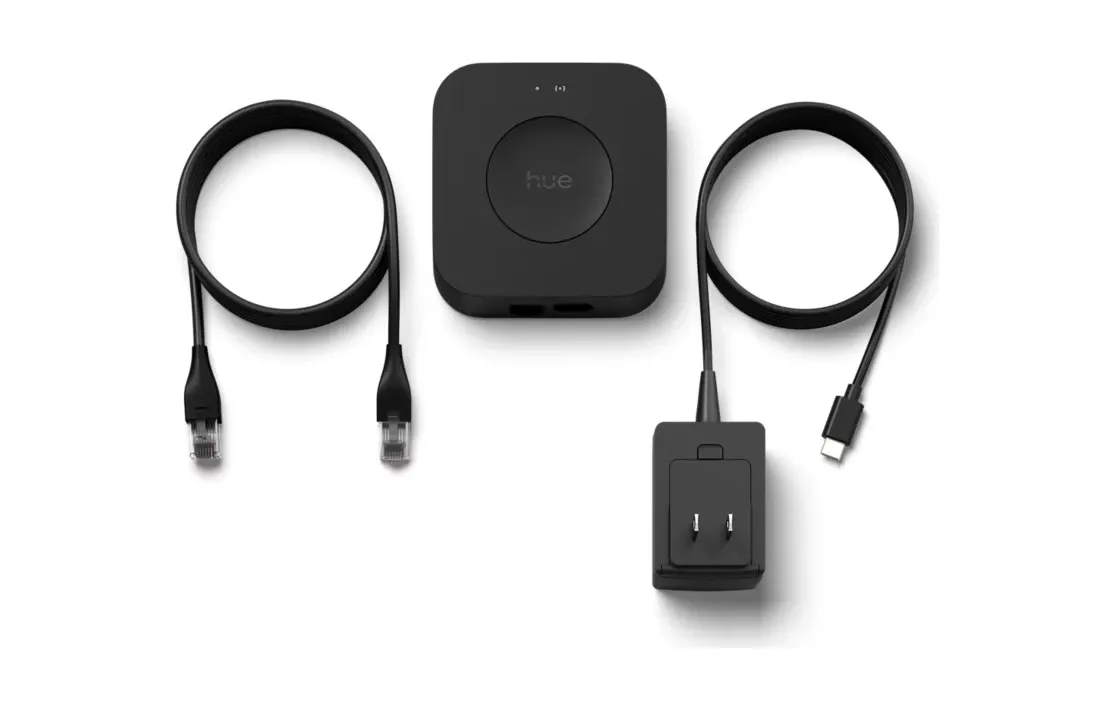
🧩 Included Components: Philips Hue Bridge, Power Adapter, Ethernet Cable, User Manual
Running 150 or more Hue bulbs from one controller used to choke the older square Bridge. The Philips Hue Bridge Pro (model 458471) is the smart home hub built to fix that ceiling. It handles up to 150 lights and 50 accessories on a single hub, roughly triple what the previous generation managed, and a dual-core processor keeps scene changes snappy instead of staggered.
Who is it for? Anyone whose setup has outgrown the standard Bridge, or a new buyer planning a whole-house install from day one. If you own a dozen bulbs across two rooms, you don't need it. That's the honest split.
Key Features and Capabilities
- 150+ light support: one hub drives a large multi-room setup
- Hue MotionAware: reads motion from your existing bulbs, no separate sensor puck required
- Dual-core chip for faster scene switching across many lights
- Storage for up to 500 lighting scenes
- Multi-hub support: chain a second Bridge Pro for very large homes
At 3.5 by 3.5 by 1 inches and 3.53 ounces, the box hasn't grown even though the capacity has. It's wired, not battery powered, so it needs a free port on your router.
Smart Hub Compatibility for a Connected Home
The Bridge Pro talks to Apple HomeKit, Google Home, and Alexa at the same time. You don't pick one ecosystem and lock yourself out of the others. Ask Google to dim the office, then tell Alexa to kill the porch light an hour later. Both route through the same hub, and the faster chip means neither reacts with the lag the old Bridge showed on big scenes.
MotionAware is the headline trick. Instead of buying dedicated sensors, the Bridge infers movement from signal patterns across your Hue bulbs and switches lights on as you enter. It won't match a wall-mounted PIR sensor for pinpoint zones. For hallway-and-stairs coverage, though, it's genuinely useful and saves you the accessory cost.
Setting Up the Hub
Setup runs through the Philips Hue app. Plug the Bridge into your router with the bundled ethernet cable, connect the power adapter, and the app walks each step. Most people finish in under ten minutes. The box ships with the Bridge, power adapter, ethernet cable, and a short manual, so there's nothing else to buy on setup day.
The unit is small and flat. Sit it on a shelf or wall-mount it near the router; after that it runs on its own and stays out of the way.
User Experience and Integration Benefits
One app holds every control. On or off, timers, color temperature, dimming level, single rooms or the whole house, it all lives in one place. Scenes are the part you'll actually use daily. Save a warm low setting for dinner, a bright neutral one for the kitchen at 7am, and a dim blue for winding down, then tap to swap.
Voice control is reliable. Say "turn off the living room lights" and they go dark without stutter, even when the command touches a large scene.
Automation and Smart Control
Automations do the tedious work. Lights fade up at sunrise, dim after sunset, or trigger on a schedule you set once. You can also mix protocols: the Bridge Pro speaks both Zigbee and Bluetooth, so you're not locked to one bulb type as your collection grows.
Zigbee is the reason response feels instant. It's a low-power mesh, so each bulb relays signals and the hub sips electricity while your commands land fast. The Bluetooth path is there as a fallback for a bulb or two near the hub, but Zigbee is what makes a big install behave. Push past a few dozen lights and that distinction stops being academic and starts deciding whether a whole scene fires at once or trickles in.
Reliability and Long-Term Value
Philips has shipped Hue gear for over a decade and pushes free firmware updates, so the Bridge Pro should keep gaining features without a new purchase. New bulbs you add later pair automatically, with no reset needed. The hub carries a two-year warranty, and it holds an aggregate 4.5 rating across 448 reviews at the time of writing, not the inflated numbers some listings quote.
Remote access lets you check and switch lights from your phone while you're out, as long as home Wi-Fi is up. That feature is free; no subscription gates basic control.
Where the Bridge Sits When Everything Else Fails
Hue's local-first design gets described as insurance against an internet outage, which undersells it depending on how your lighting is wired. My installation has every bulb permanently powered, with the wall switch acting as an input to Home Assistant instead of cutting the circuit. Lose the controller and the lighting doesn't degrade gracefully, it stops. Pressing the switch does about as much as pressing the wall beside it.
Wired that way, the bridge stops being a convenience box and becomes load-bearing. That reframes the Pro's extra CPU and its Ethernet backhaul: they aren't about faster scenes, they're about how much of your house keeps working. If your switches still physically break the circuit, none of this applies and the v2 bridge is likely fine.
Who Should Buy the Bridge Pro, and Who Should Skip It
Buy it if your Hue collection is heading past 50 bulbs, if scene changes on your current hub stutter, or if you want MotionAware without scattering sensors. Philips markets it as the ultimate hub, and for large installs that framing mostly holds.
Skip it if you run a handful of bulbs. The standard Bridge does the same core job for less, and MotionAware won't earn its keep in two rooms. Here's the real tradeoff: you're paying up front for headroom you may not touch for years. For a growing smart home, that headroom is the whole point. For a small one, it's money parked in a spare port on your router.
Frequently Asked Questions
Does it work without Wi-Fi? Yes. The hub runs on your local network, so home control keeps working. You only need Wi-Fi for remote access from outside the house.
Can you use it with other hubs? Yes. Link a second Bridge Pro for very large homes that exceed one hub's limit.
Does it need a subscription? No. Core features are free once you own the hub and the lights.
Across the major voice assistants, the Bridge Pro gives a large smart lighting setup one calm control point. It's small, quiet, draws little power, and grows with the house instead of capping it. For anyone serious about Hue at scale, that's the case for it, stated plainly.
Video Review
As an Amazon Associate we earn from qualifying purchases. Disclosure.
Check Price on Amazon →


