8 Inspiring Home Assistant Community Projects to Try

This post may contain affiliate links. As an Amazon Associate we earn from qualifying purchases. Disclosure.
Explore 8 creative Home Assistant community projects, from dynamic dashboards to DIY automations, to inspire your next smart home upgrade.
Whether you're new to Home Assistant or a seasoned user, the massive community around this platform provides endless inspiration.
Bottom line: Eight practical Home Assistant projects you can build today: voice-controlled wall dashboards, energy monitoring that cuts bills 15-25%, multi-method presence detection, DIY irrigation with weather awareness, guest mode with temporary lock codes, pet activity tracking, local AI security cameras with Frigate, and follow-me media playback. Most cost under $50 in hardware. Enthusiasts regularly share innovative automations, custom integrations, and genuinely creative builds that go far beyond what commercial smart home systems can offer. The ideas keep coming because the platform never restricts what you can build. We have rounded up eight standout projects that are inspiring exactly because they solve real problems with minimal cost and maximum control.
I'll say what most project roundups won't: half of these builds are fun weekend toys you'll quietly abandon within a month. The energy monitoring and the presence detection are the only two here that keep earning their keep years later. Build those first, and treat the rest as play.
Why Does Home Assistant Drive DIY Innovation?
Home Assistant stands apart because it's fully open-source and runs locally on your own hardware. Every automation you build stays private, responds instantly, and keeps working even when the internet goes down. That combination of control and flexibility is why so many people go far beyond basic device switching and build genuinely sophisticated systems.
The platform supports thousands of integrations covering everything from cheap Zigbee sensors to commercial HVAC systems. Once your devices are connected, the automation engine lets you write logic that spans all of them in a single rule. The result is a level of coordination that no closed ecosystem can match because each vendor only controls their own slice. That's the real power of an open platform.
Here are eight projects from the community that are practical, creative, and worth trying yourself.
1. Voice-Activated Dashboards
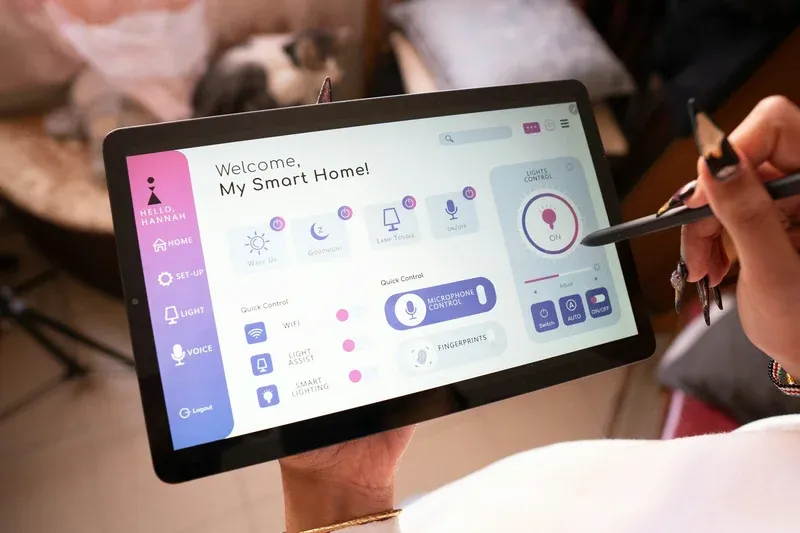
Wall-mounted tablets running the Lovelace dashboard become powerful control centers when paired with local voice input. Using the Whisper speech recognition integration, Home Assistant processes audio entirely on-device without sending recordings to any cloud service. You can define custom wake words and trigger complex scenes with a single phrase. To go further and answer questions locally, see how to run a local LLM with Home Assistant using Ollama.
A popular setup uses a repurposed Android tablet in each room. Each tablet shows a room-specific dashboard and listens for local voice commands. The bedroom tablet displays sleep schedules and controls blinds and lighting. The kitchen tablet shows active timers, grocery lists, and energy usage. Every interaction is instant because no request ever leaves the local network. This project typically costs under $50 per room using refurbished tablets and free software.
2. Energy Monitoring Automations
The Home Assistant Energy dashboard connects to devices like the Shelly 3EM clamp meter or a PZEM module wired into the electrical panel to show real-time consumption per circuit. Once the data is flowing, automations can do meaningful work:
- Notify you immediately when a specific appliance exceeds a wattage threshold indicating a fault
- Automatically shift dishwasher or EV charger start times to off-peak rate windows using time-of-use tariff data
- Track solar panel generation versus grid draw and optimize when to run high-draw appliances
- Generate weekly reports summarizing the biggest energy consumers in the home
Community members consistently report cutting electricity bills by 15-25 percent simply by shifting loads to cheaper overnight windows. The dashboard makes invisible consumption visible, which alone tends to change behavior. Adding automations that act on that data multiplies the effect without requiring any ongoing manual effort.
3. Presence Detection with Bluetooth and WiFi
Reliable presence detection is the foundation of nearly every useful home automation. Home Assistant supports several parallel methods that combine for near-perfect accuracy:
- Bluetooth passive scanning picks up phones and wearables without requiring an app or active pairing
- WiFi device tracking monitors router ARP tables for connected devices and detects departures within seconds
- Companion app GPS confirms arrival and departure using geofence zones defined on a map
Running two or three of these methods simultaneously eliminates the false-away triggers that plague single-method setups. When the system knows for certain that everyone has left, lights switch off, the thermostat steps back, and security sensors arm automatically. On return, the heat starts before anyone walks through the door. This level of accuracy is what separates a genuinely useful smart home from a frustrating one.
4. Smart Irrigation Controllers
ESPHome-powered microcontrollers connected to standard 24V irrigation solenoids make fully custom sprinkler systems possible for under $30 in hardware. Home Assistant integrates local weather forecast data and soil moisture sensor readings to decide whether scheduled watering should actually run. If rain is forecast within 24 hours or the sensors show the soil is already wet, the system skips that cycle automatically.
Schedules adjust by season based on simple calendar rules. The dashboard shows per-zone run history so you can tune durations over time based on actual results rather than guesses. Water consumption logging helps identify broken heads or soaker lines that are using far more than expected. For a typical suburban yard, this project can reduce outdoor water use by 30-40 percent compared to a timer-only controller.
5. Guest Mode Automations
A dedicated guest mode script handles the friction of having visitors without exposing private data or permanent access credentials. When activated manually or by a door code entry, the script can:
- Generate a temporary smart lock access code valid only for the specific visit window using integrations for Nuki or Ultraloq locks
- Limit voice assistant responses to basic controls and skip personal calendar, message, and reminder data
- Adjust lighting scenes and thermostat defaults to comfortable neutral settings rather than personalized ones
- Disable private sensors like bedroom motion detectors from the main dashboard view
- Automatically expire the access code and revert all settings when the visit ends
This removes the awkward process of handing out permanent codes, explaining every switch, or worrying about what a visitor can see or hear through the assistant. The automation handles all the details invisibly.
6. Pet Monitoring with Motion Sensors
PIR motion sensors placed at floor height track pet movement through the home during the day. Home Assistant logs activity patterns over time and can send alerts if movement in a pet's usual area drops below normal levels for an extended period. Unusual inactivity can be an early sign of illness, and you don't want to miss that.
Some users add bowl-level sensors using simple capacitive or weight sensors to confirm that feeding happened on schedule. Door contact sensors on a pet door log every entry and exit with a timestamp. Camera feeds with Frigate object detection can identify which animal triggered a sensor when multiple pets share the home. Together these integrations create a passive health and activity log without requiring any manual data entry.
7. DIY Security Camera NVR
Frigate is an open-source network video recorder built specifically for Home Assistant. It uses a Google Coral USB accelerator or a compatible GPU to run real-time AI object detection on multiple camera streams simultaneously, entirely on local hardware. Frigate can distinguish between a person, car, dog, delivery package, or other objects and trigger specific automations for each event type.
Local Recording and AI Object Detection
Recordings are stored on local drives with no monthly subscription fees, and footage never leaves your network. When Frigate detects a person approaching the front door, Home Assistant can send a notification with a snapshot, turn on exterior lights, and announce the arrival on interior speakers. Temporary access codes for guests or delivery services can be generated automatically when a package delivery is detected and revoked again after a set window, adding both convenience and a stronger security posture.
8. Presence-Based Media Control
When you walk into a room, Home Assistant detects your presence via Bluetooth beacon or motion sensor and resumes your media session on the nearest output device. The Music Assistant integration manages multi-room audio across Chromecast-enabled speakers, Sonos, and other endpoints. Playback follows you from room to room with a short fade transition.
When you leave a room and no one else is present, playback pauses automatically on that output. When you return or enter a new room, it resumes where it left off. This creates a follow-me audio experience without any manual interaction, remote controls, or app switching. The same logic works for video: a paused stream on the living room TV can automatically resume on a bedroom display when the system detects you have moved there. Getting your media servers wired in first helps, and the Home Assistant media add-ons guide walks through Plex, Kodi, and Jellyfin.
What Tips Help When Starting Your Own Home Assistant Project?
Getting started with any of these ideas is straightforward with the right approach:
- Start with one project that solves a real daily annoyance before expanding to others
- Use HACS (Home Assistant Community Store) to browse ready-made integrations and Lovelace dashboard cards
- Document each automation with inline comments so you can debug and update it months later
- Test edge cases like network drops, device reboots, and unexpected sensor states before relying on any automation fully
- Join the forums before starting a complex project because someone has almost certainly solved the same problem already
For step-by-step guides and shared blueprints, explore the Home Assistant Community Forums and the Projects showcase where thousands of users post their full builds.
These eight projects span a wide range of skills and budgets, from a simple guest mode script to a full local AI camera system. Each one demonstrates why Home Assistant continues to grow year after year: complete local control, no recurring fees, and a community that openly shares every build, script, and configuration file. The inspiring part isn't just the technology but how many of these ideas were built by hobbyists solving real frustrations with everyday tools.
Pick the project that addresses your biggest current pain point and build from there. The modular nature of the platform means each addition integrates with everything already running, and the community is always ready to help troubleshoot or suggest a better approach. With over 3,000 integrations available, nearly every device you own can become part of a cohesive, fully private system that you control completely.
Frequently Asked Questions
What hardware do I need to run creative Home Assistant projects at home?
A Raspberry Pi 4 with 4GB RAM handles the majority of Home Assistant projects comfortably, including Frigate NVR with one or two cameras, Node-RED automations, and a Zigbee2MQTT instance running a dozen or so devices. For heavier workloads, Frigate with hardware acceleration for three or more camera streams, or a local AI model for presence detection, a mini PC with an Intel N100 or N305 processor makes a clear difference. A used Beelink Mini S12 or similar N100 machine typically costs $100 to $150 and supports Google Coral or Hailo AI accelerators for Frigate. If you're starting out, don't over-spec upfront: a Raspberry Pi 5 ($80 for 4GB) or Home Assistant Green ($99) will handle everything in this list except multi-camera Frigate at full resolution. You can migrate your config to more powerful hardware later, Home Assistant backups make that a 20-minute job.
Are Home Assistant community projects safe to install from HACS?
HACS integrations are not vetted by Nabu Casa or the Home Assistant core team, so you're trusting individual developers and community reviewers. The risk is real but manageable if you evaluate each integration before installing. Check three things: the repository's star count (few stars on a widely-claimed integration is a red flag); the commit history (last commit over 12 months ago may break on the next HA update); and open GitHub issues flagging security concerns. It's also worth scanning the integration's Python code briefly, since HACS installs run with the same permissions as Home Assistant itself. Practically speaking, the most popular HACS integrations, Mushroom cards, Frigate, and HACS-maintained IKEA updates, have thousands of users and active maintainers. Niche integrations with under 200 stars deserve more caution. Don't install something you found in a Reddit thread without checking those basics first.
Which Home Assistant project idea gives the most immediate value for beginners?
Presence detection gives beginners the biggest payoff per hour of setup because it's the precondition for most other automations. A basic version using phone Wi-Fi detection (via the Home Assistant companion app or a router integration) takes about 30 minutes to set up and immediately enables automations like turning off all lights and lowering the thermostat when no one is home for 5 minutes. Adding motion sensors as a backup stops presence from flipping on and off with Wi-Fi drops, making it reliable. The HA companion app on Android or iOS also supports GPS-based zones, which add another layer of accuracy for arrivals and departures. From that starting point you can build conditional automations that reference who's home, not just whether anyone is. That logic scales into every other project in this list: energy monitoring, guest mode lock codes, and follow-me media all depend on accurate occupancy as their trigger.