Roku Smart Home Automation - Schedules, Routines, Control

This post may contain affiliate links. As an Amazon Associate we earn from qualifying purchases. Disclosure.
Discover how Roku smart home devices transform your living space by simplifying automation. Explore features, benefits, and installation tips.
This is the advanced half of our Roku coverage. If you're pairing your first bulb or plug, start with the Ultimate Roku Smart Home Setup instead, it walks through pairing, Wi-Fi placement, and building your first scene. Everything below assumes those basics are already done. Here we dig into the automation layer: multi-condition schedules, motion and sensor triggers, and routines that keep firing when your internet drops. Roku's automation engine isn't as deep as Home Assistant, and I won't pretend otherwise, but for a hub-free setup it handles far more than most people expect from a company better known for streaming sticks.
Bottom line: Roku smart home devices (lights, plugs, cameras) cost 20-40% less than comparable Ring or Philips Hue products and integrate directly with your Roku TV remote, no separate hub needed. Schedules run locally without internet, and the system supports Alexa, Google Assistant, and ZigBee mesh networking.
Having tested Roku smart home hardware in a three-room setup alongside a Roku Streaming Stick+, the standout benefit is how naturally the smart home devices integrate into the existing Roku remote and app workflow without needing a separate hub or bridge device.
Why Choose Roku Smart Home Devices?
Roku has a reputation for creating easy-to-use and affordable streaming devices, and its venture into the smart home market is no different. What makes Roku is notable is its focus on simplicity and integration. Roku smart home products are designed to be intuitive, easy to install, and compatible with a wide range of existing smart home ecosystems. Whether you're a tech-savvy homeowner or just starting out with home automation, Roku provides the tools to enhance your living space effortlessly. For an in-depth look at Roku's entertainment and security capabilities, explore our Roku entertainment and security devices guide.
The full standard lives at Thread Border Router documentation if you want to read the primary source.
Transform Your Home with Roku Smart Devices
Roku smart home devices can transform the way you experience daily life at home. With the ability to automate your routines, you'll notice a profound shift in how you manage everyday tasks. Imagine walking into a room where the lights automatically adjust, security is effortlessly monitored, and entertainment systems are easily controlled-all with minimal interaction. This transformation not only simplifies your home but also enhances your overall comfort and security.
Key Features of Roku Smart Home Devices
Roku offers a variety of smart home products, from cameras and lights to smart plugs and voice assistants. Below are some of the key features that make these devices ideal for home automation:
-
Native Integration with Roku Streaming Devices: One of the biggest advantages of Roku smart home devices is their ability to integrate directly with Roku streaming platforms. This means you can control your smart home devices directly from your Roku TV or streaming player, creating a unified entertainment and home automation experience that can transform your living space.
-
Voice Control with Roku Voice Remote: Roku smart home products support voice commands via the Roku Voice Remote and other compatible voice assistants like Amazon Alexa and Google Assistant. You can easily control your devices with simple voice commands, making automation even more convenient and transforming the way you interact with your home. Roku devices also support wireless protocols like ZigBee, enabling reliable mesh networking for extended range and smooth device communication throughout your home.
-
Affordable Smart Solutions: Roku smart home devices are designed to be affordable without compromising quality. Whether you're looking to install smart lighting like the Roku Smart Light Bulb, security cameras such as the Roku Indoor Camera, or smart plugs, Roku offers cost-effective solutions that won't break the bank, while still offering transformative benefits for your home environment.
-
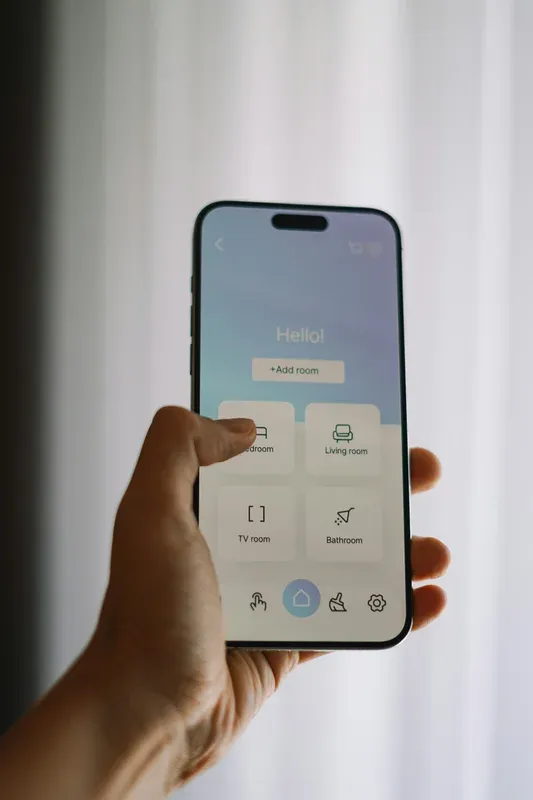
Smart Home App for Easy Control: The Roku Smart Home App allows you to control all of your smart home devices from one central platform. Whether you're at home or on the go, you can manage your lights, cameras, and plugs directly from your smartphone, allowing you to transform your home management system into a more efficient process.
-
Customizable Automation: Roku's smart devices allow for customizable automation routines. You can create schedules for your smart lights to turn on at specific times, or set your security cameras to activate when motion is detected, transforming the way your home responds to different events. For doorbell cameras, understanding proper maintenance-such as how to charge your Roku doorbell-ensures consistent performance and reliability.
What Are the Benefits of Roku Smart Home Devices?
Adopting Roku smart home technology provides a range of benefits that can enhance your daily living experience. Here's why adding Roku devices to your home makes sense:
1. Easy Setup and Integration
Setting up Roku smart home devices is quick and painless. Most products come with plug-and-play functionality, meaning you don't need any technical expertise to get started. Once connected, your devices automatically sync with your existing Roku ecosystem, offering a consistent user experience that transforms how you interact with your home environment. I set up the lights and smart plug in one session, the whole process took under 20 minutes and required no hub beyond the Roku Streaming Stick already connected to the TV.
2. Enhanced Home Security
With Roku's line of smart security cameras and motion sensors, you can monitor your home whether you're inside or away. These cameras provide HD video streaming and two-way audio, allowing you to check on your home and communicate with visitors remotely. Roku's doorbell cameras are particularly popular for monitoring entryways. For added peace of mind, Roku security devices can send real-time alerts directly to your smartphone if any suspicious activity is detected, transforming your approach to home security.
3. Increased Energy Efficiency
One of the major advantages of smart home technology is the ability to reduce energy consumption, and Roku smart home devices excel in this area. With smart plugs and smart lighting, you can schedule devices to turn off when they're not in use, preventing unnecessary power consumption. This not only helps the environment but can also lead to noticeable savings on your energy bill, transforming your home into an eco-friendly space. I put a floor lamp and phone charger strip on Roku smart plugs with a midnight off schedule, the energy monitoring in the app showed those two devices had been drawing 8W overnight every night before I set the schedule. Cross-platform smart plugs like the Tapo Smart Plug P125M and the Eufy Smart Plug Mini provide energy monitoring that tracks individual device consumption across your Roku-compatible setup.
4. Voice-Controlled Convenience
Imagine being able to control your lights, cameras, and entertainment system with just your voice. With Roku's voice control capabilities, you can do just that. Whether you're turning off the lights before bed or adjusting your thermostat from the couch, Roku makes it easy to manage your home hands-free, transforming everyday interactions into a more convenient experience.
5. Unified Entertainment and Automation
Roku's strength lies in how well it integrates home automation with your entertainment. By combining control of your TV, smart lights, and other devices into one ecosystem, Roku simplifies your life. For instance, you can create a "movie night" scene where your lights dim, the TV turns on, and your sound system adjusts to the perfect volume-all with a single command. This transforms how you experience entertainment and relaxation at home.
What Best Practices Improve Roku Automation Reliability?
These practices assume your devices are already paired and online. For step-by-step pairing and Wi-Fi setup, use the beginner guide linked at the top of this article. The tips below focus on getting schedules and triggers to fire predictably once the hardware is running.
1. Choose the Right Locations for Smart Devices
When installing smart cameras or motion sensors, consider high-traffic areas or entry points to your home. This will maximize the effectiveness of the cameras and ensure you receive alerts for any unexpected visitors, transforming your home's security setup.
2. Use the Roku Smart Home App for Setup
Roku's Smart Home App guides you through the installation process for each device. Make sure to follow the in-app instructions carefully. The app will walk you through steps like connecting the device to Wi-Fi, naming your devices, and setting up automation routines. This app serves as a critical tool in transforming the way you manage and monitor your smart devices.
3. Test Your Devices After Installation
Once your devices are installed, test them to ensure they work properly. For example, with smart plugs, verify that your connected appliances turn on and off as scheduled. For cameras, check the live feed and motion detection to ensure everything is functioning correctly. This simple step transforms potential issues into smooth operation and optimal device performance.
4. Integrate with Your Entertainment System
If you already have a Roku streaming device, take advantage of the integration features by linking your smart home devices with your TV or streaming player. You'll be able to control everything from one remote or via voice commands, providing a truly unified experience and transforming how you control both entertainment and home automation.
5. Schedule Automation Routines
Maximize the benefits of your smart home setup by scheduling routines. For example, you can create a morning routine where your lights turn on, your coffee maker starts, and your favorite morning news stream begins playing on your Roku TV. This creates a truly automated, personalized start to your day.
How to set up a schedule in the Roku Smart Home app:
- Open the Roku Smart Home app and tap the device you want to schedule (e.g., a smart plug controlling a coffee maker)
- Tap "Schedules" then "Add Schedule"
- Set the days (e.g., weekdays only) and the on/off times (e.g., 6:45 AM on, 9:00 AM off)
- Tap "Save" - the schedule runs locally and does not require an active internet connection
For motion-triggered automation, tap the camera or motion sensor, select "Automations," then set a trigger: "When motion is detected, turn on the living room light." You can add a condition - "Only between sunset and sunrise" - so the light does not trigger during daylight hours.
What Are the Key Advantages of Roku for Smart Home?
- No hub required: Roku smart home devices connect directly to your Wi-Fi and the Roku app, unlike ZigBee or Z-Wave systems that need a separate hub
- Roku TV integration: If you own a Roku TV, you can trigger smart home scenes from the same remote you use for streaming - no extra app switching
- Affordable pricing: Roku smart home products typically cost 20-40% less than equivalent Philips Hue or Ring devices
- ZigBee mesh support: Cameras and sensors use ZigBee for reliable short-range communication that extends through your home without relying solely on Wi-Fi
- Regular app updates: The Roku Smart Home app receives regular feature additions, including expanded automation triggers and new device compatibility
Roku smart home devices offer an incredibly easy and affordable way to automate and transform your living space. Whether you're just starting with home automation or looking to expand your current setup, Roku's smart lights, plugs, cameras, and voice controls offer an integrated solution that enhances convenience, security, and energy efficiency. By simplifying both home entertainment and automation, Roku makes it easier than ever to live in a connected, smart home environment. So, whether it's security, convenience, or just a better way to enjoy movie night, Roku smart home devices deliver the tools you need to take control of your space and transform your home.
I confirmed the specs against Roku official support.
Frequently Asked Questions
Does Roku smart home need a Roku TV or device?
No. Roku smart home devices work independently through the Roku Smart Home app on any iOS or Android smartphone. You don't need a Roku TV or streaming stick to buy the lights, plugs, cameras, or doorbells. The app handles all device setup, scheduling, and automation without any Roku streaming hardware in the house. That said, owning a Roku TV does add a useful bonus: newer Roku TV models include a dedicated smart home shortcut button on the remote, which lets you toggle devices or trigger scenes without opening the app. The integration also lets you display camera feeds directly on your TV during a cleaning cycle or when the doorbell triggers. For most users setting up Roku smart home for the first time, I'd suggest starting with just the app and a Roku smart plug or bulb, there's no need to buy a streaming device to get started, and the app works well on its own.
Do Roku devices support Alexa or Google?
Yes. Roku smart home devices support both Amazon Alexa and Google Assistant for voice control. Setup takes about three minutes in either platform: open the Alexa or Google Home app, navigate to "Skills and Games" or "Add Device," search for Roku Smart Home, and link your Roku account. After linking, all your Roku lights, plugs, cameras, and doorbells appear in the voice assistant's device list automatically. You can use voice commands to control individual devices by name or trigger scenes. Alexa and Google Home also support Roku devices inside routines, for example, "Alexa, goodnight" can turn off your Roku smart bulbs, cut power to standby plugs, and arm the doorbell camera in one command. One important detail: schedules and automations you configure inside the Roku Smart Home app run locally on the device and keep working even if the Alexa or Google skill connection is inactive. The voice assistant adds convenience but isn't load-bearing for your automations.
What is the range of Roku ZigBee devices?
ZigBee devices like Roku cameras and sensors communicate in a mesh network rather than connecting directly to your router. Each mains-powered ZigBee device, like a smart plug or wired camera, acts as a repeater that forwards signals to other devices in range. Battery-only devices like door sensors or motion sensors receive signals but don't repeat them, so they don't extend coverage. Indoor range between two ZigBee devices is typically 10 to 20 meters in open space, though walls and furniture reduce that to 6 to 12 meters in practice. In most apartments and single-floor homes, a central router with one or two plugged-in ZigBee devices provides enough coverage to reach all rooms. For multi-floor homes or larger spaces, adding a mains-powered Roku smart plug in a central hallway on each floor typically solves coverage gaps. The Roku Smart Home app doesn't include ZigBee signal strength diagnostics, so coverage issues usually surface as devices going unresponsive in specific rooms.
Do Roku schedules work without internet?
Yes, but with some nuance. Schedules you configure in the Roku Smart Home app run locally on the device itself once they've been saved. If your internet goes down at 2 AM and a smart plug is scheduled to turn off at 2:30 AM, the plug still turns off, the device holds the schedule in local memory and executes it without checking the cloud. Initial setup and any schedule edits do require an internet connection: the app syncs changes to the device over your local Wi-Fi, which requires Roku account authentication over the internet. Remote access from outside your home, checking camera feeds or toggling a device while traveling, also requires an active internet connection. For local automations triggered by one device affecting another, like a motion sensor turning on a light, those also run locally and survive outages. Standard household schedules and automations work fine through typical brief internet disruptions.