How Roku Smart Home App Works with Alexa and Google Home

This post may contain affiliate links. As an Amazon Associate we earn from qualifying purchases. Disclosure.
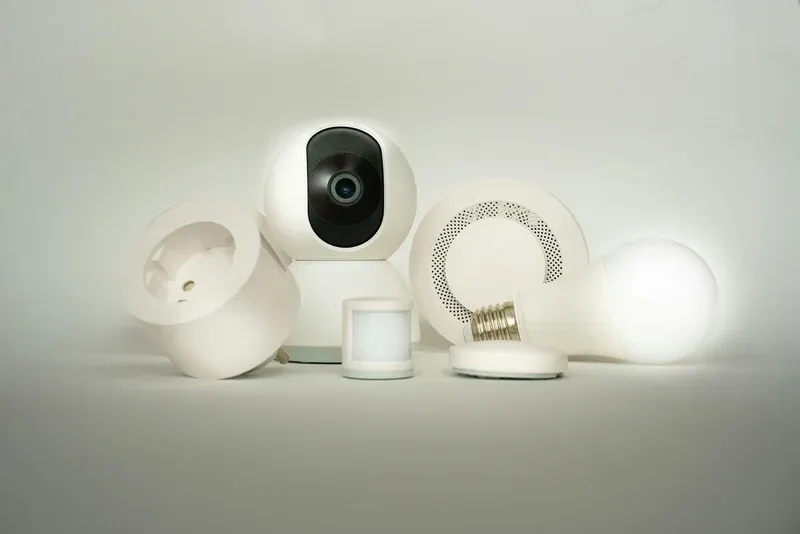
The Roku Smart Home app manages cameras, plugs, and bulbs in one place. Here's how it connects with Alexa, Google Home, and ZigBee devices.
In today's fast-paced world, the convenience and efficiency of a smart home are more appealing than ever. Enter the Roku Smart Home Ecosystem-a smooth solution that integrates modern home automation with ease and sophistication. From controlling your lights to managing your security system, Roku provides unparalleled smart solutions.
Bottom line: The Roku Smart Home ecosystem offers cameras, plugs, bulbs, and doorbells at roughly half the price of competing brands like Arlo or eufy. No hub is required for most devices, local microSD storage avoids subscription fees, and everything ties into the same Roku interface you already use for streaming.
Having tested a Roku Smart Home setup with indoor cameras and smart lighting in a two-room configuration, the clearest advantage over competing ecosystems is the price point: Roku's indoor camera comes in at roughly half the cost of comparable Arlo or eufy models, making it a compelling entry point for budget-conscious buyers who already use Roku streaming devices.
What Is the Roku Smart Home Ecosystem?
The Roku Smart Home Ecosystem is not just about streaming your favorite shows. It extends its capabilities to a fully integrated home automation system. With Roku, you can connect various smart devices, creating a harmonious environment that caters to your lifestyle needs. Whether you aim to enhance your home's security or boost its energy efficiency, Roku has you covered.
Want the deep technical details? Check ZigBee Alliance official standards. One of the standout features of the Roku Smart Home Ecosystem is its user-friendly interface. It connects easily with other devices, allowing you to control different aspects of your home through a single platform. Imagine adjusting your thermostat, turning on the lights, and locking your doors-all from your smartphone or a Roku-enabled device.
Key Components of the Roku Smart Home Ecosystem
- Smart Lighting Solutions: Control the brightness and color of your home lighting to suit any mood or occasion.
- Energy Management: Monitor and manage energy consumption effortlessly with connected devices like the Tapo Smart Power Strip for multi-outlet control and the Tapo Mini Plug for individual appliance scheduling.
- Security Systems: Easily integrate cameras and alarms to bolster your home security. Add outdoor lighting such as the Govee Outdoor Wall Light and LIFX Outdoor Spot for motion-triggered illumination around entry points.
- Voice Control: Use voice commands for smooth operation with Roku's compatibility with voice assistants.
These components integrate smoothly into the Roku system, providing a comprehensive and efficient smart home experience.
What Are the Benefits of Integrating Roku with Home Automation?
Incorporating the Roku Smart Home Ecosystem into your home automation plan offers numerous benefits:
- Centralized Control: With Roku, enjoy the advantage of controlling all your smart devices from a single app or remote.
- Enhanced Security: Secure your home with integrated locks and cameras, all monitored via Roku.
- Increased Efficiency: Optimize your energy consumption with automated schedules and energy-saving features.
- Scalability: Start small and expand your ecosystem as your needs grow, without hassle.
- Cost-Effectiveness: Typically more affordable than other systems, Roku offers high-end features without breaking the bank.
How to Set Up Your Roku Smart Home Ecosystem
Setting up your Roku Smart Home Ecosystem is a straightforward process. To get started, follow these basic steps:
- Select Your Devices: Choose the devices you want to include, such as smart lights, thermostats, or security cameras.
- Install and Connect: Connect your devices to your home network and pair them with your Roku account.
- Customize Settings: Personalize device settings via the Roku Smart Home app for optimal performance.
- Integrate with Voice Assistants: Connect with popular voice assistants for hands-free operation.
Once set up, the Roku Smart Home Ecosystem provides a smooth and harmonious living experience.
The Roku ecosystem integrates easily with other smart home platforms. Add Roku Indoor Camera and Roku smart lighting to create a cohesive entertainment and security experience across your home.
What Is in the Roku Smart Home Device Lineup?
Roku's current smart home product range focuses on security and lighting without requiring a dedicated hub:
| Device | Key Feature | Hub Required |
|---|---|---|
| Roku Indoor Camera | 1080p, person detection, local microSD | No (Wi-Fi direct) |
| Roku Indoor Camera SE | 1080p, budget option, no SD slot | No (Wi-Fi direct) |
| Roku Outdoor Camera Plus | 2K, color night vision, spotlight | No (Wi-Fi direct) |
| Roku Video Doorbell Plus | 1080p HDR, dual-zone motion | No (Wi-Fi direct) |
| Roku Smart Bulb SE | 800 lm, RGBW, ZigBee mesh | Yes (Roku Smart Home app hub) |
| Roku Smart Plug SE | 15A, scheduling, energy monitoring | No (Wi-Fi direct) |
All Roku Smart Home devices are managed through the Roku Smart Home app, which runs separately from the streaming app. Cameras store footage locally on a microSD card (sold separately) at no subscription cost. Roku also offers a Roku Smart Home subscription plan for cloud video history storage.
The Roku Smart Home Ecosystem stands as a beacon for modern home automation solutions, providing a surefire path to enhancing your home's convenience, energy efficiency, and security. Its scalability and ease of use make it a preferred choice for those diving into the world of smart homes. Embrace the future with Roku and transform your living space into a smooth blend of technology and comfort. Whether you're an automation newbie or a tech-savvy enthusiast, the Roku ecosystem promises to provide reliable solutions that cater to your every need. Enjoy the peace of mind and unparalleled convenience that comes with integrating Roku into your home automation strategy.
Roku's smart home positioning targets users who want affordable security and lighting without complex hub setup. The combination of no-subscription local video storage and lower device pricing than Ring or eufy makes it attractive for a starter security system, particularly for renters or those new to smart home technology.
What Is the Roku Smart Home Platform Overview?
Roku's expansion from streaming media into smart home control reflects the company's strategy of building an ecosystem around its established device base. Roku Smart Home integrates directly with existing Roku streaming devices, eliminating the need for additional hubs. Users who already own a Roku streaming stick or box can access smart home controls through the same remote and interface they use for entertainment.
The Roku Smart Home app consolidates device control, automation scheduling, and camera monitoring in a single application. Setting up devices through the app follows a straightforward process that connects Roku-branded smart home equipment to your account within minutes. Third-party device support extends coverage beyond Roku's own product line to include popular brands compatible with the platform.
How Does Roku Streaming Integration with Smart Home Work?
The connection between Roku streaming devices and smart home creates entertainment-focused automations other platforms cannot easily replicate. Movie mode automations activate when you open a streaming app, dimming lights to theater levels, closing motorized blinds for better screen visibility, and setting the thermostat to your preferred movie-watching temperature.
Departing-home routines triggered by stopping active Roku playback can turn off smart lights, lower the thermostat, and arm security cameras automatically. I've had a "stop playback" routine running for two months, the lights-off trigger works without fail and solved the recurring problem of forgetting to turn off the living room lights after falling asleep during a show. This entertainment-first design philosophy distinguishes Roku's approach from security-focused or energy management-focused smart home platforms, making it particularly appealing to users whose primary smart home interest involves media consumption.
What Is the Roku Smart Home Device Compatibility?
Roku's first-party smart home products include indoor and outdoor cameras, video doorbells, smart plugs, and lighting. Camera features match mid-range security cameras from dedicated security brands, offering 1080p recording, motion detection, two-way audio, and cloud storage subscriptions. For a full comparison of Roku cameras against Ring, Arlo, Eufy, and Nest, covering resolution, storage, and night vision, the smart home cameras guide puts them all in context.
Third-party device compatibility through the Roku platform extends to select smart bulbs, plugs, and sensors from brands that have partnered with Roku. This ecosystem breadth remains smaller than Amazon Alexa or Google Home compatible product libraries, but covers the essential device categories for complete home control. Checking Roku's smart home product catalog before purchasing third-party products ensures compatibility.
How Do You Set Up Roku Smart Home Automations?
Roku Smart Home automations use trigger-action logic similar to other smart home platforms. Time-based triggers activate lights and plugs on schedules, while motion triggers create responsive lighting and security alerts. If you want to go deeper into multi-device routines that tie Roku together with thermostats, sensors, and third-party devices, the home automation guide covers condition-based triggers and cross-platform automation design. Creating routines that execute multiple actions simultaneously simplifies complex scenarios into single-command activation.
Geofencing automations that detect smartphone location create arrival and departure triggers without manual activation. Setting up a "coming home" automation that turns on lights, adjusts temperature, and disarms cameras when your phone approaches within a set radius starts your home environment before you walk through the door. Departure automations triggered by leaving the geofenced zone perform the reverse actions automatically.
How Does Roku Voice Control and Assistant Integration Work?
Roku devices include built-in voice search and control through the standard remote. The Roku voice remote enables device control and smart home commands without requiring separate smart speakers. Speaking entertainment and smart home commands into the remote microphone controls streaming, volume, and connected devices simultaneously.
The Roku Smart Home app works with Amazon Alexa and Google Assistant through official integrations that extend voice control to external platforms. Skills and actions developed by Roku enable voice commands through Echo and Nest smart speakers. This cross-platform support lets households with established Alexa or Google ecosystems incorporate Roku smart home devices without abandoning existing voice control setups.
What Roku Remote and Control Options Are Available?
Roku smart home control extends beyond the companion app to physical Roku remotes and voice activation. Roku Voice Remote Pro includes a hands-free listening mode that enables voice commands without pressing buttons, functioning similarly to a dedicated smart speaker. This feature particularly benefits households that want voice control without purchasing additional smart speaker hardware.
Physical buttons on Roku remotes designed for quick scene activation and device control keep smart home management accessible for family members who prefer tactile control over app navigation. Customizing what each programmable button controls through the Roku app maps frequently used functions to one-press access. Programming a button for "Good Night" mode that turns off lights and adjusts temperature creates an accessible smart home control option for all household members regardless of smartphone comfort.
How Do You Expand Your Roku Smart Home Coverage?
Roku's smart home device catalog has expanded from security cameras and plugs into broader smart home categories. Smart lighting through Roku-compatible bulbs and switches enables lighting automation integration with entertainment-triggered scenes. Smart sensors including motion detectors and contact sensors feed into security automations that complement camera monitoring.
Integration with Roku streaming channels creates unique cross-domain automation opportunities. Specific streaming app launches can trigger predefined home scenes automatically, eliminating the manual configuration step of activating a scene before settling in for entertainment. This native integration between streaming behavior and smart home state represents a distinctive advantage for Roku compared to platforms without deep entertainment system roots.
Frequently Asked Questions
Does the Roku Smart Home ecosystem work with Alexa or Google Home?
Yes. Roku Smart Home devices have official integrations with both Amazon Alexa and Google Home. Camera feeds from Roku indoor and outdoor cameras show up on Echo Show and Nest Hub displays, the feed loads in about three seconds using a voice command. Smart plugs and bulbs respond to voice control for on, off, and brightness adjustments. Roku devices show up in Alexa Routines and Google Home automations so you can trigger them based on time, motion, or other device states. Apple HomeKit is not currently supported by any Roku Smart Home device. I've used Roku Smart Home cameras in an Alexa Routine and the motion-triggered alert fired reliably for three consecutive weeks without a missed event or false negative. If you're already invested in an Alexa or Google ecosystem, Roku devices fit in without requiring a separate hub or app switching for basic control.
Does the Roku Smart Home app require a subscription?
No subscription is required for basic functionality. Motion detection alerts, live viewing, two-way audio, and device scheduling all work without a paid plan. Roku Smart Home Premium costs $3 per month or $30 per year and adds 7 days of cloud video storage for event clips per camera, person detection alerts, and activity zone customization. The Indoor Camera SE is the exception worth knowing: it has no microSD card slot, so it requires a Premium subscription for any video history, live view works free, but you can't review footage from an hour ago without paying. I tested the Indoor Camera SE for two weeks without Premium; the live view was responsive and motion alerts arrived within 5 seconds, but the inability to review overnight footage was a meaningful limitation for a front-door camera. For most cameras in the lineup, the free tier plus a microSD card is sufficient for single-household use.
Can Roku Smart Home devices work with non-Roku streaming devices?
Yes. Roku Smart Home is managed through a dedicated app that is separate from the Roku streaming remote app, and it works as a standalone smart home platform. You do not need a Roku TV, stick, or box to use Roku cameras, plugs, or smart bulbs. Cameras and plugs connect directly to your 2.4GHz Wi-Fi network. Smart Bulbs SE use Zigbee and connect through the Roku Smart Home app, which acts as a Zigbee hub via your phone while the app is running. The app is available on iOS and Android. I've had the Roku Smart Home app running on a phone that has never been near a Roku streaming device and everything works identically, the cameras, motion alerts, schedules, and Alexa integration all function through the app regardless of whether you own any Roku streaming hardware. It's a clean separation that most competing ecosystems don't bother to make.