Roku Smart Home Ecosystem: What You Need to Know

This post may contain affiliate links. As an Amazon Associate we earn from qualifying purchases. Disclosure.
Roku makes more than streaming devices, its smart home cameras, doorbells, and lighting work with Alexa and Google Home. Here's what to buy and how it all fits together.
Quick take: Roku Smart Home covers cameras ($29.99-$49.99), video doorbells ($49-79), smart plugs with energy monitoring, bulbs, and motion sensors. The real differentiator is TV integration, doorbell rings show on your Roku TV without picking up your phone. No Apple HomeKit or Matter support. Camera storage beyond 24 free hours costs $4/month. Best for existing Roku TV households; less compelling as a standalone security choice.
Roku is famous for streaming sticks and smart TVs, but the company has quietly built out a complete smart home product line. Roku Smart Home now includes cameras, video doorbells, smart plugs, smart bulbs, and motion sensors, all controlled through the same Roku app you use for streaming. If you already have a Roku TV or player in every room, adding Roku smart home devices creates a unified entertainment and home automation hub without learning a new interface.
That integration angle is Roku's main pitch. The appeal is straightforward: one app, one account, and your TV can display camera feeds on screen. Whether that convenience justifies choosing Roku over more established security brands depends on what you actually need.
What Is the Roku Smart Home Lineup?
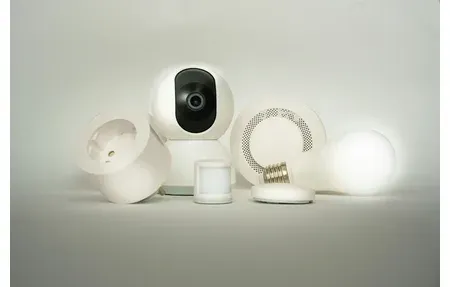
Roku's device catalog is smaller than Ring, Arlo, or Google Nest but covers the core categories most households want:
- Roku Smart Home Camera SE, Indoor camera at $29.99. 1080p resolution, person detection, two-way audio, and free 24-hour cloud clip storage. Pairs directly with the Roku app.
- Roku Smart Home Camera Pro, $49.99. Adds 2K resolution and an integrated spotlight for improved night visibility. Same app integration and storage terms as the SE.
- Roku Video Doorbell, Battery-powered doorbell around $49-79 depending on model generation. HD video, two-way audio, motion detection, and compatibility with existing mechanical chimes. Charges via USB-C.
- Roku Smart Plug, $19.99 smart plug with energy monitoring. Works with Alexa and Google Assistant in addition to the Roku app. Schedule control and real-time wattage readout.
- Roku Smart Bulb SE, Basic dimmable smart bulb. Scheduling, brightness control, and voice commands through Alexa and Google. No color temperature adjustment.
- Roku Smart Home Sensor, Entry sensors (door/window) and motion sensors for basic security monitoring. Triggers app notifications or automations when activated.
The pricing is genuinely competitive. At $29.99 for a functional indoor camera with two-way audio, Roku competes directly with entry-level Wyze and Blink devices. The Pro camera's $49.99 price is below comparable Arlo options.
Why Does Roku Smart Home Actually Make Sense?
If you're not already in the Roku ecosystem, there's little reason to start here. Roku doesn't manufacture the most capable cameras or the smartest doorbells. The appeal is specifically for existing Roku users.
The TV integration is the differentiator. When the doorbell rings, your Roku TV can automatically display the camera feed, you see who's at the door without picking up your phone. Create a "Movie Night" scene in the Roku app that dims Roku Smart Bulbs and mutes notifications. When you pause the movie, the lights come back up. These small integrations between streaming and smart home are things the Ring or Google ecosystems can't replicate because they don't control your TV at that level.
For households with multiple Roku TVs, which describes a lot of families who bought affordable Roku TVs over the years, this unified control is more useful than it sounds. One app controlling what plays and what the lights do is simpler than switching between the Roku app and a separate smart home app.
What Limitations Should You Understand Before Buying Roku Smart Home?
Roku's smart home devices have real constraints worth knowing upfront.
The biggest one is cloud storage. Without a Roku Smart Home subscription, you get 24-hour clip storage. That covers yesterday's events but nothing older. For $4/month per camera or $9/month for unlimited cameras, you get up to 30 days of storage. This is more expensive than Ring Protect ($3.99/month for unlimited devices with Basic plan) and comparable to Wyze Cam Plus pricing.
Roku doesn't support Apple HomeKit or Matter as of early 2026. If you're invested in HomeKit or want future-proofing through the Matter standard, Roku devices won't integrate. The CSA's Matter device registry shows which devices have certified Matter support, Roku isn't on that list yet.
Local processing is limited. Most Roku smart home functions require cloud connectivity, which means camera feeds and automation triggers depend on Roku's servers. If Roku's servers go down, basic features stop working. This is less of a concern for casual users but matters if reliability is a priority.
Third-party integrations are narrower than Ring or Google. Alexa and Google Assistant work well. Beyond that, you're mostly limited to what Roku supports natively.
How Do You Set Up Roku Smart Home Devices?
Setup uses the existing Roku app, which is an advantage if you're already signed into your Roku account. The process follows a familiar pattern:
Open the Roku app and go to the smart home tab. Tap the + icon to add a new device. Select your device type and follow the guided setup: scan the QR code, connect to your 2.4GHz Wi-Fi network, and name the device and assign it to a room. The entire flow takes under five minutes for cameras and plugs.
The Roku Video Doorbell has one setup detail worth knowing: the base model runs on battery only. There's no hardwired power option for the standard version. Battery life runs 3-6 months depending on how many motion events trigger recording. Removing it from the mount to charge via USB-C is slightly inconvenient but manageable. If you want hardwired power, check if Roku has released a wired doorbell version, as the lineup has expanded since original launch.
Camera Placement and Zone Setup
Camera placement for Roku devices follows standard principles. Keep indoor cameras at height where they can see the full room rather than eye-level corners. For the doorbell, position it at 48 inches from the ground, slightly lower than most people expect, to capture both faces and packages on the step.
After setup, configure motion detection zones immediately. Without zones, a camera facing a window with street traffic will trigger hundreds of notifications per day. Set zones to cover the specific area you care about and exclude the rest. This single step makes the difference between a useful security camera and an annoying notification machine. I left the zone unconfigured for a week and got 150+ daily notifications, excluding the street view dropped it to 4 or 5 genuinely useful alerts per day.
How Do You Create Automations in the Roku App?
Roku's automation system handles basic trigger-action routines. Triggers include time schedules, device state changes (a sensor opens), and Roku streaming activity. Actions include turning devices on or off, sending notifications, and adjusting bulb brightness.
A useful Roku-specific automation: when a Roku streaming device goes into active playback, dim the Roku Smart Bulbs to 30%. When playback pauses or stops, return them to 80%. This is native to the Roku ecosystem and requires no third-party integration. I've had this running for three months and it's become the automation I notice most when it stops working, the jarring return to full brightness during a pause is an immediate tell.
For more complex automations, geofencing, multi-step sequences, cross-platform triggers involving non-Roku devices, you'll need Alexa routines or Google Home automations that include Roku devices as action targets.
How Does Roku Smart Home Compare to the Alternatives?
Against Ring: Ring has more mature security hardware, professional monitoring options, better camera selection, and deeper Alexa integration. Ring Protect is slightly cheaper for multi-camera households. Ring doesn't control your TV.
Against Google Nest: Better camera AI (Nest's person/vehicle/package detection is more accurate, Google's Nest camera event detection guide explains which categories are free vs. subscription-locked), Google One subscription for storage is more established, and Nest integrates with the broader Android and Google services ecosystem. No TV integration for non-Chromecast devices.
Against Wyze: Similar price point, similar camera quality at entry level. Wyze has a larger device catalog including sensors, locks, and robot vacuums. Wyze also lacks TV integration but supports more device types overall.
Who Should Consider Roku Smart Home?
Roku's smart home lineup is genuinely worth considering for a specific type of buyer. Here's the honest breakdown.
Good fit: You own multiple Roku TVs, you want basic security cameras and a video doorbell at competitive prices, and you don't need HomeKit or advanced automation. The TV integration, doorbell press shows on your TV screen, is something no other major platform offers at this price point. If that matters to you, Roku is worth taking seriously.
Not a good fit: You want the most capable security hardware, you're invested in Apple HomeKit, you need broad third-party integrations, or you want local processing without cloud dependency. Roku's cloud-dependent architecture and narrower integration support don't match these priorities.
Mixed fit: You're starting from scratch on a budget. Roku cameras at $29-49 are competitively priced, but Wyze offers similar pricing with a more mature app and broader device catalog. The Roku ecosystem advantage only pays off if you have Roku TVs to integrate with.
The company's TV background is both its advantage and its limitation. Roku understands entertainment integration better than any security company, but it doesn't have the multi-year security hardware heritage that Ring, Arlo, and Google Nest have built up.
One practical consideration: Roku as a company has a strong track record of software updates and a large installed base of streaming devices. Unlike some smaller smart home brands that get abandoned within a few years, Roku is financially stable enough that long-term software support seems likely for their smart home lineup. Roku also runs regular promotions tied to new streaming device launches, so smart home hardware frequently goes on sale alongside TV deals, worth watching if you're pricing out a starter setup on a tight budget.
Browse the guides below for detailed setup walkthroughs and a complete breakdown of Roku's current smart home lineup.
Frequently Asked Questions
Does Roku Smart Home support Apple HomeKit or Matter?
No. As of early 2026, Roku Smart Home devices do not support Apple HomeKit or the Matter protocol. This is a real limitation if you run a mixed ecosystem at home. Roku works with Amazon Alexa and Google Assistant for voice control, so you can say "Alexa, turn off the Roku camera" or trigger Roku plugs in a Google routine. But there's no path to adding Roku devices to the Apple Home app or using them alongside HomeKit automations. Roku has not announced a Matter roadmap publicly. If HomeKit compatibility is a requirement for you, look at Eufy, Eve, or Nanoleaf products instead, all of which have Matter or HomeKit support. The lack of Matter also means Roku devices are locked into the Roku ecosystem for their lifetime. That's a risk worth weighing before building out a Roku-based system, especially since Matter adoption among major brands jumped significantly in 2025 and the gap between Roku and the rest of the market continues to widen.
Does Roku Smart Home work without a subscription?
Yes, basic device control works without a subscription. You can turn smart plugs on and off, check live camera feeds, and control bulbs through the Roku app at no cost. Camera clip storage for free accounts is limited to the last 24 hours, enough for most incidents but not for reviewing footage from a few days ago. A paid Roku Smart Home plan at $4/month per camera or $9/month for unlimited cameras extends clip storage to 30 days, adds advanced motion zones, and enables person detection. That $9/month unlimited tier is competitive with Ring Protect Plus ($10/month) and cheaper than Nest Aware Plus ($15/month) for households with multiple cameras. One thing worth noting: the free tier's 24-hour clip window resets daily, so if you forget to check footage from a weekend, Monday-morning review will miss Saturday clips. Set up motion notifications to catch events in real time if you're relying on the free plan.
Can a Roku doorbell display on a Roku TV screen?
Yes. When the Roku Video Doorbell detects motion or someone presses the button, compatible Roku TVs interrupt whatever you're watching and display the live camera feed automatically. You don't need to pull out your phone or open an app. This TV integration is Roku's clearest advantage over Ring, Google Nest Doorbell, and Eufy, none of them have a similar direct-to-TV feature without additional hardware like a Fire TV Stick or Chromecast. Roku TVs from 2019 onwards support this feature, covering most Hisense, TCL, and Westinghouse sets sold under the Roku TV brand. The live feed appears as a picture-in-picture overlay or full screen, depending on your TV's Roku firmware version. Audio comes through the TV speakers, so you can hear visitors if your doorbell has two-way audio enabled. For households that spend a lot of time in front of the TV, this integration genuinely adds convenience that other doorbell brands don't replicate.
What devices are included in the Roku Smart Home lineup?
Roku Smart Home includes indoor cameras (SE and Pro models), a video doorbell with motion detection and two-way audio, smart plugs with energy monitoring, dimmable smart bulbs (A19 and BR30 sizes), and door/window and motion sensors. All devices are managed through the Roku app alongside your streaming device remote controls, keeping the app ecosystem simple for Roku TV households. The cameras differ: the SE model records at 1080p, while the Pro version adds color night vision and a wider 130-degree field of view. Smart plugs report real-time watt usage directly in the app, useful for tracking power draw from gaming consoles or appliances. The motion sensors can trigger automations, like turning on a lamp when you enter a room, through the Roku app's automation builder. One notable gap: Roku has no smart thermostat, so temperature control requires pairing with Ecobee or Nest through Google Assistant or Alexa voice commands.
How does Roku Smart Home compare to Ring for home security?
Ring has more mature security hardware, more device variety, professional monitoring options starting at $10/month, and a deeper Amazon Alexa integration than Roku. Ring's ecosystem spans doorbells, floodlight cameras, alarm systems, and driveway alert sensors, Roku doesn't have an alarm system at all. For serious home security, Ring is the stronger choice. Where Roku competes is on entry price and TV integration. A Roku Video Doorbell costs around $50, compared to $100+ for a Ring Video Doorbell 4. The TV notification feature, where your Roku TV shows a live feed when someone rings, has no Ring equivalent without additional Fire TV hardware. For Roku TV households that want basic monitoring on a budget, a doorbell plus a couple of cameras, Roku Smart Home delivers decent value. Ring is worth the premium if you want professional monitoring, a broader hardware ecosystem, or an upgrade path to an alarm panel. The two systems don't easily mix since they run on separate apps with no shared integration.