Raspberry Pi 5 for Smart Home Automation
Product Details
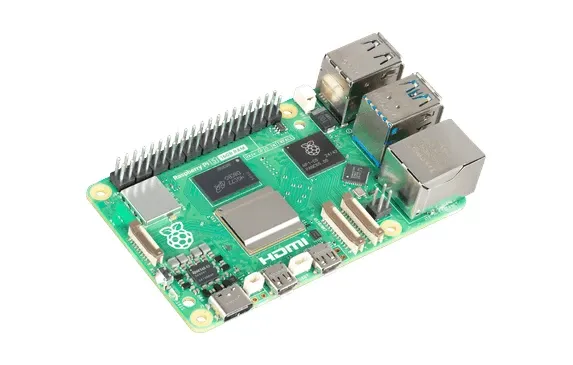
🏭 Manufacturer: Raspberry Pi
🔌 Plug Format: USB-C
📄 Specification Met: FCC, CE, IC, RCM, UKCA
🔖 Part Number: SC0194
🏋️♂️ Weight: 46 g
📏 Dimensions: 88 mm x 58 mm x 19.5 mm
🏳️ Country of Origin: China
🆔 Model Number: Raspberry Pi 5
📐 Size: 88 mm x 58 mm x 19.5 mm
🎨 Style: Single-board computer
🧲 Mounting Type: Desktop
🔧 Usage: Indoor Use
🧩 Included Components: Raspberry Pi 5 board
The Raspberry Pi 5 represents a significant leap forward in smart home computing. It offers unparalleled performance and features that make it ideal for enthusiasts and IoT developers seeking to build custom automation systems. Whether you're automating lighting, monitoring security cameras, or managing thermostats, the Pi 5 provides the computational power and flexibility needed for sophisticated home control.
Powerful Processing Capabilities
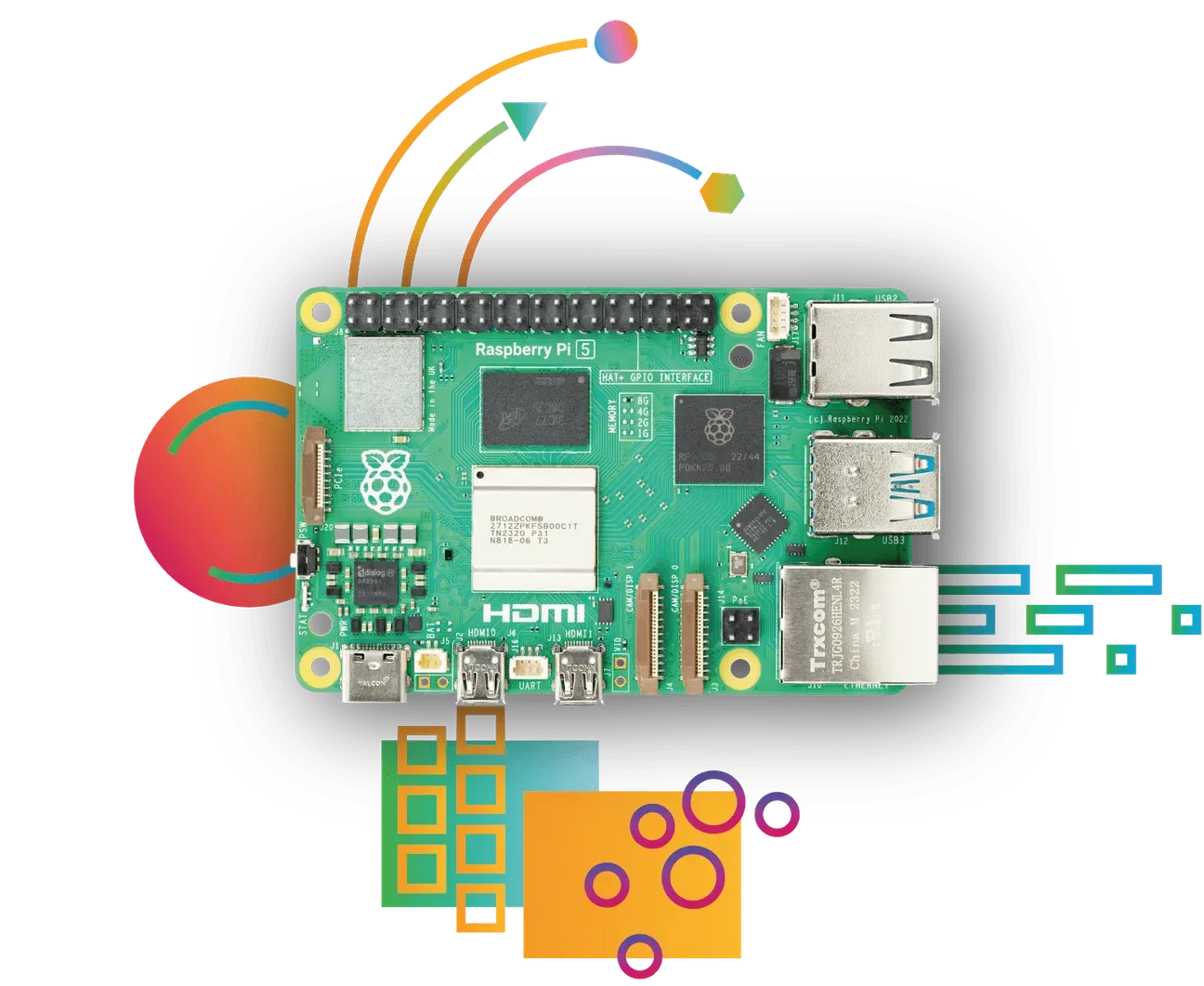
This latest generation includes a 64-bit quad-core Arm Cortex-A76 processor running at 2.4GHz. Performance improves significantly compared to earlier models, delivering a 2-3x speed increase over the Raspberry Pi 4. The enhanced computational power enables real-time processing of sensor data and complex automation logic without lag or bottlenecks.
Multimedia and Connectivity
Enhanced features include 4Kp60 display output over HDMI with full HDR support. The MIPI camera/display transceivers allow users to connect up to two cameras or displays simultaneously, enabling comprehensive smart home monitoring and control interfaces.
Smart Home Applications
The Raspberry Pi 5 excels in numerous smart home scenarios:
- Smart Lighting Control: Use the Raspberry Pi 5 to control lights remotely through custom interfaces. Integrate with various smart lighting systems and motion sensors for automated responses to occupancy.
- Home Security Systems: Develop sophisticated security systems using connected cameras and motion sensors. Real-time processing enables AI-powered threat detection and instant alerts.
- Energy Monitoring: Track energy efficiency by monitoring power consumption in real-time. Optimize your home's energy usage through data-driven automation rules and scheduling based on occupancy patterns and time-of-use rates.
Flexible Configuration Options
The Raspberry Pi 5 comes in multiple memory configurations to match your project complexity:
- 2GB Version: Perfect for basic applications and beginners learning automation fundamentals
- 4GB Version: Suitable for most IoT projects and smart home automations controlling multiple devices
- 8GB Version: Ideal for advanced applications with machine learning, video processing, and complex sensor networks
Where My Pi 5 Actually Lives
Every photo of a Raspberry Pi 5 shows it on a desk next to a mechanical keyboard. Mine isn't there. The board running Home Assistant OS in my house sits on a DIN rail inside the electrical panel, screwed to a rail carrier between the breakers, and it has never had a keyboard attached to it.
Power comes from a Mean Well MDR-60-5, a DIN-rail supply rated 5 V at 10 A, wired into the panel like any other module. No USB charger, no wall wart, nothing plugged into a socket that somebody can reclaim for a vacuum cleaner. That single decision removed a whole category of failure that has nothing to do with the Pi and everything to do with the fact that a plug is a thing people pull out.
A Home Assistant Connect ZBT-1 coordinator hangs off one of the USB ports and carries a few dozen Zigbee devices. Two DIN breakers sit on the same rail, both Tuya TONGOU: a 50 A with energy metering and a 63 A without. Which one do you think I regret? The metered one turns into a chart in Home Assistant the moment you ask for one. The unmetered one is a hole in that same chart, and no amount of clever templating fills it in. Skipping the metering was the cheapest bad decision in the entire panel, and it only became visible the day I wanted the data.
Fair warning on how far my word goes here. The house is still being finished and nobody lives in it yet, so what I can tell you is how this was built, not how it holds up after three years of a family leaning on it.
A DIN Rail Is a Different Thermal Problem Than a Desk
Most Pi 5 cooling advice quietly assumes free air on six sides. A vented case on a shelf works because the room around it is a heat sink with no lid. An electrical panel is the opposite: a closed metal box that already contains warm things, mounted flat against a wall, usually with no vents worth the name.
That changes what you design for. There's no dust to filter and no fan bearing to fail, which is the upside. The downside is that convection has nowhere useful to go, so you buy your margin with layout instead of airflow. Leave a clear slot above the board rather than packing the next module tight against it, keep the Pi away from anything that dissipates real power, and treat the panel temperature as the number that matters rather than the board's idle reading. Mine runs passively and hasn't needed a fan, though I don't log a temperature curve, so take that as one build's experience rather than a benchmark.
The tidy version of my opinion: a Pi 5 on a rail behind a panel door is better home infrastructure than the same board in a lovely aluminium case on a shelf, and the case market has spent years polishing the wrong problem. A controller that runs the lights should be wired in, not plugged in.
Advanced Integration Possibilities
Popular smart home projects include automated window blinds that respond to sunlight and temperature, and comprehensive home security systems with AI-powered threat detection. The open ecosystem supports integration with popular platforms like Home Assistant, openHAB, and Node-RED, enabling easy control of thousands of connected devices.
Community and Support
The Raspberry Pi community provides extensive resources for smart home projects. Thousands of tutorials, guides, and working examples demonstrate proven automation patterns. Active forums connect enthusiasts globally, enabling knowledge sharing and collaborative problem-solving. The combination of cost-effectiveness and powerful capabilities makes Raspberry Pi 5 the foundation of choice for serious smart home builders.
The Pi 5's versatility extends beyond traditional smart home applications. Its thermal performance improvements handle continuous operation without throttling, critical for 24/7 monitoring systems. The enhanced GPIO capabilities enable direct sensor integration without additional shields or breakout boards. Support for modern protocols like Thread and Matter-compatible software ensures your automation setup remains compatible with evolving smart home standards. Whether running Home Assistant, openHAB, or custom Python automation scripts, the Raspberry Pi 5 delivers the reliability and performance needed for stable, responsive smart home control.
Computing Power for Smart Home Automation
The Raspberry Pi 5 provides sufficient processing power for running sophisticated smart home automation software including Home Assistant, openHAB, and Zigbee2MQTT bridge functionality. PCI Express expansion enables external SSD storage for fast data access, improving response times for automation rules and database queries. True USB3 ports support high-speed external devices while the Gigabit Ethernet ensures lag-free network communication. The power management features reduce energy consumption during idle periods, making it suitable for always-on automation servers. Fanless operation keeps installation quiet and maintenance-free in bedroom or living areas.
Single-board computers like the Raspberry Pi democratized home automation by providing powerful computing at consumer prices. Traditional servers consumed significant electricity and generated heat requiring cooling infrastructure. The Raspberry Pi runs sophisticated software on just a few watts of power, making 24/7 operation economically feasible. The fanless design eliminates noise that would be objectionable in living spaces or bedrooms. Compact size enables installation in utility closets or network cabinets without occupying significant space. GPIO ports support direct sensor connection without additional interface boards, enabling custom automation scenarios. The large community provides extensive documentation, tutorials, and pre-built software stacks. Users can run Home Assistant directly on Raspberry Pi for comprehensive local automation without depending on cloud services or subscription fees. Docker support enables container-based software deployment for easy updates and experimentation. USB expansion ports support additional cameras, zigbee dongles, or custom hardware. Network connectivity includes both traditional Ethernet and modern WiFi for flexible network integration. Most importantly, the affordable price makes Raspberry Pi accessible to hobbyists, students, and budget-conscious home automation enthusiasts who might not afford expensive commercial systems.
This overview summarizes the standout features and performance characteristics.
Who Should Buy the Raspberry Pi 5?
This product suits tinkerers and home-lab builders who want a real jump in speed over the Pi 4 for running Home Assistant, Pi-hole, or a small media server. It isn't the right pick for a plug-and-play newcomer, since it needs setup, a case, and often active cooling under sustained load. If you're comfortable on the command line and want one board that can juggle several self-hosted services at once, the Pi 5 earns its place. And if you're wiring a house rather than furnishing a desk, skip the case debate entirely and put the money into a rail mount and a DIN power supply instead.
For real-world notes on running a home automation stack on this board, storage choices, thermals under load, and which SD cards die early, r/homeassistant carries more useful detail than most benchmark posts.