How I Wired a Wall Button to a TaHoma Scene, Not to the Motor

This post may contain affiliate links. As an Amazon Associate we earn from qualifying purchases. Disclosure.
A wired pushbutton in the garage now runs a TaHoma scene instead of being bolted to a motor. The only real trap is in the pairing wizard: the app can need about fifteen silent seconds after you press PROG, and nothing on screen says so.
There's a switch in my garage that doesn't control a light. It sits where a light switch would sit, in a normal frame, and behind it is a Somfy Izymo Transmitter io wired across two pushbuttons. Press the top one and the garage roller blinds open. Press the bottom one and they close, slowly and quietly.
The hardware side of that is simple. The pairing is where it goes wrong, and the reason is embarrassingly small.
What Does the Izymo Transmitter io Actually Add?
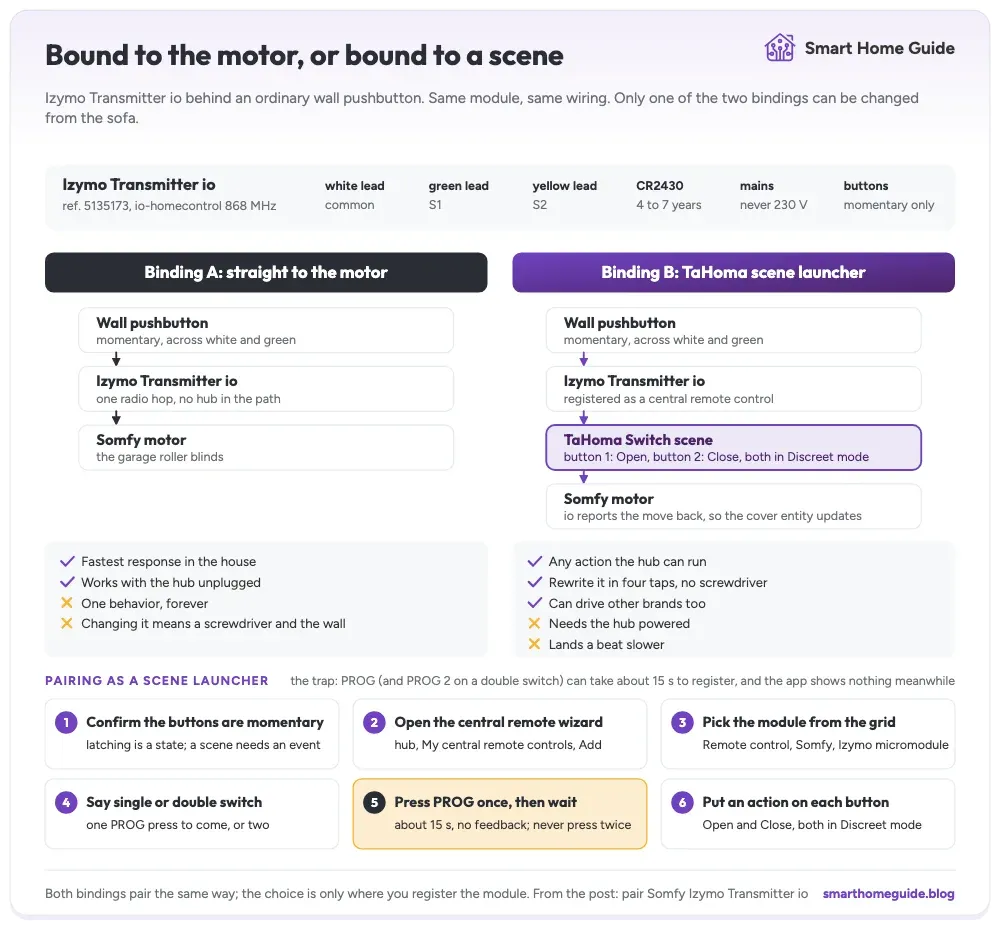
It turns a wired button into an io-homecontrol radio transmitter and does nothing else. Three low-voltage leads come out of the module: white to the common terminal, green to channel S1, yellow to channel S2. Wire a pushbutton across white and green, and each press becomes a radio command on the 868 MHz band that Somfy shares with the rest of the io-homecontrol alliance. Power is a single CR2430 cell fitted at the factory, quoted at four to seven years, and the leaflet is blunt about the rest: never connect this to 230 V mains.
That narrowness is the appeal. A battery wall remote stuck next to an abandoned plate looks like exactly what it is. This leaves a normal plate on the wall and hides the intelligence behind it. Full specs and the buying case live on the Somfy Izymo Transmitter io page.
Should the Button Drive the Motor or Run a Scene?
You get a real choice here, and it decides what that button can ever do.
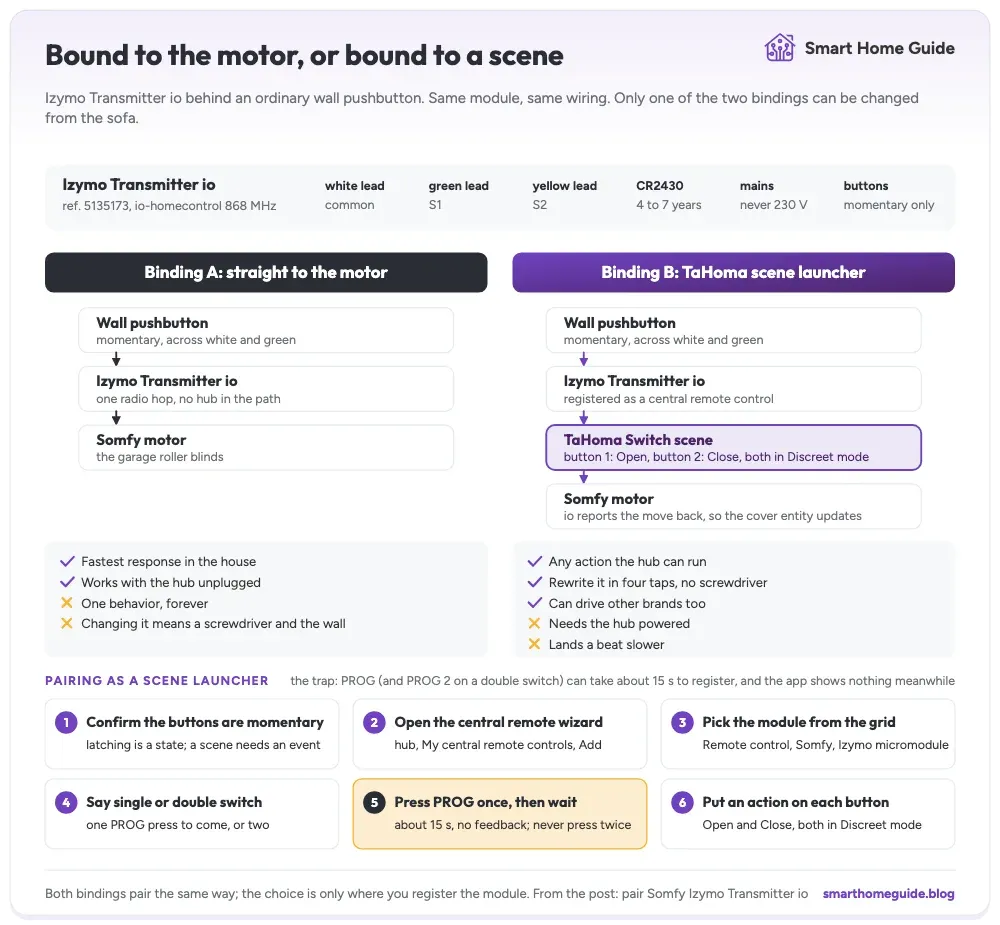
Bind the module straight to a motor and you get the fastest, dumbest, most reliable wall button in the house. One radio hop, no hub in the path, works whether or not anything else is powered. It's also worth exactly one behavior for the rest of its life, and changing that behavior means a screwdriver and the wall again.
Register it with the hub instead and it lands under scene launchers in the TaHoma app. Now each button fires a scenario, and a scenario is a thing you edit on the sofa. It can close the garage blinds today, and close them plus do something else next month. It can drive gear from a different manufacturer entirely, which a direct binding can never do. That flexibility is the same argument that put Home Assistant above every vendor in this house rather than beside them.
I went the scene route on both modules. The cost is honest and worth stating plainly: the press now travels to the hub and back, so it lands a beat slower, and it depends on the Somfy TaHoma Switch being awake.
What Do You Need Before You Open the Wall?
Very little, which is why the failure mode below stings.
- The Izymo Transmitter io module, ref. 5135173, with its CR2430 already fitted
- A wall plate with one or two momentary pushbuttons behind it
- A small screwdriver to get the plate off
- The TaHoma app, signed in, with the hub already on your network
- The motor or device you want to control, already working on its own
That last one is not filler. A hub can only expose a motor that already works, which is the same lesson as in the walkthrough on how to connect a garage operator to the TaHoma Switch.
The One Requirement That Sinks Most Retrofits
The buttons have to be momentary, not latching. The wizard gives this its own screen before you touch a screwdriver, and it is worth reading rather than tapping past: only pushbutton switches can be used as scene starters.
Think about why. A normal wall switch stays closed after you flick it, so what it reports is a state, and it stays in that state until somebody flicks it back. A scene is not a state. A scene is an event, a single moment where something should happen. A bell push gives you that moment and then lets go. If your box currently holds a standard light switch, you're replacing the mechanism, and that is a small job rather than a reason to give up on the plan.
How Do You Find the Module in the TaHoma App?
Not where you would look for it, which is an easy place to lose time. The Izymo transmitter is not under devices. It is a remote control, so it lives in the hub's own settings.
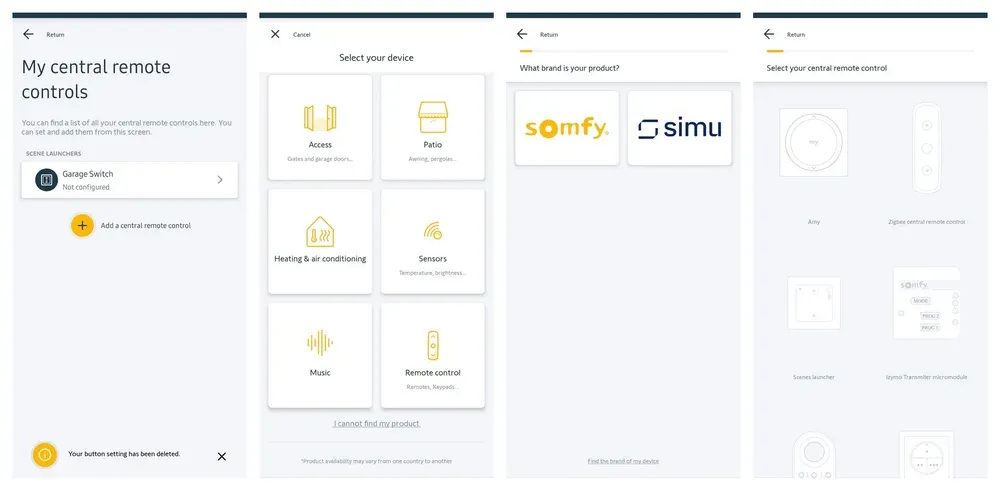
Open the hub, then My central remote controls, then Add a central remote control. Pick Remote control as the category, Somfy as the brand, and then look for the tile the app calls the Izymo Transmiter micromodule. Yes, with one T. It sits in a grid next to Amy, a Zigbee remote and a scenes launcher, and it is drawn as a small module face with MODE, PROG 2 and PROG 1 on it, which is exactly what you are holding.
Then the wizard asks whether the plate is single or double. Answer honestly, because it decides whether you get asked for one PROG press or two.
Why Does the App Freeze on the PROG Step?
Because it isn't frozen. It is just slow and completely silent about it, and this is the one thing I would tell anybody before they start.
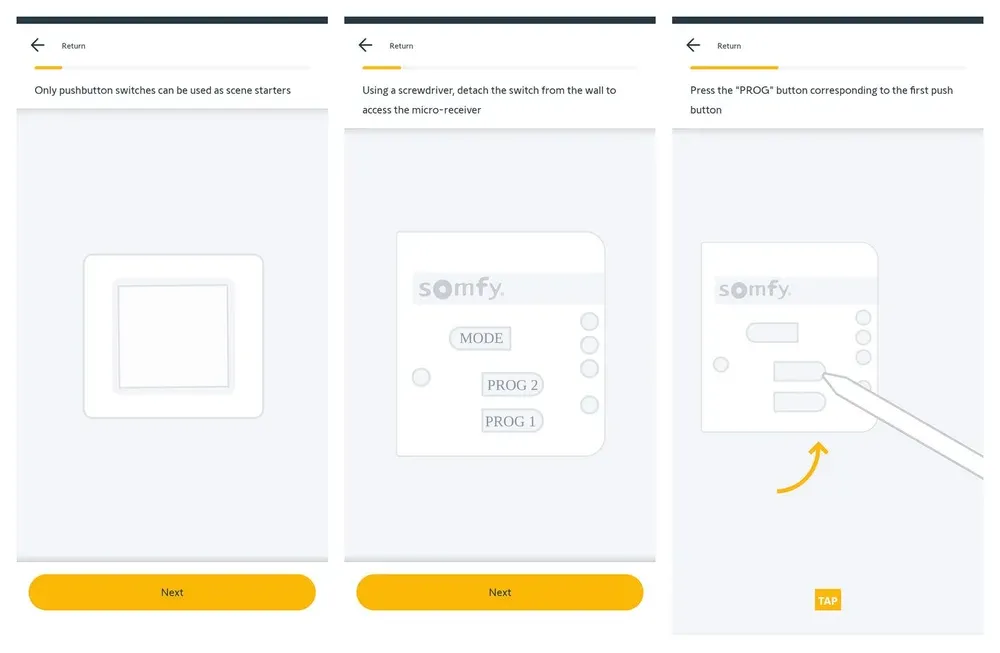
The wizard tells you to unscrew the switch from the wall to reach the micro-receiver, shows a drawing of the button layout, and then asks you to press the PROG button matching the first pushbutton. You press it. The small LED near the button blinks green. The screen does not move. Nothing on it acknowledges that anything happened at all.
A PROG press can take about fifteen seconds to register. The TaHoma app shows no progress indicator of any kind while it waits. Both of my modules behaved identically.
Everything about that pause invites you to help. Press it again, hold it longer, back out and restart the wizard. All three make it worse. A second press restarts the exchange from the beginning. A long hold means something else entirely, because holding PROG for two seconds puts a receiver into pairing mode rather than sending a pairing request. So press once, set the phone down, and count slowly to twenty. Both of my modules moved on by themselves once I stopped interfering.
On a double switch the wizard then asks for PROG 2, and the same fifteen seconds apply again. The second module went through without a hitch, and the only thing that changed was patience.
How Do You Put an Action on Each Button?
Once the module is registered, it shows up under scene launchers with both buttons empty, drawn as two plus signs on a switch plate.
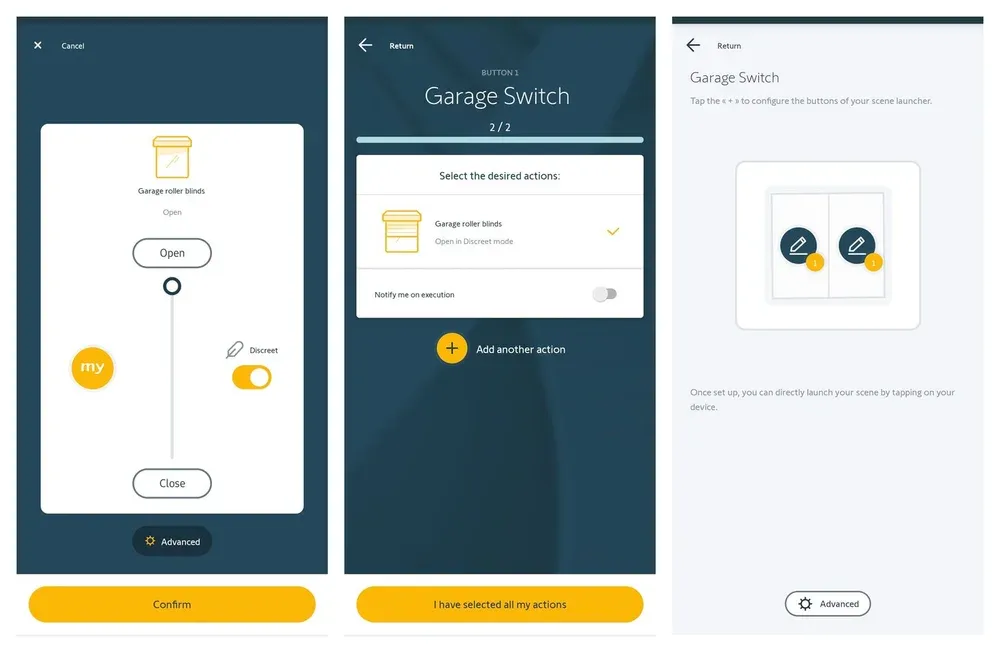
Tap a plus and the app walks you through picking a device and the action you want from it. For a shutter you get the familiar travel slider with Open at the top, Close at the bottom, the my position on the left, and a Discreet toggle on the right. Choose, confirm, and the app tells you your button settings are saved.
My garage plate ended up with one action per button. Button one opens the garage roller blinds in Discreet mode, button two closes them the same way. Nothing clever, and that's the point: the wall does the obvious thing, and the interesting logic lives elsewhere.
Why Discreet Mode Is the Right Default Here
Discreet is Somfy's slow and quiet motor profile, exposed per action rather than as a device setting you configure once. The blinds take noticeably longer to travel. They also make much less noise doing it, which matters early in the morning when the garage sits next to a room where somebody is sleeping.
Would I use it on a living room window at midday? No. Speed wins there. That's the nice part about it living in the scene rather than in the motor: the same shutter can move quietly from the wall button and quickly from an automation.
What Does Home Assistant See, and What Doesn't It?
Plan around this rather than assuming it. The Izymo Transmitter io is registered to the hub as a central remote control, which means it is a transmitter with no on, off, open or closed state to publish. There is no obvious entity for the module itself.
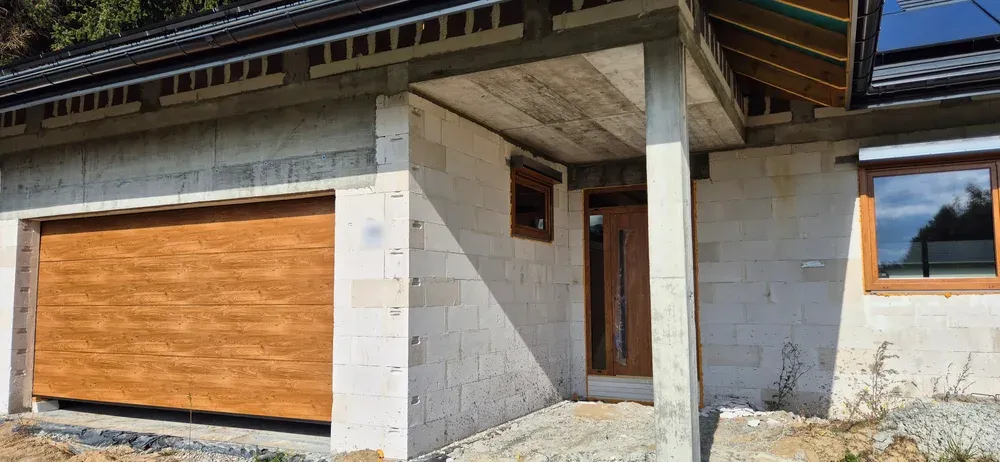
What does reach Home Assistant and Google Home through the TaHoma bridge is the outcome. The blinds move, io-homecontrol reports the movement back because the protocol is two way, and the cover entity updates a moment later. For most automations that state change is the trigger you actually wanted, not the button press.
If you specifically want the press itself as a trigger, test it on your own setup before you design anything around it. I have not confirmed whether it surfaces as an event through the hub, and I would rather say so than guess on your behalf.
What Would I Do Differently Next Time?
Two things, and neither is about the hardware.
I would check the mode setting before mounting anything. The MODE button cycles the module through four behaviors, and the setting applies to the whole module rather than to each channel, so S1 and S2 always do the same kind of job. One button for a lamp and one for a shutter is not a configuration this module supports. Finding that out with the plate already screwed to the wall is avoidable.
And I would trust the fifteen seconds from the start. Somfy built a wizard that asks you to stand in a garage holding a screwdriver, then gives you no feedback at the one moment feedback matters. That's a genuinely poor bit of interface design on an otherwise sensible piece of hardware, and it is the entire difference between a smooth pairing and a stalled one.
Frequently Asked Questions
Why does the TaHoma app not react when I press PROG?
It takes about fifteen seconds to notice, and it displays nothing at all while it waits. I paired two modules and both behaved the same way. Press PROG once, put the phone down, and count to twenty before you decide the step has failed. Pressing again restarts the exchange and makes it worse.
Can I use a normal wall switch instead of a pushbutton?
Not for scenes. The wizard says so on its own screen before the wiring step: only pushbutton switches can be used as scene starters. A latching switch stays closed after you flick it, which is a state, and a scene needs an event. Swapping the mechanism for a bell push is a small job.
Is a scene slower than binding the button to the motor?
Slightly, and you can notice it. A direct binding is one radio hop from the module to the motor. A scene goes to the hub, the hub decides what to run, and only then does the motor move. The delay is short, and the trade is worth it for being able to change what the button does without a screwdriver.
What is Discreet mode on a Somfy shutter action?
It is the slow and quiet motor profile that io motors expose, not a separate device setting. Both garage buttons in this walkthrough use it. The blinds take longer to travel and make much less noise doing it, which is the whole point of the profile.
Does the button press reach Home Assistant as a trigger?
Treat that as unproven until you test it yourself. The module is registered to the hub as a transmitter, so it has no state to publish. What definitely reaches Home Assistant is the result, because io is two way and the cover entity updates once the motor moves.
Sources & References
- Home Assistant - Overkiz home-assistant.io