Somfy, Home Assistant and Google Home in the Right Order

This post may contain affiliate links. As an Amazon Associate we earn from qualifying purchases. Disclosure.
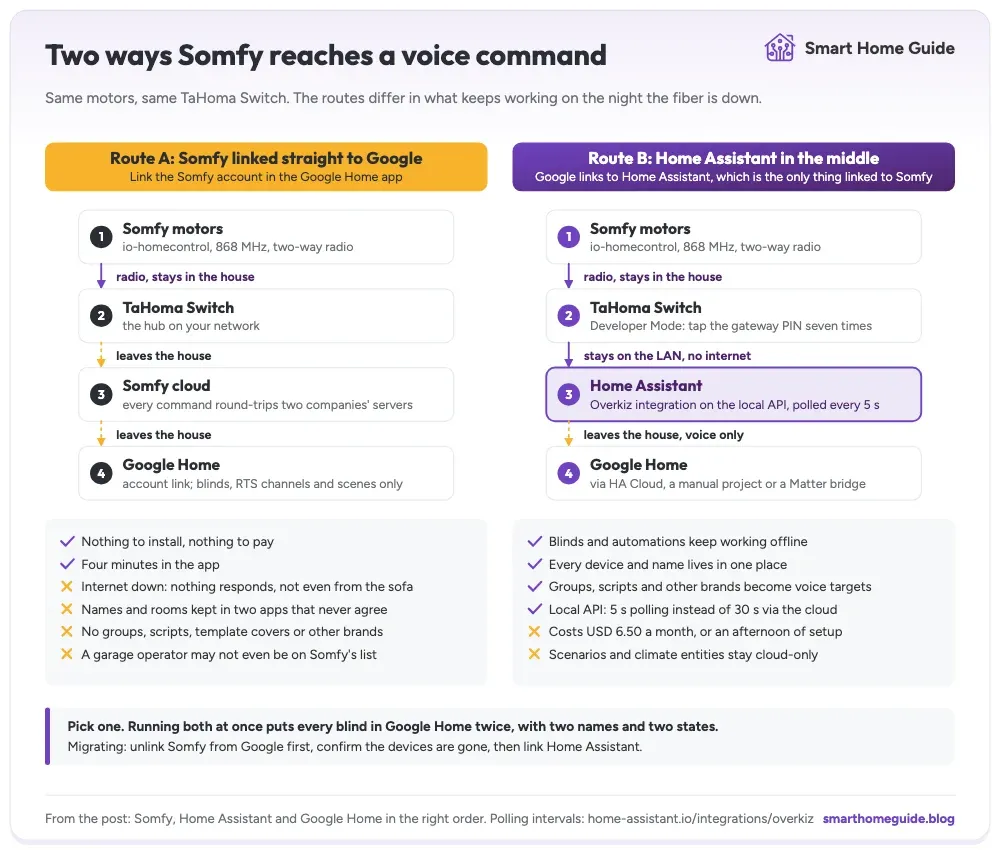
Two links, one decision. You can hand Somfy straight to Google Home, or put Home Assistant in the middle and let Google talk to that instead. The second is the one I would build, because the TaHoma local API keeps the blinds moving on a night when the fiber is down and the Somfy cloud is unreachable.
There are only two sensible wiring diagrams here, and people usually pick the wrong one because it's the one the app suggests first. You can link your Somfy account directly to Google Home. Or you can pull Somfy into Home Assistant and let Google talk to Home Assistant instead. Both end with you saying something out loud and a blind moving. They behave nothing alike the moment anything goes wrong.
The second is the one I would build. Here's the reasoning, the setup, and the honest costs.
Which Route Should Somfy Take to Google Home?
Put Home Assistant in the middle. Link Google Home to Home Assistant, and let Home Assistant be the only thing linked to Somfy. That is the answer for any house that already runs Home Assistant, or intends to.
The reason isn't ideology; it's that the middle route gives you something the direct one physically cannot. With Somfy Developer Mode switched on, Home Assistant talks to the Somfy TaHoma Switch over a local API on your own network. The blinds keep working when your connection dies. Link Somfy straight to Google and every single command, including the ones you send from the sofa, makes a round trip through two companies' servers.
There is one case for the direct route. If blinds are the only motorized thing you own, and you don't run Home Assistant and never will, then linking Somfy to Google in the app takes four minutes and costs nothing. Everything below is for everyone else.
What Does the TaHoma Local API Actually Change?
Somfy publishes a Developer Mode that turns on a local API on eligible TaHoma boxes, and Home Assistant's Overkiz integration speaks it. The practical difference shows up in two places: latency and dependency.
Home Assistant documents the polling difference plainly: the local API is queried every 5 seconds, versus every 30 seconds for the cloud API. Six times fresher. You notice it when an automation is waiting on a blind's position rather than firing blindly and hoping.
The dependency change is the bigger one. A local connection means the chain from Home Assistant to the motor never leaves the building. Your automations run. Your dashboard is accurate. Your wall tablet works. What still breaks in an outage is voice, because Google Assistant is a cloud service no matter how you wire the house underneath it. Local control and local voice are two different projects, and only one of them is solved here.
Which Hubs Support It
Home Assistant lists Somfy Connexoon IO, Connexoon RTS, TaHoma v2, TaHoma Beecon, TaHoma Switch, and several Rexel Energeasy gateways. If your hub is on that list, you can do this today for free.
If it is not on the list, the cloud API still works and everything else in this article still applies. You simply lose the offline behavior and the faster polling, which is a real loss but not a blocking one. The older TaHoma boxes that predate Developer Mode are the usual casualty here.
Worth checking before you plan around it: Developer Mode is tied to your Somfy account rather than to a firmware version, so a hub that supports it will show the option in the app regardless of how long it has been on your wall. If the seven-tap gesture does nothing, your gateway is not on the list.
What the Local API Leaves Behind
It isn't a clean superset of the cloud. Scenarios and climate entities are not supported over the local API, and the documentation notes various sensors are missing too. If your installation leans on TaHoma scenarios or a Somfy thermostat, you need the cloud configuration alongside the local one.
Running both is allowed and is what I would do in that case: one Overkiz entry on the local API for the covers you care about, a second on the cloud for whatever the local one cannot see. It costs you a duplicate set of entities to tidy up, and it beats choosing between fast local shades and a working thermostat.
Don't discover this after you've torn out the working setup. Check which of your devices actually appear over the local API before you unlink anything, because the answer depends on what Somfy hardware you own rather than on anything you can configure.
How Do You Connect Somfy to Home Assistant?
The whole job is five steps, and most of the time is spent waiting for the app.
- Open the TaHoma by Somfy app, go to Account, then Configure the installation, then the parameters of your gateway.
- Tap seven times on the gateway PIN. That's the gesture that reveals Developer Mode. It's not documented anywhere you'd look first, which is why people give up here.
- Activate Developer Mode and note the gateway PIN, because the integration asks for it.
- In Home Assistant, add the Overkiz integration and choose the local API option, then give it the PIN, the hub's address, and your Somfy credentials.
- Check that your covers appear as entities and that a test command moves the right motor.
That last step matters more than it sounds. Somfy device names arrive as whatever they were called during commissioning, which is often a set of installer labels nobody would say out loud. Rename everything in Home Assistant now, before you expose any of it to Google, because those names become the voice commands.
The Garage Door Is a Separate Conversation
Somfy's own Google Assistant page talks about blinds, shades, RTS channels, and scenes. I couldn't find a garage operator listed on it. So if you have a Somfy Dexxo Smart io over the garage, routing through Home Assistant is worth checking before you assume voice will just appear. And whichever way you wire it, keep the Somfy Keygo io on the car keys, because a keyfob doesn't care whether any of this is reachable.
There is a second reason the door deserves its own thought. Google treats a garage door as a security-sensitive device type and asks for a spoken PIN before opening one, though not before closing it. That behavior comes from Google rather than from Somfy or Home Assistant, so it follows the device whichever route you use.
The full walkthrough for the door itself, including the calibration failure that makes a freshly paired operator ignore the app entirely, is in the step by step garage door guide, and the Google Home side is in opening the garage by voice.
How Do You Get Home Assistant Into Google Home?
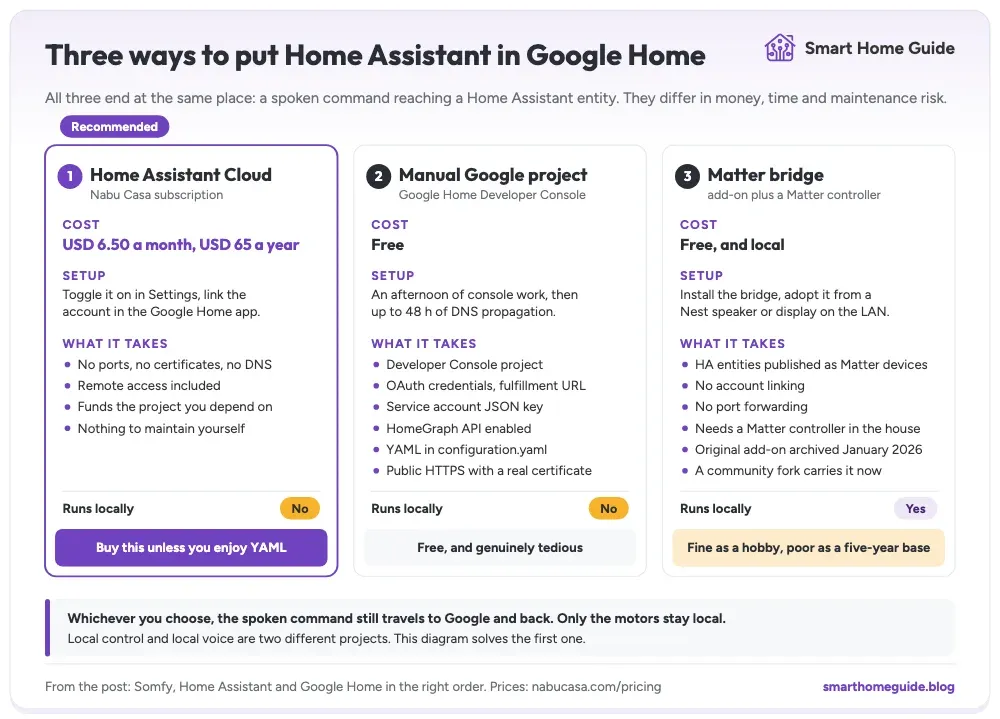
Three routes, and the right one depends on how you feel about subscriptions versus YAML.
| Route | Cost | Setup | Runs locally |
|---|---|---|---|
| Home Assistant Cloud | USD 6.50 a month, USD 65 a year | Toggle and link | No |
| Manual Google project | Free | Console, OAuth, service account | No |
| Matter bridge | Free | Add-on plus a Matter controller | Yes |
Home Assistant Cloud is what I'd tell most people to buy. It removes dynamic DNS, certificates, and open ports from the problem, it includes remote access, and the money funds the project you're depending on. Nabu Casa prices it at USD 6.50 a month or USD 65 a year, which is cheaper than one takeaway coffee a week for something the whole household uses daily.
The subscription also buys you something less obvious than convenience. Exposing Home Assistant to the internet yourself means you now own a certificate, a DNS record, and an attack surface, and you own them on the day you are busy with something else. Paying somebody to hold that end of the connection is a reasonable trade-off for most households.
Which One Should You Actually Pick?
The manual route is genuinely free and genuinely tedious. Home Assistant's own documentation warns it "requires a bit more setup than most", and "a bit" is doing a lot of work in that sentence. You need a Google Home Developer Console project, OAuth credentials, a fulfillment URL, a service account JSON key, the HomeGraph API enabled, YAML in your configuration, and Home Assistant reachable from the internet with a real certificate. Budget an afternoon and up to 48 hours of DNS propagation.
A Matter bridge publishes Home Assistant entities as Matter devices, which a Google Nest speaker or display can adopt on the local network. No account linking, no port forwarding, no subscription. The catch is maintenance: the best known project was archived in January 2026 and a community fork carries it now. That's fine if you enjoy this, and a poor foundation if you want something your family can rely on for five years without your attention.
Why Not Link Somfy and Google Home Directly?
Because you lose the layer where everything interesting happens. Somfy exposes Somfy things. Home Assistant exposes everything, including things that don't exist as hardware at all.
None of these exist as Somfy devices, and all of them become voice-addressable the moment Google is linked to Home Assistant instead:
- A group called "south side blinds" that covers four motors at once
- A template cover reporting a sensible position for an awning that has no position sensor
- A script that closes the shades, drops the awning, and starts the air conditioning as one spoken command
- An input boolean that puts the whole house into holiday mode
- A cover exposed from a completely different brand, sitting next to the Somfy ones
Link Google to Somfy instead and you get the motors, the RTS channels, and whatever scenes you built in the TaHoma app. That's the whole menu.
Two Apps, Two Sets of Names
The other loss is administrative, and it grates daily. Two links means device names, rooms, and grouping are maintained in two apps that don't know about each other. Rename a blind in Home Assistant and Google keeps calling it by the old Somfy name. Isn't one source of truth the entire reason you bought a hub?
What Breaks When You Do Both at Once?
This is the mistake I'd warn hardest against, because it looks harmless while you're doing it. You link Somfy to Google Home to get voice working quickly. Later you add Home Assistant, wire it up properly, and expose that to Google as well.
Now every blind is in Google Home twice. Two entries, two names, two states that drift apart, and the assistant picking whichever it matched best. Ask it to close the bedroom blind and you get a disambiguation question about which bedroom blind you meant, forever. Routines built against the old entries keep working until they silently don't.
Pick one path, unlink the other in the Google Home app, and delete the orphaned devices. If you're migrating, do it in that order: unlink Somfy from Google first, confirm the devices are gone, then link Home Assistant. Doing it the other way around leaves you sorting duplicates by hand.
What Does This Chain Look Like When It Is Built?
Somfy motors on io-homecontrol, a TaHoma Switch on the network, Overkiz carrying them into Home Assistant, and Home Assistant as the only thing Google Home is linked to. In my own house the shutters are the one system not bridged into Home Assistant yet, so this is the layout I am building toward rather than one I run today. Google is a voice layer and a set of widgets, and it holds no logic.
That split is the point of running the logic layer locally, and the blinds are where it pays off most obviously, because they're the devices that move on their own. Outside temperature and sun position can close the west-facing shades before the air conditioning starts fighting them. Neither the Somfy app nor Google Home can express that, because neither can see both halves of it.
The honest limitation, stated plainly: none of this makes voice work offline. When the connection drops, the house keeps running and the automations keep firing, but nobody can talk to it. Wall switches and remotes are the answer to that, not a better cloud.
In What Order Would I Build It?
Do it in this sequence and you skip every problem in this article.
- Commission the Somfy motors properly first, with the physical remote, before any hub sees them.
- Enable Developer Mode and connect Overkiz to Home Assistant on the local API.
- Rename every entity and assign it to an area in Home Assistant.
- Decide which of the three routes into Google you're using, and set up only that one.
- Expose a deliberate subset to Google, not everything you own.
That fifth point is worth a sentence. Exposing every entity to Google gives your family a voice assistant that misfires on sensors and diagnostic switches nobody wants to talk to. A sensible starting subset is covers, lights, the climate units, and a handful of scripts, and nothing else. The assistant gets better the less there is in it, and that is not a compromise most people expect to end up arguing for.
If you're weighing the platforms themselves rather than the wiring between them, the comparison of Home Assistant against the two big ecosystems covers that ground, and the Somfy platform overview covers what the motors can do before any of this is connected.
Frequently Asked Questions
Should Google Home connect to Somfy or to Home Assistant?
To Home Assistant, in almost every case. Linking Google to Home Assistant gives you one place to name devices, one place to build routines, and it lets Google reach entities Somfy never exposes, such as groups and scripts. Link Google straight to Somfy only if blinds are the only thing you own and you have no intention of running Home Assistant at all.
Does Home Assistant control Somfy without the internet?
Yes, if you enable Somfy TaHoma Developer Mode and let the Overkiz integration use the local API. Home Assistant then polls the hub every 5 seconds on your own network instead of every 30 seconds through the Somfy cloud. Voice is a separate matter, because a spoken command still travels to Google and back before it reaches the house.
What does the TaHoma local API not support?
Scenarios and climate entities are not available over the local API, and Home Assistant documents that various sensors are missing too. If you depend on TaHoma scenarios or a Somfy thermostat, keep a cloud configuration alongside the local one rather than assuming Developer Mode covers the whole installation.
Can I link Somfy to Google Home and to Home Assistant at once?
You can, and it makes a mess. Every blind then appears twice in Google Home, once from Somfy and once from Home Assistant, with two different names and two different states. Pick one path into Google, unlink the other, then clean up the leftover duplicates in the Google Home app.
Do I have to pay for Home Assistant Cloud to use Google Home?
No. Home Assistant Cloud costs USD 6.50 a month or USD 65 a year and is the least painful route, but the manual Google Home Developer Console setup is free, and a Matter bridge publishes Home Assistant entities to Google locally with no subscription and no port forwarding.
Which Somfy hubs support Developer Mode?
Home Assistant lists Somfy Connexoon IO, Connexoon RTS, TaHoma v2, TaHoma Beecon, TaHoma Switch, and several Rexel Energeasy gateways as compatible with the local API. You enable it in the TaHoma app under the gateway parameters by tapping seven times on the gateway PIN.
Sources & References
- Home Assistant Overkiz integration documentation home-assistant.io Documentation
- Home Assistant Google Assistant integration documentation home-assistant.io Documentation
- Nabu Casa pricing nabucasa.com Pricing
- Somfy Google Assistant integration page somfysystems.com Manufacturer