Pairing a Garage Door With TaHoma Switch, Step by Step

This post may contain affiliate links. As an Amazon Associate we earn from qualifying purchases. Disclosure.
A garage operator pairs with a TaHoma Switch in minutes, and that is the easy part. Getting the door to answer the app is a different job. Here is the order that works, and the failure nobody warns you about.
Blinds are forgiving. If a shade ignores a command you shrug and press the button again. A garage door is the heaviest thing in a house that moves on a schedule, and it's the motor most likely to punish a sloppy setup. I have a Somfy Dexxo Smart io on my own garage door, but I haven't written up my pairing session step by step. So this guide leans on Somfy's manual and published product data for the details, and on how these operators are built for the rest. The pairing step is quick. Everything around it is where the time goes.
What Do You Need Before You Start?
Four things, and only one of them is the hub.
- An io-homecontrol garage operator. The Somfy Dexxo Smart io, which is the one on my garage door, is rated for doors up to 10 m2 and 200 kg according to Somfy's product page. The same unit is sold under some door manufacturers' own brand names, so check the radio, not the badge.
- A Somfy TaHoma Switch on your network, already set up in the TaHoma app.
- The Somfy Keygo io remotes that come with the operator. You need a physical transmitter to test with, and you will need it again later.
- The installation manual for your operator. I mean it. The button sequences on the motor head are model-specific, and I am not going to guess them for you.
Worth measuring before any of this: the door has to fit the operator's rating. Width times height gives the surface, so a 4750 by 2100 mm door is 9.975 m2, which only just squeezes under a 10 m2 limit. Then check headroom, side clearance and garage depth against the rail length and the clearances in the installation manual. If your door does not fit inside those numbers, no amount of clever pairing helps.
Why Does the Order of Operations Matter?
Because the app encourages the wrong one, and the wrong one can fail silently.
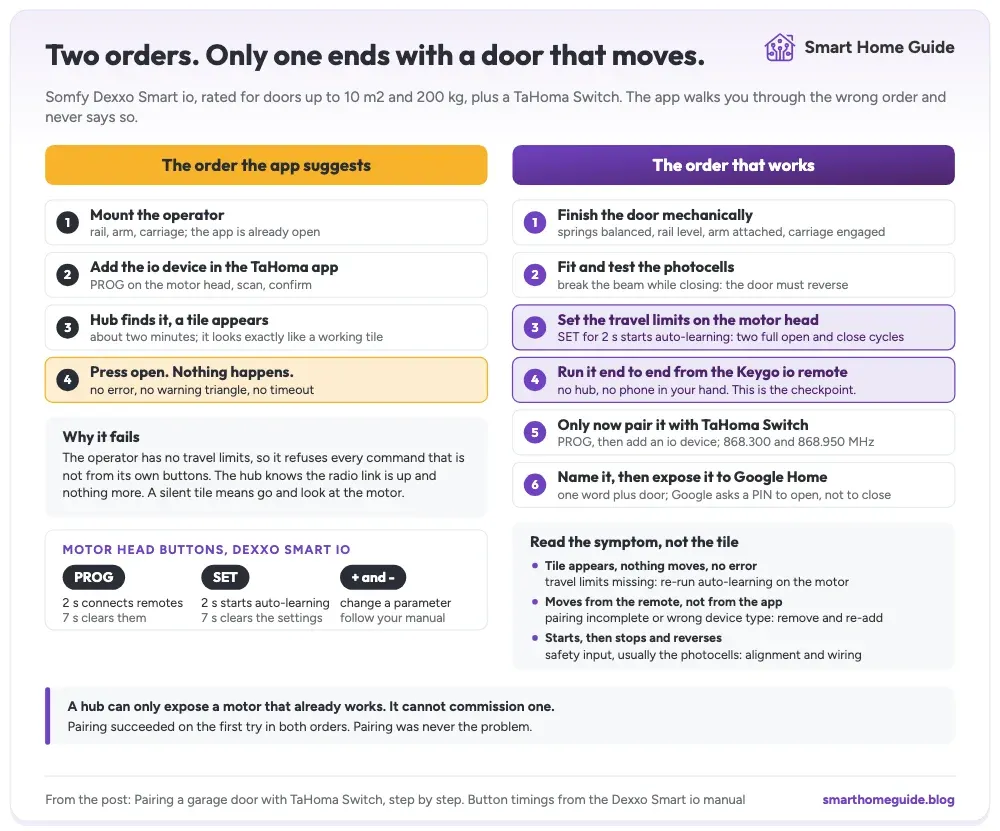
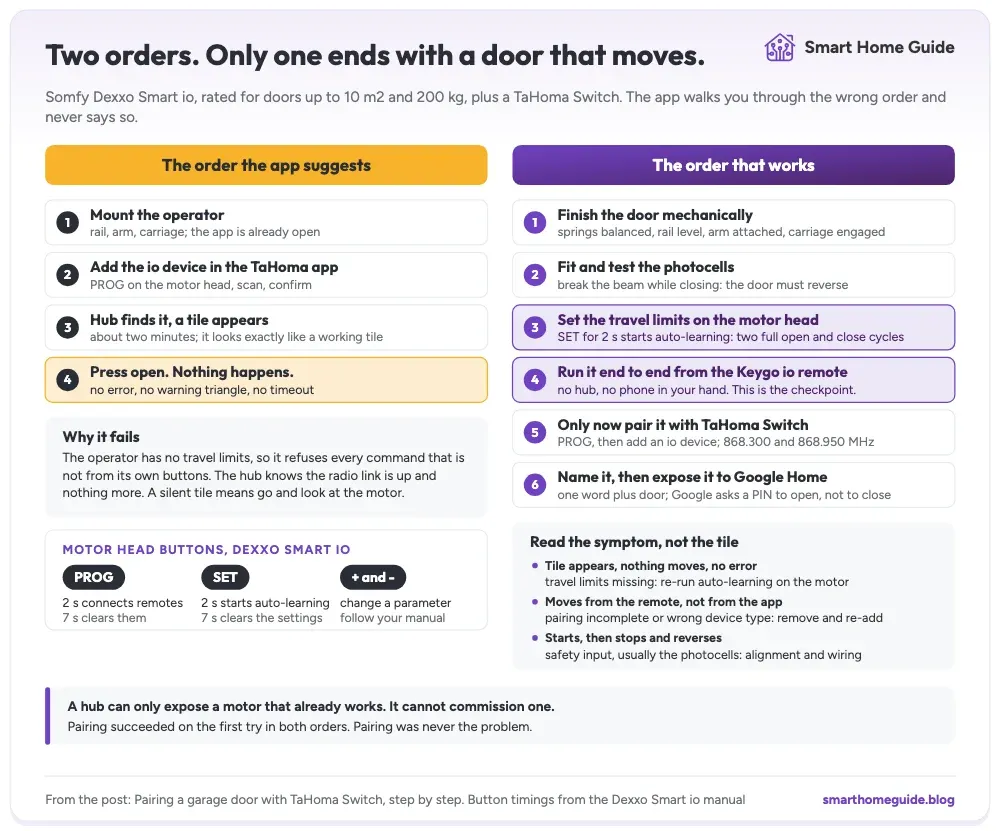
The obvious sequence is to mount the operator, open the TaHoma app, add the device, and start pressing buttons on your phone. That is what the app's flow suggests, and the pairing step itself usually succeeds. You get a tile, and it looks exactly like a working tile.
The sequence that works puts the motor first. Set the travel limits on the motor head first. Prove the door runs end to end from the handheld remote, and only then let a hub anywhere near it. A hub can expose a motor. It cannot commission one. Everything a garage operator needs to know about your particular door lives in the motor's own memory, and the hub has no visibility into whether any of it is there.
That is not a Somfy quirk; it is how these operators are built. It is just badly signposted.
How Do You Set the Travel Limits on the Motor?
The travel limits are the closed position and the open position. On the Dexxo Smart io the installation manual has you engage the carriage, then run an auto-learning routine that moves the door to its end positions and completes two full open and close cycles. Until that has finished, the operator doesn't know where its door starts and stops. The manual also notes that changing the configuration after auto-learning puts the motor back into a non-set state, so the learning has to be run again.
Do this with the door mechanically finished: springs balanced, rail level, arm attached, and the carriage engaged. Fit and test the safety accessories at this stage too, because they change how the motor behaves. Break the photocell beam while the door is closing and it should reverse. If it does not, stop and fix that before anything else, because no amount of automation makes an unsafe door acceptable.
The Buttons on the Motor Head
The head carries a PROG button, a SET button, and plus and minus buttons. According to the manual, a 2 second press on PROG connects remote controls and a 7 second press clears them. A 2 second press on SET starts auto-learning, and a 7 second press clears the learned settings and parameters. Plus and minus change parameter values. The exact sequence differs between the 800 io and 1000 io variants and between firmware revisions, so follow your manual rather than a sequence you found in a forum.
What you should end up with is a door that runs fully closed to fully open and back from the Keygo io remote alone, with no hub involved and no phone in your hand. That is the checkpoint. Do not move on without it.
The parameter list behind SET is worth a slow read rather than a skim. It holds settings such as the automatic closing behavior and how the operator treats its photocell inputs, and those are the settings that decide whether the door is safe rather than merely convenient. If you are not certain what a value does, leave it at the factory setting and ask the installer.
How Do You Pair the Door With TaHoma Switch?
Once the motor knows its own door, the hub part is genuinely quick.
- Put the motor head into radio programming mode using the PROG button, following the manual for your variant.
- In the TaHoma app, choose to add a device, then select the io-homecontrol category and the garage door type.
- Let the app scan. Somfy's product page lists the operator's io-homecontrol frequencies as 868.300 and 868.950 MHz, which is the band the hub listens on.
- Confirm the pairing on the motor when prompted, then name the device in the app.
- Test open, stop, and close from the app while standing where you can see the door.
The pairing is not the hard part of this job, and if you've completed the previous section, it should go through without drama.
Name it something a human would say out loud. Whatever the installer called it during commissioning is not that. This name becomes the voice command later, and renaming things after you have exposed them to Google causes more mess than doing it properly now.
What If the Door Ignores the App?
This is the failure worth keeping in mind, because it looks like nothing at all. The door appears in the app. The tile renders normally. You press open and nothing moves. There is no error message, no warning triangle, no timeout, just a control that does precisely nothing while reporting no problem.
The first suspect is the operator's own state, not the pairing. Per Somfy's manual, an operator that hasn't completed auto-learning, or that went back to the non-set state after a configuration change, isn't a commissioned operator, and the hub can't tell you why it's unresponsive. So go back to the motor and run the auto-learning again by hand. Re-pairing is rarely the answer.
Four symptoms come up on a freshly paired door, and each one points at a different cause. Read the symptom, not the tile.
| Symptom | What it usually means | Where to fix it |
|---|---|---|
| Tile appears, nothing moves, no error | Travel limits are missing or lost | Motor head, re-run auto-learning |
| Door moves from the remote, not from the app | Pairing did not complete, or wrong device type | TaHoma app, remove and re-add the device |
| Door starts, then stops and reverses | Safety input triggered, usually the photocells | Alignment and wiring at the motor |
| Works locally, fails by voice only | Account link or the spoken PIN | Google Home app |
So if your newly added door does nothing: stop touching the app. Walk to the motor, confirm the door runs end to end from the physical remote, and if it does not, the limits are your problem and not the radio.
How Do You Add Voice Through Google Home?
With the door working in the TaHoma app, voice is an account link rather than a configuration job. Link Somfy in the Google Home app, or link Google to Home Assistant if you are running the chain with Home Assistant in the middle, which is what I would recommend, and that article explains why. Home Assistant reaches a TaHoma hub through the Overkiz integration, and the TaHoma Switch is on its list of gateways that support the local API through Developer Mode.
One thing to check first: Somfy's own Google Assistant page talks about blinds, shades, RTS channels, and scenes. I could not find a garage operator listed on it. If the device type you care about is not there, routing through Home Assistant is what gets it a voice command at all.
The PIN Google Asks For
Google's developer documentation for secondary user verification makes a PIN mandatory for opening garage-type devices, while closing uses a lighter acknowledgement. That asymmetry is correct for a device that is a hole in the wall of your house, but budget a few seconds for it and expect it to struggle in a noisy car.
The payoff is real, though. Opening the door by voice from Android Auto, before you reach the drive, means no digging through the door pocket for the remote. It only works with a signal. Pick the device name with that sentence in mind. Whatever you called the door in the app is what you will be saying out loud in a moving car, so short and unambiguous beats descriptive. One word plus "door" works. A name that shares its first syllable with a room or a blind will get matched to the wrong thing often enough to be annoying.
Why Does the Keyfob Still Live on the Car Keys?
The voice chain runs Assistant, Google Home, the Somfy cloud, the hub, then the door. Five links, and four of them are somebody else's servers. Kill the router and that sentence does nothing at all.
The Keygo io remote talks straight to the motor and skips every one of those links. It works with the hub unplugged, the internet down, and the phone dead. Because io-homecontrol is two-way, which Somfy highlights for the Dexxo, a press on the keyfob can still be reported back to the hub, so opening the door from the car doesn't leave your automations blind. You get the resilience without losing the logging.
Keep one on the keys. A house that can only be opened by a charged phone with signal is not a smart house; it is a single point of failure with an app.
The same argument applies indoors, where the physical control is a wall button rather than a keyfob. Pairing an Izymo transmitter puts an io radio behind an ordinary pushbutton, so the plate people have pressed on the way past for years keeps working whatever the hub is doing.
Why Is This the Category Where You Pay Up?
Most of this house is deliberately cheap where cheap works. Unbranded Zigbee bulbs, no bridge, no vendor app. I'd make that trade for lighting without a second thought.
Not here. A gate or a garage door is a couple of hundred kilos of moving metal at chest height, on a path children and cars use every day. That puts it in a different category from a bulb, and it should change what you're willing to spend. Photocells that fail safe, force detection that actually reverses when it meets a shoulder instead of an obstacle, and a motor that behaves identically on the two-thousandth cycle as on the first, those are the things you're buying, and they're exactly the things a cheaper motor quietly economises on.
So yes, Somfy costs more than the generic kit, and I paid it on purpose. Peace of mind is a real feature, even though no spec sheet lists it. The rule I use across the whole build: pay for the category where a failure hurts somebody, save on the category where a failure means walking to a switch.
In What Order Should You Do It?
Nothing about the hardware needs to change. The order is what matters.
Finish the door completely before the TaHoma app is even open: mechanics, photocells, travel limits, force, safety reverse tested, and a full run from the handheld remote. Then pair. Then name. Then expose to voice. Most of the trouble people report with a freshly paired door comes from doing step four before step two, encouraged by an app that is perfectly happy to let you.
The other thing to adjust is expectations rather than actions. Don't expect the hub to tell you anything useful when the door does not respond. The hub knows the radio link is up and nothing more, so a silent tile means go and look at the motor. A connected garage has more to it than the door alone, presence detection, EV charging, and climate control are all easier problems than this one, and worth tackling once the door itself works.
Frequently Asked Questions
How long does it take to pair a garage door with TaHoma Switch?
The pairing itself is quick. You put the motor head into programming mode, tell the app to add an io device, and the hub finds it. The part that takes real time is everything before that, because an operator whose travel limits are not set will pair happily and then refuse every command the app sends it.
Why does my garage door appear in the app but not move?
The first suspect is the operator's own state. A Somfy Dexxo Smart io that hasn't completed auto-learning, or that went back to its non-set state after a configuration change, doesn't know where the closed and open positions are, and the hub can't tell you that. The app shows a normal tile and no error, which is what makes this so hard to diagnose. Re-run the auto-learning on the motor first.
Do I need a hub to use a Somfy garage door operator?
No. The operator runs on its own with the Keygo io remotes it ships with and a wall button if you fit one. A TaHoma Switch adds app control, schedules, scenes, remote access, and exposure to Google Home and Home Assistant. Everything safety-related is set on the motor, not in the hub.
Can I open the garage door by voice in the car?
Yes, through Google Home on Android Auto, and Google will ask you to speak a PIN before it opens a garage door. Closing only needs an acknowledgement. The whole chain runs over the internet, so a dead connection means the spoken command does nothing and you are back to the handheld remote.
Should the photocells be fitted before or after pairing?
Before. Safety accessories wire to the motor and are part of how the operator behaves, not something the hub knows about. Fit and test the photocells, confirm the door reverses when the beam is broken, and only then bring a hub into the picture.
What happens to the garage door if the internet goes down?
The handheld io remote keeps working, because it talks straight to the motor over io-homecontrol and needs nothing else. Voice control stops, because Google Assistant is a cloud service. App control over the local network may keep working depending on your setup, but do not rely on it as the way out of the house.
Sources & References
- Somfy Dexxo Smart io product data somfy.pl Manufacturer
- Somfy TaHoma and Google Assistant integration somfysystems.com Manufacturer
- Home Assistant Overkiz integration documentation home-assistant.io Documentation