Thread vs Matter in a Rented Home: What Survives the Move-Out

This post may contain affiliate links. As an Amazon Associate we earn from qualifying purchases. Disclosure.
Thread and Matter aren't rivals, so a tenant isn't really choosing between them. The useful question is what each one leaves attached to your account, your phone and your old address when you pack the boxes. Here is the move-out ledger, built from the specs and the docs.
I haven't moved a Thread network between two buildings, and my own house has no Thread mesh yet. So this isn't a field report. It's research: the Home Assistant Matter and Thread pages, the CSA's Matter FAQ and its Matter 1.6 announcement, and the Thread Group's Thread 1.4 white paper. I went looking for one thing in all of them, a procedure for taking a mesh to a new address. Most of what I found is what the docs leave out, and that gap is the useful part.
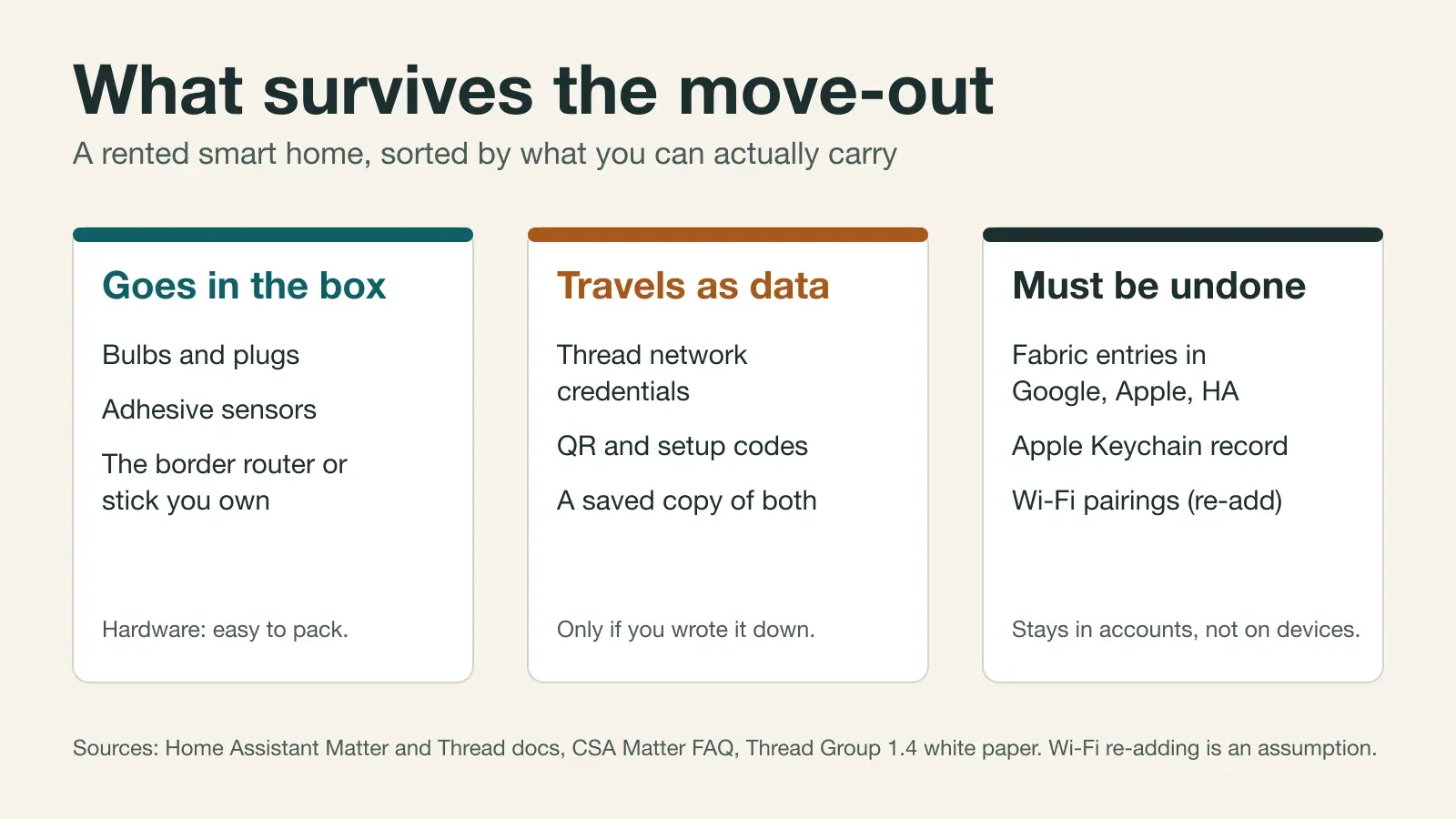
Bottom line: Thread and Matter don't compete, so a tenant isn't picking a winner. A bulb unscrews in seconds, but its pairing doesn't come off with it. Sort everything in the rented flat into what goes in the box, what travels as data, and what must be undone before you hand back the keys.
Why Is "Thread vs Matter" the Wrong Question for a Tenant?
Because they live on different layers. The CSA's Matter FAQ says Matter is a protocol that runs over other technologies like Wi-Fi, Ethernet, Thread and Bluetooth, with Bluetooth LE used for setup. Thread is one of the roads. Matter is the language spoken on it. If you want the radio-by-radio comparison, which radio fits which wall covers it, and the renters guide covers what you're allowed to stick or screw to a tenancy.
This piece adds a third axis. Mounting tells you what you can put up without a drill. It says nothing about what stays behind when you take it down.
So what's left? Three things, and each needs its own plan:
- The box: hardware you can physically pack.
- The data: network credentials, setup codes and backups, which only travel if you saved them.
- The paperwork: memberships in Google, Apple and Home Assistant accounts that outlive the hardware.
What Goes in the Box?
Bulbs, plugs, adhesive-mounted sensors, and the one box people forget to count: whatever acts as your Thread border router. Home Assistant's Thread page lists Home Assistant Yellow, Connect ZBT-1 and ZBT-2, Google's Nest Hub and Nest Wifi models, and Apple's HomePod and Apple TV 4K among them. Some are sticks. Some are speakers. Some are Wi-Fi routers.
Check that last group before you build anything. If your border router is also the thing you'd leave behind or can't take, whether that's a landlord-supplied router or a speaker that's staying in the flat, then the mesh is tied to something you won't be holding.
What Does Thread Carry That You Can't Box Up?
Credentials. Home Assistant's docs say it stores Thread network credentials, and that they work like a Wi-Fi password for the mesh. A border router announces that a network exists, but not its credentials. The Thread Group's white paper puts the consequence bluntly: without the credentials, adding a new Thread device to an existing network is impossible, and setting up a new border router would typically form an entirely new network.
Vendors make it worse. Home Assistant says each vendor forms its own network when you start using its products, and that devices can't roam between those networks.
Now put that in a tenancy. Say your Thread network was formed by a speaker's border router, and the speaker doesn't make it to the new flat. As I read the documents, the devices keep their old credentials and have nowhere to use them. The docs I read don't test that exact case, so this is an inference, not a measurement. It matches what I'd expect from the white paper's wording, though.
The fix is dull and cheap. Form your own network on a border router you'll carry, mark it as the preferred network in Home Assistant, and import any ecosystem network you already have. The Thread page describes a "Send credentials to Home Assistant" action in the companion app for exactly that. It also says the network is managed by Home Assistant and not stored on the adapter, and that swapping adapters moves the network to the new radio. That's the property a tenant wants: the identity lives in software you own, not in a plastic puck.
A smart bulb unscrews in seconds. Its pairing doesn't come off with it.
Does Thread 1.4 make this go away?
It's meant to ease it. The Thread Group's 1.4 features white paper describes credential sharing: a user grants temporary administrative access to an existing network with a one-time passcode, a short-lived key is derived from it, and an app can then fetch the credentials. Border routers that are certified for Thread 1.4 have to support the exchange. That's a real fix for the "new border router starts a second network" problem.
But a standard in a PDF isn't a button on your phone. What matters in a tenancy is whether the specific border router you own supports it today, and I can't tell you that for your model. Write the credentials down anyway. The Thread troubleshooting guide makes the same point from the owner-report side, and the setup guide covers forming a network you own in the first place.
What Does Matter Carry?
Memberships. Home Assistant's Matter page says you can join the same device to multiple controllers and that the standard expects each device to support at least five fabrics. A fabric is one controller's relationship with a device, so a bulb that sits in Google Home, Apple Home and Home Assistant holds three of them. All three outlive a move, unless you cut them.
Setup codes are the other half. The Home Assistant page notes that after a device is reset, you need its QR code or numeric setup code to add it again, and it advises keeping a backup of the code. Photograph the sticker before the device goes on a wall. Why leave that to chance?
The CSA says Matter is a local technology, so Matter-only devices need an internet-connected controller in the home for remote access. That makes the controller the first box to unpack at the new address, not the last. Matter 1.4 added Enhanced Multi-Admin, which the CSA's 1.6 announcement describes as sharing device access across platforms with a single user consent, and it's one reason a fabric list gets long.
What about Wi-Fi-based Matter devices?
Here the picture is murkier. A Wi-Fi Matter device is commissioned onto a specific network, and a new flat means a new router. I searched for a documented way to change the Wi-Fi credentials of an installed device without a reset and didn't find one. So my working assumption is that you'll re-add each of them. That's an assumption, not a finding. Cheap plugs are fine on those terms, because re-adding a plug costs minutes. A glued-up sensor you'd have to peel off is a worse candidate.
The new network matters in another way. Home Assistant warns that Matter is designed for regular residential network setups, that Wi-Fi Matter devices and Thread border routers should sit on the same VLAN as Home Assistant, and that multicast filtering and IGMP snooping can break discovery. An ISP router you can't configure is exactly where that bites.
The Move-Out Ledger at a Glance
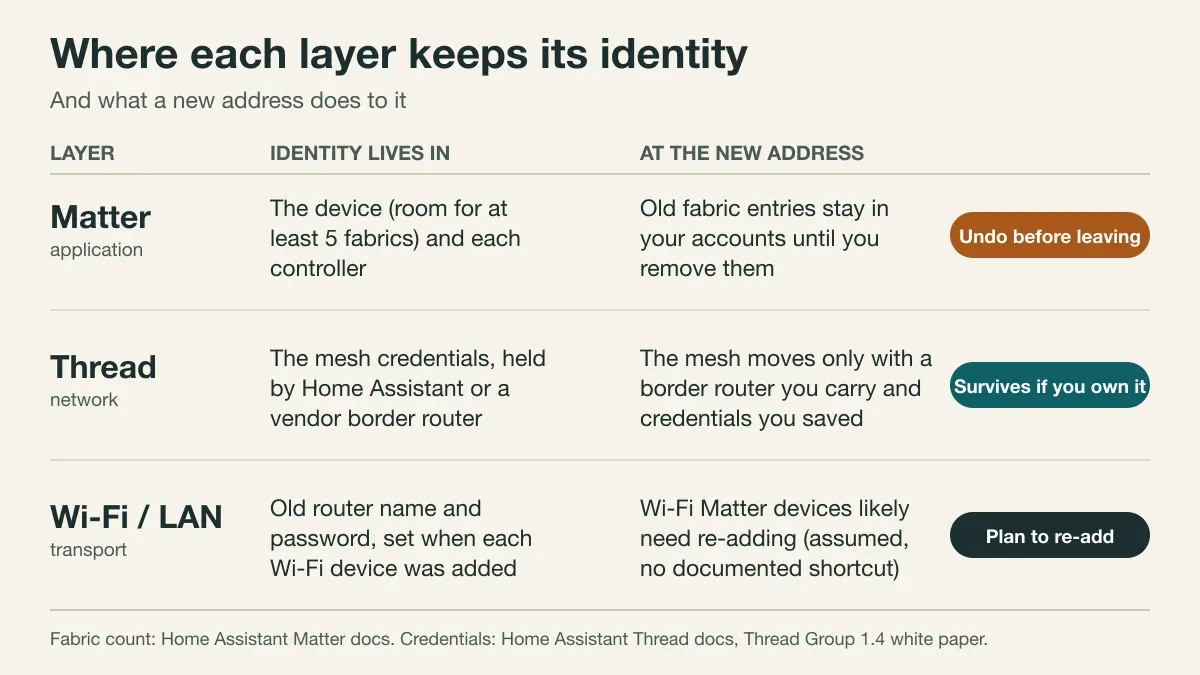
| Piece | Goes with you? | What the new address changes |
|---|---|---|
| Matter-over-Thread bulb or sensor | Yes, if its mesh credentials travel | Nothing, when your own border router and dataset come along |
| Matter-over-Wi-Fi plug | Hardware yes | Re-add against the new router (my assumption, not documented) |
| Border router you own (stick, Home Assistant box) | Yes | The new LAN must pass IPv6 and multicast traffic |
| Border router you can't take (speaker, landlord router) | No | The mesh it formed stays with it |
| Fabric entries in Google, Apple, Home Assistant | They stay in the accounts | Remove them from the old devices before you leave |
What Should the Exit Checklist Look Like?
What survives a move-out is what you prepared for, so I'd run this list a week before the keys go back, not on the last evening. In order:
- Note the Thread credentials on the preferred network, and keep that note outside the flat's Wi-Fi.
- Photograph the QR codes and numeric setup codes for every device you plan to re-add.
- Decide per device: pack it, or leave it. A device you leave stays in the landlord's flat, still listed in your accounts.
- For anything you leave, remove it from each controller via Manage fabrics, and delete the Apple Keychain entry if Apple Home held it.
- Reset devices using each maker's own instructions. The Home Assistant pages don't give a reset procedure, and neither does the CSA FAQ. I checked both.
- Pack the border router and controller last, so you have a working home until the final day.
If you plan to leave anything for the landlord, say so in writing. The renters guide has the framing that tends to work.
Which Would I Pick?
Not a radio. A place for the identity to live. My rule would be one box I own, holding both the Thread network and the Matter controller, which for most readers means a Home Assistant machine. Everything else follows from that.
Then, an opinion you can argue with: in a rental, don't buy Thread-only sensors unless you also own the border router that formed the mesh. The sensor is cheap. The network it belongs to is the part you can't repurchase. Wi-Fi Matter plugs are the opposite case. They're cheap to re-add, so they're a fine fit when you don't know how long you'll stay.
And the version number on the box? Matter 1.5.1 is the maintenance release from March 31, 2026, and Matter 1.6 followed on June 17. Home Assistant's Matter page doesn't state which spec version it implements, so a device's version tells you little about whether your controller will use it. It's the same lesson as the Home Assistant Matter network map piece: look at what your controller supports, then buy.
Could Matter 1.6 make landlords part of the answer?
Maybe, eventually. The CSA's 1.6 announcement describes Joint Fabric as a new multi-admin method where multiple user-authorised controllers co-administer a single shared Matter network, and says administrators can be added or removed without affecting devices. It names new-construction handovers, multi-platform households and professionally managed properties as uses. That sounds close to a landlord and a tenant, but the announcement never says so, and I haven't checked which products ship it. It also adds NFC commissioning, which could make re-adding a device a matter of holding a phone near it. Don't plan a tenancy around either feature yet.
What Does This Mean for My Own House?
The same test applies, and that's the most useful thing I took from the research. A tenant asks what happens on move-out. A builder should ask what happens when the box that owns the network dies. Same question, different trigger.
My Home Assistant machine runs on a DIN rail, as the rack write-up shows, with a Connect ZBT-1 on Zigbee firmware. Thread isn't running here. The plan is a separate ZBT-2 in Thread mode, which is why I read the pages about credentials with such attention. If Home Assistant owns the Thread dataset and I keep a written copy, replacing a stick becomes a documented adapter migration instead of a weekend of re-pairing. I'd rather learn that from the Thread page now than from a dead adapter later. My Zigbee layer has the same logic, covered in Zigbee mesh reliability.
What Couldn't I Confirm?
- Whether a Wi-Fi Matter device can change networks without a reset. I found no documented method.
- What happens to Thread devices when the border router that formed their network leaves. The Home Assistant page doesn't say.
- Whether a Home Assistant backup carries the Thread dataset in every setup. I didn't test it.
- Which shipping products support Joint Fabric. I didn't check.
- The Thread 1.4 specification itself. I read the white paper, which summarises it.
Frequently Asked Questions
Do Thread devices need re-pairing after a move?
Not by definition. A Thread device joins a mesh that has its own credentials, and Home Assistant says it stores those separately from the radio adapter. If the same credentials come along on a border router you own, the devices should find the mesh again. If the mesh was formed by a speaker or hub you no longer have, expect to reset and re-add them. I haven't moved a mesh myself, so treat this as a reading of the docs.
Is it Thread or Matter for a rental?
It's a trick question. The CSA describes Matter as a protocol that runs over Wi-Fi, Ethernet and Thread, with Bluetooth LE for setup. So you choose a transport for your Matter devices, and for a tenant the better guide is which transport leaves less to undo. Thread keeps its own network credentials. Wi-Fi devices depend on the router at the new address.
What should I do with smart devices I leave for the landlord?
Remove them from every controller first. Home Assistant's Matter page says a device is detached from a controller under Manage fabrics, and that an Apple Home entry also needs its Keychain record removed. A device can sit in several fabrics at once, so one removal isn't enough. Then hand over the setup code, because after a reset the device needs it again.
Does Matter 1.6 help tenants and landlords share devices?
Possibly, later. The CSA says Matter 1.6 adds Joint Fabric, where several authorised controllers co-administer one shared Matter network, and it names professionally managed properties among the intended uses. The announcement doesn't mention tenants, and I haven't checked which products support it. Today, plan for the older multi-fabric route.
Sources & References
- Home Assistant - Matter integration home-assistant.io Documentation
- Home Assistant - Thread integration home-assistant.io Documentation
- CSA - Matter FAQs csa-iot.org Standards body
- CSA - Matter 1.6 announcement (June 17, 2026) csa-iot.org Standards body
- CSA - Matter 1.5.1 announcement (March 31, 2026) csa-iot.org Standards body
- Thread Group - Thread 1.4 Features White Paper (September 2024) threadgroup.org Standards body
- Thread Group - Thread Benefits threadgroup.org Standards body