Zigbee Mesh Reliability in Home Assistant: What the Docs and Owners Agree On, and Where They Don't

This post may contain affiliate links. As an Amazon Associate we earn from qualifying purchases. Disclosure.
Every Zigbee network that drops devices gets the same advice: add routers, move the dongle, change the channel. The Zigbee2MQTT and ZHA documentation and a few long owner threads agree on some of it and flatly contradict each other on the rest. Here is the cross-check, with the arithmetic done.
I'm going to be straight about where my evidence stops. My house is still being finished, the Zigbee layer there isn't a lived-in network yet, and I haven't measured a single dropout, collision or range figure on it. So this isn't a field report. It's a cross-check. I read the Zigbee2MQTT network guide and the ZHA documentation end to end, Silicon Labs' explanation of how parents and sleepy children behave, and three long Home Assistant community threads where owners tried to fix real networks. Then I looked for the places where those sources disagree, because that's where people lose weekends. The one thing I did run myself was the channel arithmetic, using the planner code that ships with this site.
Bottom line: on mesh reliability the sources agree on the boring, strong fixes: enough mains-powered routers, a coordinator kept away from USB 3 noise, no power cuts to routers, and patience after any change. They disagree on where to pair a battery sensor, on what "unavailable" means, and on whether the channel is a first fix or a last one. My ordering is at the end. The short version is that the channel change goes last, because it's the only fix that can strand devices.
What Does a Zigbee Mesh Do When It Breaks?
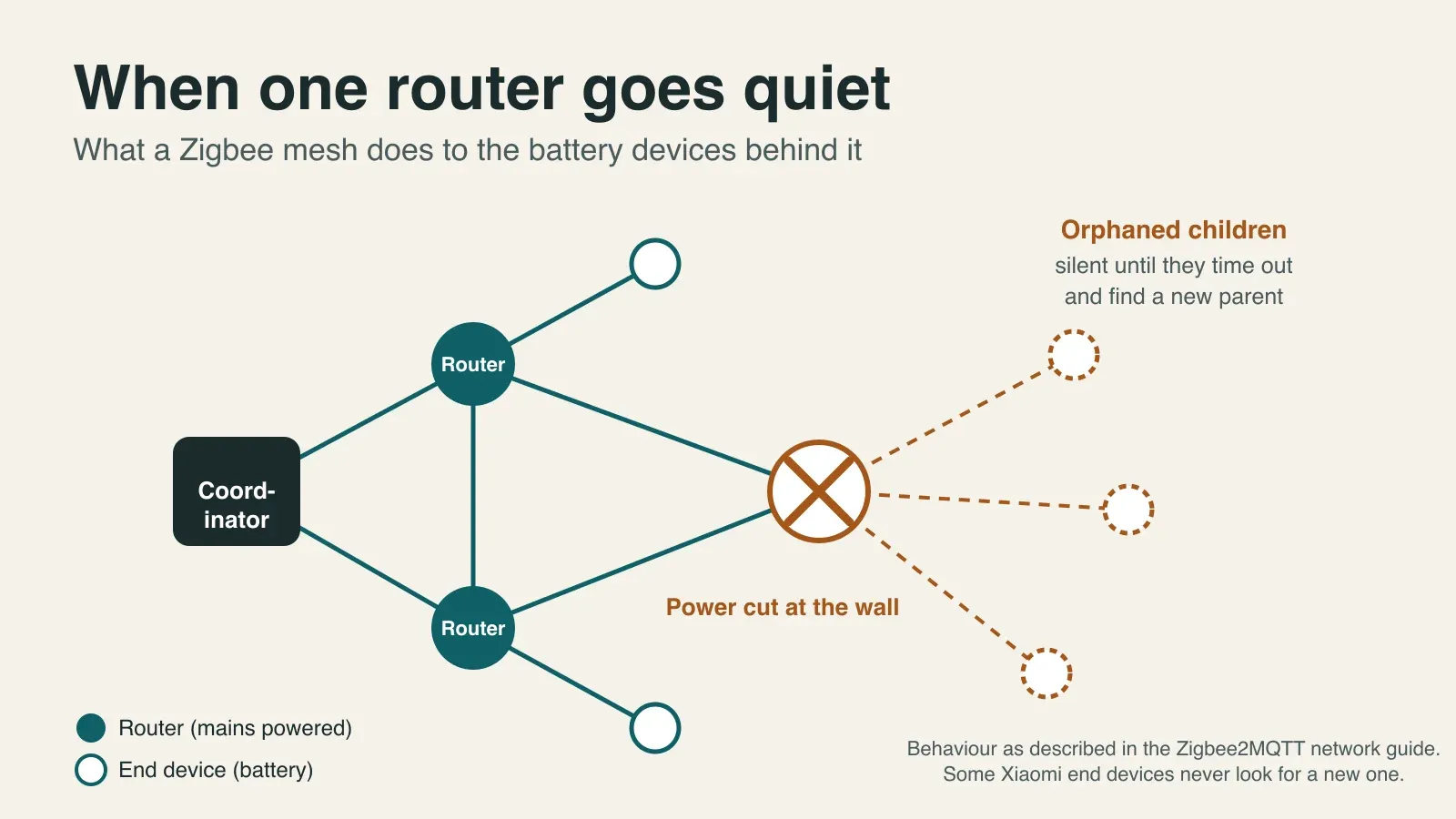
Start with the plumbing, because every symptom below follows from it. Zigbee2MQTT's network guide says a network has exactly one coordinator, plus any number of routers and end devices. Routers relay traffic and never sleep. End devices are the sleepy, battery-powered ones, and each has one parent, generally the closest router or coordinator at the moment it was paired. Everything to and from that device goes through the parent.
So what happens when the parent disappears? Per the same guide, all traffic to its children stops until those children time out and go looking for a new parent. Some end devices, Xiaomi models in particular, never go looking. They stay isolated until you re-pair them. That's the picture in the hero image above, and it's why a mesh that "worked for months" can lose three sensors at once when one plug gets unplugged.
Silicon Labs' documentation explains the timing side. A parent buffers messages for its sleeping child, and the child has to poll its parent within a timeout or it's aged out of the parent's child table. A parent that gets a poll from a child it doesn't know tells it to leave and rejoin. A child that keeps getting no answer tries to rejoin to find a new parent. The page I read doesn't state a default timeout, so I won't invent one.
My own small data point is old and unscientific. In my flat, Aqara Zigbee sensors have outlived two changes of coordinator. That fits the Zigbee2MQTT FAQ, which says that after an adapter swap you may only need to wait and power-cycle a few routers. It's one flat, though, not a test.
How Many Routers Is Enough, and Which Ones Are Bad?
ZHA's documentation is the only source that puts numbers on it. The zigpy library caps a coordinator at 32 direct children. Hundreds of devices can still join through routers, and the worked example goes like this: 32 end devices and 3 routers leave 29 direct slots, each router adds 16, and the total is 77. The page itself says you'll likely need more routers than that example in practice.
Zigbee2MQTT says the same thing in plainer words: add routers to fix both the forward and the return path. It also gives a warning I hadn't seen elsewhere. Raising a coordinator's transmit power can make links lopsided, where messages reach the device but the replies don't come back. More power isn't the cure. More routers are.
Which devices count as routers? Most mains-powered ones. Zigbee2MQTT lists one exception that matters for anyone planning smart switches: most AC relays installed without a neutral wire don't route. My own house was wired with a neutral in every switch box, so that exception shouldn't bite me, but I haven't paired a single controller there yet to confirm it.
Not every router is a good one. Zigbee2MQTT names some versions of the Sonoff S26R2ZB plug as limited and says they can cause routing errors. The fix it gives is to add better routers and re-pair devices while allowing joins only through the new one. ZHA's page goes further and lists brands whose routers some Xiaomi and Aqara devices reportedly refuse to work with, among them Ledvance/OSRAM, Orvibo, Securifi and SmartThings, while IKEA and Nue/3A mains devices get better reports. Those are owner reports collected in documentation, not lab results.
I buy a lot of cheap Zigbee GU10 bulbs, in batches, for the house. Do they make good routers? I don't know. The forum suspicion of no-name bulbs is real, but the official docs name a plug, not a bulb, and I couldn't verify a specific bad one. In the 2023 ZHA thread about losing devices, a person with 44 devices lost roughly one a week, and the culprits were mostly battery end devices, not the mains bulbs. That's the pattern I'd bet on: routers are rarely the weak link, and their children are.
Where Should You Pair a Battery Sensor?
Here the sources split, and I'm part of the split.
ZHA's documentation says to pair devices where you intend to use them, and that pairing next to the coordinator and moving the device later can degrade the connection. Zigbee2MQTT's network guide explains the mechanism: the parent is generally the closest device when the end device paired. My own Zigbee2MQTT setup guide says the opposite. It tells you to pair within about six feet of the coordinator and then move the device. For a mains-powered router, that's harmless. For a battery sensor it may leave the coordinator as its parent after you carry it to the far bedroom.
Zigbee2MQTT's FAQ adds a twist. If the interview fails, try pairing near a bulb acting as a router instead of the coordinator. And the pairing page shows how to pick the router that accepts the join, with a warning that the choice isn't guaranteed or permanent.
My ruling, and you can disagree: for battery sensors, pair them where they'll live, through a router if the tool lets you. I've changed the line in my Zigbee2MQTT guide to say so. Should you ever add routers later, expect to re-pair the sensors that don't move to them, because a 2023 ZHA thread has owners advising exactly that.
Which Channel Should You Use?
Zigbee and Wi-Fi share the 2.4 GHz band. Zigbee channel k is centred on 2405 + 5 x (k - 11) MHz and is about 2 MHz wide. Wi-Fi channel n is centred on 2407 + 5 x n MHz and is 20 to 22 MHz wide. I ran every pair through the channel planner module in this blog's repository, which is the same code behind the browser tool, and drew the result.
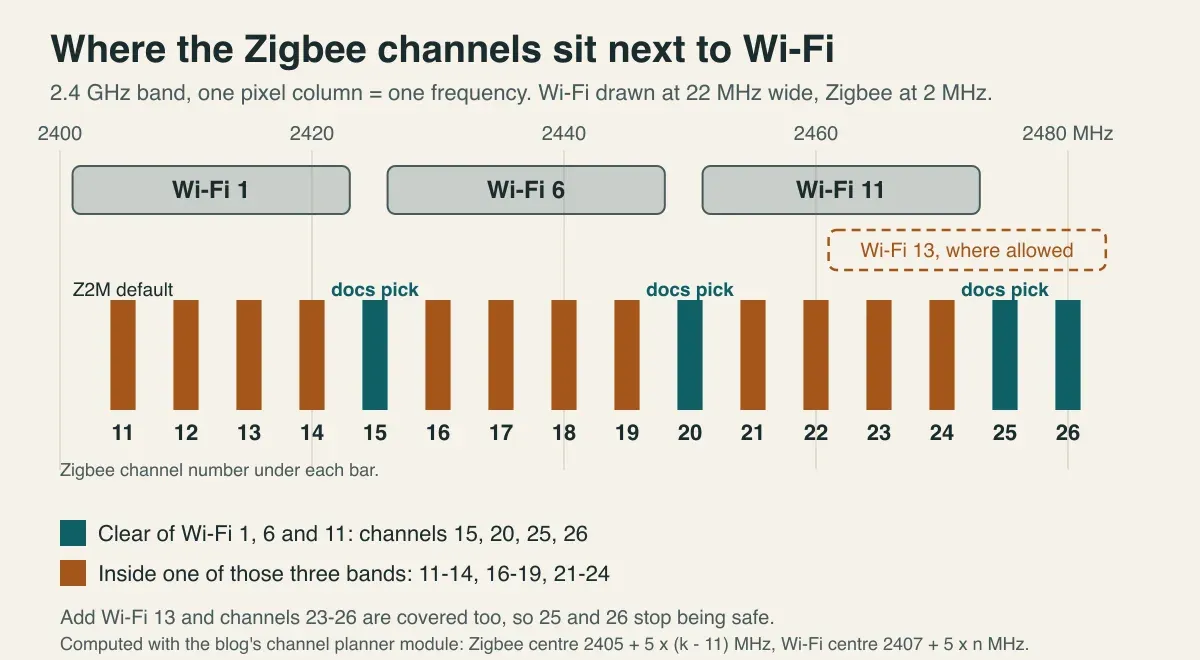
With Wi-Fi on the classic 1, 6 and 11, the clear Zigbee channels are 15, 20, 25 and 26. That's why both projects point at 15, 20 and 25. It also shows two things the documentation leaves unsaid.
First, Zigbee2MQTT's default is channel 11, and channel 11 sits inside the band of Wi-Fi channel 1 at either width. Its docs recommend the Zigbee Light Link channels 11, 15, 20 and 25 and don't tie that to Wi-Fi at all, so a new owner who never touches the setting inherits the overlap. ZHA's docs say to keep the ZHA default, or use its Smart option, which scans once and prefers 15, 20 and 25.
Second, an owner thread claims channel 25 "partially overlaps" Wi-Fi channel 11. By the nominal bands it doesn't: the edge gap is 1 to 2 MHz. Real transmitters spill energy past their nominal edge, so the claim is plausible, but it's a guess, and the person who made it called the diagnosis a guess. Where Wi-Fi channel 13 is allowed, though, channels 23 to 26 sit inside it, and 25 and 26 stop being safe.
The documents also disagree on order. ZHA says to fix Wi-Fi first, with a static channel on your router and access points, before touching Zigbee. A 127-device owner with five Wi-Fi access points couldn't do that, and the thread ended with the owner splitting into two smaller networks, no diagnosis proven. If you want the arithmetic for your own neighbourhood, the Zigbee and Wi-Fi channel planner ranks all sixteen channels against the networks you list.
Then there's the cost of moving. Zigbee2MQTT supports a channel change on Z-Stack and Ember adapters, sleeping devices follow when they wake, and some devices don't support it at all and need a re-pair. ZHA says reconnection can take up to an hour and recommends power-cycling end devices. One ZHA owner says every device had to be re-paired. In that same thread a user moved from 15 to 20 as Hue motion sensors kept dropping, got two to three weeks of relief, saw the failures return, and later reported channel 24 stable as of mid-March. I don't know that user's Wi-Fi plan, so I can't say whether 24 was clear for them. It shows only that a channel change can fix a symptom for a while.
Change the Zigbee channel last. It's the one fix that can strand a device.
Is the Coordinator in a Bad Spot?
Both projects agree here, and the agreement is the useful part. Use a USB 2.0 port, because USB 3 devices and unshielded USB 3 cables are widely reported to disrupt 2.4 GHz reception. Put the adapter on an extension cable. Zigbee2MQTT says 50 cm is enough to reduce interference, and ZHA asks for a long, shielded one. Keep it away from power supplies, appliances and Wi-Fi access points, and ideally near the middle of the house. Zigbee2MQTT also lists other 2.4 GHz neighbours: Bluetooth gear, Logitech and Razer wireless gaming dongles, wireless audio transmitters, Zigbee-based utility meters and a Philips Hue hub running its own network.
Where does that leave me? As I described in the DIN-rail host write-up, the Home Assistant machine sits in the distribution board, which is mains wiring, power supplies and metal, and the plan is a ZBT-1 on a short USB extension away from the Pi and the enclosure. Is "short" 50 cm? I haven't checked, and I haven't measured what the location does to range. The documented escape hatch is an Ethernet-attached coordinator mounted centrally, covered in the coordinator comparison, and I'd reach for it the day a map shows long, thin branches.
Can One Chatty Device Slow the Whole Network?
Yes, according to Zigbee2MQTT, and the evidence from owners is uncomfortably vivid. The troubleshooting page says devices that spam reports crowd the network and reduce stability, names Tuya devices and some mmWave sensors as known offenders, and offers one cure: lower the reporting rate. For devices that won't let you, its advice is blunt. Replace them.
The best-documented case is a recent thread. A home owner swapped every wall switch for 14 Moes Star Feather switches and watched the network turn sluggish, with responses ranging from instant to about 10 seconds. The Zigbee2MQTT health dashboard showed some switches sending more than 1.35 messages per second. Filtering attributes didn't help. A helper pointed at a Zigbee2MQTT issue reportedly fixed in November 2025, and the thread has no confirmed resolution. Zigbee2MQTT also says the network averages about one broadcast per second, and that groups, routing and Green Power devices all use broadcasts.
Fourteen switches and a slow house is a number I'd keep in my head. The Zigbee items on my own list include mmWave ceiling presence sensors and a mix of Tuya gear, which are the two families Zigbee2MQTT names. Is that a problem? Possibly not. Nothing here is measured, so my plan is to look at message rates before and after adding each family.
What Does "Unavailable" Actually Mean?
Two stacks, two clocks. Zigbee2MQTT's availability page expects a router to check in every 10 minutes, pings it when it doesn't, and marks it offline if the ping fails. Battery devices get 25 hours and can't be pinged. ZHA marks a mains device unavailable after 2 hours of no activity and a battery device after 6.
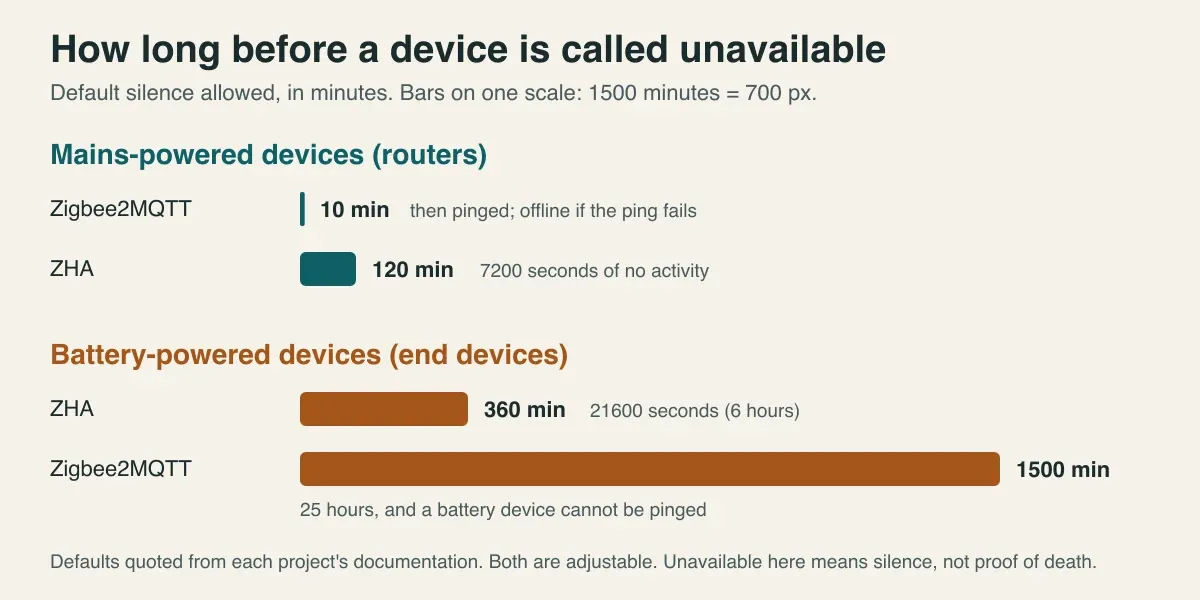
Same flaky sensor, different dashboards. A Zigbee2MQTT user sees a plug go offline in 10 minutes, and a ZHA user sees nothing wrong for 2 hours. Neither number says the device is dead. Both are adjustable, so before you compare two people's complaints, check which clock they're reading.
The topology views carry a similar split. Zigbee2MQTT's FAQ says a link missing from the map usually doesn't mean the device left, because sleeping end devices can drop out of a parent's child table and still communicate through it. ZHA's documentation says the same about missing links for sleepy devices. They diverge on signal numbers. ZHA calls an RSSI of -60 or better strong and -80 or worse a sign of a noisy environment, then says LQI isn't standardised between vendors and to ignore both unless you have Zigbee expertise. Zigbee2MQTT tells you to rotate the adapter while watching the link quality value. My reading is that both can be right, because LQI is only safe for comparing one device with its own past, not a Hue bulb with an IKEA one.
How Long Should You Wait After a Change?
Longer than you want to. Zigbee2MQTT says moving, removing or re-pairing a router, or migrating the coordinator, changes routes and tables and can briefly cause route errors, slow responses and silent devices. A good network settles in minutes or seconds. Otherwise it can take a few hours. One owner thread says the mesh needs a few hours to stabilise while each router builds its neighbour list, and an owner there suggests switching Home Assistant off for over an hour to force a recalculation, which they call a bodge. I'd treat that last one as folklore until someone documents it.
After a coordinator migration the numbers vary by stack. ZHA says devices normally rejoin within an hour. For Ember-based adapters in Zigbee2MQTT, a failed IEEE migration can make devices leave seconds after pairing, and the documented steps are verify the byte order, check for a stack bug, then factory-reset the adapter, with a backup of the coordinator file and the configuration first. If your working devices are already fine, the page says migration is often unnecessary.
The practical lesson is dull. One change, then wait, then look. Stack three changes in an evening and you'll never know which one helped.
Does a Wall Switch Break the Mesh?
I found no official page that tests this, so treat it as reasoning, not evidence. ZHA's documentation says mains-powered devices act as routers and should be kept powered and available. Zigbee2MQTT says a router's children go quiet when it goes offline. Put those together and a bulb that someone switches off at the wall isn't a router for the evening, and whatever hangs off it goes with it.
My house avoids this by design, for a different reason: every bulb stays permanently powered and a controller in a deep box decides when it lights. Whether that keeps the mesh calmer is something I can't tell you yet. There's a catch on the same topology. When Home Assistant is down, the lights go with it, which is a different failure from the one in this article.
What Would I Check First, and in What Order?
This ordering is mine, built from where the sources agree, with the reversible fixes first.
- Look before touching anything. Open the network map or visualisation, and write down which devices drop and whether they run on batteries or mains.
- Fix the coordinator's position: USB 2.0, an extension cable of at least 50 cm, away from noise sources.
- Add mains-powered routers where the map shows a long single-link branch. Pair battery sensors where they'll live. Re-pair any that don't re-parent.
- Find the chatty devices, lower their reporting, and replace the ones that won't listen.
- Update the coordinator firmware.
- Fix Wi-Fi first: static channels on your router and access points, per ZHA.
- Only then change the Zigbee channel. Back up first, change nothing else that evening, and expect a few devices to need a re-pair.
Wait between steps. How long depends on the step, but "a few hours" is the honest figure from the sources.
What Could I Not Confirm?
Plenty, and you should know where the holes are.
- I have no measurements from my own network, so nothing in this article is a result. The channel chart is arithmetic, not a survey of anyone's air.
- I couldn't confirm that ZHA can't stop a bulb from routing. A 2023 owner reply says the underlying library lacks the feature. I didn't verify that against current code.
- I found no official statement on wall switches and routers.
- The Silicon Labs page doesn't give a default poll timeout, so I gave none.
- The owner threads are anecdotes. They show what people tried, not what's typical. Where a thread named no fix, I said so.
The wider case for keeping the radio layer under your own control is in why I chose Home Assistant. The mesh part of that argument is simple. A Zigbee network belongs to you, which also means its failures do. If you want to see which protocol suits which house before you build a mesh at all, start with Thread vs Zigbee vs Matter by scenario. And if a device simply won't show up, the discovery troubleshooting guide covers the Wi-Fi side. When a first measurement of my own mesh exists, I'll rewrite this around it.
Frequently Asked Questions
How many routers does a Zigbee network need?
No document I read gives a ratio. ZHA's documentation says a healthy network needs many routers fairly close together, and that the zigpy library caps the coordinator at 32 direct children. Its worked example, 32 end devices and 3 routers, ends at 77 devices in total. This site's channel planner flags more than 8 battery devices per router as thin, but that number is our own rule of thumb, not a specification.
Which Zigbee channel should I use?
ZHA says to keep its default and, if you choose, to prefer 15, 20 or 25. Zigbee2MQTT defaults to 11 and lists 11, 15, 20 and 25. Against Wi-Fi channels 1, 6 and 11, channels 15, 20, 25 and 26 are the ones that sit clear of all three bands. Channel 11 sits inside the band of Wi-Fi channel 1, which is the most common one.
Why do my Zigbee devices keep going unavailable?
The label only means silence. Zigbee2MQTT marks a router offline after 10 minutes without a message plus a failed ping, and a battery device after 25 hours. ZHA waits 2 hours for mains devices and 6 hours for battery ones. Real causes in the sources I read were too few routers, a router that lost power, a chatty device flooding the network, and 2.4 GHz interference.
Do I have to re-pair devices after changing the Zigbee channel?
Not necessarily. Zigbee2MQTT supports a channel change on Z-Stack and Ember adapters, and sleeping devices follow the next time they wake. Some devices don't support it and need a manual re-pair. ZHA's documentation says reconnection can take up to an hour. One ZHA owner thread says all devices had to be re-paired, so plan for the worse case.
Does switching a Zigbee bulb off at the wall hurt the mesh?
Probably, if the bulb is a router. ZHA's documentation says mains-powered devices should be kept powered and available, and Zigbee2MQTT says the children of a router that goes offline fall silent until they time out. I found no official page that tests wall switches specifically, so this rests on that wording and on how parents and children work.
Sources & References
- Zigbee2MQTT - Improve network range and stability zigbee2mqtt.io Documentation
- Zigbee2MQTT - Zigbee network (coordinator, routers, end devices) zigbee2mqtt.io Documentation
- Zigbee2MQTT - Zigbee network configuration (channel, network key) zigbee2mqtt.io Documentation
- Zigbee2MQTT - Device availability zigbee2mqtt.io Documentation
- Zigbee2MQTT - Pairing devices zigbee2mqtt.io Documentation
- Zigbee2MQTT - Troubleshooting zigbee2mqtt.io Documentation
- Zigbee2MQTT - Frequently asked questions zigbee2mqtt.io Documentation
- Home Assistant - ZHA integration documentation home-assistant.io Documentation
- Silicon Labs - End devices and polling (Zigbee concepts) docs.silabs.com Documentation
- Home Assistant Community - Losing devices with ZHA community.home-assistant.io Community
- Home Assistant Community - ZHA drops all devices community.home-assistant.io Community
- Home Assistant Community - Extreme network congestion after installing 14 Tuya switches community.home-assistant.io Community