Somfy Izymo Transmitter io Behind a Wired Wall Switch
Product Details
🏭 Manufacturer: Somfy
📄 Specification Met: CE
🔖 Part Number: 1822609
🏳️ Country of Origin: France
🆔 Model Number: Izymo Transmitter io
📐 Size: One Size
🎨 Style: Micromodule
🧲 Mounting Type: Back Box
🔧 Usage: Wall Switch to io-homecontrol Transmitter
🧩 Included Components: Izymo Transmitter io module, CR2430 cell fitted, wiring leads, instruction leaflet
🔋 Batteries Included: Yes
🔋 Batteries Required: Yes
The Somfy Izymo Transmitter io is a small radio micromodule that sits behind an ordinary wall switch and turns every press into an io-homecontrol command. It doesn't switch a load and it doesn't need a neutral. I have two of them in the garage, wired behind pushbuttons that open and close the garage roller blinds, and that's the case this page is written around.
What Does the Somfy Izymo Transmitter io Actually Do?
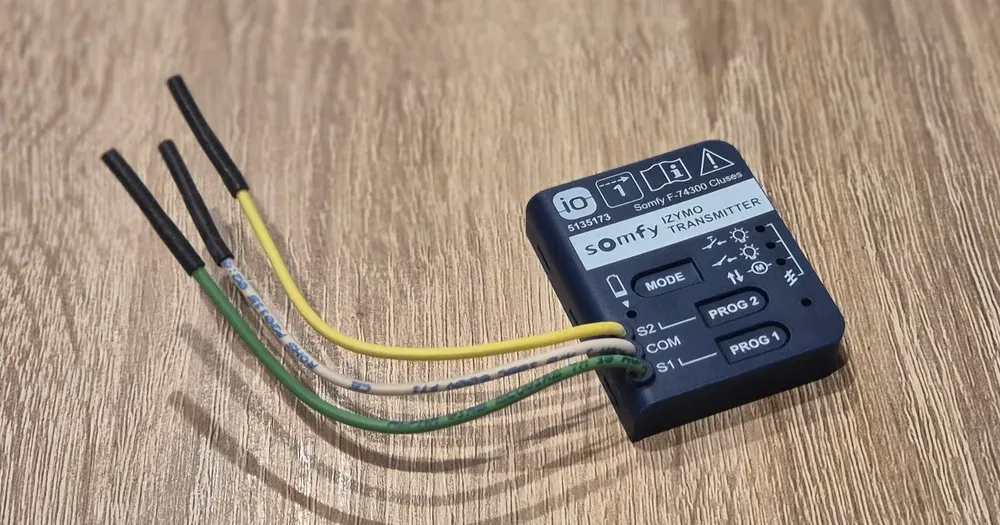
It turns a wired button into a radio transmitter. That is the entire job, and the narrowness is the point. Three terminals are printed on the module face: COM, S1 and S2. Wire a button between COM and S1 and each press becomes a radio command on the 868 MHz band that Somfy shares with the rest of the io-homecontrol alliance. Wire a second button between COM and S2 and you have a double switch.
Power comes from one CR2430 lithium cell. Somfy's product page quotes a radio range of 200 m in the open on 868.700 MHz, and the installation manual adds 20 m through two concrete walls. The module is rated IP 20, so it belongs in a dry back box. Somfy says it fits a standard 60 mm recessed box, or a 50 mm deep one, without renovating the wall.
Two numbers can confuse a search: the label on the module in the photo at the top reads 5135173, while Somfy's catalog reference is 1822609. The leaflet is blunt about one more thing: never connect this product to the mains. The leads carry a dry contact and nothing else.
Two Channels, One Mode
Three buttons sit on the face: MODE, PROG 1 and PROG 2. The factory default is mode 1, push-button. Press MODE briefly several times to cycle through the modes, wait two seconds, and the indicator light flashes three times to confirm the choice. Somfy's manual states that the selected mode applies to both channels.
That has a practical consequence. S1 and S2 always do the same kind of job at the module level. One button for a lamp and one for a shutter isn't something the modes can express, so the clean route is to register the module in the hub and give every button its own scene.
Which Switches Can You Put in Front of It?
Somfy lists six types, which is a broader list than people expect:
- Single pushbutton
- Double pushbutton
- Single rocker switch
- Double rocker switch
- Up/down switch
- Up/stop/down switch
That means an existing wall plate often survives the retrofit.
Scenes are the exception. A TaHoma scene needs an event, a single moment where something should happen, and a latching switch only reports a state. For scene use the pairing wizard puts the requirement on its own screen before you touch a screwdriver: only pushbutton switches can start a scene. If your box holds a standard rocker today, swapping the mechanism for a bell push is a small job rather than a reason to abandon the plan.
Why Does Pairing Stall on the PROG Step?
Because the app is slow and says nothing about it. In my own notes on pairing the Izymo transmitter with a TaHoma Switch, the app needed roughly fifteen seconds to register a PROG press, with no progress indicator the whole time. The LED near the button blinks green, the screen doesn't move, and everything invites you to press again.
Don't. A second press restarts the exchange, and holding PROG for two seconds does something else entirely, since it puts a receiver into association mode instead of sending a pairing request. Press once, put the phone down and count to twenty. Both of my modules moved on by themselves.
Should the Buttons Run the Motors or Run a Scene?
You get a real choice, and it changes what the wall switch can ever do. Bind the module straight to a motor and you have a fast, dumb, reliable button that works whether or not the hub is powered. Register it with the hub and it lands under the scene launchers in the TaHoma app, where each button fires a scenario you can rewrite from the sofa.
I went the scene route. On the garage plate the upper button opens the garage roller blinds and the lower one closes them, both in Discreet mode, which is Somfy's slow and quiet motor profile. Changing what the wall does is now a few taps in the app, not a trip to the garage. The cost is honest: the press travels to the Somfy TaHoma Switch and back, so it lands a beat slower than a direct binding, and it depends on the hub being awake.
Does the Module Reach Home Assistant and Google Home?
Not as itself, and you should plan around that. The Izymo Transmitter io is registered to the hub as a central remote control, so there is no open, closed or on/off state for it to publish. What can reach Home Assistant and Google Home is the result. The blinds move, io-homecontrol is two-way so the motor reports back, and the cover entity updates a moment later. The route is the one described in the walkthrough on connecting Somfy to Home Assistant and Google Home.
One caveat belongs here. In this house the TaHoma hub isn't connected to Home Assistant yet, so that route describes how the platform works, not something I run every day. And whether the button press itself shows up as an event through the hub is unproven; test it on your own setup before building an automation on it.
What the Izymo Transmitter io Cannot Do
It's a one-way transmitter. It can't switch a light or drive a motor by itself, because Somfy sells separate Izymo receiver modules for that. It can't give each channel a different behavior through its own modes. It can't run from the mains, and there is no version that can.
Battery warnings do exist: Somfy's product page says the app and the module itself signal a low cell. None of that is a defect. It's a small radio bridge sold as a small radio bridge.
Is the Izymo Transmitter io Worth It?
If you have a wired switch position you want to keep using, yes, and without much argument. The alternative is a battery wall remote stuck beside an abandoned plate, which looks like exactly what it is. This puts the intelligence behind the wall and leaves a normal plate on top, and in a finished room that matters more than any figure on the box.
Settle two things before you buy. Confirm your buttons are momentary if you want scenes, or budget a new mechanism. And accept that one module means one mode across both channels, so buy the second module up front if that isn't enough. Discovering it later means opening the wall again.
Frequently Asked Questions
Does the Izymo Transmitter io need mains power?
No, and connecting it to the mains is explicitly forbidden in Somfy's leaflet. The module runs on a single CR2430 lithium cell. Somfy's manual quotes four years at 20 operations a day and seven years at two a day, while its product page rounds that down to three years. The three leads carry a dry contact only, which is why it fits behind a switch in a back box with no neutral.
Why does the TaHoma app not react when I press PROG?
In my pairing notes the app took about fifteen seconds to register the press and showed no progress indicator while it waited. Both modules I paired behaved the same way. Press PROG once, put the phone down, and count slowly to twenty before you decide anything went wrong. A second press restarts the exchange.
Can one module run two different device types?
Not through its own modes. The mode chosen with the MODE button applies to both channels, S1 and S2. If you want one button for a light and one for a shutter, register the module in the hub and give each button its own scene, or fit a second module.
Do the buttons have to be momentary pushbuttons?
Only for scene use. Somfy lists single and double pushbuttons, single and double rocker switches, and up/down and up/stop/down switches as compatible. To start a TaHoma scene, though, the pairing wizard asks for pushbuttons, because a scene needs an event and a latching switch only gives you a state.
Which terminal goes where on the Izymo Transmitter io?
The module face is labelled COM, S1 and S2. COM is the common line shared by the buttons, S1 is the first channel and S2 the second. Each button bridges its channel to COM, and the module reads that contact closure as a press. Somfy's manual asks you to insulate any lead you leave unused.
Technical References
- io-homecontrol alliance io-homecontrol.com Standards
- Somfy Service and Support service.somfy.com Manufacturer