The Aqara Panel Hub S1 Plus Is a Light Switch That Runs a Zigbee Network
Product Details
🏭 Manufacturer: Aqara
🔌 Plug Format: Hardwired 200-240 V AC (neutral required) or USB-C 5V 2A
🔖 Part Number: MP-K03D
📏 Dimensions: 172 x 86 x 42.2 mm
🏳️ Country of Origin: China
🆔 Model Number: MP-K03D
📐 Size: 6.9-inch screen, 1440 x 720
🎨 Style: Wall-mounted touchscreen control panel with two relays
🧲 Mounting Type: Wall Mount
🔧 Usage: Indoor Use
🧩 Included Components: Panel Hub S1 Plus, user manual, compliance statement, 2 screw kits
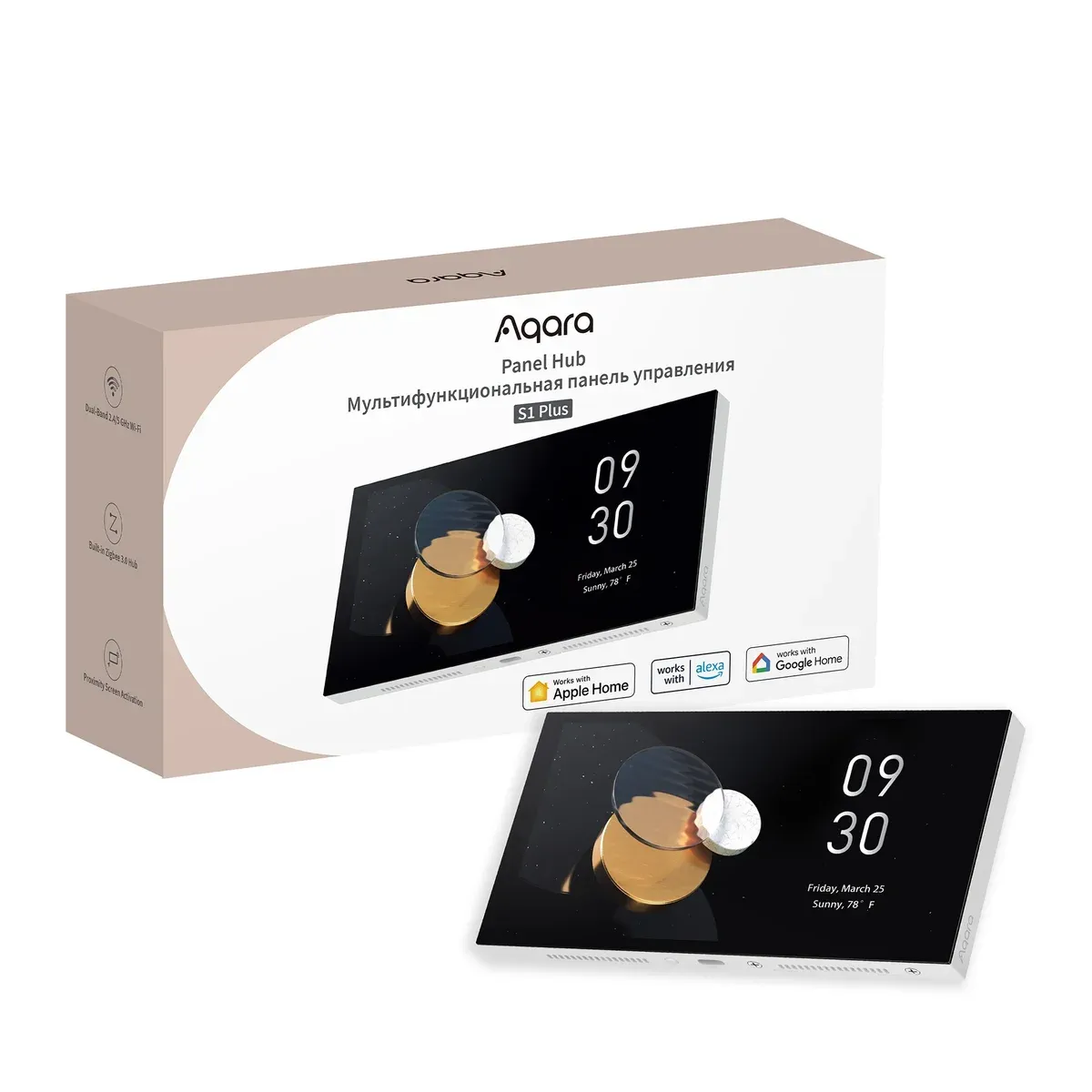
A light switch that is also a Zigbee hub is an odd category, and Aqara has been building it for a while in China before bringing an EU version west. The Aqara Panel Hub S1 Plus is a 6.9-inch touchscreen that sits in a wall box, drives two lighting circuits through its own relays, runs a Zigbee 3.0 network for up to 60 Aqara devices, and hands those devices to Apple Home, Google Home, Alexa or Home Assistant as a Matter bridge. Aqara showed it at CES in January 2025, shipped the EU model at 289.99 EUR, and the Aqara UK shop currently lists it at 359.99 GBP, discounted from a 469.99 GBP list price.
I don't own one. Everything below comes from Aqara's EU user manual, Aqara's product pages, and four independent reviews that installed it, plus the Home Assistant threads of people who paired it. This site's how we test page says that plainly, and I'd rather repeat it than pretend. What I do have is a house wired for exactly this kind of device, which is where my opinion comes in.
What the Panel Hub S1 Plus actually is
Start with the switch half. Two relays sit behind the screen and take the lighting loads on terminals L1 and L2, with live and neutral on L and N. The manual rates the whole unit at 200 to 240 V AC, 50/60 Hz, with a maximum of 8 A resistive load. The Aqara UK shop splits that into a single channel up to 300 W, or 200 W plus 100 W when both are wired. Six wireless buttons live on the screen as well, so one panel can trigger scenes or other Aqara switches that have no wire to it.
Then the hub half. It's a Zigbee 3.0 coordinator for Aqara's own sensors, switches, curtain motors and locks, and it bridges those devices into Matter. Bridges, not controls. Does the distinction matter to a buyer? More than any other line on the spec sheet, and I'll get to it.
The screen is 1440 x 720, which is sharp for the size, and it can show live video from Aqara cameras and doorbells on the same account. Four microphones and two 1 W speakers handle two-way audio and a voice assistant that answers to "Hi, Aqara" on the EU model. A proximity sensor wakes the display when someone walks up, adjustable from close to about 2.5 m, and an ambient light sensor sets brightness. Dashboards go up to ten, each holding up to 60 cards, and you can copy a layout from the Aqara Home app instead of building it on the wall.
Key specs at a glance
| Feature | Specification |
|---|---|
| Model | MP-K03D (EU) |
| Screen | 6.9-inch touchscreen, 1440 x 720 |
| Size | 172 x 86 x 42.2 mm |
| Power | 200-240 V AC, 50/60 Hz, max 8 A resistive; or USB-C 5V 2A |
| Relays | 2 wired channels (L1, L2), neutral required |
| Wireless buttons | 6 |
| Radios | Wi-Fi 802.11 a/b/g/n/ac at 2.4 and 5 GHz, Zigbee 3.0, Bluetooth |
| Thread | None |
| Matter role | Bridge for its Zigbee children, not a controller |
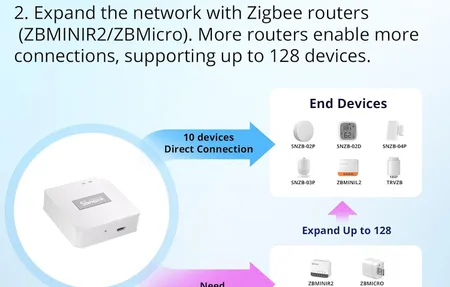
| Zigbee devices | Up to 60 (retailer and reviewer figure, not in the manual) |
| Audio | 4 microphones, 2 x 1 W speakers |
| Operating range | -10 to 40 C, 0-95% RH non-condensing |
| In the box | Panel, manual, compliance statement, 2 screw kits |
| Price | 289.99 EUR at launch; 359.99 GBP at the Aqara UK shop, list 469.99 GBP |
Matter bridge, not Matter controller
This is the spec that decides whether the S1 Plus is a hub for your house or a hub for your Aqara gear, and Aqara's marketing is careful with the wording. The panel is a Matter bridge. It takes the Zigbee devices it manages and presents them to a Matter controller somewhere else: an Apple TV, a Google Nest Hub, an Echo, or Home Assistant. It does not go the other way. A Philips Hue bulb on Matter, an Eve sensor on Thread, a third-party Matter plug: none of them can be commissioned by the S1 Plus, and none of them appear on its screen through Matter.
Thread is the other absence. There's no Thread radio in this panel, so it's not a border router, which is strange for an Aqara hub in 2025 when the Hub M3, the Hub M100 and even the small Touchscreen Switch S100 all carry one. Aqara's own product page says it outright: adding Matter-over-Thread accessories needs a Matter controller like the Hub M3 set up in Aqara Home first. Mighty Gadget's review scored the panel 90% and still listed the missing Thread radio as its main complaint, and I'd go further. A 290 EUR panel sold in 2025 without Thread is a panel you'll pair with a second hub within a year.
Why does that matter for a house on Home Assistant? Because the Thread network on a Home Assistant machine already has a border router, and what a wall panel could add is reach on the far side of the house. The S1 Plus adds Zigbee reach instead, which is useful, but only for Aqara-branded Zigbee.
What Home Assistant gets, and what it doesn't
The supported path is Home Assistant's Matter integration. You scan the pairing code, the panel joins as a bridge, and the Zigbee children come through as entities: motion, contact, temperature and humidity sensors, Aqara switches, and the panel's own two relays. The six wireless buttons arrive as unnamed entities you wire into automations yourself. Early firmware bridged only part of the device list, and Private Home Lab's July 2026 write-up says later updates fixed that, so update before judging it. Is that the whole picture? Not quite.
Some things stay on the panel:
- Power monitoring for the two relays shows on the screen and in Aqara Home, and does not reach Home Assistant through Matter. Mighty Gadget and Private Home Lab both flagged it.
- The screen shows Aqara's dashboards only. There's no way to load a Home Assistant dashboard on it, and no way to stream a non-Aqara camera to it.
- It can't act as a Zigbee coordinator for Zigbee2MQTT or ZHA. The radio belongs to Aqara Home.
- Automations built in Aqara Home run locally on the panel when the internet drops. Anything that crosses into Home Assistant depends on the Home Assistant box being up, which is true of every bridge and worth saying anyway.
A second path exists. Home Assistant's HomeKit Controller integration can pair to the panel's HomeKit code, and Chinese early adopters reported it exposes more attributes than the Matter route. The catch is that HomeKit pairing is one slot: use it for Home Assistant and Apple Home loses the panel. If you're on the Apple side of the fence anyway, our Aqara compatibility guide covers which of the sensors show up natively.
Here's my honest position. The layer above the hardware in my house is Home Assistant, on a Raspberry Pi 5 in the distribution board with a Connect ZBT-1 for Zigbee and Thread. Every wall switch is an input to that machine, not a break in the circuit, which is a decision I made at the cable stage and stand by. A panel that keeps its own Zigbee network and its own dashboard, and shares a subset with Home Assistant over a bridge, is the opposite of that design. It works. It just means a second brain on the wall with its own opinion about which devices exist.
The wall box decides this purchase
The build angle is where the S1 Plus stops being a gadget question. It needs a neutral in the box. The manual says so in the wiring step, and every UK reviewer repeated it, because older switch loops there carry only a switched live. In my house I specified a neutral in every switch box and the deepest boxes the electrician could source, not because I planned to buy this panel, but because a 42 mm deep body is the sort of thing you can't add after the plaster goes on.
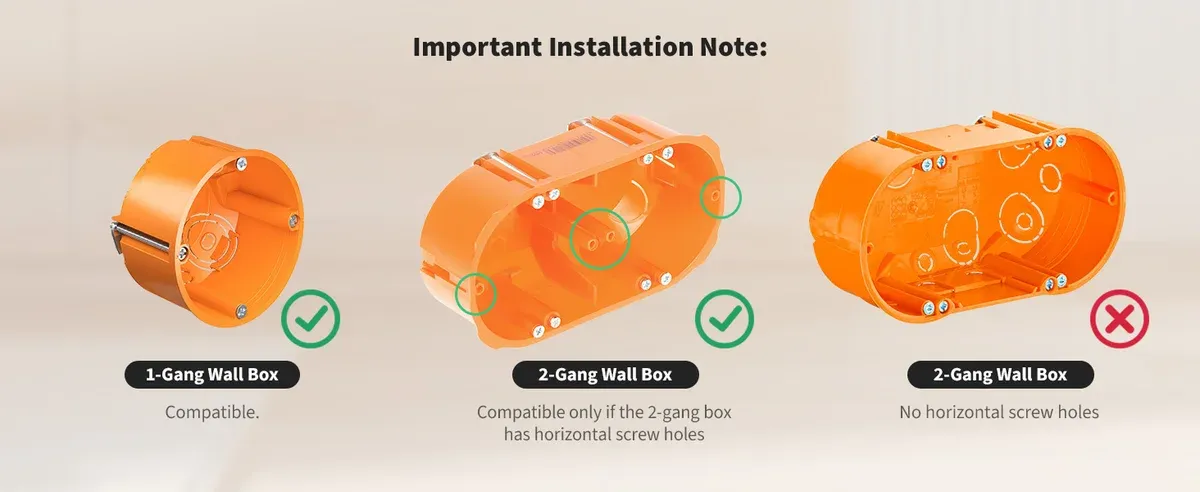
Aqara publishes a box compatibility note that's worth reading before ordering. A standard single-gang round box fits. A two-gang box fits only if it has horizontal screw holes at the standard spacing; a two-gang box without them doesn't, even though the panel is wide enough to cover it. HomeKit News, which ran the EU unit for its February 2025 review, found the terminal housing left the connector sitting a couple of millimetres proud of the wall and ended up with a 3D-printed bracket, and noted Aqara sells no stand for the wall version. Aqara has since listed a separate desktop version with a stand, which is the answer if you want the screen on a shelf.
Two more wiring details from the manual. Terminal screws are limited to 0.7 N m of torque, and Aqara wants the router between 2 and 6 m from the panel, with no metal between them. That second one is about the Zigbee radio as much as Wi-Fi: a panel buried in a metal-lined box at the far end of a corridor is a coordinator with a poor mesh. Where would you mount it? Somewhere central, at eye height, and with a neutral, which rules out a lot of walls.
What happens when this panel loses power? The relays open, the lights on L1 and L2 go dark, and the Zigbee network it coordinates goes with it. That's the same trade I accepted with a wall switch feeding Home Assistant: a single point of failure moved from copper to a computer. The difference is that my Home Assistant box sits on a UPS. A switch in a wall box doesn't.
Where the sources disagree
Product research usually turns up one wrong number, and this one turned up several, which is exactly why I'd rather list them than average them.
The Ambient's July 2025 review prints 172 x 86 x 42.2 mm and 538 g in its spec table, then gives 199 x 113 x 56 mm and a weight of just over 500 g in the body text of the same article. The manual agrees with the table on size and gives no weight at all, so treat 538 g as one reviewer's scale. The 60-device Zigbee limit appears in Mighty Gadget's review and in several European retailer listings, but not in Aqara's manual or on Aqara's own product page. The proximity sensor has ten distance settings according to Aqara's product page and five according to Mighty Gadget, who set it up. Aqara's manual also tells you the "cumulative load of the three channels" must not exceed the rating, on a panel with two load terminals, which reads like text carried over from a three-gang sibling. And the US version? Aqara announced one at the same CES, with an extra speaker grille, and HomeKit News was still waiting for it in early 2025. The EU model is rated 200 to 240 V, so it isn't a candidate for a 120 V box either way.
None of this is a reason not to buy. It's a reason to read the manual before the marketing page, and to size your Zigbee plans against 60 devices rather than the 128 that Aqara's other hubs quote.
Who should buy it
Buy it if your sensors, switches and curtain motors are already Aqara, you have a neutral in a deep box on a central wall, and you want a screen that shows doorbell video and arms the alarm without a phone. In that house the S1 Plus replaces a hub, a switch and a tablet, and 290 EUR for the three is fair. Apple Home users get the cleanest result, since the panel's HomeKit pairing brings everything over in one go.
Skip it if the house runs on Home Assistant with a mixed bag of brands. For that setup the panel's own screen can only ever show Aqara devices, and you're paying for a 6.9-inch display that can't render the dashboard you actually use. My ten heating zones run on Sonoff panels I reflashed to talk to Home Assistant directly, at roughly 90 EUR each, and a cheap tablet in a wall mount would do the dashboard job for everything else. That's an uglier answer than the S1 Plus. It's also the one that keeps the layer above the hardware mine, which is the whole point of the Zigbee hub choice for Home Assistant in the first place.
The one thing I'd want Aqara to fix is Thread. Put a border router in the next revision and the S1 Plus stops being an Aqara accessory panel and becomes a real second hub for the far end of a house. Until then, the Home Station M410 does more as a hub, and this does more as a switch.
Frequently Asked Questions
Is the Aqara Panel Hub S1 Plus a Matter controller or a Matter bridge?
A bridge. It exposes the Aqara Zigbee devices paired to it as Matter accessories inside Apple Home, Google Home, Alexa, SmartThings or Home Assistant. It cannot commission or control Matter devices from other brands, and it has no Thread radio, so it is not a Thread border router. For that role Aqara points you at the Hub M3, which Aqara says must be set up in Aqara Home first if you want Matter-over-Thread accessories.
Does the Aqara Panel Hub S1 Plus work with Home Assistant?
Yes, through Home Assistant's built-in Matter integration. You scan the Matter pairing code, the panel appears as a bridge, and its Zigbee child devices plus the two built-in relays show up as entities. Automations stored on the panel keep running when the internet drops. What does not cross over, according to owners who have tried it, is the panel's power monitoring data, and there is no way to put a Home Assistant dashboard on the panel's own screen.
Does the Panel Hub S1 Plus need a neutral wire?
For wall installation, yes. The EU manual wires live and neutral to L and N, with the two lighting loads on L1 and L2, and it rates the unit at 200 to 240 V AC. There is also a USB-C input rated 5V 2A, which powers the screen and hub without mains wiring, so a box with no neutral can still host it as a desk or shelf panel. Aqara sells a separate desktop version with a stand for exactly that use.
How many Zigbee devices can the Aqara Panel Hub S1 Plus manage?
Retailer listings and reviews put the limit at 60 Aqara Zigbee devices, which is lower than the 128 that the Hub M3 and Home Station M410 quote. Aqara's own EU manual does not print a number at all. Treat 60 as the working figure, and plan a second hub if your sensor count is heading past it.