SONOFF Zigbee Bridge Pro: The 128-Device Hub Explained
Product Details
🔧 Usage: Zigbee to Wi-Fi Gateway
The SONOFF Zigbee Bridge Pro is the translator that lets a pile of cheap Zigbee sensors and switches talk to your phone and to each other. It speaks Zigbee 3.0 on one side and Wi-Fi on the other, so battery sensors that could never reach your router directly get a reliable path into your smart home. If you're building out a SONOFF or eWeLink setup and tired of juggling one gadget per app, this hub is the piece that ties the mess together.
What the ZBBridge-P Does
At its core the bridge is a gateway. Zigbee devices form a low-power mesh network, and the Bridge Pro sits at the center of that mesh, passing commands and status between your Zigbee gear and the eWeLink app over Wi-Fi. Inside it runs a Texas Instruments CC2652P radio paired with an Espressif ESP32 processor, which is a genuinely capable combination for a hub at this price.
- Zigbee 3.0 gateway with Wi-Fi and Bluetooth LE
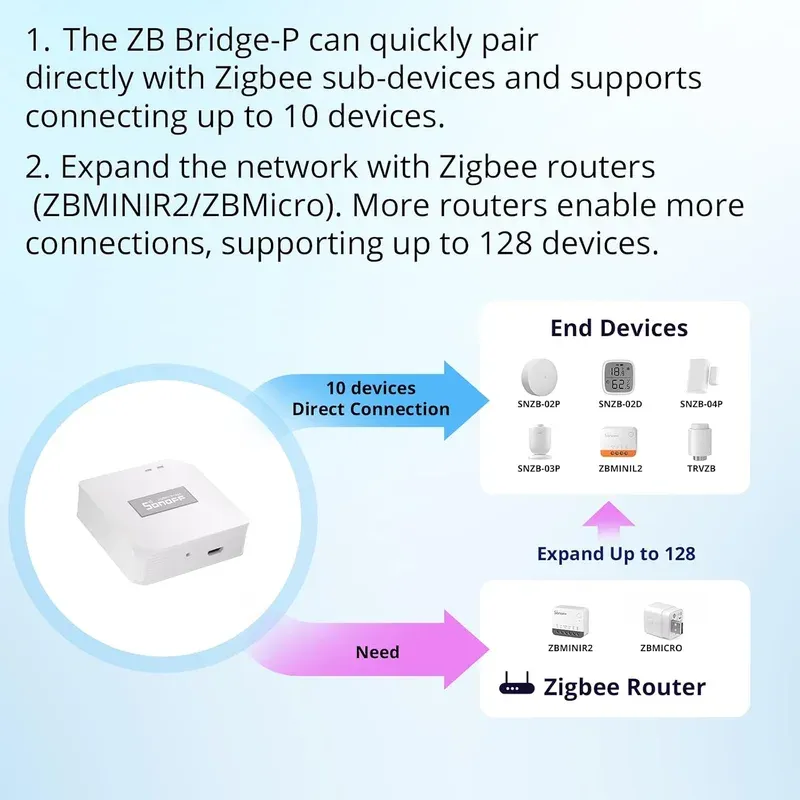
- Supports up to 128 sub-devices through mesh routers
- Local Smart Scene execution that survives internet outages
- Home, Away, and Sleep security modes with local alarm functions
- Works with all SONOFF and eWeLink Zigbee devices via one app
The 128-Device Number Deserves an Asterisk
Here's the detail the marketing glosses over. That headline figure of 128 devices isn't what you get out of the box. The bridge connects 26 sub-devices directly, split as 10 end devices and 16 routers. To climb toward 128 you have to add mains-powered router devices, because each router extends the mesh to carry another 20 to 32 units. Battery sensors don't route traffic for others; only powered devices do.
Is that a dealbreaker? Not really. Most homes never approach 26 devices, let alone 128. But if you're planning a large install, understand that the big number assumes a mesh built from plenty of powered switches and plugs, not a swarm of coin-cell sensors.
Local Scenes Are the Real Selling Point
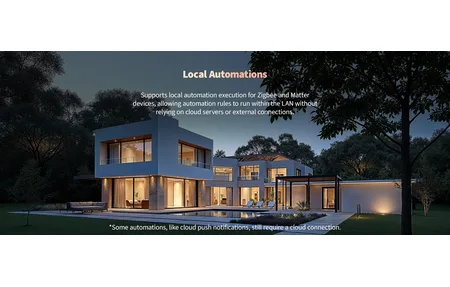
Plenty of hubs fall apart the moment your internet hiccups. The Bridge Pro handles this better than most. Its Local Smart Scene feature runs timing schedules and device linkages on the hub itself, so a motion sensor can still switch on a light, and a door sensor can still fire an alert, even when the connection to the outside world is down.
That local execution matters more than any spec sheet suggests. A hub that keeps automations alive during an outage is a hub you can actually trust with security-adjacent tasks. Pair that with the Home, Away, and Sleep modes and the bridge doubles as a modest local alarm controller, sounding a linked siren or pushing a notification when a sensor trips.
Where It Fits
This bridge makes the most sense for someone already leaning on SONOFF and eWeLink hardware, or anyone who wants an affordable, standards-friendly Zigbee 3.0 gateway. It won't replace a full Home Assistant setup for advanced users, and the eWeLink cloud is still in the loop for remote access and voice assistants. For a straightforward, reliable hub that keeps the lights and sensors talking, though, the ZBBridge-P earns its spot as the heart of a budget smart home.
Setup and Day-to-Day Use, Explained
Getting started is refreshingly ordinary. You plug the bridge into power with the supplied cable, add it in the eWeLink app, and let it join your Wi-Fi. From there, pairing sensors is a matter of putting each one into pairing mode and tapping add in the app. The whole first-device experience usually takes under ten minutes, and there's no soldering, no coordinator flashing, and no command line unless you deliberately want that route.
The point of a hub like this is that it should fade into the background once configured. That's exactly what happens here. After the initial pairing, the bridge sits quietly and does its job, relaying commands and keeping your automations ticking over. You mostly forget it exists until you add a new device, which is the highest compliment you can pay to infrastructure gear.
A quick word on placement. Zigbee is a mesh, but the bridge itself still benefits from a central spot away from thick walls and large metal appliances. Give it a clear line to at least a couple of mains-powered devices and the mesh builds itself out from there. Reception problems on a Zigbee network almost always trace back to too few routers or a poorly placed coordinator, not to the protocol itself. Plan the powered devices first and the battery sensors tend to fall into place.
The Migration Test Nobody Runs Before Buying
Before weighing one hub against another, ask the question no spec sheet answers: what happens to your devices when this box gets replaced? I've got a straight answer, because it has already happened to my network twice.
My coordinator today is a Home Assistant Connect ZBT-1 running several dozen Zigbee devices. Those devices have come through two coordinator changes without a single re-pair. Not "mostly fine", not "re-add the awkward ones" - they came across. The Wi-Fi gear I was running through Mi Home didn't survive even one platform move, and re-adding devices one at a time through an app is the sort of chore that quietly ends a smart home project. That difference isn't about which brand made the hub. It's about the protocol, and Zigbee happens to be one where the network is portable and the coordinator is a replaceable part.
The other half of the lesson came from a product line simply disappearing. My apartment still runs eQ-3 MAX! kit, and when a contact sensor failed there was nowhere left to buy another one, because the line had been discontinued. Home Assistant reads the Cube locally through the maxcube integration, and that local path is the only reason any of it is still worth keeping.
So when a hub gets sold as future-proof, translate it. A hub is future-proof if your devices can leave it. Judge the ZBBridge-P on price, on local scenes, and on the eWeLink app you'll be living inside, because those are the parts you'll actually feel. Don't pay a premium for longevity promises attached to a box, and do pay attention to whether the mesh underneath is one you could carry somewhere else.
How It Compares to the Older Bridge
If you already own the original SONOFF Zigbee Bridge, the upgrade question is fair. The first bridge topped out at 32 devices and leaned harder on the cloud, so automations stalled the moment your connection dropped. The Pro raises the ceiling to 128 and, more importantly, moves scene execution onto the hub itself. That single change is the reason to upgrade if you run anything that matters when the internet is down, like a door sensor tied to a siren.
Against pricier hubs such as the Aqara or a dedicated Home Assistant setup, the ZBBridge-P sits in a comfortable middle. It costs a fraction of a full Home Assistant Yellow, yet it handles the everyday jobs most people actually want: schedules, motion-triggered lights, and simple security modes. You give up the deep customization and local API that power users crave, but you gain a setup that a non-technical household can live with.
Who should skip it? Anyone already deep into Home Assistant with a Zigbee coordinator stick has no reason to add another hub. And if your smart home is built entirely on a different ecosystem, adding SONOFF's bridge just to run a couple of sensors rarely pays off. For a SONOFF-first or budget-first home, though, this is the natural anchor. If you'd rather use a USB coordinator, the Sonoff Zigbee 3.0 USB Dongle Plus is the alternative.
Frequently Asked Questions
Does the SONOFF Zigbee Bridge Pro really support 128 devices?
Yes, but with a caveat. It connects 26 sub-devices directly (10 end devices plus 16 routers). To reach 128 you need mains-powered router devices, since each router extends the mesh by roughly 20 to 32 more sub-devices.
Does it work without internet?
Partly. Local Smart Scene execution and Zigbee device linkages run on the hub itself, so schedules and automations keep working during an internet outage. Remote access and voice control still need the eWeLink cloud.
What devices are compatible with the ZBBridge-P?
It supports all SONOFF and eWeLink Zigbee 3.0 sub-devices, plus many third-party Zigbee 3.0 sensors and switches. Everything is managed through the eWeLink app.
Can it act as a security hub?
Yes. It offers Home, Away, and Sleep security modes and can run as a local alarm hub, triggering linked sirens or notifications when a paired sensor reports motion or a door opening.