Halliday AI Smart Glasses Guide
Halliday AI glasses bring an invisible display, live translation, and a voice assistant to a lightweight wearable for everyday smart home use.
Products
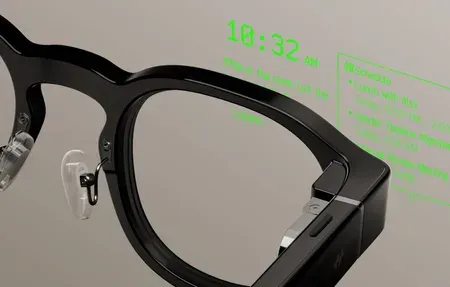
Halliday AI Glasses review: 28.5g smart glasses with invisible display, proactive AI,...
Halliday builds AI smart glasses that put a tiny display and a voice assistant right in your line of sight. The pitch is simple. You get directions, translations, and quick answers without pulling out a phone. Is that worth wearing on your face all day? For some people, yes. The hardware ditches the camera-first approach most rivals took, and that one decision shapes everything else about how the glasses feel to wear.
We have spent enough time around wearable AI to be skeptical of big promises. Halliday earns a second look because it solves a real problem instead of chasing a demo reel. You glance up, read a line of text, and look back at the world. No goggles. No bulky brick on your temple. That restraint is the whole point.
What Makes Halliday Different
The headline feature is an invisible display projected into the upper corner of your vision. It does not cover your view like bulky AR headsets. The glasses stay light, close to a normal pair, and the battery lasts through a typical day of light use. Because the projector aims at a small zone near your eyebrow, only you can read it, and bystanders see nothing.
Halliday leans on AI for the parts that matter. Real-time translation across dozens of languages. A built-in assistant that answers questions, sets reminders, and reads notifications. Teleprompter mode for speakers who want notes without looking down. The glasses pair to your phone over Bluetooth, so the heavy processing happens where the battery and chips can handle it.
The Invisible Display, Explained
Most AR glasses stick a screen across your full field of view. Halliday doesn't. It uses a micro-projector mounted in the frame that beams a small monochrome readout into the top edge of your sight line. You only see it when you look up, the way you'd check a car's heads-up display. The rest of the time your vision is clear, which makes the glasses far easier to wear in public without feeling like you've strapped a gadget to your face.
That design choice has trade-offs. The text area is small, so you read short prompts, not long articles. Color is limited. But for directions, a translated sentence, or your next teleprompter line, it's enough. We'd rather have a readable snippet that never blocks our view than a flashy screen we keep wanting to take off.
Live Translation and the Voice Assistant
Translation is where these glasses make the strongest case. Speak to someone in another language, and the translated text appears in your display while their words get captured by the microphones. It isn't flawless. Heavy accents and noisy rooms trip it up, like every system we've tried. Still, for ordering food abroad or asking directions, it removes a lot of friction.
The built-in voice assistant handles the quick stuff. Ask a question, set a timer, get a calendar reminder read back to you. It draws on modern AI technology to answer in plain language rather than dumping a list of links. Think of it as a hands-free layer over your phone, not a replacement for it.
Who Halliday Suits
- Travelers who want live translation on the go
- Commuters who prefer glanceable navigation
- Public speakers using the teleprompter feature
- People who hate pulling out a phone mid-conversation
- Anyone curious about wearable AI without a full headset
If you wear prescription lenses, check fit and lens options before buying. Comfort matters more than any feature here. Glasses you won't wear are glasses that do nothing, no matter how clever the software is.
How Does Halliday Fit a Smart Home?
Smart glasses are not a hub. They are a control surface. Pair them with voice routines and you can trigger scenes, check a status, or hear a doorbell alert while your hands stay busy. The value grows when the rest of your setup already runs on voice and your phone sits in the middle as the bridge.
Here's the practical picture. You're cooking, hands covered in flour, and the front door chimes. Instead of wiping off and grabbing your phone, you hear the alert through the glasses and ask your assistant who's there. Or you walk in after work and a quick voice command kicks off your evening scene. The glasses don't run the home. They give you a faster way to talk to it.
Voice Routines and Glanceable Alerts
Because Halliday rides on your phone's assistant connection, it inherits whatever routines you've already built. If you've set up home automation through Alexa, Google, or another platform, the glasses become one more way to fire those commands. Short alerts can surface in the display too, so a sensor trip or a reminder lands in your sight line without a buzz in your pocket.
We see this as a convenience layer rather than a control center. The phone and your hub still do the real work. The glasses just shorten the distance between a thought and an action, which is the entire promise of a connected home in the first place.
A Note on Privacy
Privacy deserves a straight answer. Halliday's no-camera design is a deliberate response to years of backlash against camera glasses. Without a lens pointed at the world, the people around you have far less reason to worry about being recorded. That alone makes these easier to wear into a meeting, a gym, or a friend's living room.
That said, the microphones still listen for commands, and translation captures nearby speech. Treat them like any smart speaker in that respect. Know when the mics are active, check what gets sent to the cloud, and read the app's data settings before you lean on the assistant for anything sensitive.
The Wider AI Wearables Trend
Halliday lands in the middle of a fast-moving shift toward AI you wear instead of hold. Pins, pendants, rings, and earbuds have all taken a swing at it. Most stumbled because they tried to replace the phone outright. The smarter bet, and the one Halliday makes, is to extend the phone with a screen you glance at and a voice you talk to.
This category is part of the broader push into connected, intelligent devices. The same forces driving better IoT devices and tighter smart home ecosystems are pushing personal hardware to get smaller and more aware of context. Glasses are a natural endpoint because your eyes and ears are already where you take in information.
What separates Halliday from the pile is restraint. It picks a few jobs, translation, navigation, notes, quick answers, and does them without forcing you into a headset or a camera. We think the first wave of these products will feel rough, and the early adopters are paying for ambition more than polish. But the direction is clear, and Halliday is one of the more honest attempts so far.
I think the category is early, and the first models trade polish for ambition. The translation lag, the small display, the dependence on a paired phone, these are real limits, not nitpicks. Still, Halliday shows where personal AI hardware is heading. If you want a closer look at how wearables tie into the rest of the house, browse our home automation and home security coverage for the systems these glasses talk to.