Robot Vacuum Mapping Technology Explained for Smart


This post may contain affiliate links. As an Amazon Associate we earn from qualifying purchases. Disclosure.
A robot vacuum that maps house layouts lets modern cleaners build digital floor plans, choose efficient paths, and finish the job faster with fewer collisions-explained in clear terms.
This guide covers robot vacuum mapping. It shows how maps help your vacuum clean better. Smart path planning has changed how robot vacuums work. They used to bounce off walls at random. Now they build a full map of your home. In this guide, we get mapping technology explained in plain terms. You'll see how modern vacuums use sensors, smart methods, and AI to find their way.
TL;DR: LiDAR mapping (used by Roborock, Ecovacs, Samsung) holds up better than camera-based vSLAM (iRobot's j-series and Combo 10 Max rely on a front camera), especially in low light. If you have multiple floors or frequently rearrange furniture, get a LiDAR model, it remaps in real time instead of starting over from scratch.
Bottom line: Modern robot vacuums use LiDAR, cameras, or hybrid sensors to build digital floor plans that improve with every cleaning session. Mapped vacuums generally finish faster than random-path models, cover more floor area, and use less battery by avoiding repeat passes.
Your vacuum builds a floor plan on its first run. It then plans the best path through each room. It learns your home with each clean. It gets faster and smarter over time.
This matters a lot in real life. A vacuum that knows your home cleans faster. It covers every corner and doesn't get stuck. Whether you have a small flat or a large house, this guide helps you pick the right device.
Why Did Mapping Change the Game for Robot Vacuums?
Gone are the days of random movement. New vacuums scan your floors and build maps. These maps help them:
- Cover every inch in neat, set rows
- Avoid objects like vases or pet dishes
- Save the layout for next time
- Recharge and keep going without repeat areas
The result? Cleaner floors, fewer crashes, longer battery life, and less work for you.
One standards note: Matter 1.2 (October 2023) added a robot vacuum device type, so Matter-ready vacuums can be started and monitored from any Matter app. Per reports on the spec, the map itself stays in the maker's app. The primary source is the CSA Matter specification.
How Did Robot Vacuums Go From Chaos to Order?
Old vs. New Cleaning: Early models used only bump sensors. They hit an object and turned in a random way. This left many spots uncleaned. Other spots got cleaned more than once.
The old way was slow. Early vacuums needed far longer to clean a space, got stuck in corners, and missed big patches.
New vacuums with maps work in a smart, set way. They split your home into zones. Each zone gets a full, neat pass. The vacuum picks routes that cut back-and-forth travel. Once an area is clean, it moves on and doesn't return.
This change is huge. A home that once needed your help can now run on its own every day. The robot knows where it's been and where to go next. Good maps are now the core of any useful robot vacuum.
How Does the Mapping System Work?
To get how robot vacuum maps work, let's look at each step. It goes from raw sensor data to a full map and clean route.
The Basic Mapping Steps
When your robot starts its first clean, here's what it does:
-
Scan the Room: The sensors read the space around the robot. Laser pulses bounce off walls and return with distance data. Cameras spot things like door frames and chair legs.
-
Process the Data: Smart methods read the sensor data in real time. The robot finds its spot in the room. It builds a grid that marks each point in space.
-
Build the Map: As the robot moves, it adds new data to its map. The result is a full floor plan. It shows walls, doors, objects, and open space.
-
Plan the Route: Using the map, the robot picks the best clean path. It works out how to cover every area with less wasted travel.
-
Update Over Time: Each clean makes the map more exact. The robot spots moved chairs or new objects and updates its view.
All of this runs while your vacuum cleans. Fast chips let the robot update its map and path in real time.
The Sensor Set
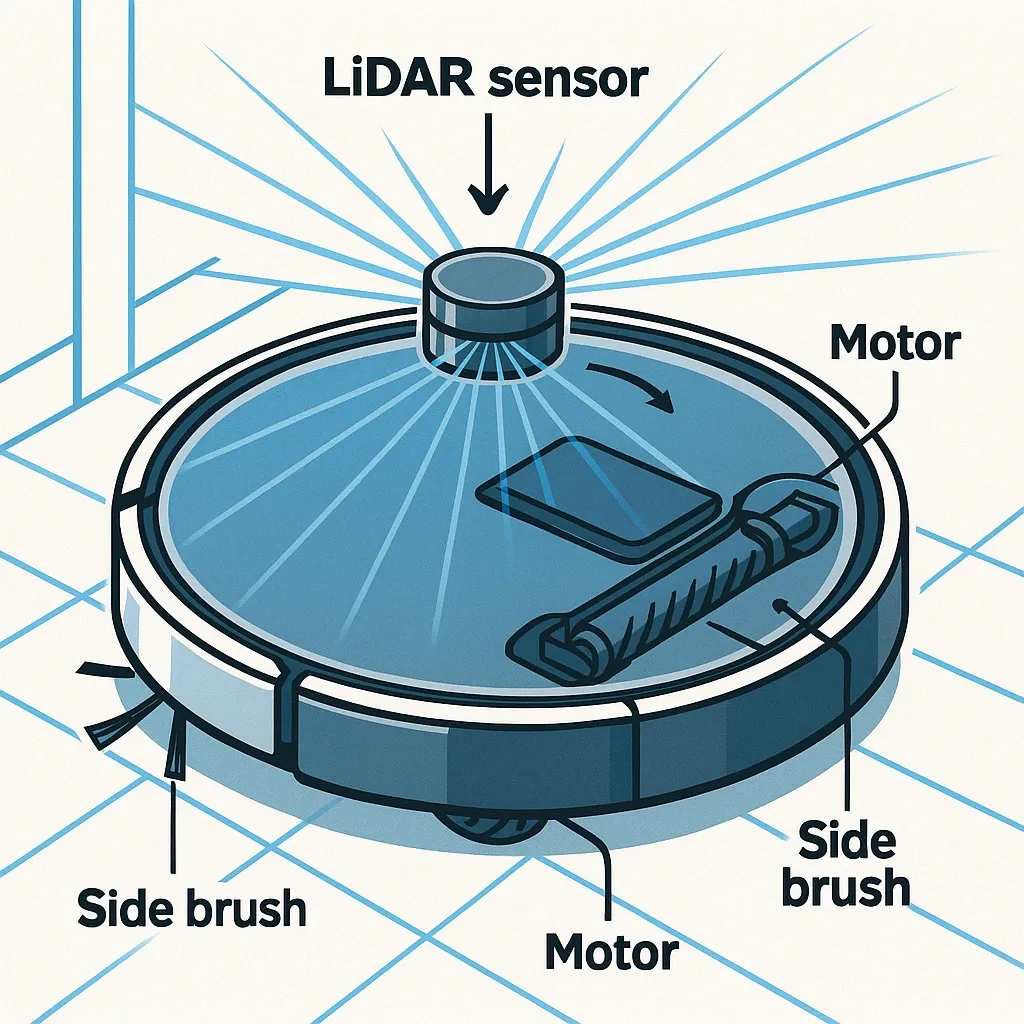
- LiDAR - A spin laser sends out many pulses each second. It builds a 360 scan, even in the dark.
- Visual Cameras - Front lenses take photos. They map using key spots like door frames or lamps.
- Infrared Sensors - These find steps or ledges. They stop the robot from falling off a drop.
- Ultrasonic Sensors - Found in some top models, such as the Roborock S8 MaxV Ultra. They detect carpet so the robot can raise its mop or boost suction.
- Bump Sensors - If all else fails, these feel contact and make the robot turn away.
All these tools feed data to the robot. They help it move safe and smart through your home.
How Do Clean Routes Work in Mapping Vacuums?
One big plus of maps is smart route planning. A mapped clean route is far better than random movement.
Planned Clean Routes: When your vacuum maps your home, it plans the best path. It doesn't wander. Instead, it follows a set plan. It starts by tracing the walls. Then it cleans in neat rows with slight overlap. It gives more passes to high-traffic spots. It changes its path if it finds a new object.
This smart way cuts wasted travel a lot. A random vacuum covers the same ground several times over, while a mapped one drives a much shorter path for the same floor.
Real-World Gains: Good routes lead to real benefits. A room that takes a long time with random moves takes far less with a map. Less travel saves battery life. You get full floor coverage with few missed spots. Less movement also means less wear on motors and wheels.
What Are the Core Mapping Features?
New vacuums use smart sensors to build detailed floor plans. Using LiDAR and infrared, they make 2D or 3D maps. The robot saves these maps and uses them to follow smart paths and clean every corner.
The mapping steps work in layers. First, the robot scans each room with its sensors. Second, it builds a grid-based floor plan from that data. Third, it plans routes that change in real time if new objects appear. This layered way works even in complex spaces with tight halls.
Robots with maps clean much better than those without. They know exactly where they are in your home. This knowing drives constant improvement. Your floors stay clean and the robot uses less energy.
Mapping Software and AI
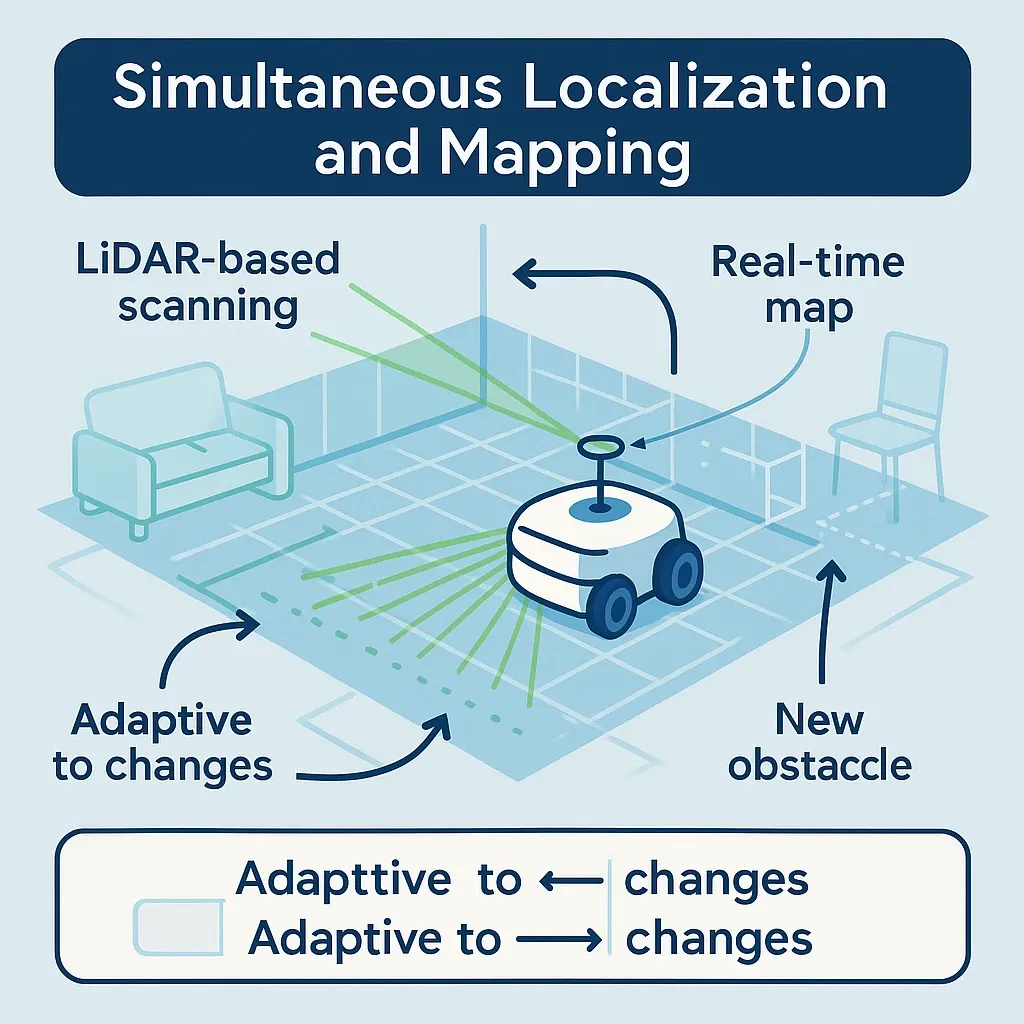
What is SLAM: SLAM stands for "map while you move." It lets a robot build a map and track its spot at the same time. SLAM uses LiDAR or other data to build real-time maps. It adjusts when things move or new objects show up. It works fast and well in low light.
What is Visual SLAM: Visual SLAM uses camera images instead of lasers. It looks at video frames to find key spots and tracks the robot's spot as it moves. Visual SLAM works best in bright, well-lit homes.
Hybrid Map Systems: Some of the best vacuums from Roborock and Ecovacs Robotics mix both approaches. These hybrid systems use LiDAR for navigation and a camera plus 3D structured light for obstacles. Roborock lists this combo on the S8 MaxV Ultra, and Ecovacs lists it on the T50 PRO OMNI. They spot objects faster and update maps more quickly.
Smart Features Built on Mapping
Smart Room Split: Once a map is made, the robot can find and label rooms. Through your app, you can set tasks like "Clean the kitchen after dinner" or "Skip the nursery until 10 AM."
No-Go Zones: Maps let you draw digital no-go zones. Just tap your phone to block areas with pet bowls, toys, or good rugs. No tape needed.
Multi-Floor Support: Some top vacuums save maps for many floors. Carry the robot upstairs and it switches to the right floor map on its own. This works great for split-level homes.
Real-Time Object Avoidance: New models spot items like shoes, cables, and pet messes. They avoid these in real time using AI sensors. This cuts stress for home owners.
What Are the Real-Life Benefits in Daily Cleaning?
When a mapped robot moves through your home, it works in a set, smart way. Thanks to LiDAR, the device updates its clean path in real time. It also updates its map as things move around. This keeps it fast over time, because the route cuts backtracking and redundant passes over sections that are already clean.
Each Session Gets Better
Each clean builds on the last one. The vacuum uses its map to find areas that need more work. It can change suction based on floor type or dirt level. This makes mapped devices great for homes with pets or heavy foot traffic.
Is Privacy a Concern?
Yes. Robot vacuums collect floor data, and some use cameras. Look for these privacy features:
- On-device processing (no cloud upload)
- Encrypted maps
- Local-only mode to turn off cameras
- Regular updates from trusted brands like iRobot and Samsung
How Do You Compare Features: Which Tech Fits Your Home?
| Mapping Method | Best For | Strength | Weakness |
|---|---|---|---|
| LiDAR | Large, complex layouts | Works in any light | Slightly taller robot |
| Visual SLAM | Bright, detailed spaces | Uses real-world landmarks | Struggles in darkness |
| Hybrid | Mixed environments | Most exact overall | Higher price point |
What Are the Top Robot Vacuum Models in 2026?
Picking the best mapped vacuum depends on your space and budget. Lineups turn over fast, so check current stock before you commit to any model below.
- Roborock S8 MaxV Ultra - Strong for large, multi-level homes. It pairs PreciSense LiDAR navigation with a 3D structured light sensor and an RGB camera for obstacles. It dates from 2024, and Roborock's US store showed it sold out at the time of this update, so newer Roborock lines such as the Saros series may be the better buy.
- iRobot Roomba j7+ - Great at avoiding objects. Its map gets better after every run. The Combo j7+ is now hard to find: several European and Canadian retailers list it as unavailable, and iRobot itself changed hands in early 2026 when Picea took it over out of bankruptcy. iRobot says existing models and support continue.
- Samsung Bespoke Jet Bot Combo AI - Samsung's mapped option. It uses dToF LiDAR for a 3D map and no-go zones, and runs through the SmartThings app.
- Ecovacs Deebot T50 PRO OMNI - Mixes vacuum and mop. It replaces the older T30 Omni in Ecovacs's current T-series lineup, with embedded dToF LiDAR and TrueMapping 2.0. The slimmer T80 OMNI sits above it.
Mapped vs. Random: Which Works Better? Early models used random bump moves. They missed debris and needed more passes. Mapped devices finish faster. They chart smart paths, recall clean zones, and re-dock for quick top-ups. Mapped vacuums generally beat random ones in both coverage and battery use.
What Is a Floor Map? It's the digital layout your vacuum builds and saves. The map tells the robot where it's been and where to go next. This gives you even, full coverage with no missed spots.
What Is in the Buyer's Guide for Robot Vacuum Mapping?
LiDAR models work best in large, complex homes. They make exact 360 scans that work in any light. But they cost more. Visual SLAM uses cameras to spot key points and works well in bright spaces. It's found in more compact models but can struggle in dim rooms. Hybrid systems mix both methods for very exact maps and fast updates. They tend to cost the most.
Quick Picks:
- Best for small flats: Eufy entry models such as the C10. Comparison listings show LiDAR navigation even at this price, so camera-only mapping is no longer the cheap route.
- Best for large homes: Roborock S8 MaxV Ultra with LiDAR and multi-floor maps.
- Best budget pick: Shark AI Ultra robots. Comparison listings put them at roughly $420 to $445 with LiDAR navigation, though prices move week to week.
- Best for pet owners: iRobot Roomba models. Great at avoiding objects and picking up pet hair.
Picking the right robot depends on your home size, budget, and clean needs. A good mapped device pays off in time saved and better results.
What Are Frequently Asked Questions About Mapping Technology?
Q: How does mapping work? A: The robot uses sensors like LiDAR or cameras to scan your home. It builds a floor plan that guides its clean path.
Q: How does a robot map your house? A: It gathers data through lasers or visual cues. It then builds a layout that tracks clean areas and guides future moves.
Q: What is a digital floor plan? A: It's a map the robot builds to move through your home. It stores room layouts, objects, and zones for a better clean.
Q: Can robots update maps in real time? A: Yes. Most new models update their maps in real time. They adapt to moved chairs or new objects.
Q: Do all robot vacuums have maps? A: No. Only models with mapping labels use sensors to build and use digital layouts. Others use random or basic move patterns.
Q: Is mapping safe for privacy? A: It depends on the brand and your settings. Some let you turn off cameras or cloud sync, so check the privacy options before the first run.
Q: How often does a robot need to remap? A: It updates its map during each clean, mostly when it spots changes in the room or layout.
How Do You Maintain Your Mapped Vacuum?
Good care keeps your vacuum running well for years. Here are the key steps:
Sensor Care: Clean LiDAR windows and camera lenses each month with a soft, dry cloth. Dust on the lenses makes maps less exact. If your device uses infrared sensors, keep them clear. Clean sensors mean accurate maps.
Brush and Filter Care: Change brushes every 3-6 months based on use. Clogged filters cut suction and leave floors dirtier. Follow the maker's guide for when to change parts.
Software Updates: Makers improve mapping methods through updates. Turn on auto updates or check each month for new versions. Updates often add better object sensing, faster maps, and smarter routes. Ecovacs and Roborock release updates based on real user feedback.
Dock Care: Keep the charging dock clean and in an open spot. The vacuum returns to the dock to charge and empty its bin. If the dock is blocked or dirty, the vacuum may not find it. This can break multi-room clean plans.
What Factors Affect Mapping Performance?
Your home's traits change how well your vacuum can map and move.
Light Levels: Visual SLAM struggles in dim rooms. LiDAR works without light. If you have a dark basement or inner rooms, pick a LiDAR model. Bright, well-lit spaces suit Visual SLAM well.
Floor Types: Shiny floors like polished wood or tile can confuse optical sensors. Matte floors and carpet tend to work better with sensors. Test your vacuum in tricky spots before setting it to clean on its own.
Wall Types: Dark or porous walls can absorb LiDAR signals. This can reduce map quality. Standard white or painted walls work best.
Objects and Clutter: Cables, toys, and pet items can affect map updates. New AI vacuums treat these as short-term objects and adjust. But too much clutter makes mapping hard. A quick pre-clean helps a lot.
Stairs and Level Changes: Thick rugs or level changes between rooms can confuse sensors. Test around these areas before you schedule solo cleans.
How Does Mapping Improve Over Time?
Don't expect a perfect map on the first run. The map gets better each time. Knowing this helps you set fair hopes:
First Clean: The robot maps most of your home but may miss some spots. Some vacuums need 2-3 runs before they have a full map.
Second and Third Cleans: Each run adds detail to the map. The robot spots things it missed and updates object spots. By run three, most vacuums have a map that is close to complete.
Long-Term: After 5-10 cleans, the map is as good as it gets. The robot knows your home and can plan well. This is when you see the speed and coverage the maker talks about.
Adapting to Changes: When you move chairs or block old paths, the robot updates on its next run. New systems spot big changes on their own and adjust their routes. Some apps let you edit the map by hand too.
How Does a Mapped Robot Vacuum Connect to Your Smart Home?
Mapped vacuums work with smart home systems for more auto options.
Voice Control: Google Home and Alexa work-with vacuums take voice commands like "Start cleaning the living room." The vacuum uses its map to clean just that room.
Auto Triggers: Set your vacuum to start when you leave home. Or link it to a calendar to clean around your family's plans.
Phone Apps: Maker apps show your home's map. You can watch the robot in real time, set zones, and see clean history. This helps you spot areas that need more passes.
Location Triggers: Link your vacuum to your phone's location. When the last person leaves home, it starts to clean on its own. When you return, it stops and sends a status update.
Cross-Device Links: Your smart home can sync the vacuum with other systems. For example, turn off motion sensors during a clean to avoid false alerts.
How Do You Fix Common Mapping Problems?
Even good mapping systems can have issues. Here's how to fix them:
Incomplete or Wrong Maps: Run a manual clean to let the robot remap. Clear objects from problem areas for a clean run. The vacuum often fills gaps on the next pass. Do a factory reset if the issue stays.
Stuck in a Loop: If the vacuum cleans one spot over and over, clean all its sensors. Update the software too. Factory reset as a last step.
Split Maps: Sometimes the robot makes two or more maps instead of one. This often happens in complex layouts with very narrow halls. You can sometimes merge zones through the app.
Can't Find the Dock: Make sure the dock is in an open, clear spot. Clean the dock contacts and nearby sensors. If docking fails often, the dock spot or sensor cleanliness is the likely cause.
Why Does Mapping Matter More Than Suction Power?
Mapping is no longer a luxury. It's key for any smart home vacuum. Paired with auto-empty stations and mop pads, it makes cleaning fast and easy. Whether you want full control or hands-free cleaning, a mapped device pays off each day.
The mopping hardware the robot guides also moved forward. Roborock's Qrevo Curv 2 Flow, shown at CES 2026, is the brand's first model with a roller mop: a rotating cylinder in place of the flat spinning or vibrating pads standard on combo models. It reached the US and Australia first. Better navigation gets the robot to the right spot; the roller drum is what changes what happens when it gets there.
Understanding maps, from LiDAR and SLAM to real-world use, helps you pick the right tool for your home. The mapped vacuum market has grown a lot. There are now good options at every price point.
For anyone who likes reading the spec firsthand, the Connectivity Standards Alliance publishes the Matter documentation. As you look at your options, check out the future of smart home cleaning to see what's coming next. Good maps are just one part of a bigger shift in how we keep our homes clean. Once mapping is on your must-have list, the robot vacuum buying guide shows what else to weigh against price. Whether you're upgrading or buying your first robot, mapping changes how well and how fast your floors get clean. For independent testing of how robot vacuums handle real rooms, RTINGS runs a household adaptability test with large furniture and a full-length mirror, which can confuse LiDAR models, plus a separate obstacle avoidance test.
Frequently Asked Questions
How does mapping work?
The robot fires laser pulses or uses cameras to scan your home while it moves. LiDAR-based models, like the Roborock S8 series, bounce invisible beams off walls and furniture to measure distances accurate to a few millimeters. The robot's processor builds a grid map from those measurements in real time. Camera-based systems, called vSLAM, work differently, they photograph landmarks like corners and picture frames, then triangulate position from what they see. Either way, the robot combines those readings with data from gyroscopes and wheel-spin counters to track exactly where it is on the map at any moment. The result is a persistent floor plan the robot stores in memory and updates on every subsequent run. More sensor types generally means more accurate maps. Hybrid models pair LiDAR with cameras for obstacle detection at close range, which cuts down on missed spots under chairs and around cable clumps.
How does a robot map your house?
On the first run, the robot does a full sweep of every room it can reach, this is the mapping run, and it usually takes longer than a normal clean. The robot drives along walls, under furniture edges, and across open floors while its sensors log positions every fraction of a second. That raw data feeds into a SLAM algorithm, Simultaneous Localization and Mapping, which builds a coordinate grid and places the robot inside it at the same time. Subsequent runs update the existing map rather than starting over. If you moved a chair, the robot patches its map in the section it just cleaned. Most apps let you view the generated map, rename rooms, draw virtual walls, and schedule different zones for different days. Expect the first mapping run to take longer than a normal cleaning pass, because the robot is exploring as well as cleaning.
What is a digital floor plan?
It's a data structure stored on the robot, and usually mirrored to the app, that represents the physical layout of your home. Think of it as a grid where each cell is marked as free space, wall, furniture, or unknown territory. The robot fills in cells as it explores. Room boundaries get labeled automatically on most modern devices, though the labels are sometimes wrong on the first pass, so check them. You can rename and redraw room boundaries in the app. The map also stores no-go zones you've drawn, persistent virtual walls, and cleaning preferences per room. Whether a map lives only on the robot or also on the maker's servers depends on the brand and the app settings, which is worth checking if privacy matters to you. Multi-floor homes typically require separate maps, each floor is stored independently and you switch between them in the app.
Can robots update maps in real time?
Yes, though real-time updating covers a wide range of actual behavior. Top-tier models like the Roborock S8 MaxV Ultra and Ecovacs's X-series flagships update their maps continuously while cleaning, the robot detects a chair you moved this morning and routes around it without stopping or pausing. Mid-range models do something less impressive: they update the map section by section as they clean each row, then save the updated version at the end of the run. Budget models might not update at all, they just use the saved map without patching it. The key thing to know is that no robot replaces its entire map when it finds a change. It patches only the cells it's currently cleaning. So if you moved furniture in a room the robot isn't cleaning today, that room's map stays outdated until the robot cleans it again. That's just how incremental SLAM works.
Do all robot vacuums have maps?
No, and the gap between mapped and unmapped models is significant. Entry-level robots typically use a random-bounce pattern or a simple edge-first spiral without storing any map. They clean your floor eventually, but inefficiently: they'll cross the same patch three times while missing a corner entirely. Mapped models start appearing reliably from the lower mid-range up. Look for terms like LiDAR navigation, SLAM mapping, room recognition, or persistent maps in the product listing. iRobot's camera-based PrecisionVision Navigation, run by its iRobot OS software (called Genius Home Intelligence before 2022), is their version; Roborock sells LiDAR as PreciSense; Ecovacs uses TrueMapping. Without a map, the vacuum doesn't know which rooms it has cleaned, can't follow zone-based schedules, and won't let you draw virtual walls in the app. For a small studio apartment, a mapless model can work fine. For anything larger than two rooms, mapped navigation saves real time and battery on every single run.
Is mapping safe for privacy?
It depends on the brand and your settings. Most connected robots sync their maps to the maker's cloud so the app can show them, and the home layout itself is personal data. For camera-equipped models, the concern goes further, because images from obstacle-detection cameras are sensitive too. My advice is to read the privacy policy and check the privacy settings in the robot's app before the first run, not after. Look for a local-only or offline maps option if privacy is a priority. GDPR users in Europe have stronger data deletion rights, but you still need to exercise them actively, the robot won't do it for you.
How often does a robot need to remap?
Modern robots don't need full remaps as often as you might expect. The short answer: trigger a full remap only when you've done a major furniture rearrangement, moved a couch to a different wall, added a new room divider, or opened up a previously blocked area. For day-to-day changes like moved chairs or pet toys, the robot patches its map automatically during the next cleaning run without any input from you. In most apps, a full remap option sits in the settings menu under map management. Plan for some interrupted cleaning while the robot surveys, since a dedicated mapping pass is about scanning rather than picking up dirt. The one case where frequent remaps become necessary is if you store the robot away from its charging base for more than a few weeks. Some models lose their positional reference and need to re-learn the floor on the next run.