Avatto TRV06 and Home Assistant: ZHA Pairing and What LC Means


This post may contain affiliate links. As an Amazon Associate we earn from qualifying purchases. Disclosure.
LC on the Avatto TRV06 display is the child lock, not a fault. Hold the knob for five seconds and it clears. Getting the valve into Home Assistant was easier than I expected: ZHA found it on the first search, used a stock Tuya quirk and created ten entities. Staying connected is the open question.
LC on an Avatto TRV06 means the child lock is switched on, and it isn't an error. Hold the knob for about five seconds and the code disappears. I saw it within minutes of mounting the valve on a radiator, and my first guess was a dead sensor or a bad firmware flash. Wrong on both counts.
The more interesting question comes after that. How do you get this valve into Home Assistant without handing your heating to somebody else's server?
Bottom line: The TRV06 is a Tuya-based Zigbee 3.0 radiator valve. On Home Assistant 2026.10 with a Home Assistant Connect ZBT-1, ZHA joined it on the first search and exposed a climate entity with a stock quirk, no custom file. Zigbee2MQTT lists it natively too. My one complaint so far is the link: RSSI was -82 and the entities dropped to Unavailable.
What does LC mean on the Avatto TRV06?
LC is the child lock. The manufacturer's manual puts it plainly: long-press the knob while the head is powered on and the screen shows LC. Repeat the press and it unlocks. While it's locked, turning the knob does nothing. That's exactly what you'd expect from a child lock, and exactly what looks like a broken valve if nobody told you about it.
The manual lists a handful of other codes, and you'll meet most of them sooner or later:
| Display | Meaning |
|---|---|
| LC | Child lock active |
| OF | Valve head off, frost protection still armed |
| OP | Open window detected, valve closed |
| Ad | Anti-scale cycle, valve opens fully for 30 seconds |
| Er | Temperature sensor (NTC) damaged |
| Battery symbol | Batteries nearly empty |
Two details are worth remembering. Open window detection triggers when the room temperature falls more than 6 C within 4 minutes, and it releases after a 3 C rise or automatically after 48 minutes. And the anti-scale cycle runs every two weeks, so if the display briefly says Ad on a quiet afternoon, nothing's wrong. It's the valve exercising itself so the pin doesn't seize.
What should you check before you buy one?
Don't start with the app. Start with the valve on your radiator, because that decides whether the head fits at all.
The TRV06 screws onto the common M30x1.5 thread. If your valve body is a Danfoss RA, a Caleffi or a Giacomini, the box includes adapters for those, and the manual shows how each one clips on. Anything else, and you'll want to measure before you order. A head that doesn't seat properly will either leak heat or never close the valve fully.
A few other things to settle early:
- Power: Two AA alkaline batteries, nothing exotic. The display shows a battery symbol when they run low.
- Reach: A battery-powered Zigbee valve is normally an end device, so it needs a coordinator or a mains-powered router within range. A radiator behind a thick wall is exactly where a weak link hides, and mine showed it.
- Sensor position: The temperature sensor sits in the head, right beside a hot radiator. It will read warmer than the room. Zigbee2MQTT exposes a calibration offset for that, and ZHA gives you a local temperature calibration entity, so you'll probably need it.
- Network choice: Decide now whether the valve lives on a Tuya gateway or on your Home Assistant coordinator. Changing your mind later means a reset and a re-pair.
How do you mount it before pairing?
Mount first, pair second. The valve calibrates its stroke on the radiator, so pairing a head that's sitting on your desk tells you very little.
- Open the cover and put in two AA batteries, matching the + and - marks in the compartment.
- Wait until the push rod draws back flush with the bottom of the head.
- Screw the head onto the valve's M30x1.5 thread and tighten the ring. If your valve is a Danfoss RA, Caleffi or Giacomini, use the matching adapter from the box first.
- Press the knob. The head runs a stroke-matching routine and then enters its initial setup.
That whole routine takes a minute or two. If you see LC afterwards, you've just met the child lock.
How do you put the TRV06 in pairing mode?
Turn the knob until the display reads OF. Then hold the knob for five seconds. The Wi-Fi icon starts flashing fast, and that's pairing mode. Start the join on your gateway or coordinator while it flashes. If the icon stops, the window has closed and you repeat the five-second hold.
The icon is misleading, by the way. It's a Wi-Fi symbol on a Zigbee device. Nothing on this valve speaks Wi-Fi.
One more trap. The child lock and pairing mode are both a five-second hold on the same knob, so a slightly wrong sequence leaves you staring at LC instead of a flashing icon. Mine did exactly that.
Which route gets the TRV06 into Home Assistant?
There are three, and they aren't equal. This is where I'd stop and think before sticking the valve on a wall in a house you're building.
| Route | How it appears in HA | Local control | My verdict |
|---|---|---|---|
| Tuya Zigbee gateway + Tuya Smart app | Official Tuya integration | No, Tuya cloud API | Fine for a first test, not tried by me |
| Zigbee2MQTT on your own coordinator | MQTT climate entity | Yes | Documented, not tried by me |
| ZHA on your own coordinator | Climate entity, stock quirk | Yes | The one I used, joined first try |
I paired it straight to the Home Assistant Connect ZBT-1 that already runs my ZHA network. The two other routes below come from documentation and community reports, not from my own bench, and I'll say so each time.
One catch applies to every route: a Zigbee device joins one network at a time. If the valve lives on a Tuya gateway, it can't also be on your HA dongle.
How does the Tuya gateway route work?
Your phone has to be on a 2.4 GHz network for the first step. In the Tuya Smart app you add the gateway, open it and choose Add sub-devices. Then you pick "LED already blink", which matches the fast-flashing Wi-Fi icon on the valve, and wait for the search to find it. The app confirms with a Done button.
From there, Home Assistant reaches the valve through the official Tuya integration, which uses Tuya's cloud API. So the valve works, but every temperature reading and every setpoint takes a trip out to a server and back. If that cloud has a bad evening, your radiator schedules follow it down.
Why is Zigbee2MQTT a good fit?
Zigbee2MQTT lists the valve as AVATTO_TRV06, and the exposed features are generous for the price:
- A climate entity with a setpoint from 5 to 35 C, system mode (auto, heat, off), running state and valve opening from 0 to 100 percent.
- A local temperature reading with a calibration offset from -20 to +20.
- Child lock, battery low, frost protection and scale protection switches.
- Seven weekly schedule fields, one per day.
- An error value that reports the damaged temperature sensor.
The quirks are documented too, and they matter. Schedules are write-only, so you can't read them back. Child lock state can't be read either, which is a small irony after the LC saga. Valve position is read-only. There's also a time_start option that controls how the valve answers Tuya time-sync requests, defaulting to 2000.
If you've never run it, start with our Zigbee2MQTT setup guide and pick a coordinator from the Zigbee coordinator comparison. If the valve refuses to join, repeat the five-second hold on OF and move it closer to the coordinator before you suspect the valve.
How do you add the TRV06 to Home Assistant with ZHA?
This is the route I actually walked, on Home Assistant 2026.10 with ZHA already running on a Home Assistant Connect ZBT-1. Put the valve into pairing mode first, as described above, and keep it near the coordinator. Everything below happens in the Home Assistant interface.
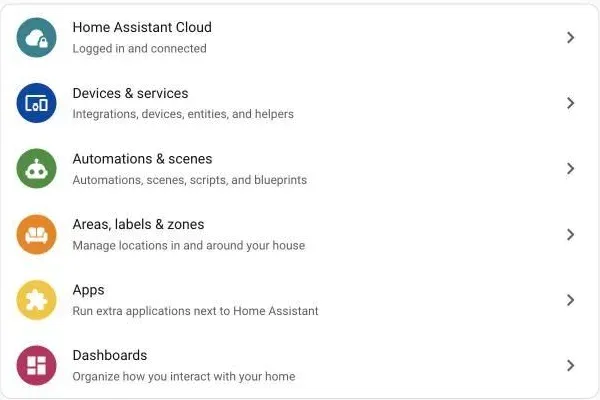
Step 1. Open Settings, then Devices & services.
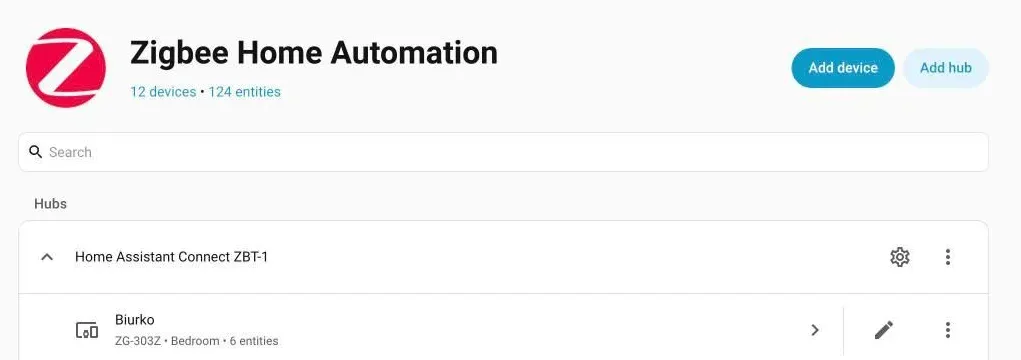
Step 2. Open Zigbee Home Automation and press Add device. ZHA starts a time-limited search, so have the valve flashing before you click.
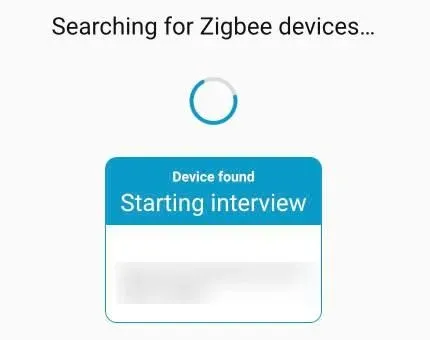
Step 3. Wait for "Device found". The card moves to "Starting interview". It also prints the valve's IEEE address and network address. I blurred them in the screenshot, because the IEEE address is a hardware ID.
Step 4. Wait for "The device is ready to use". For me that took under ten seconds from the moment I started the search. The card identifies the valve as a TS0601 from the manufacturer ID _TZE284_o3x45p96. Tuya ships this product under many IDs, so yours may read differently.
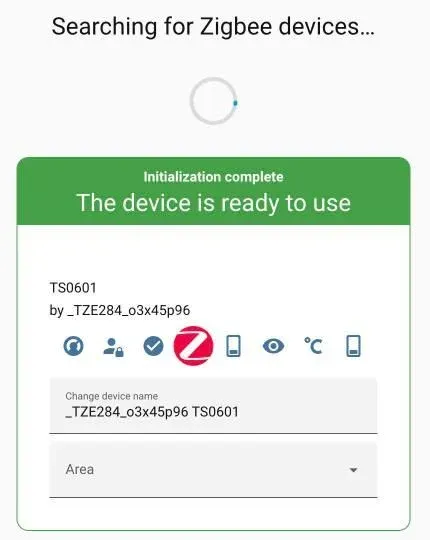
Step 5. Give it a name. I typed Avatto TRV06 into the name field and left the area empty. If you do set an area, pick the room the radiator is in, because dashboards and voice assistants group by it.
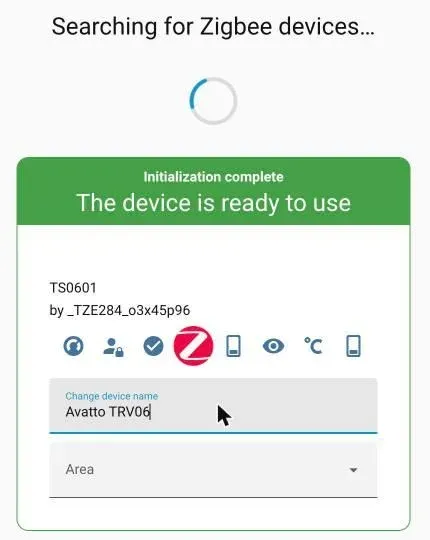
Step 6. Leave the wizard. Press the back arrow. The valve is now in the ZHA device list, and the integration counts went from 12 devices and 124 entities to 13 devices and 134 entities. Ten new entities, then.
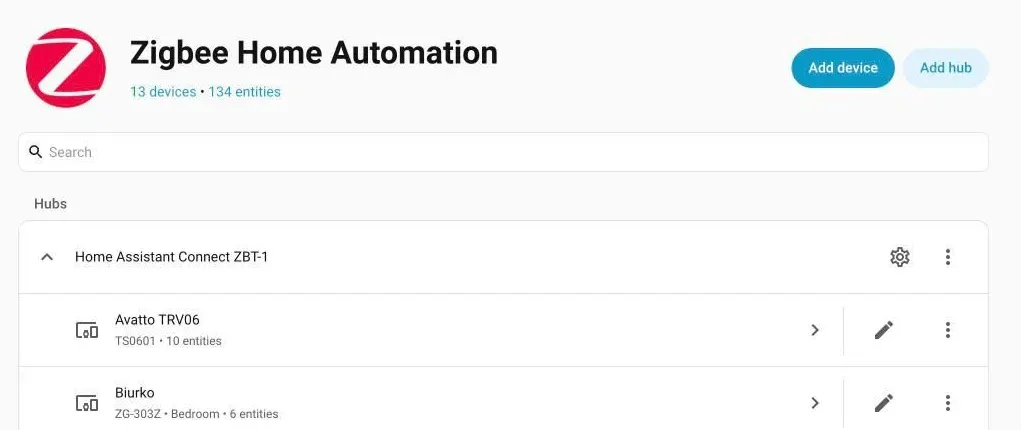
Step 7. Open the device page and read what you got. There's a climate control, an HVAC action sensor, and under Configuration the child lock, frost protection, local temperature calibration and scale protection, plus firmware. Diagnostic holds an error-or-battery-low flag and two entities that are disabled by default. That matches what Zigbee2MQTT documents, except that I didn't see any weekly schedule entities.
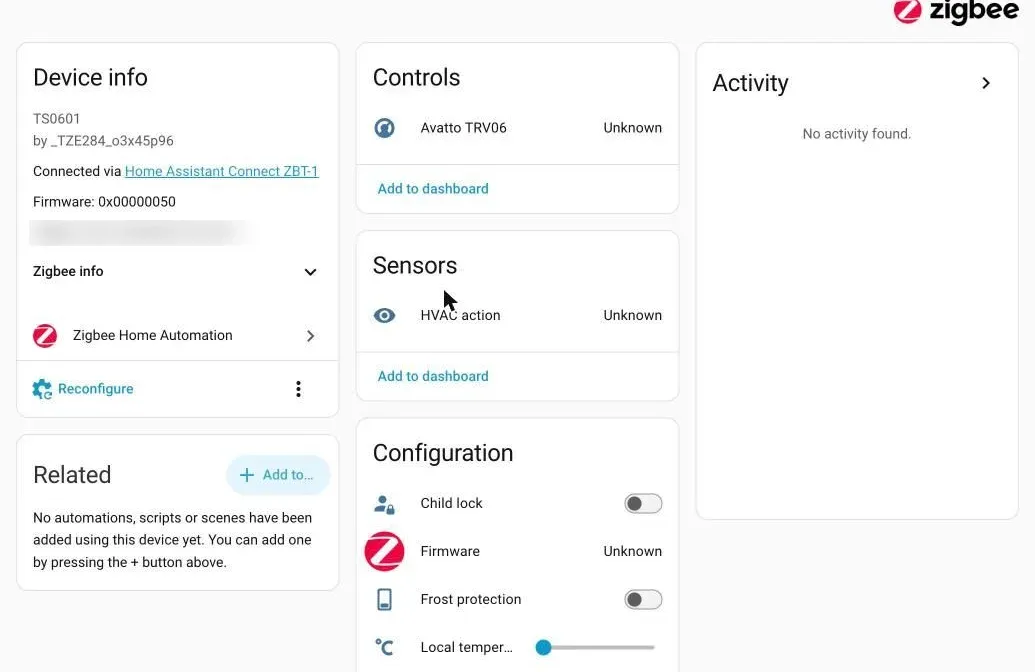
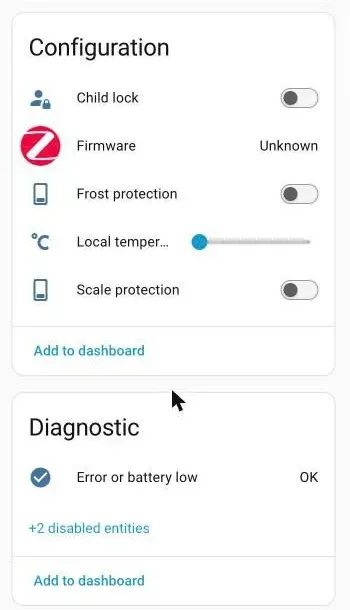
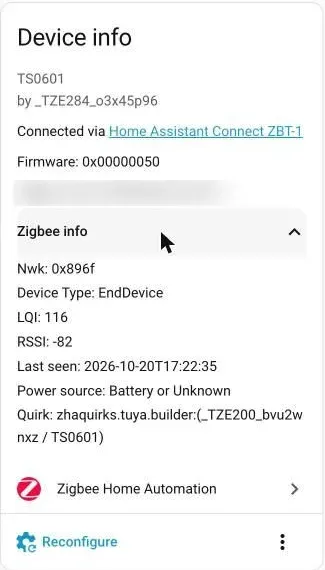
Step 8. Expand Zigbee info. This is the card to check before you trust the valve. Mine reported Device Type EndDevice, LQI 116, RSSI -82, power source Battery or Unknown, and a quirk named zhaquirks.tuya.builder for TS0601. That last line is the interesting one. It's a stock quirk that ships with ZHA, so nothing custom had to be loaded.
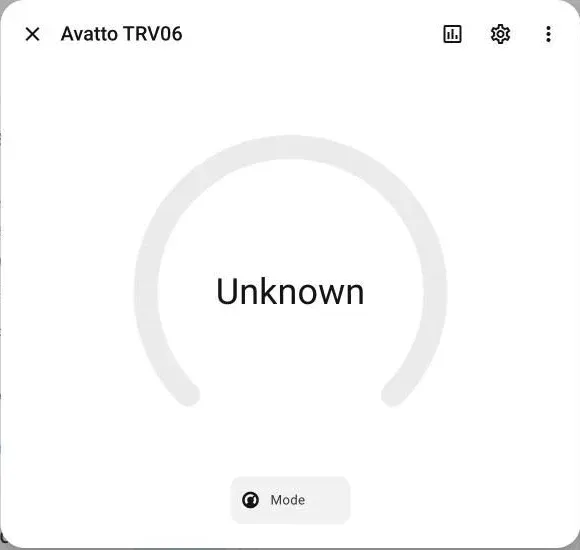
Step 9. Expect Unknown at first. Right after pairing, the climate entity showed Unknown and the dial had no temperature on it. That's normal for a battery valve. It sleeps and only talks when it has something to say, so the states filled in once it sent its first reports, within a couple of minutes.
Step 10. Set a mode and a temperature. The Mode menu offered only Heat and Off. There's no Auto here, unlike the Zigbee2MQTT entity. I picked Heat, and the entity switched at once.
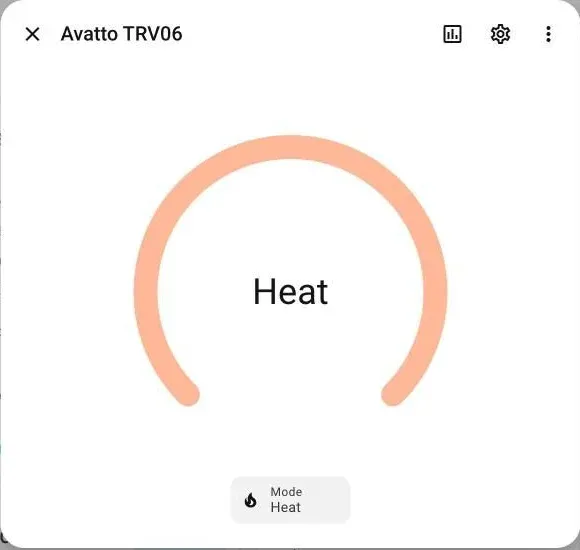
The round dial had no plus and minus buttons yet, presumably because the valve hadn't reported a setpoint. So I used Developer tools, then Actions, and called the thermostat action against that one entity:
action: climate.set_temperature
target:
  entity_id: climate.avatto_trv06
data:
  temperature: 21
  hvac_mode: heat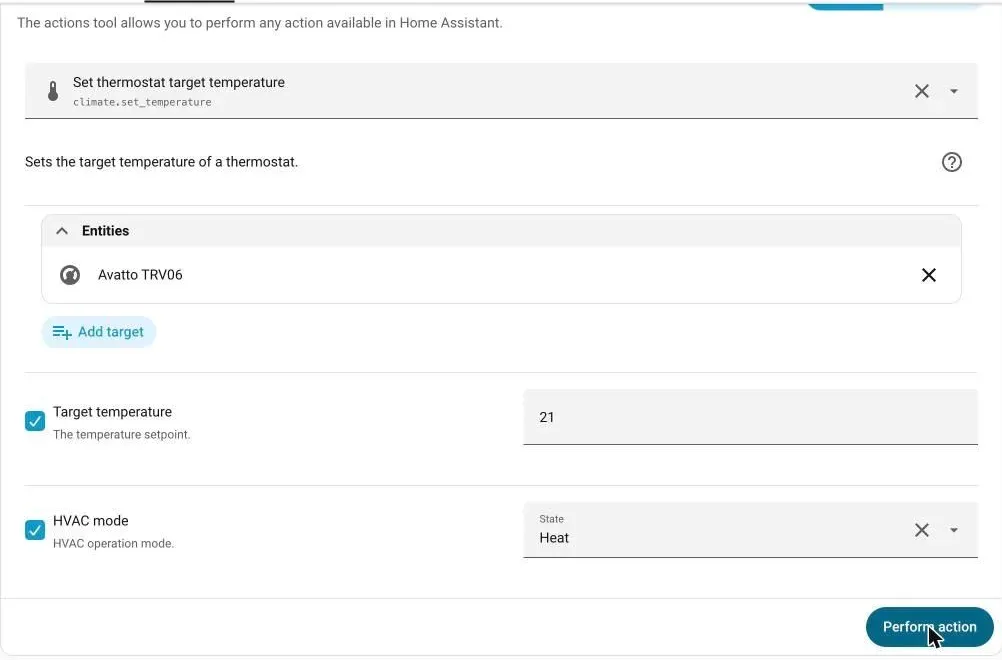
Check the target before you press Perform action. My picker also offered a room air conditioner, and that's the kind of entity you don't want to send 21 C to by accident.
Step 11. Confirm both directions. Turn the knob and watch the entity follow. Then change the setpoint in Home Assistant and watch the valve's display. Both worked for me.
Why did I expect ZHA to be the awkward one?
Because everything I'd read said so. ZHA identifies Tuya valves by manufacturer ID, and Tuya ships the same product under many IDs. Community threads describe custom quirks loaded through custom_quirks_path, valves that paired but showed no entities, and a few that wouldn't pair at all.
None of that happened to me. The card lists a stock quirk, and the entities showed up straight away. I can't promise the same for every batch, because mine reports _TZE284_o3x45p96 and others will carry different IDs. That's why the Zigbee info card in step 8 is worth a look before you fit anything to a radiator.
What went wrong after pairing?
The link. Within a few minutes of joining, the climate entity went Unavailable, and at the time of writing the valve still shows as Unavailable. The Zigbee info card had already warned me: RSSI -82 is a weak signal, and the last-seen time stopped at the moment it dropped.
I don't know yet whether that's distance to the ZBT-1, a wall in between, or the valve sleeping longer than ZHA likes. What I'd do about it is boring and reliable: put a mains-powered Zigbee device, a bulb or a plug that acts as a router, between the coordinator and the radiator and pair the valve again. I'll update this article when I've tried it.
Does it pass the house test?
This blog judges devices by three questions. Does it keep working with the router unplugged? Does it expose cleanly to Home Assistant? Can the family still use it through Google Home?
On a local coordinator the first two should hold, and the second one I've now seen with my own eyes. Google Home comes along once HA exposes the climate entity, though I haven't tested that. On the Tuya gateway route the first answer flips to no. My opinion, and you may disagree: a heating valve is the wrong device to leave on a vendor's cloud. I run eQ-3 MAX! radiator thermostats in the flat, and a closed protocol cost me once already when a window contact died and nobody sold a replacement. Open Zigbee is the better bet.
For a wider look at what else is out there, the smart thermostat shortlist for Home Assistant compares valves and wall units side by side.
What haven't I tested yet?
Plenty, and I'd rather list it than pretend. Here's what this article does not yet cover from my own use:
- Pairing the valve to Zigbee2MQTT or a Tuya gateway. I only used ZHA.
- Whether a router closer to the radiator fixes the Unavailable drops.
- How accurate the head's temperature reading is against a reference thermometer on the same wall.
- How long a pair of AA batteries really lasts through a full heating season.
- Whether open window detection fires on a normal ventilation routine or only on a long draught.
- How the climate entity shows up in Google Home once Home Assistant exposes it.
Each of those will change this article when I have a number. Until then, treat the pairing steps as tested and the long-term behaviour as unproven.
Would I buy a second TRV06 for the house? Not before I know why it dropped off the network. Ask me after a full heating season, and after I've seen what the valve does to a radiator in January.
Frequently Asked Questions
What does LC mean on the Avatto TRV06?
LC means the child lock is on. While it's active the knob won't change the temperature. According to the manual you toggle it by long-pressing the knob for about five seconds while the valve head is powered on.
How do I put the Avatto TRV06 in pairing mode?
Turn the knob until the display shows OF, then hold the knob for five seconds. The Wi-Fi icon starts flashing fast, which means the valve is searching for a Zigbee network. Start pairing in your gateway or coordinator at the same moment.
Does the Avatto TRV06 work with ZHA?
On my Home Assistant 2026.10 install it did. ZHA found the valve on the first search, applied a stock Tuya quirk and created ten entities, including a climate entity, a child lock switch and frost and scale protection. I didn't have to write a custom quirk. Tuya sells this valve under several manufacturer IDs, so check the device signature on yours.
Can the Avatto TRV06 run without the Tuya cloud?
Yes, if you pair it to your own Zigbee coordinator instead of a Tuya gateway. With a Tuya gateway the official Home Assistant integration talks to Tuya's cloud API, so the valve stops reporting when that link goes down.
Why does the TRV06 show Unknown or Unavailable in Home Assistant?
Right after pairing the entities show Unknown until the valve sends its first report, because a battery valve sleeps most of the time. Unavailable means Home Assistant stopped hearing from it. On mine the Zigbee info card showed a weak signal, RSSI -82, so check range before you blame the valve.
Sources & References
- AVATTO TRV06 - Zigbee2MQTT supported devices zigbee2mqtt.io documentation
- TRV06 Wireless Smart Radiator Thermostat user manual dwn.alza.cz manufacturer
- Zigbee Home Automation (ZHA) - Home Assistant integration home-assistant.io documentation