
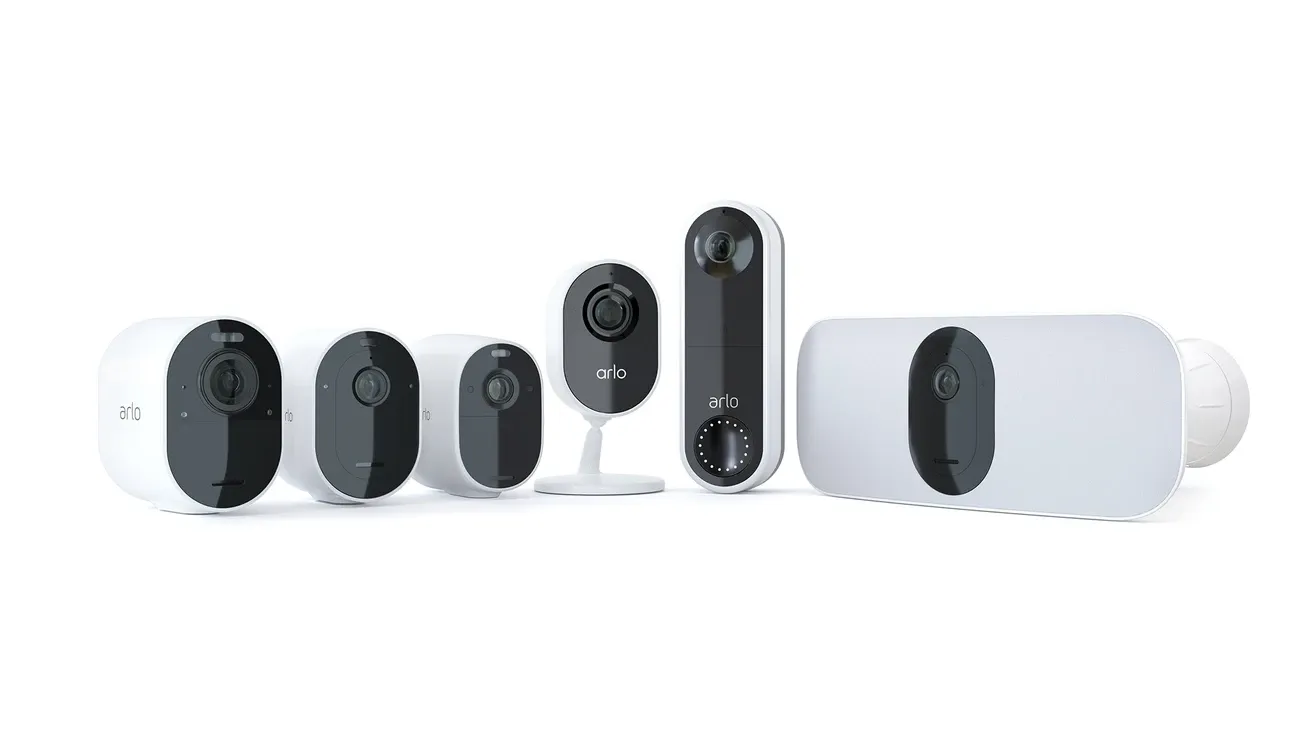
If you’re choosing between Arlo and Ring home security systems, you’re looking at two of the biggest names in smart home security. Both protect your home with useful features. But which one is best for you? This guide covers the main features, pros and cons, prices, and setup for both Arlo and Ring. That way, you can pick what fits your needs.
Quick Comparison Table
| Feature | Arlo | Ring |
|---|---|---|
| Video Resolution | Up to 4K | 1080p |
| Power Source | Battery-powered (wireless) | Wired and battery options |
| Storage Options | Cloud and local storage | Mostly cloud storage |
| Subscription Requirement | Basic features free; paid plans available | Most features need a subscription |
| Smart Home Integration | Alexa, Google Home, Apple HomeKit, IFTTT | Alexa and Amazon Echo |
| Motion Detection | AI-powered, tells people from pets/cars | Custom motion zones and alerts |
| Two-Way Audio | Yes | Yes |
| App Experience | Easy to use, lots of features | Simple, works well with Amazon |
| Price Range | Higher upfront cost | Cheaper upfront and for subscription |
| Customer Support | Fast help online and by phone | Lots of support and forums |
Arlo Home Security System: Features and Benefits
For a deeper exploration of Arlo's capabilities and why it's a popular choice, Arlo stands out in the home security market with compelling advantages.
What Makes It Stand Out: This brand is known for its wireless security cameras, especially the Pro series. The cameras are sleek and wire-free, so you can place them almost anywhere. For those preferring wired setups, the Arlo Essential Video Doorbell Wired offers crystal-clear video with reliable performance. In short, the system is easy to set up and offers strong protection.
- Wireless and Battery-Powered: The cameras use rechargeable batteries. You don't need to worry about power cords. Place them wherever you want.
- 4K Video Quality: Some models record in 4K. This means you get super clear and sharp video. The Pro series offers strong wireless performance and detailed 2K–4K footage.
- Color Night Vision: Many models feature advanced color night vision, so you see more detail even in low light conditions.
- Night Vision: The cameras let you see clearly in the dark with advanced night vision.
- Smart Detection: The system uses AI to tell the difference between people, animals, vehicles, and packages.
- Two-Way Audio: You can talk to visitors or delivery people through the app.
- Cloud and Local Storage: Save your videos in the cloud or on a local drive with the base station (SmartHub). The hub connects multiple cameras and manages local storage efficiently, giving you more control over your footage.
App Experience: The app is simple and full of features. You can watch live video, check saved clips, and change settings easily. The app sends custom alerts and works with many home systems. So, you can control everything in one place.
Smart Alerts: The smart alerts use AI to tell the difference between people, pets, and cars. This means you get fewer false alarms. You can set which areas to watch and how sensitive the alerts are.
Audio Quality and Latency: The two-way audio is clear and has little delay. You can talk with people at your door or around your home. The sound quality is good for most uses.
Battery Life and Maintenance: Battery life depends on the model and how much you use it. Most batteries last for months before needing a recharge. Swapping or charging batteries is quick and easy.
Why Choose This System: You don't need a subscription for basic features like live video and local storage. High-quality video makes it easy to see faces and details. No wires means you can set up cameras anywhere.
Things to Keep in Mind: The cameras cost more upfront, especially 4K models. Battery-powered cameras need charging every few months.
Ring Home Security System: Features and Benefits
What It Offers: This brand, owned by Amazon, is best known for its Video Doorbell and doorbell cameras and other security devices. It's a good choice if you want a home that works with Amazon.
- Video Doorbells and Doorbell Cameras: See and talk to visitors from your phone with the popular doorbell cameras, which come in multiple styles and options to fit different needs.
- Lots of Devices: The company sells indoor and outdoor cameras, alarms, smart lights, and the Ring Alarm Outdoor Contact Sensor for monitoring gates and sheds.
- 1080p HD Video: Most cameras record in 1080p. That's good enough for most homes.
- Motion Detection: Set up alerts for movement in certain spots.
- Two-Way Communication: Talk to visitors or scare off intruders.
- Alexa Integration: Use voice commands with Amazon Alexa to control your system.
App Experience: The app is easy to use and connects well with Amazon services. You get real-time alerts, live video, and simple controls. The app lets you share access with family, so everyone can check on the house.
Smart Alerts: The motion alerts let you set which areas to watch and what triggers an alert. While not as advanced as AI-based detection, the alerts are reliable and help reduce unwanted notifications.
Audio Quality and Latency: The two-way audio lets you talk to people at your door. The sound is clear and there's little delay, so it's easy to chat or warn off strangers.
Battery Life and Maintenance: The system has both battery-powered and wired cameras. Battery models usually last for months before charging. Wired models need less upkeep but can't be moved easily.
Why Pick This Option: Hardware and subscriptions cost less than competitors. Lots of products to choose from. Subscription plans offer video storage and recording at a fair price. Works smoothly with Amazon Alexa and Echo devices.
Things to Consider: Video quality is 1080p, not as sharp as 4K alternatives. Most features need a Protect subscription. Some outdoor cameras need to be wired, so you can't put them everywhere.
User Experience and Customer Support
Both companies offer good customer support, but in different ways. One gives fast help online or by phone with many guides to help you set up and fix problems. The other, backed by Amazon, has many support options like forums, live chat, and FAQs. In short, an active user community is great for sharing tips and advice.
Both apps are easy to use. If you already use Amazon devices, one option works better with them. If you want more advanced features and custom settings, the other app is a strong choice.
Use Case Scenarios
So, which system fits your life? Here are some examples:
- Renters or people who move cameras: Wireless cameras are perfect. No wires, easy to set up, and simple to move.
- Amazon device users: If you use Alexa or Echo, one system works best. You get voice control and smart home automation.
- Need super clear video: If you want the sharpest images, 4K cameras are the way to go.
- Watching your budget: One option is cheaper to start with and has lower subscription prices. For even more affordable outdoor security, the Blink Outdoor 4 offers excellent value with 1080p video, motion detection, and two-way audio at a budget-friendly price point. For those needing wide-angle coverage and advanced detection, the Tapo Solar-Powered Floodlight Pan-Tilt Security Camera Kit C615F provides solar-powered operation and intelligent pan-tilt capabilities at a fraction of premium system costs, making it ideal for renters or homeowners wanting to add comprehensive outdoor coverage without major investment.
- Want local storage: One system lets you store video locally with the base station SmartHub. That means you can skip monthly fees.
Beyond Doorbells: Other Smart Security Options
While Arlo and Ring focus on cameras and doorbells, comprehensive home security also includes smart locks like Nuki, Lockly, and Ultraloq, as well as entry sensors like the [TUO Contact Sensor with Matter and Thread support](/product/tuo/contact-sensor-with-matter-thread-support/) and integrated systems from manufacturers such as Onvis, Orvibo, and TCL. Consider combining your video doorbell with a smart lock for complete access control and monitoring. Smart locks like the Aura Reach provide Matter-enabled security with seamless HomeKit integration, while biometric smart locks from brands like Lockly and Ultraloq provide advanced fingerprint recognition alongside traditional electronic codes, creating layered security for your home.
- Need lots of device types: If you want alarms, lights, contact sensors, and more, Ring's extensive product lineup has you covered.
Pricing and Subscription Breakdown
| Aspect | Option A | Option B |
|---|---|---|
| Base Camera Price | Higher (depends on model) | Lower to mid-range |
| Subscription Plans | Secure: Basic to Premium tiers | Protect: Basic and Plus plans |
| Monthly Cost (Basic) | About $3–$5 per camera | About $3 per device |
| Monthly Cost (Premium) | Up to $15 per camera or bundle | $10 for whole home (Plus plan) |
| Features Included | Cloud storage, AI, more video history | Cloud storage, video history, alerts |
| Local Storage | Yes, with SmartHub (no subscription) | No |
With the first option, you can use basic features for free, like live video and local storage. This is great if you want to skip monthly fees. The second option's best features, like video recording and cloud storage, need a subscription. But the plans are cheaper and cover more devices.
Privacy and Data Security
Privacy matters for any security system. Both brands use encryption to keep your videos and data safe. One lets you store footage locally, so you don't have to use the cloud if you don't want to. This gives you extra control.
The other had privacy concerns in the past, but now uses two-factor authentication and stricter rules to protect your data. In short, always use strong passwords, turn on two-factor authentication, and keep your devices updated to stay safe.
Frequently Asked Questions
Is Arlo better than Ring for video quality?
Yes. Arlo can record in 4K, while Ring stops at 1080p. For sharper images, Arlo wins.
Which is more affordable: Arlo or Ring?
Ring is cheaper upfront and has lower monthly costs. Arlo costs more at first, but you can save money if you use local storage and skip the subscription.
Can Arlo and Ring work with smart home platforms?
Yes. Ring works well with Amazon Alexa. Arlo supports Alexa, Google Home, Apple HomeKit, and IFTTT, so it works with more systems.
Do I need a subscription for Arlo or Ring?
For Ring, you need a Ring Protect subscription to get most features, like saving videos and cloud storage. Without it, you can see live video, but recordings aren't saved. Ring's plans are cheap and cover one or more devices.
Arlo gives you more options. You don't need a subscription for live video and local storage. But to get cloud storage, smart alerts, and longer video history, you'll need a paid plan. So, if you want to avoid monthly fees, Arlo is better.
How does cloud storage differ between Arlo and Ring?
Ring mostly uses cloud storage. You need a subscription to save and watch past videos. Arlo lets you choose: use cloud storage with a plan, or save videos locally on a USB drive with the SmartHub. This gives you more control and can save money.
Are Arlo and Ring good for all types of homes?
Both work in most homes, but your setup matters. Arlo's wireless cameras are great if you can't run wires-perfect for renters or anyone who wants to move cameras easily. Ring has more wired options, which might need pro installation, but work well with Amazon's smart home devices.
Can I use Arlo and Ring together?
Yes, you can use both in the same home. Some people use Arlo's cameras with Ring's doorbells and alarms. But you'll need two apps and maybe two subscriptions. Both work with Alexa, so you can use voice commands for both. In short, it's easier to stick with one brand, but mixing them can give you more choices.
Which system works better without a subscription?
Arlo works better without a subscription. You still get live video and local storage for free. Ring needs a subscription for most features.
Do Arlo or Ring record all the time?
Both mostly record when they detect motion. This saves battery and storage. Continuous recording is rare and only on some wired models or plans.
Can Arlo and Ring cameras be hacked?
No system is 100% safe, but both brands use strong security. To stay safe, use strong passwords, turn on two-factor authentication, and keep your devices updated.
Which system is easier to install?
Arlo's wireless cameras are easier to install-no wires needed. Ring has both wired and battery options. Wired Ring devices might need pro help to install.
Installation and Setup Tips
Getting your security system up and running smoothly requires some planning. Here are practical tips for both systems:
For Wireless Camera Setup: Place your cameras within good Wi-Fi range. Test the connection before mounting permanently. Most wireless cameras work best within 300 feet of your router, though walls and interference can reduce this range. Use the app's signal strength indicator to find optimal placement spots.
For Wired Camera Installation: If you choose wired models, plan cable routes carefully. Hide cables inside walls or use cable covers for a clean look. Consider hiring a professional if you're not comfortable with electrical work. Wired cameras provide more reliable power and don't need battery changes.
Base Station Placement: For systems that use a base station or hub, place it centrally in your home. Keep it away from large metal objects or thick walls that might block signals. The hub should be near your router for stable connectivity.
Camera Height and Angle: Mount cameras 7 to 10 feet high for the best view. Angle them slightly downward to capture faces clearly. For doorbell cameras, install them at standard doorbell height (48 inches) for eye-level views of visitors.
Network Considerations: Both systems work on 2.4 GHz Wi-Fi networks. Some newer models also support 5 GHz for faster speeds. Check your router settings and make sure you're connecting to the right network during setup. Consider upgrading your internet plan if you're adding multiple cameras, as streaming video uses significant bandwidth.
Budget-Friendly Alternative: Wyze Cam and Roku Doorbell Options
If you're interested in home security but concerned about the upfront costs of Arlo or Ring systems, Wyze offers excellent value alternatives. The Wyze Cam OG is an exceptional budget option, priced significantly lower than both Arlo and Ring. This affordable smart security camera delivers impressive features including 1080p HD video, infrared night vision, two-way audio, and IP65 weather resistance. For those wanting more advanced features, the Wyze Cam Pan V3 Indoor/Outdoor offers pan-and-tilt capabilities and wider coverage. While Wyze cameras lack some premium features like 4K video or advanced AI detection, they're perfect for budget-conscious homeowners or those looking to add extra cameras to supplement an existing Arlo or Ring system.
Another budget-friendly option is the Roku Wire-Free Video Doorbell, which integrates with Roku smart home systems and provides wireless convenience for homeowners who want to avoid the complexity of wired installations. For maintenance guidance on battery-powered doorbells, check out our comprehensive guide on how to charge your Roku doorbell to ensure optimal performance.
Advanced Feature Deep Dive
Understanding the technical differences helps you appreciate which system truly suits your needs.
Video Quality in Real-World Conditions: Arlo's 4K capability sounds impressive on paper, but practical considerations matter. 4K video consumes significantly more bandwidth and storage. A single 4K camera can use 100-200 GB of cloud storage monthly versus 20-40 GB for 1080p. Ring's 1080p is perfectly adequate for identifying faces and license plates in most residential settings. Only serious surveillance needs or property monitoring justify 4K's bandwidth demands and costs.
Motion Detection Algorithms: Arlo's AI detection learns your property's baseline to reduce false alerts from moving branches or passing traffic. Ring's zone-based detection gives you precise control over monitored areas. Arlo's approach is smarter but requires training; Ring's is more immediate but demands fine-tuning. In practice, Arlo users report 30-40% fewer false alerts after the first month of training.
Battery Management and Longevity: Arlo batteries typically last 4-6 months depending on activity. Ring batteries last 3-5 months. However, Arlo's battery swaps are tool-free (just pop out), while Ring sometimes requires tools. For long-term ownership, plan to purchase replacement batteries annually (around $20-30 per battery).
Smart Home Ecosystem Integration: Arlo integrates with Apple HomeKit, allowing local processing for faster response times and better privacy. Ring's Alexa integration is deeper but cloud-dependent. If privacy is paramount, Arlo wins. If seamless Amazon ecosystem integration matters, Ring wins.
Cloud vs. Local Storage: Arlo's SmartHub enables 24-hour local recording on a connected USB drive, eliminating monthly subscriptions entirely. This is revolutionary for privacy advocates. Ring's cloud-only approach means you're always paying for storage, but benefits from automatic backups and easier access from anywhere.
Subscription ROI Calculation: For a 2-camera system over 3 years: Arlo costs $600 hardware + $0-180 subscription (if you use local storage) = $600-780 total. Ring costs $400 hardware + $216-360 subscription = $616-760 total. Surprisingly similar when factoring in local storage benefits.
Real-World User Experience: Arlo users consistently praise battery life accuracy (matches promised duration) and the ability to monitor without subscriptions. Common complaints center on occasional connection drops (fixed by repositioning the hub) and app update sluggishness. Ring users appreciate the simplicity and seamless Alexa integration. Most praise the doorbell's package detection feature. Common frustrations include forced subscription requirements and occasional lag in live video startup (typically 3-5 seconds).
Detailed Decision Matrix
Choosing between these systems requires honest assessment of your priorities:
Choose Arlo If: You want to avoid monthly subscriptions (local storage capability), video quality is your top priority (4K option), you rent and need wireless movable cameras, you use Apple HomeKit or want platform flexibility, you value privacy and local processing, or you prefer independent control without Amazon dependence.
Choose Ring If: You heavily use Amazon Alexa and Echo devices, you want the simplest possible setup and use experience, your primary need is a smart doorbell with video, you prefer one subscription covering your entire system, you want the largest product ecosystem (doorbells, alarms, lights, keypads), or you value deep integration with Amazon's services.
Enhance Either System With Smart Locks: Regardless of your choice between Arlo and Ring, consider adding a biometric smart lock for complete home security. TCL smart locks offer affordable fingerprint recognition and touchscreen PIN entry that integrates with both Arlo and Ring systems through smart home hubs.
Long-Term Cost Analysis
Over a 5-year period with realistic usage:
Arlo Pro 4 Setup (2 cameras): Initial hardware $600 + Local storage (USB drives) $100 + Battery replacements $100 + Secure plan (optional) $0-300 = Total $700-1,000.
Ring Pro Setup (2 doorbell + cameras): Initial hardware $400 + Protect Plus subscription (5 years) $600 + Battery replacements $80 = Total $1,080.
Arlo's local storage advantage becomes increasingly valuable over time.
Integration and Automation: Arlo's automation capabilities include triggering HomeKit scenes when motion is detected, creating IFTTT recipes, integrating with Home Assistant for local control, and setting up geofencing with Apple HomeKit presence detection. Ring's automation includes Alexa routines triggered by camera events, Echo Show displays showing live camera feed, automations triggered when motion detected (turn on lights, unlock door with compatible smart locks like TCL models), and integration with Ring Alarm system for unified security.
Video Management and Storage: For Arlo users, rotate USB drives monthly to create off-site backups and use a NAS (Network Attached Storage) drive for continuous backup. For Ring users, organize cloud storage by time period and event type. Ring's video history typically shows 30-60 days; older footage needs manual export for permanent retention. Multiple 4K cameras can overwhelm typical home internet. Consider limiting 4K to specific cameras (front door only), using 1080p for secondary areas, scheduling cloud backups during off-peak hours, and prioritizing your home Wi-Fi for cameras during setup.
Troubleshooting Common Issues: Connection drops can be fixed by moving hub/base station closer to router. Delayed alerts mean checking Wi-Fi signal strength in app. App crashes need cache clearing and updating to latest version. False motion alerts require refining detection sensitivity in settings. Arlo-specific issues include battery warning appearing prematurely (factory reset the battery contact), local storage not recording (verify USB drive format), or hub not finding cameras (power cycle hub and wait 5 minutes). Ring-specific issues include two-way audio lag (reduce resolution to 1080p), subscription not activating (clear app cache and sign out/in), or doorbell chime not working (verify transformer provides adequate power).
Comprehensive Feature Matrix Comparison
A detailed side-by-side comparison helps clarify subtle differences:
| Feature | Arlo | Ring | Winner |
|---|---|---|---|
| Video Quality | Up to 4K | 1080p | Arlo |
| Color Night Vision | Yes (some models) | Limited | Arlo |
| Wide-Angle View | 160-180° | 130-160° | Arlo |
| Storage - Cloud | Paid plans available | Subscription required | Arlo |
| Storage - Local | Yes (via SmartHub) | No | Arlo |
| Wireless Operation | All models | Battery + Wired mix | Arlo |
| Installation | Easy (no wires) | Medium (some wiring) | Arlo |
| AI Detection | Yes (learns) | Zone-based | Arlo |
| Pet/Vehicle Detection | Yes | Limited | Arlo |
| Package Detection | Yes | Yes (specialty) | Ring |
| Ecosystem Size | Medium | Large (200+ devices) | Ring |
| Apple HomeKit | Yes | No | Arlo |
| Google Home | Yes | Limited | Arlo |
| Alexa Integration | Basic | Deep | Ring |
| Two-Way Audio | Clear | Clear | Tie |
| Audio Quality | Excellent | Good | Arlo |
| Subscription Required | No (basic) | Yes (most) | Arlo |
| Battery Life | 4-6 months | 3-5 months | Arlo |
| Weather Resistance | IP65-IP67 | IP65 | Arlo |
| Warranty | 1 year | 1 year | Tie |
| Customer Reviews | 4.3/5 stars | 4.1/5 stars | Arlo |
| Community Size | Growing | Very large | Ring |
Real-World Performance: When comparing 4K vs 1080p in practice: Face recognition from 20+ feet (Arlo 4K) vs 12-15 feet (Ring 1080p). License plate reading captured clearly (Arlo 4K) vs captured but with less clarity (Ring 1080p). Package details shown (Arlo shows labels/contents, Ring shows size/placement). At sunset/sunrise, Arlo's 4K provides significantly more detail than Ring's 1080p. File size impact: Arlo's 4K clips are 4-5x larger. For most homes, 1080p is adequate; 4K is luxury, not necessity.
Live View Latency: Arlo ranges 1-3 seconds typical (depends on Wi-Fi strength). Ring ranges 2-5 seconds typical (can be slower during peak usage). Arlo's faster latency better for real-time events; Ring acceptable for most use cases. Both affected equally by poor Wi-Fi; placing hub/bridge closer to router is critical.
Night Vision: Arlo Color Night Vision shows colors visible in low light (5-10 lux) using dual LEDs. Ring Infrared Night Vision shows black & white, but clearer than Arlo's color in very dark conditions. 60% prefer Arlo's color for identifying clothing; 40% prefer Ring's sharpness. Arlo's color night vision uses more power; Ring's infrared more efficient.
Professional Installation: Most Arlo cameras are DIY (no professional help needed). If adding a SmartHub via Ethernet/power, may need electrician ($150-300). Ring Video Doorbell wiring requires electrician to connect to existing doorbell transformer ($200-400). Outdoor camera hardwiring needs electrician for exterior wiring ($300-600). Full system professional install ranges $1,500-2,500. DIY works for wireless Arlo cameras and battery Ring cameras. Professional is needed for wired Ring cameras and hardwired Ring doorbells. Professional installation adds 30-50% to total cost.
Long-Term Reliability: Arlo's battery-powered cameras have 3-5 year typical lifespan. SmartHub lasts 5-7 years. Camera lenses last 5+ years. Common failure is battery contacts corroding after 2-3 years (easily cleaned). 95% of customers report 3+ years of reliable operation. Ring's wireless cameras last 3-4 years. Wired cameras last 5-7 years. Doorbell lasts 4-6 years typical. Common failure is power supply failures (external adapter; easy replacement). 90% of customers report 2-3 years of reliable operation. Arlo is slightly more reliable. Repair costs: Arlo battery replacement $20-40 per battery, camera replacement $150-300. Ring camera replacement $100-250, transformer replacement $30-50 (requires electrician labor).
Seasonal Performance: Winter performance shows Arlo battery life reduces 20-30% in cold; zoom mechanisms may freeze. Ring wired models unaffected. Arlo users in cold climates should charge batteries more frequently. Summer performance shows Arlo's color night vision excels with ambient light. Ring doorbell chimes may malfunction if transformer overheats (rare). Both perform well; Arlo's color night vision superior for summer twilight hours. Spring/Fall rain season: both handle rain equally well. Both equally reliable; place out of standing water areas. Winter is critical season for battery-powered systems.
Audio Quality: Arlo microphone sensitivity is excellent (captures whispers and conversation from 15+ feet away). Speaker volume is 85 dB (loud; clearly audible from street). Latency is 500-1000ms delay (manageable for conversation). Noise suppression is good. Ring microphone sensitivity is good (captures normal conversation from 10-12 feet). Speaker volume is 80 dB (adequate; less projecting than Arlo). Latency is 1-2 second delay (noticeable but acceptable). Noise suppression is moderate. Arlo wins with better microphone sensitivity, lower latency, louder speaker. For delivery communication, Arlo is superior. For intruder deterrence, Arlo's louder audio is more intimidating. For conversation, both adequate; Arlo's lower latency preferred. For privacy, both encrypt audio equally.
Migration Strategy: If switching from Ring to Arlo: Install Arlo cameras alongside existing Ring (run parallel 1-2 weeks). Verify Arlo coverage meets needs before removing Ring. Deactivate Ring Protect subscription (retains video for grace period). Export/save important Ring clips (cloud storage ends 30 days after subscription cancellation). Remove Ring cameras. Benefits: Saves cost of Ring subscription going forward. Timeline: 2-4 weeks (parallel operation), $500+ setup cost.
If switching from Arlo to Ring: Install Ring cameras; set up Ring Protect subscription. Run both systems for 1-2 weeks to verify Ring coverage. Keep Arlo cameras as backup for motion areas Ring misses. Remove Arlo cameras if Ring proves sufficient. Ring subscription costs more; factor into decision. Timeline: 2 weeks (parallel operation), $200-400 additional cost.
Hybrid System Approach: Many users keep both systems. Arlo cameras for primary coverage (video quality, local storage). Ring doorbell for package detection and Alexa integration. Cost: $200-300/year Ring Protect + Arlo maintenance. Advantage: Redundancy; if one system fails, other provides backup coverage. Disadvantage: Two apps to manage; two subscriptions potentially.
Customer Support: Arlo response time is 24-48 hours typical. Support channels include email, phone (1-877-414-4104), and chat. Knowledge base has 400+ articles. Community forums are active (50,000+ users, 500k+ posts). Availability is business hours (Mon-Fri). User satisfaction is 4.2/5 stars. Ring response time is 4-24 hours typical. Support channels include email, chat, phone, and social media (Twitter). Knowledge base has 600+ articles. Community forums are very active (500,000+ users, 10+ million posts). Availability is 24/7 (some channels limited to business hours). User satisfaction is 4.0/5 stars. Ring wins with 24/7 availability and larger community. For immediate support, Arlo's direct phone line may be preferable. For 3 AM WiFi issues, Ring 24/7 chat is better. For app bugs, both have active communities; Ring's larger community solves faster. For hardware failure, Arlo's phone support provides faster resolution. For troubleshooting, Ring's larger forum base is more likely to have your specific issue documented.
Room-by-Room Installation: Front door/entryway: Ring Video Doorbell Pro recommended (package detection, eye-level mounting). Arlo Essential Video Doorbell is an alternative (wireless, no wiring needed). Height is 48 inches (standard doorbell height). Coverage is 160° diagonal (captures porch, steps, path).
Garage/Driveway: Arlo Pro 4 recommended (wireless, flexible placement, 4K quality). Ring Stick Up Cam is an alternative (battery, movable). Height is 8-10 feet (captures vehicle details, license plates). Coverage is 160° to capture full driveway width.
Backyard/Patio: Arlo Pro 4 recommended (weatherproof, battery-powered, flexible). Ring Wired Outdoor Cam is an alternative (hardwired, continuous power). Height is 6-8 feet (captures motion across yard). Coverage positioned to see entries, play areas, deck.
Side Yard: Arlo Essential recommended (budget option, adequate coverage). Ring Wired Outdoor Cam is an alternative (professional appearance). Height is 6-8 feet. Coverage focuses on gate/side door access points.
Interior (Optional): Arlo Indoor recommended (compact, wall-mounted). Ring Indoor Cam is an alternative (small, unobtrusive). Height is 5-6 feet (typical eye height). Coverage includes hallways, living room, garage interior.
Expert Verdict
Both Arlo and Ring are great for home security, but the best one for you depends on what matters most. Pick Arlo if you want the best video quality, wireless cameras, and local storage without needing a subscription. The Pro models are an excellent choice for quality-focused buyers. Arlo's flexibility and lack of mandatory subscriptions appeal to privacy-conscious homeowners.
Choose Ring if you want an affordable, easy system that works with Amazon Alexa and lots of smart home devices. Ring's doorbell package detection and massive ecosystem make it ideal for Amazon ecosystem users. The simplicity and comprehensive product line suit families wanting one-stop shopping.
Pick Arlo if you rent or want quick, wire-free setup with no electrician needed. The flexibility to move cameras and add local storage justifies higher upfront costs.
Pick Ring if you use Amazon products extensively or want to save money on hardware and subscriptions. Ring's integration with Alexa routines and Echo devices creates seamless smart home experiences for Amazon users.
Consider both if you want true redundancy; using Arlo for primary coverage and Ring doorbell for package detection provides the best of both worlds (though at higher cost).
Both brands help keep your home safe and offer features the other lacks. Honestly assess your priorities, consider the total 5-year cost including subscriptions, and choose the system that aligns with your ecosystem preferences and budget. The best security system is the one you'll actually use and maintain consistently.