Wyze Cam v1: Affordable Home Security Solution
As an Amazon Associate we earn from qualifying purchases. Disclosure.
Check Price on Amazon →Product Details
🏭 Manufacturer: Wyze Labs
🔌 Plug Format: USB
📄 Specification Met: FCC, CE
🔖 Part Number: WYZEC1
🏋️♂️ Weight: 100g
📏 Dimensions: 56 x 50 x 50 mm
🏳️ Country of Origin: China
🆔 Model Number: WYZEC1
📐 Size: Compact
🎨 Style: Modern
🧲 Mounting Type: Wall Mount, Stand
🔧 Usage: Indoor
🧩 Included Components: Camera, USB Cable, Power Adapter, Quick Start Guide
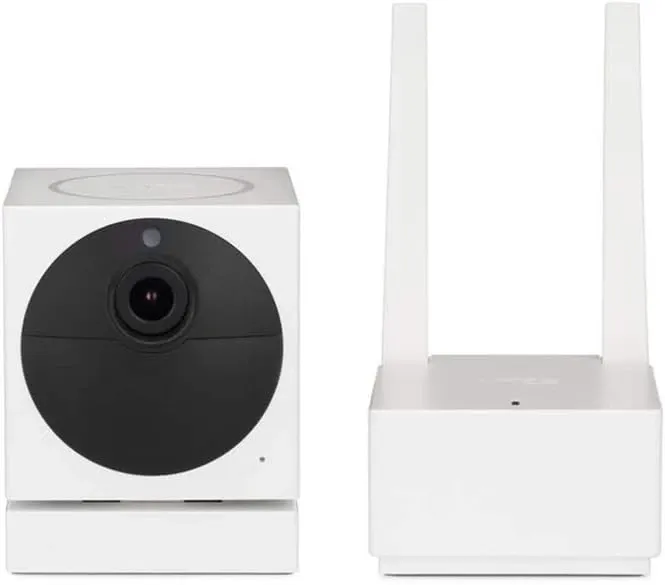
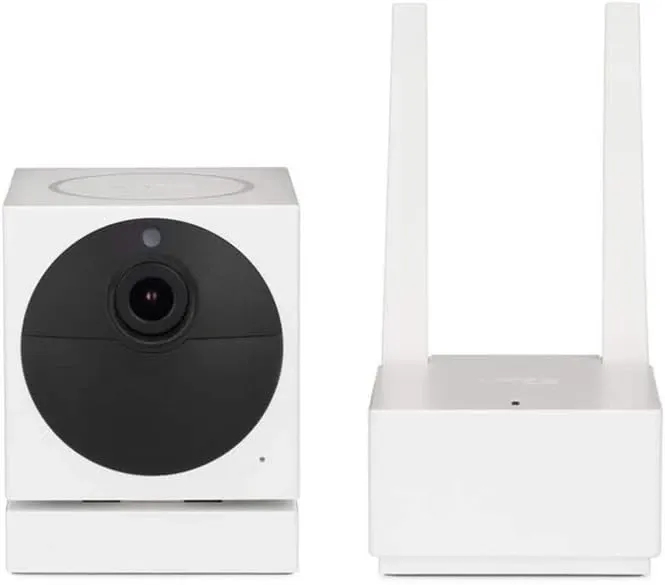
The Wyze Cam v1 put an affordable smart security camera on the map. It's widely known among renters, students, and first-time buyers. It launched at a low price that seemed almost too good to be true. This compact indoor camera had features found only in much more costly models. Wyze ended support on February 1, 2022. But the device's legacy lives on. It proved that everyone deserves an easy, affordable route to peace of mind.
Why the First-Gen Wyze Cam v1 Still Matters
The Wyze Cam v1 changed what buyers expected from budget cameras. It showed that a low price doesn't mean low quality. It's a landmark product in the affordable camera space. Here's what made it is notable.
Crystal-Clear 1080p Video
A Full HD sensor captures sharp footage by day and in dim light. You're checking in on pets or reviewing an event after work. The extra detail helps you spot faces and fine details without guessing.
Smart Motion and Sound Alerts
Built-in AI detects movement and odd noise. It then sends an alert to your phone in seconds. Real-time push alerts mean you can act quickly. You can cancel a false alarm or call a neighbor to check things out.
Night Vision with Infrared LEDs
Six infrared lights switch on at dusk on their own. They light up to 30 feet in full darkness. That range lets the camera see the whole living room or nursery with the lights off.
Two-Way Talk
A mic and speaker let you talk through the Wyze app. Say hello to the dog. Remind kids about homework. Or warn a visitor that the room is being watched.
Free Cloud Storage and MicroSD Backup
At launch, Wyze Cam v1 had rolling 14-day cloud clips at no extra cost. You could also add a microSD card for local recording. It's great for long trips or spotty Wi-Fi.
Quick Specs
- Resolution: 1920 x 1080 at 15 fps
- Lens: 110-degree wide angle
- Connection: 2.4 GHz Wi-Fi
- Power: 5V 1A via micro-USB
- Audio: Full-duplex two-way
- Local Storage: microSD up to 32 GB
- Size and Weight: 56 x 50 x 50 mm, about 100 g
Setup in Minutes, Not Hours
- Plug in and power up. A compact USB adapter lets you place the camera almost anywhere.
- Open the Wyze app. It's on Android and iOS. It walks you through setup step by step.
- Scan the QR code. Hold the screen in front of the lens. The device beeps when it's linked.
- Name your camera. "Living Room" or "Cat Cam" - make it personal.
- Choose your view. The swivel base tilts 180 degrees. Point the lens exactly where you need it.
Most users finished setup in under five minutes. That simple experience set the bar for smart gadgets that came after it.
Security, Privacy, and End-of-Life Notice
Wyze Labs fixed security issues and added features through firmware updates. That support ended on February 1, 2022. No new patches will arrive. If you still use a Wyze Cam v1, put it on a guest Wi-Fi network. Use a strong, unique password. Consider a firewall to keep the feed isolated. Or upgrade to the Wyze Cam v3. It has waterproof housing, color night vision, and active support.
Why It Mattered to the Smart Home Market
Wyze Cam v1 offered top features at a cost much lower than rivals. It forced big brands to rethink their prices. It also sparked a wave of DIY security projects. Open-source projects used its RTSP stream. Home Assistant plug-ins made setup simple. The little cube turned passive buyers into active smart home fans.
Comparing Wyze Cam v1 to Today's Models
Stack the original against newer siblings and you'll see some gaps. But it still holds its own in many day-to-day uses. New cameras have 2K or 4K video, color night vision, and on-device person detection. If your goal is simple room watching or pet checking, the 1080p classic can still do the job without extra cost.
Today's users who want more can look at the Wyze Cam OG or Wyze Cam Pan v3. Both have better specs and active software support. But the v1 showed them what was possible.
What It Means for DIY Security
Many buyers used the Wyze Cam v1 as a starting point. They added more cameras over time. They linked it with smart plugs for remote power cycling. They used it with Home Assistant for local control. The v1 was easy to expand on. That's a big part of why it became so popular.
It also got people thinking about privacy. It let users store video locally. That meant no monthly fees and no cloud dependency. Those features are now common in new cameras. The v1 helped push that shift.
Pro Tips for Getting More Out of an Aging Wyze Cam v1
- Aim for soft, indirect light during the day. This cuts backlighting and boosts clarity.
- Secure the firmware by running the final update before connecting to your guest network.
- Use motion zones in the app to cut false alerts from ceiling fans or passing headlights.
- Pair with smart plugs so you can power-cycle the camera from your phone if it freezes.
- Record to microSD for days of local history without relying on cloud bandwidth.
These tips extend the life of older hardware while you plan your next upgrade.
Should You Buy It
The Wyze Cam v1 is a landmark in smart home history. It made security cameras affordable for everyone. It proved that top features don't have to cost a lot. Its official life span has ended. But its impact lives on in every affordable, easy camera released since. If you own one today, treat it as a collector's piece. Or repurpose it in a low-risk area while you explore the next generation of Wyze products.
Frequently Asked Questions
Does Wyze Cam v1 still work?
Yes, existing units can stream and record locally. But cloud services may be limited. No new updates will arrive.
Can I use it outdoors?
It's designed for indoor use only. If you need outdoor coverage, the Wyze Cam v3 or Battery Cam Pro are weather-resistant options.
Does it support Alexa or Google Assistant?
Voice assistant support was available during the product's active life. Some skills might still work. But they could break without notice due to no firmware upkeep.
Video Review
As an Amazon Associate we earn from qualifying purchases. Disclosure.
Check Price on Amazon →


