Kasa Smart Dimmer Switch HS220: Wi-Fi Dimmer Wiring Guide
Product Details
🏭 Manufacturer: TP-Link
🆔 Model Number: HS220
The TP-Link Kasa Smart Dimmer Switch HS220 is a Wi-Fi enabled dimmer that replaces a standard light switch and adds app control, scheduling, and voice assistant compatibility without requiring a hub. It's a straightforward way to add smart dimming for anyone comfortable with basic electrical work. It's also a 100 to 120 V North American product per TP-Link's spec sheet, so it isn't an option on a 230 V supply.
One thing to state up front, because it changes how you should read the rest. This review is built on the spec sheet, the wiring requirements, and my own experience wiring a house for exactly this class of device. It isn't built on living with an HS220, and I'd rather say that than pretend otherwise.
Installation: What You Actually Need
The HS220 fits a standard single-gang box. You need a neutral, a line wire, and a load wire. Turn the breaker off, confirm the wires with a tester, and follow the included instructions. Once you know what you're looking at, the swap itself is a short job.
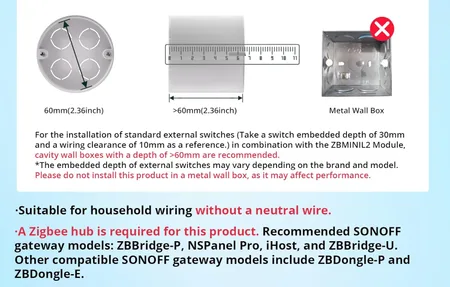
The most common installation issue is missing a neutral wire. If your existing switch has only two wires, you likely don't have a neutral. That's worth checking before buying. TP-Link's installation guide shows how to identify your wiring type.
For multi-switch (3-way) circuits, check TP-Link's wiring documentation for your exact model before buying, because a single-pole dimmer won't work in every arrangement.
App and Scheduling
The Kasa app lets you set schedules, sunrise/sunset triggers, and create scenes. You can dim to a specific percentage on a schedule - for example, 30% at 9 PM, off at midnight. The switch itself needs no monthly subscription.
Away mode randomly toggles lights on and off to simulate occupancy, which is useful when you're traveling.
Voice Control Performance
Alexa and Google Home integration works without a hub or bridge. The Kasa skill links your account and makes all Kasa devices available in the respective apps. TP-Link markets voice dimming ("Alexa, set the living room lights to 50%"). I haven't timed the response, and it depends on your Wi-Fi and the cloud path behind the voice assistant.
Dimming Quality
The HS220 uses leading-edge (triac phase-cut) dimming, which TP-Link says to check against your bulb's supported dimming type. At low brightness, some LEDs on leading-edge dimmers flicker, depending on the specific bulb. Whether yours does is a question about the bulb as much as the switch, so buy one, try it on the fixture you care about, and only then buy the rest.
What the Neutral Wire Requirement Really Means
The one genuine limitation is the neutral wire requirement. In an older house, check the switch box before ordering, because a switch loop with only a live and a switched live gives this dimmer nothing to run on.
This is the part I can speak to directly, because I made the opposite bet when wiring my own house. Every switch box got the deepest back box available, a neutral in every one, and the bulb permanently live with a controller deciding the light. All the lighting cable for a room lands in one box behind a single wall switch. No two-way circuits anywhere.
My electrician's reaction is the part worth repeating: he said the lighting was unusually simple, because there were no two-way or intermediate switching arrangements to run. Received wisdom says a smart home complicates the wiring. Here the copper got simpler, because control from several points moved into software instead of extra cable between switch positions.
That decision cuts both ways, and the honest cost is worth stating. When the hub is down, the lights in my house won't switch. That follows from the design, it isn't an outage I've lived through, and a UPS under the server softens it. The wall switch is an input to the system, not a break in the circuit. I accepted that deliberately, but it is exactly the trade a Wi-Fi dimmer like the HS220 does not ask you to make: it keeps working as a dimmer whether or not anything else on your network is alive.
What you get:
- Wi-Fi dimmer with app and voice control
- Scheduling, sunset/sunrise triggers, and away mode in the Kasa app
- Rated for 150W LED, 300W incandescent, or 150W CFL loads
- No hub, no bridge, no subscription for the switch
- Neutral wire required
One behavior worth checking before you buy any smart switch: what it does after a power cut. I haven't verified the HS220's behavior, so look for it in TP-Link's documentation or in owner reports. It's not a footnote. A device that waits for a human after the power returns fails on the one night nobody is home to tap it.
The body is deeper than a plain switch, so a crowded three-gang box with thick cable gets tight. This is the argument for deep back boxes long before you know which brand you will buy.
The Right Buyer
The HS220 is the right choice for anyone who wants smart dimming without a hub and is comfortable with a basic switch swap. It's usually cheaper than Lutron Caseta, which needs its own hub for full smart home integration. If you need no-neutral wiring support, look at Lutron Caseta. For standard installs with a neutral, the HS220 is a simple choice.
Frequently Asked Questions
Does the Kasa HS220 require a neutral wire?
Yes, TP-Link's spec sheet lists a neutral wire as required. If your switch box only has two wires (line and load), you don't have a neutral and the HS220 won't work. In that case, look at a dimmer that explicitly advertises no-neutral support, such as the Lutron Caseta series. Note also that the HS220 is rated for 100 to 120 VAC at 60 Hz, so it's a North American product and not suitable for a 230 V supply.
What bulb types work with the Kasa HS220 dimmer?
TP-Link rates the HS220 for 150W of LED, 300W of incandescent, or 150W of CFL load, using leading-edge (triac phase-cut) dimming. Standard (non-dimmable) LED bulbs can flicker, buzz, or fail to dim properly, so check that your bulbs are labeled "dimmable" and ask the bulb maker whether they support leading-edge dimming. Don't put smart bulbs behind a dimmer: they need constant, full mains power.
Does the Kasa HS220 work with Google Home and Alexa?
Yes. TP-Link says the HS220 works with Alexa and Google Assistant voice commands, including dimming, and needs no separate hub. It joins a 2.4GHz Wi-Fi network through the Kasa app, and you then link your Kasa account in your Alexa or Google Home app.