Kasa EP25 Smart Plug: Energy Monitoring in a Slim Body
Product Details
🏭 Manufacturer: TP-Link
🆔 Model Number: EP25
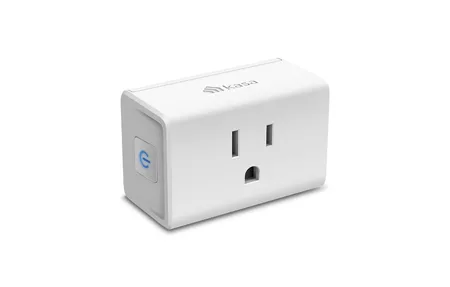
The TP-Link Kasa EP25 is a slim, single-outlet Wi-Fi smart plug with energy monitoring. It plugs into a wall socket, switches whatever you connect to it on a schedule or by voice, and reports how much power that device draws. I haven't used one myself. This page is based on TP-Link's own product page, the Home Assistant documentation and what the plug is designed to do, and I'll say where the specs leave a gap.
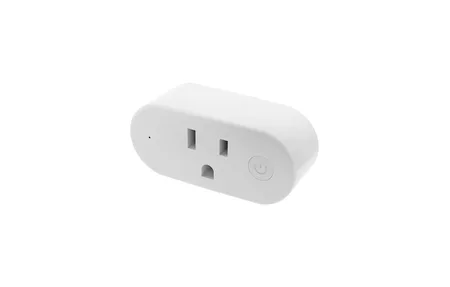
One point first, because it trips people up. The EP25 is not a dual-outlet plug. It has one socket and is shaped so two can sit in the same wall outlet. The two-socket members of the Kasa family are different models, such as the in-wall KP200 and the outdoor EP40.
One Outlet, Built to Stack
The EP25 is small, about 66.5 x 38 x 40 mm without the pins according to TP-Link, and the stackable shape is the whole idea. A duplex wall outlet can hold two EP25 plugs at once, each controlled on its own. That gets you the independent control a dual plug would give you, with the flexibility of moving one plug elsewhere later.
In the Kasa app each plug appears as its own device with its own name, schedule and automation options. Name it for what is plugged in, not for where it sits. "Desk lamp" is easier to say to a voice assistant than "Plug 2".
Energy Monitoring
Energy monitoring is the reason to pick the EP25 over a basic plug. TP-Link lists real-time consumption plus history for today, the past 7 days and the past 30 days. That is enough to answer practical questions: how much does a monitor draw asleep versus awake, does a charger pull power with nothing connected, is the always-on streaming box worth switching off overnight.
It's a spot-check tool. A plug measures one device. Whole-home questions need a meter at the panel. In my own house build, for example, whole-house production and consumption comes from a Huawei EMMA meter, with a metered DIN-rail breaker for one circuit, rather than from plug-level sensors. The two approaches complement each other, and plugs are the cheap way to find the surprising loads first.
From Box to First Use
Setup follows the usual Kasa flow: plug in, open the Kasa app, add the device, follow the prompts. Two details from the spec page matter. The plug connects over 2.4 GHz Wi-Fi only, so it won't join a 5 GHz-only network. And no hub is required, since control runs through the app and your router.
TP-Link lists support for Apple HomeKit, Amazon Alexa, Google Assistant and Samsung SmartThings. Features include schedules through the week, a countdown timer and an away mode that randomizes on and off times to suggest someone is home.
Using It with Home Assistant
Home Assistant's TP-Link integration lists the EP25 and talks to it locally, over the local network rather than through TP-Link's cloud. When a device supports energy monitoring, the integration creates consumption sensors that can feed the Energy dashboard. That is the strongest argument for this plug if you run Home Assistant: the readings arrive as ordinary sensors, so you can chart them and build automations on them.
There's a catch. The docs note that newer Kasa and Tapo devices need your TP-Link cloud username and password to authenticate for local access, and the EP25 carries that note. Control stays local afterwards, but you still need a TP-Link account for the initial authentication. If keeping every device free of vendor accounts is a hard requirement, that is worth weighing.
Practical Uses
An entertainment center is the classic case: streaming box on a plug that switches off at midnight, TV left alone. A home office works the same way, with a lamp on a sunset trigger and a monitor on a schedule. The energy view is the part worth checking regularly for the first few weeks, since it shows which devices keep drawing power when you think they are off.
A few habits make a plug like this more useful:
- Name each plug for the device it controls
- Set schedules in the plug's own app where possible, because a schedule stored on the device keeps firing if your phone is off
- Check the energy history after a week to spot standby loads
- Keep the load well below the rating
What to Check Before Buying
- Load limit. 15 A at 120 V is 1.8 kW, per TP-Link. Space heaters and kettles can come close, so don't use a smart plug for them without checking the rating.
- Wi-Fi band. 2.4 GHz only, 802.11b/g/n.
- Account requirement. Newer firmware needs TP-Link cloud credentials, even for local control in Home Assistant.
- Regional variants. The 15 A and 120 V figures describe the US model. Other regions sell different Kasa plug variants, so confirm the exact model and rating for your socket type.
- Warranty. TP-Link lists a 2-year warranty.
Is the EP25 Worth Buying?
For a cheap, small plug with usable energy data and broad assistant support, the EP25 is a sensible pick, and it is particularly good value if you can use the energy sensors in Home Assistant. It won't give you two sockets in one body, and it ties you to a TP-Link account for local access on current firmware. If either of those matters, look at a plug with a different design before you buy.
Frequently Asked Questions
Is the Kasa EP25 a dual-outlet plug?
No. The EP25 has a single outlet. TP-Link designed it as a slim plug so that two of them can be stacked in the same wall outlet, which is probably why it gets mistaken for a dual-outlet model. If you want two independently controlled sockets in one body, look at Kasa's in-wall KP200 or the outdoor EP40 instead, both of which are sold as two-socket devices.
Does the Kasa EP25 measure energy consumption?
Yes. TP-Link lists real-time and historical consumption for the EP25, with views for today, the past 7 days and the past 30 days in the Kasa app. I couldn't find an accuracy figure on TP-Link's product page, so treat the readings as a good guide to what draws power rather than as billing-grade data.
What is the maximum load for the EP25?
TP-Link rates the EP25 for 15 A, which it states as 1.8 kW at 120 V. That covers lamps, fans, chargers and most small appliances, but not several high-draw heaters on one plug. Check the rating for your own mains voltage and keep a margin below the limit.