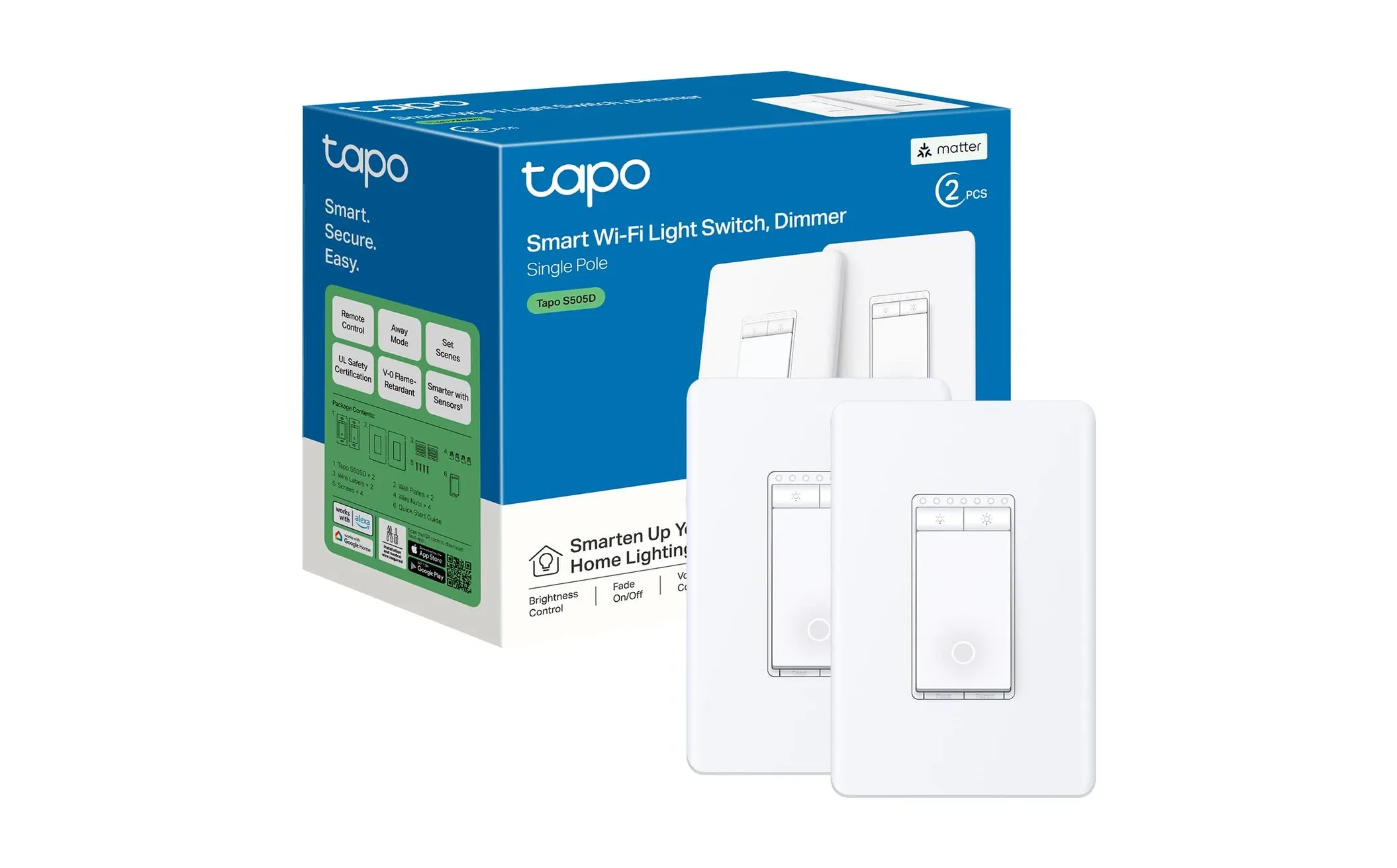
Tapo Smart Wi-Fi Dimmer Switch S505D: Effortless Lighting
As an Amazon Associate we earn from qualifying purchases. Disclosure.
Check Price on Amazon →Product Details
🏭 Manufacturer: TP-Link
🔌 Plug Format: US
📄 Specification Met: Yes
🔖 Part Number: S505D
🏋️♂️ Weight: 4.8 ounces
📏 Dimensions: 4.13 x 1.7 x 1.5 inches
🏳️ Country of Origin: China
🆔 Model Number: S505D
📐 Size: Single Pole
🎨 Style: Modern
🧲 Mounting Type: Wall Mount
🔧 Usage: Indoor Use
🧩 Included Components: Smart Dimmer Switch, Wire Nuts, Wall Plate, Quick Installation Guide
Swap out a standard wall switch, reuse the wiring that's already in the box, and you get app plus voice dimming for that room. That's the case for the Tapo Smart Wi-Fi Dimmer Switch S505D. It's a 15-amp single-pole dimmer from TP-Link that joins your smart home ecosystem over 2.4GHz Wi-Fi, with no hub or bridge needed. This review covers what it does well, how the install actually goes, and where the S505D comes up short.
Transform Your Home with Smart Lighting
Envision controlling your home lighting from anywhere, adjusting the brightness to suit any mood or occasion with ease. The Tapo Smart Wi-Fi Dimmer Switch S505D allows you to do just that. Its modern design and advanced technology enable effortless control over your lights without the need to get up from your seat. This smart switch is compatible with major voice assistants, allowing for hands-free operation and greater convenience in your daily routine.
Key Features of the Tapo Smart Wi-Fi Dimmer Switch
To fully appreciate the capabilities of the Tapo Smart Wi-Fi Dimmer Switch S505D, let's take a look at its key features:
- Ease of Use: The dimmer switch connects to your home Wi-Fi network, enabling wireless control via the Tapo app.
- Energy Efficiency: By allowing you to adjust lighting levels, this switch helps reduce electricity consumption, promoting a more energy-efficient home.
- Voice Control: Works with popular voice assistants like Amazon Alexa and Google Assistant for hands-free operation.
- Smart Scheduling: Set schedules and timers to automate lighting adjustments based on your daily routine.
- Compatibility: Works with LED, CFL, and incandescent bulbs, making it versatile for various lighting setups.
- Warranty: Backed by a two-year warranty, which is standard for TP-Link switches in this range.
Simple Installation Process
Installing the Tapo Smart Wi-Fi Dimmer Switch S505D is straightforward, even if you're not an experienced DIYer. Below is a brief guide to help you get started:
- Turn Off Power: Before beginning, ensure that the power to the switch is turned off at the circuit breaker to ensure safety.
- Remove the Old Switch: Carefully detach the existing switch from the wall.
- Connect Wires: Use the provided wire nuts to connect the dimmer's wires to your home's wiring.
- Secure the Switch: Mount the Tapo switch to the wall and attach the wall plate.
- Turn On Power: Restore power at the circuit breaker and confirm the switch is functioning correctly.
- Connect to Tapo App: Download the Tapo app and follow the setup instructions to pair the switch with your Wi-Fi network.
Smooth Integration and Control
One of the standout features of the Tapo Smart Wi-Fi Dimmer Switch S505D is its ability to integrate with various smart home platforms. Whether you're using Amazon Echo, Google Home, or other IoT devices, the S505D can easily blend into your setup, providing an intuitive and unified home automation experience.
With the Tapo app, you have full control over your lighting, whether you're in another room or miles away from home. The app also allows you to set customized lighting scenes and schedules, creating the perfect ambiance for every moment. Enhanced remote access ensures you're never left in the dark, quite literally.
Enhance Your Home's Ambiance
Lighting plays a real role in how a room feels. The S505D lets you shift from bright light for focused tasks to a softer glow for relaxing, all from the slider. Its scheduling and automation can track your day too - easing the lights up in the morning to wake you gently, then dimming them at night to help you wind down.
Is the Tapo S505D Worth Buying?
At 4.5 stars across 851 reviews, the S505D is an easy recommendation for one specific job: adding smart dimming to a single-pole circuit without paying for a hub. The Tapo app is genuinely simple, voice control works with Alexa and Google Assistant, and the switch handles LED, CFL, and incandescent bulbs. For a first smart switch, it's a sensible pick.
Two honest limits, though. It needs a solid 2.4GHz Wi-Fi signal at the switch box, so a weak router in a far bedroom will cause dropouts no dimmer can fix. And it's single-pole only - if a hallway or stairwell light is controlled from two switches, this one won't wire in without a workaround. Confirm your setup first. Get those two things right and the S505D is one of the better-value smart dimmers going.
The dimmer operates on a standard two-point-four gigahertz Wi-Fi connection and requires no separate hub or bridge, keeping your setup straightforward and affordable. It supports single-pole configurations and works with most dimmable LED, CFL, and incandescent bulbs rated up to four hundred watts for LEDs. The Tapo app provides a smooth slider interface for adjusting brightness in precise increments, giving you exact control over the light level in any room. Fade-on and fade-off features let the switch gradually increase or decrease brightness over a configurable duration, which is gentler on your eyes than instant transitions. Firmware updates arrive automatically through the app to ensure continued compatibility with the latest platform features and security improvements.
Video Review
As an Amazon Associate we earn from qualifying purchases. Disclosure.
Check Price on Amazon →