Lenovo Smart Clock Google Assistant Bedside
As an Amazon Associate we earn from qualifying purchases. Disclosure.
Check Price on Amazon →Product Details
🏭 Manufacturer: Lenovo
🔌 Plug Format: AC Power
📄 Specification Met: FCC, CE
🔖 Part Number: ZA4R0002US
🏋️♂️ Weight: 328 g
📏 Dimensions: 113 mm x 79 mm x 80 mm
🏳️ Country of Origin: China
🆔 Model Number: ZA4R0002US
📐 Size: Compact
🎨 Style: Minimalist
🧲 Mounting Type: Desktop
🔧 Usage: Indoor Use
🧩 Included Components: Lenovo Smart Clock, Power Adapter, User Manual
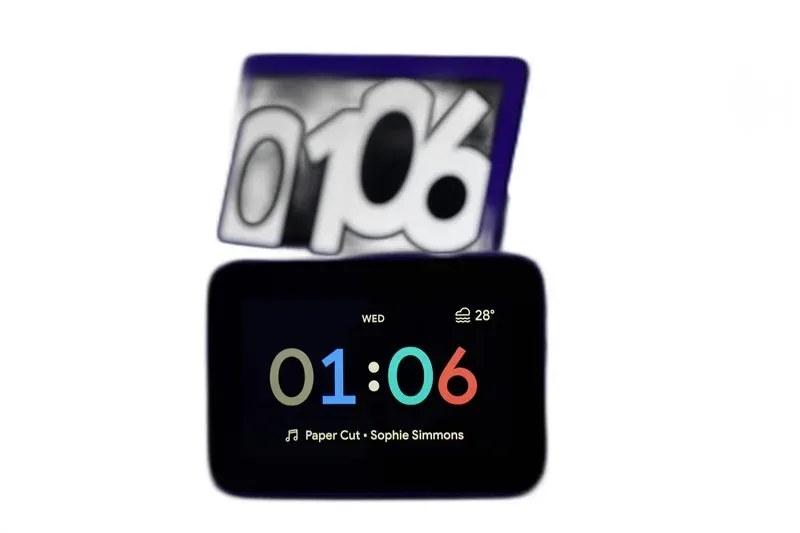
Most smart displays try to be everything at once: a video-call screen, a TV, a rolling photo frame. The Lenovo Smart Clock goes the other way. It's a compact 4-inch bedside unit with Google Assistant baked in, and it deliberately stops at time, alarms, weather, and smart home control. No camera. No video streaming. No web browser. Sit it next to the Google Nest Hub or Amazon Echo Show and it clearly does less, on purpose, which is the whole point on a nightstand.
It still reaches over 30,000 smart home devices through the Google Home ecosystem, so voice-controlled lighting, thermostat tweaks, and music through the 6-watt speaker all work from bed. The Sunrise Alarm, which gradually brightens the screen before your set time, is the feature people end up keeping.
Specs and Numbers
The Lenovo Smart Clock packs useful features into a remarkably compact form factor. At just 4.48 x 3.11 x 3.14 inches and 0.72 pounds, it takes up minimal nightstand space.
- Display: 4-inch 800x480 pixel IPS LCD touchscreen
- Speaker: 6-watt full-range driver with adequate bedside volume
- Microphones: Far-field dual microphones with physical mute switch
- Connectivity: Wi-Fi 802.11ac (2.4GHz and 5GHz) plus Bluetooth 4.2
- USB port for charging your smartphone or tablet overnight
- Power: AC adapter required (no battery, always plugged in)
- Construction: Soft-touch fabric finish with rounded edges
The far-field microphones pick up voice commands clearly from across the room, even with background noise from fans or white noise machines. The physical mute switch on the back provides a hardware-level microphone cutoff when you want guaranteed audio privacy.
Display Features
The 4-inch touchscreen displays time in multiple clock face styles that you can customize. During the day it shows weather, upcoming calendar events, and commute information. At night, the screen dims automatically based on ambient light, reducing to a faint glow that does not disturb sleep. You can also set the display to turn off completely at night.
Hubs, Apps and Protocols
The Lenovo Smart Clock integrates directly with the Google Home ecosystem, giving it access to one of the largest smart device networks available. Through Google Assistant, you can control:
- Smart lights from Philips Hue, LIFX, TP-Link, and others
- Thermostats from Nest, Ecobee, and Honeywell
- Smart plugs and switches from a wide range of manufacturers
- Security cameras (view on your phone through Google Home, not on the clock screen)
- Door locks, garage controllers, and robot vacuums
The clock supports multi-room audio through Google speaker groups. Add it to a group with other Google-compatible speakers to play synchronized music throughout your home. Bluetooth 4.2 connectivity lets you stream audio directly from your smartphone when voice commands are not convenient.
Google Calendar and Google Maps integration provides personalized morning briefings. Ask for your schedule, commute time, or daily forecast and the information appears on screen while Google Assistant reads it aloud.
Everyday Use Cases
The Lenovo Smart Clock is at its best in bedroom and bedside scenarios, where its narrow feature set turns into an advantage rather than a limitation:
- Sunrise Alarm: The screen gradually brightens 30 minutes before your alarm, simulating natural dawn light for gentler waking
- Morning briefing: Say "Good morning" to trigger a customized routine that reads your schedule, weather, commute, and news headlines
- Bedtime routine: Set a "Good night" routine to dim smart lights, lock doors, adjust the thermostat, and start ambient sleep sounds
- Music and podcasts: Stream from Spotify, YouTube Music, Apple Music, or radio stations through the 6-watt speaker or paired Bluetooth speaker
- Phone charging: The USB port lets you charge your phone overnight without needing a separate nightstand charger
The deliberate absence of a camera makes this device appropriate for bedrooms where privacy matters. Unlike smart displays with cameras that require trust in software-based privacy shutters, the Smart Clock physically cannot record video.
Setting Up the Lenovo Smart Clock
Setup takes approximately 5 minutes through the Google Home app on your smartphone:
- Plug the Smart Clock into a power outlet and wait for the welcome screen
- Open the Google Home app on your Android or iOS device
- Follow the prompts to connect the clock to your Wi-Fi network
- Sign in with your Google account to sync calendar, routines, and device preferences
- Customize clock face, alarm sounds, and smart home routines
Configuration Tips
After the initial setup, configure these features to maximize daily utility:
- Create a "Good morning" routine in the Google Home app that combines weather, calendar, and news
- Set up a "Good night" routine to automate lights, locks, and thermostat with a single voice command
- Add the Smart Clock to a speaker group for multi-room audio playback
- Enable Sunrise Alarm in the clock settings for gradual wake-up lighting
- Use the USB port to charge your phone overnight
Is the Lenovo Smart Clock Worth Buying?
The Lenovo Smart Clock wins by doing less. Its small footprint, soft-touch design, and stripped-back feature list make it a bedside companion instead of one more screen fighting for your attention. The Sunrise Alarm, far-field voice control, and reach into 30,000-plus Google Assistant devices cover the things you actually do at 7 a.m. or 11 p.m., without dangling video and social feeds in front of you.
The tradeoff is plain: this is an alarm clock with smarts, not a mini tablet. Want video calls, YouTube, or a bigger panel? The Google Nest Hub or Amazon Echo Show fit better, and honestly they should be your pick there. But if you want a compact, camera-free clock that runs alarms, music, and smart home control by voice, the Lenovo Smart Clock is a cheap, dependable choice that slips into a nightly routine without fuss.
Frequently Asked Questions
Does the Lenovo Smart Clock have a camera?
No. The Lenovo Smart Clock does not have a built-in camera. This is a deliberate design choice for bedroom privacy. You cannot make video calls on this device. A physical mute switch disables the microphones when you want complete audio privacy.
Can the Lenovo Smart Clock play music from Spotify?
Yes. The Smart Clock supports Spotify, YouTube Music, Apple Music, and other streaming services through Google Assistant voice commands. You can also use Bluetooth to stream audio from your phone. The built-in 6-watt speaker provides clear sound for a bedside device.
What smart home devices work with the Lenovo Smart Clock?
The Smart Clock works with over 30,000 devices from more than 3,500 brands through the Google Home ecosystem. This includes smart lights, plugs, thermostats, cameras, locks, and more from brands like Philips Hue, TP-Link, and Nest. Any device compatible with Google Assistant works with the clock.
Does the Lenovo Smart Clock support Netflix or YouTube video?
No. The 4-inch display is intentionally limited to clock faces, weather, calendar, and smart home controls. You cannot watch Netflix, YouTube, or any video content on this device. Lenovo designed it specifically as a bedside clock, not an entertainment screen.
What is the Sunrise Alarm feature on the Lenovo Smart Clock?
The Sunrise Alarm gradually brightens the screen starting 30 minutes before your set alarm time, simulating a natural sunrise to wake you more gently. The screen transitions from dim warm tones to full brightness, helping you wake up without a jarring alarm sound.
Video Review
As an Amazon Associate we earn from qualifying purchases. Disclosure.
Check Price on Amazon →