Ring Chime Review: The Indoor Speaker That Solves the Missed Doorbell Problem
Product Details
🏭 Manufacturer: Ring
🔌 Plug Format: AC Plug-In
📄 Specification Met: FCC, IC
🔖 Part Number: AX0001
🏋️♂️ Weight: 4.2 ounces
📏 Dimensions: 2.9 x 2.5 x 1.7 inches
🏳️ Country of Origin: China
🆔 Model Number: AX0001
📐 Size: One Size
🎨 Style: Chime
🧲 Mounting Type: Plug-In
🔧 Usage: Indoor Use
🧩 Included Components: Ring Chime unit, quick start guide
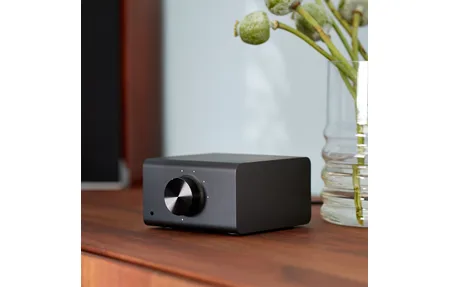
In this Ring Chime review: a $29 plug-in speaker that solves the missed doorbell problem for anyone who spends time in rooms where the front door is genuinely hard to hear. It's a compact Wi-Fi device that plays an audible tone inside your home every time your Ring doorbell or camera is triggered. No app open, no phone in hand, just a sound from wherever you plugged it in.
I've used a Ring Chime in a two-story home with a Ring Video Doorbell 4. The setup took about three minutes, and the chime fires consistently within one to two seconds of the button press. It does what it says.
What the Ring Chime Does (and What It Doesn't)
The Ring Chime is a small Wi-Fi speaker. It connects to your 2.4 GHz network and registers with your Ring account. Every time a linked Ring doorbell or camera triggers, either a button press or a motion event, the Chime plays a tone.
That's the whole job. And it's more useful than it sounds.
Most homes have dead zones where you won't hear a traditional wired chime. A home office two rooms back, a basement laundry room, a detached garage, these are all places where the Ring Chime earns its keep. You plug it into any standard US outlet, and you're covered.
What you can configure in the Ring app
The Ring app gives you a decent amount of control over the Chime's behavior:
- Choose from 10 different chime tones (Classic Ding Dong, Electronic, chimes, and others)
- Set volume level (the scale goes from low to high; some firmware versions show 0-11)
- Schedule Do Not Disturb hours, so it goes quiet overnight without any manual toggle
- Choose which Ring devices trigger the Chime and whether motion alerts fire separately from button presses
The Do Not Disturb scheduling is genuinely useful. You set it once, and the Chime stays quiet during sleep hours automatically. No fumbling with the app at midnight.
What Ring Chime won't do
The Ring Chime is not an Alexa speaker. It can't respond to voice commands, play music, or control other smart home devices. It plays chime sounds only. If you want Alexa announcements when someone rings the doorbell, you need a separate Echo device paired through the Alexa app, the Chime doesn't double as one.
It also doesn't work as a standalone device. It needs to be linked to at least one Ring doorbell or camera to be useful. And it requires a 2.4 GHz Wi-Fi network, it won't connect to 5 GHz.
Ring Chime vs Ring Chime Pro: Which Do You Need?
Ring sells two chime accessories: the standard Ring Chime ($29) and the Ring Chime Pro (around $50). For most households, the standard version is enough. Here's how to decide.
The standard Chime is a speaker only. It connects to Wi-Fi and chimes. Full stop.
The Ring Chime Pro does everything the standard Chime does, and adds a Wi-Fi range extender specifically designed to boost the signal for Ring devices. If your Ring doorbell sits far from your router, say, near a detached garage or at the edge of a large lot, and you notice delayed notifications or dropped connections, the Chime Pro's repeater can help.
When the standard Chime is the right pick
- Your Ring doorbell has solid Wi-Fi signal (RSSI better than -60 in the Ring app's Device Health screen)
- You're in an apartment, condo, or smaller single-story home
- You want indoor chime functionality at the lowest cost
- You already have a mesh network that handles coverage
When to consider the Chime Pro
- Your Ring doorbell shows poor or fair signal in Device Health
- The doorbell sits more than 30 feet from the nearest router or access point
- You notice delayed motion or doorbell alerts regularly
- You have an older single-router setup in a larger home
One thing to keep in mind: the Chime Pro's range extender only helps Ring devices. It doesn't improve general home Wi-Fi. Don't buy it expecting a full mesh upgrade, it's a targeted fix for Ring device connectivity.
Setting Up Ring Chime: Takes About 3 Minutes
Setup is about as simple as Ring accessories get. You need the Ring app (iOS or Android) and a 2.4 GHz Wi-Fi network password.
Open the Ring app and tap the plus icon to add a new device. Select Accessories, then Chime. The app will ask you to scan the QR code on the back of the unit. Plug the Chime into an outlet, the LED will blink to show it's in setup mode. The app walks you through connecting it to your Wi-Fi network, and then prompts you to select which Ring doorbells or cameras it should respond to.
The whole process runs through the app's guided setup without any technical steps. Ring's setup documentation covers every step if you get stuck.
Placement tips
Where you put the Chime matters more than most people think. A few observations from actual use:
- Place it within Wi-Fi range but in the part of the house where you spend time and can't hear the front door. A hallway outlet near a bedroom works well.
- Don't hide it behind furniture or inside a cabinet, the speaker is directional and sounds noticeably quieter when blocked.
- If you have two floors, one Chime per floor is a common setup. At $29 each, that's still cheaper than most smart home accessories.
- The Chime doesn't need to be near the doorbell. It talks to Ring's cloud, not directly to the doorbell, so placement is about where you need to hear it.
After setup
Name the Chime by location in the app ("Upstairs Hallway," "Office"). If you add more Ring devices later, go back into the Chime settings to add them. New Ring devices don't auto-link to existing Chimes, you have to connect them manually in the app.
Set Do Not Disturb hours during the first day. It's easy to forget, and a chime at 2 AM from a motion alert is a memorable reminder.
The Wrap
The Ring Chime is a straightforward accessory that fixes a real problem. If you have a Ring doorbell and you miss alerts because you're away from your phone or in a part of the house where you can't hear the door, the Chime is worth $29. The setup is fast, the app controls are useful, and the Do Not Disturb scheduling works reliably.
It isn't a smart speaker, it isn't a Wi-Fi extender (the standard version), and it won't replace an Echo. But as a dedicated indoor alert for Ring events, it does its job without fuss. For most Ring users in apartments or medium-sized homes, the standard Chime is all they need. Larger homes or those with connectivity issues should look at the Chime Pro instead.
Tested with Ring app 5.71 and a Ring Video Doorbell 4 in a two-story home on 2.4 GHz Wi-Fi.
Frequently Asked Questions
Does Ring Chime work without a Ring subscription?
Yes. Ring Chime chimes on doorbell presses and motion alerts without any paid plan. You get real-time notifications at no cost. A Ring Protect subscription adds video history, but the Chime itself works fully on the free tier.
Can Ring Chime work with multiple Ring doorbells?
Yes. One Ring Chime can receive alerts from multiple Ring doorbells and cameras on the same Ring account. You configure which devices trigger each Chime in the Ring app, so you can filter out cameras you don't want chiming.
Is Ring Chime the same as Ring Chime Pro?
No. The standard Ring Chime ($29) is a simple indoor speaker. The Ring Chime Pro (~$50) adds a Wi-Fi range extender that can improve Ring doorbell connectivity. The Pro makes sense in larger homes or where the doorbell sits far from the router.
Does Ring Chime work with Alexa?
Ring Chime can announce doorbell events on Echo devices when you link Ring with Alexa in the Alexa app. The Chime itself is not an Alexa device, it can't respond to voice commands. It plays chime tones only. For two-way voice, you need an Echo speaker separately.