Smart Locks: Are They Safe and Which Are Worth Buying

This post may contain affiliate links. As an Amazon Associate we earn from qualifying purchases. Disclosure.
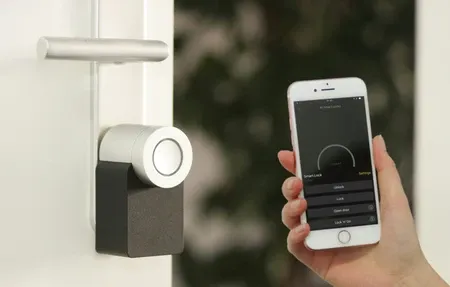
Smart locks are convenient, but the security trade-offs aren't always obvious. This guide covers what they protect against, top brands like Schlage and August, and installation requirements.
Quick take: A Grade 1 certified smart lock (ANSI/BHMA) is as physically secure as a traditional deadbolt, the smart layer adds keypad entry and app control without weakening the physical barrier. Schlage, Yale, and August are the tier-1 choices; avoid no-name locks with no published ANSI certification. Z-Wave S2 is the most secure wireless protocol for locks, it runs at 908MHz away from Wi-Fi congestion and encrypts the signal end-to-end. I've had a Schlage Encode Plus on my front door for two years: reliable, no lockouts, no regrets. Temporary codes for guests and contractors are the feature you didn't know you needed until you have it.
Smart locks replace or augment your deadbolt with keypad entry, app control, and smart home integration. They're genuinely convenient, no keys to lose, temporary codes for guests, auto-lock when you forget. But the security questions are legitimate and worth answering before you buy one. The complete smart home security guide covers how locks fit into a layered setup with cameras and alarms.
The short answer: a well-made smart lock from Schlage, Yale, or August with proper ANSI/BHMA Grade 1 certification is as physically secure as a traditional deadbolt. The smart layer adds convenience with minimal added risk when configured correctly. I've had a Schlage Encode Plus on my front door for two years and wouldn't go back to a traditional key for daily use.
What Do Smart Lock Physical Security Ratings Mean?
The most important spec on a smart lock isn't its app or voice assistant compatibility, it's the physical lock grade. Without good physical security, the smart features are irrelevant.
The ANSI/BHMA lock grading system divides residential locks into three grades based on standardized durability and resistance tests:
According to BHMA certification standards, Grade 1 is the highest residential rating. A Grade 1 certified lock withstands 250,000 open/close cycles, 10 door slam cycles at 75 lb force, 150 lb kick force at the door, and 1 million keypad presses. Schlage, Yale, and Kwikset all offer smart locks with Grade 1 certification. This is what you want on exterior doors.
Grade 2 is adequate for secondary doors and interior applications. Not recommended as your primary exterior deadbolt if security matters to you.
Grade 3 is the lowest rating and is not suitable for exterior doors.
The deadbolt mechanism matters more than the smart module. An August Smart Lock Pro attaches to your existing interior deadbolt, leaving the exterior keyhole and physical lock completely unchanged. A Schlage Encode replaces the entire lock assembly with a Grade 1 deadbolt plus the smart module. Both approaches can achieve the same physical security level, what differs is installation complexity and whether you keep or replace your current lock.
What Are the Real Smart Lock Digital Security Risks and Mitigations?
Smart locks do introduce attack surfaces that traditional deadbolts don't have. Understanding them helps you configure for safety. The smart home security basics guide covers the full threat model before you commit to any setup.
PIN guessing via brute force is the most straightforward digital attack. High-quality smart locks automatically lock out the keypad after 3-5 incorrect PIN attempts and alert the owner. Verify this feature is present before buying. Any smart lock without a lockout mechanism is a genuine concern.
Replay attacks on wireless signals were a problem with earlier Bluetooth and Z-Wave implementations. Modern locks use encrypted, rolling-code protocols. Z-Wave S2 Security (the current Z-Wave security layer) and modern Bluetooth Low Energy implementations both use session encryption that changes on every interaction, making replay attacks ineffective.
Cloud dependency is the risk most people don't think about. Locks that require cloud connectivity to function can stop working if the manufacturer's servers go down or the company shuts down. Prefer locks that work locally via Bluetooth or Z-Wave even when internet is unavailable. August Smart Lock Pro and Schlage Encode Plus both function fully without cloud connection.
Credential attacks on your account are the most likely real-world vector. If your lock app account is compromised, an attacker can unlock your door remotely. Use a strong unique password and enable two-factor authentication on the lock app account. Don't reuse passwords from other services. The smart home security systems guide covers alarm panels that integrate with smart locks for coordinated entry protection.
What Are the Top Smart Lock Brands and What Are They Best For?
Schlage Encode Plus ($279): Grade 1 deadbolt with built-in Wi-Fi and Matter/Thread support, no hub required. HomeKit integration is excellent, works via Control Center on iPhone, integrates with automations, and functions locally. The best pick for Apple HomeKit users.
Yale Assure Lock 2 ($189-$279): Grade 1 lock available in Z-Wave, Zigbee, Wi-Fi, and Matter variants. The modular design lets you swap the connectivity module if you change smart home platforms. A solid pick if you want future-proofing or already use Z-Wave.
August Smart Lock Pro ($199): Retrofits onto your existing interior deadbolt. Exterior appearance is unchanged, guests and visitors see a standard keyhole door handle. This is a genuine advantage for apartment renters who can't modify the exterior. Z-Wave connectivity works with Alexa, Google Home, and HomeKit via August Connect bridge.
Kwikset Halo Touch ($159): Fingerprint reader for primary entry, no PIN or app required for authorized users. Good for households where family members don't want to manage codes. Grade 2 rating, which is adequate for most residential use but below Schlage and Yale Grade 1.
Wyze Lock Bolt ($89): Budget option with fingerprint sensor and Bluetooth. No Z-Wave or HomeKit. Works well for the price, though limited to Bluetooth range and the Wyze app. Worth considering if budget is the primary constraint.
What Auto-Lock and Access Code Tips Should You Know?
Auto-lock is the smartest feature on any smart lock. Set it to engage after 5 minutes in the unlocked position. You stop thinking about whether you locked the door, because it locks itself.
Code Management Best Practices
A few practical tips for using smart lock features well:
- Create a separate access code for every recurring visitor (cleaner, dog walker, regular contractors) so you can revoke individual codes without changing the main code
- Use time-limited codes for contractors and one-time visitors, set an expiration date or a daily time window when the code works
- Review your active codes list every 3 months and delete any that are no longer needed
- Don't share your main PIN widely, keep it for household members only and use guest codes for everyone else
- Set the auto-lock delay to 5 minutes rather than immediate locking, leaving it at immediate sometimes causes lockouts when you step outside briefly
Most smart locks support 30-100 access codes. The August app shows a log of every code use with timestamps, which is useful for verifying when service providers actually arrived and left.
What Are the Smart Lock Installation Requirements?
Smart lock installation is genuinely DIY-friendly for most exterior doors. What you need to know before buying:
Deadbolt compatibility matters. Most smart locks replace a standard ANSI-format deadbolt (2-3/8 inch or 2-3/4 inch backset). Measure your existing deadbolt's backset before ordering. Non-standard door prep, double-cylinder locks, storm doors, oversized door thickness over 2 inches, may require special hardware or a different model.
The installation process for a replacement lock (Schlage Encode, Yale Assure) takes 20-30 minutes with a screwdriver. You're removing four screws from the existing lock, replacing the components, and re-securing. The August Smart Lock Pro is even faster, it clips over the existing interior thumb turn in about 5 minutes, and nothing is removed from the door.
Wi-Fi locks don't need anything extra beyond your existing home network. Z-Wave locks require a Z-Wave hub (SmartThings, Aeotec, or Home Assistant with a Z-Wave stick). Zigbee locks need a Zigbee hub. Thread/Matter locks work with a compatible border router (HomePod mini, Apple TV 4K, Google Nest Hub with Thread support). The complete smart home setup guide walks through hub configuration and getting everything connected in one place.
How Does Smart Home Integration for Locks Work?
Smart locks shine brightest when connected to a broader smart home platform. The best automations for locks in practice:
When you leave home (geofencing), the lock engages and the security system switches to Away mode automatically. When you arrive, the lock disengages after verifying it's your phone in range. Paired with a video doorbell, you can see who's at the door, speak to them, and unlock remotely if needed, all from your phone regardless of where you are. The video doorbells hub covers the best doorbell options that pair with smart locks for a complete entry system.
Home Assistant users have the most flexibility here: the Lock Code Manager integration manages codes across multiple locks from one interface, logs usage, and integrates code scheduling with calendar events. If your cleaner has a Thursday 10-12 slot in Google Calendar, Home Assistant can activate their code just before arrival and deactivate it automatically when the time window ends. The Home Assistant advanced automation guide covers lock code scheduling and geo-based entry in detail.
How Do Smart Locks Compare?
| Brand & Model | Price | ANSI Grade | Connectivity | HomeKit | Best For |
|---|---|---|---|---|---|
| Schlage Encode Plus | $279 | Grade 1 | Wi-Fi, Matter | Yes | Apple users, max security |
| Yale Assure Lock 2 | $189-279 | Grade 1 | Z-Wave/Zigbee/Matter | Yes | Multi-platform flexibility |
| August Smart Lock Pro | $199 | Grade 1* | Z-Wave, Bluetooth | Yes (bridge) | Renters, retrofit |
| Kwikset Halo Touch | $159 | Grade 2 | Wi-Fi | No | Fingerprint entry |
| Wyze Lock Bolt | $89 | Grade 2 | Bluetooth | No | Budget, secondary door |
*August uses your existing deadbolt, Grade 1 depends on the original lock. For a broader look at how locks compare with cameras and sensors, see the smart home cameras brand comparison.
What Are the Top Smart Lock Picks by Use Case?
The best smart lock depends on your priorities. Here's how the top picks break down by what matters most:
Best for security: Schlage Encode Plus. ANSI Grade 1 rating, built-in Wi-Fi, Apple Home Key support. Schlage's mechanical quality is consistently ranked above average in third-party testing. The built-in alarm detects door kicks and tampering.
Best for Apple users: Yale Assure Lock 2 with HomeKit. Supports Thread for local, cloud-free automation. Works with Home Key, tap your iPhone or Apple Watch to unlock. Clean design, solid build quality.
Best for retrofit (no installation): August Wi-Fi Smart Lock (4th gen). Fits over your existing interior thumb turn without touching the exterior hardware. Your existing key still works. Neighbors see the same door; you get full smart lock features inside.
Best for multiple users: Schlage Encode or Yale Assure with code management. Both support 100+ unique access codes. Pair with a code management integration in Home Assistant or SmartThings to schedule codes per person and per time window. The video doorbells comparison also covers multi-user entry scenarios where doorbells and locks work together.
Best budget option: Wyze Lock Bolt. Fingerprint reader, Bluetooth, basic app, under $60. No Wi-Fi without the separate Wyze Lock Gateway ($35 additional). Fine for a secondary door where remote access matters less.
When you're narrowing down choices, the ANSI/BHMA Grade certification system is the most objective measure of physical security. Grade 1 is residential highest, Grade 2 is mid-range, Grade 3 is lowest. All of the picks above are Grade 1 or Grade 2. Pairing a Grade 1 lock with compatible cameras adds another layer, the camera integration benefits guide explains how locks and cameras work together.
Browse the detailed guides below for brand comparisons, security analysis, installation walkthroughs, and pros/cons for specific lock models. If you're comparing complete security setups, the Arlo vs Ring home security comparison covers full system trade-offs beyond just locks.
For the certification grades referenced throughout this guide, the Builders Hardware Manufacturers Association (BHMA) publishes the Grade 1, 2, and 3 lock standards every credible smart-lock maker tests against.
Frequently Asked Questions
Are smart locks safer than traditional key locks?
Smart locks and traditional deadbolts use the same physical locking mechanism, so cylinder security is equivalent when both use ANSI/BHMA Grade 1 certified deadbolts, the best consumer rating for physical resistance to forced entry, impact, and picking. Where smart locks add security is access management: time-limited entry codes for contractors, housekeepers, or dog walkers with automatic expiry; entry logs that show exactly who entered and when; remote locking if you leave without checking. The added attack surface is the wireless protocol, choose locks with AES-128 encryption and Z-Wave S2 or Matter certification for the best wireless security. I've had a Schlage Encode Plus on my front door for two years; the Grade 1 cylinder hasn't been a concern, and the temporary code feature for contractors has saved me multiple trips home to let people in.
What happens to a smart lock during a power outage?
Battery-powered smart locks, the majority of consumer models, including Yale Assure, Schlage Encode, and August Smart Lock Pro, keep working during power outages because they run on internal batteries, not household power. The keypad, fingerprint reader, and mechanical deadbolt all function normally. Wi-Fi and cloud features go offline only if your router also loses power, but you can still unlock with your PIN or a physical key backup. Z-Wave locks are more battery-efficient than Wi-Fi models; Z-Wave typically runs 12 months on four AA batteries, while Wi-Fi models average six to nine months. Most locks send a low-battery alert through the app when charge drops below 20%. During our last extended power outage, I unlocked my front door with the PIN pad without any issues, the lock didn't know the internet was down and operated exactly as normal.
Can I install a smart lock myself?
Most smart locks are designed for DIY installation on standard US door prep, a 2-1/8-inch bore hole for the deadbolt and a 1-inch bore for the edge bolt. Yale Assure Lock SL and Schlage Encode both include paper installation guides and in-app video walkthroughs that walk you through each step. Standard deadbolt replacement takes 20 to 30 minutes with a Phillips screwdriver and a 10mm socket. Lever-handle smart locks replace the entire door handle and latch assembly; plan for 45 minutes on those. Professional installation makes sense for non-standard doors that need a new bore hole drilled, a hole saw and a steady hand are required, and one slip ruins the door slab. I installed a Yale Assure Lock SL in under 30 minutes on a standard door, the only tricky part was threading the door sensor cable through the bore hole before inserting the lock body.