How to Choose Smart Lights: Bulbs, Switches, Strips

This post may contain affiliate links. As an Amazon Associate we earn from qualifying purchases. Disclosure.
Cheap smart bulbs work fine until the cloud goes down or the app shoves a 20MB update mid-evening. The real choice isn't price. It's protocol, form factor, and which dumb fixture you're trying to make smart without rewiring half the house.
Cheap smart bulbs work fine until the cloud goes down or the app shoves a 20MB update mid-evening. The real choice isn't price, it's protocol, form factor, and which dumb fixture you're trying to make smart without rewiring half the house.
I've installed bulbs and switches across three flats and two parental houses since 2018. Same brand chosen twice in a row exactly once. This guide is the actual decision tree I run through when I help people choose lights for a new room without buying twice. Once the hardware's sorted, our guide to dialing in the perfect lighting ambiance covers the scenes and color temperatures that make a room feel right. Once the hardware is picked, the smart lighting hub covers what to actually do with it, and our tested shortlist of the best smart light bulbs for 2026 saves you the shortlisting step entirely.
Pick the Form Factor First
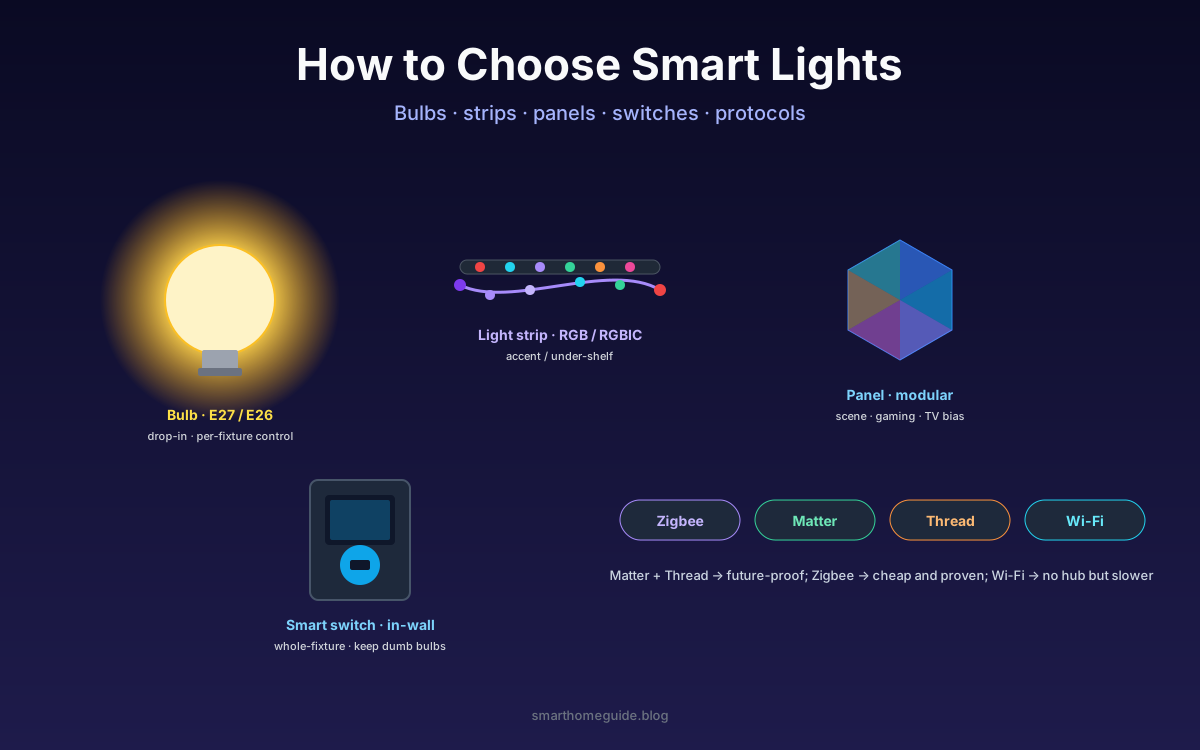
The form factor question is bigger than brand or protocol. Three real options:
- Smart bulbs (E27, E26, GU10, B22): drop into existing fixtures, per-bulb control, easy to move
- Smart strips (RGB or RGBIC): accent lighting, under cabinet, behind TV, decorative
- Smart switches and dimmers: replace the wall switch, control any bulb in the fixture
Bulbs work great in single-fixture rooms where one bulb is the light. Bedside lamps. A reading corner. The fancy pendant over the dining table. Strips solve different problems, ambience, accent, scenes you'd never get from a ceiling bulb.
Switches are the boring grown-up answer. If a fixture has five bulbs, replacing the switch costs less than five smart bulbs and survives anyone flipping the wall toggle. Renters can't always rewire switches, which is the real reason smart bulbs sell.
Protocol: Zigbee, Matter, Thread, or Wi-Fi?
This is where decisions actually matter. The protocol determines whether the bulb still works in a power cut, how it pairs, and how much router traffic you generate.
Zigbee is mature, cheap, low-power, and works locally through a hub. The downside is the hub itself, a small box you have to buy and keep powered. Philips Hue is the famous Zigbee setup; IKEA Tradfri and Aqara are cheaper alternatives that share the same radio.
Matter is the new universal standard that runs over Wi-Fi or Thread. A Matter bulb pairs with Apple Home, Google Home, and SmartThings out of the box without per-app accounts. Thread is the radio Matter prefers, low power, mesh, and reliable for battery devices.
Wi-Fi bulbs like cheap TP-Link Tapo or Wyze need no hub but every bulb is another device on your router. A house with 20 of them slows your network. Worse, most depend on cloud servers, so a vendor outage means dark rooms.
I default to Matter-over-Thread for new installs in 2026. Zigbee for budget builds where I already own a hub. Wi-Fi only for one-off bulbs in a lamp where I don't want a hub at all.
Brightness, CRI, and Colour Quality
Lumens are the number that matters for usable light. A standard living room ceiling bulb wants 800-1100 lumens; a reading lamp wants 400-600. Anything below 500 lumens in a kitchen and you'll squint.
Colour rendering index (CRI) gets ignored on cheap bulbs. CRI 80 is fine in a corridor. CRI 90 or higher is what you want in any room where skin, food, or fabric matters. A Philips Hue White and Color rates around CRI 80-83, which surprises people. The Nanoleaf Essentials GU10 hits CRI 90, one reason I use them over bathroom mirrors.
Don't forget the warm-cool range. "Tunable white" bulbs swing from 2700K (candle warm) to 6500K (cold daylight). The cheap "white only" bulbs lock you at one temperature, usually a slightly bluish 3000K that makes wood look wrong.
What I Actually Buy (After Six Years of Mistakes)
Real shortlist, by room type:
- Living room ceiling: smart switch plus dumb 800-lumen E27 bulbs (CRI 90+)
- Reading corner / bedside: Nanoleaf Essentials E27 or Hue White bulb
- Behind the TV: Govee RGBIC strip with camera sync if you watch films
- Bathroom mirror: Nanoleaf GU10 at CRI 90 (skin tone matters)
- Hallway with motion: Philips Hue White bulb on a Hue motion sensor
The total cost is lower than the all-Hue setup people start with, and the switch survives the in-laws who refuse to use the app. Add a smart hub only if you want shared automations across rooms.
Common Mistakes I See Every Month
These trip up nearly everyone:
- Buying colour bulbs and using only warm white. Save money and get tunable white instead.
- Filling a router with 20 Wi-Fi bulbs. Move to Zigbee or Matter-Thread before you hit 8.
- Skipping the smart switch because "I'll just use the app". Guests will flip the wall toggle. The bulb goes dumb.
- Ignoring CRI in the kitchen. Food on Instagram looks dreadful under cheap LEDs.
- Mixing protocols across a single room. One protocol per zone keeps scenes consistent.
The Philips Hue Bridge Pro is overkill for a studio flat. So is a full Aqara hub if you only want three bulbs. Match the hub to the room count, not the marketing.
Quick Picks Under 50 GBP per Fixture
For most readers the answer is simpler than the spec sheets suggest:
| Room type | Pick | Why |
|---|---|---|
| Bedside lamp | Nanoleaf Essentials E27 | Matter native, CRI 90, no hub for one bulb |
| Living room ceiling | Smart switch + dumb LED | Survives wall toggle abuse |
| TV ambient | Govee RGBIC strip | Camera sync at half the Hue price |
| Outdoor path | Philips Hue Outdoor Spot | Built for weather, mature ecosystem |
Total budget for a usable smart-light layout: around 200 GBP plus a hub if you have more than four bulbs. Most regret comes from skipping research, not from picking the wrong brand. If Philips Hue pricing is what's holding you back entirely, our cheap smart lighting guide covers budget-tier picks that skip the Hue ecosystem without giving up reliability.
Pick the form factor first, then the protocol, then the brand. That order saves money and stops you re-buying everything in 18 months when the cheap Wi-Fi bulbs stop responding to Alexa.
Where Each Form Factor Earns Its Keep
The form factor decision sounds abstract until you walk room by room. Let me show you what I mean with concrete examples from my own house. The kitchen has two pendant lights, one ceiling spot, and three under-cabinet zones. Each one needed a different answer.
For the pendants I picked a single smart dimmer switch in the wall, then bought ordinary 800-lumen tunable-white bulbs that match the colour temperature of the ceiling spot. Two pendants, three bulbs, total cost roughly 90 GBP. The wall dimmer lets the kids and visitors operate the lights without an app. It also lets me schedule the bulbs from cold daylight at breakfast to warm white by dinner, which makes wood countertops look properly grain-coloured instead of plastic.
The under-cabinet zones got Govee RGBIC strips because the strip cost is per metre and the colour matters here. When I'm cooking pasta sauce, having warm white over the worktop is fine, but when guests arrive for drinks I switch the strips to a soft amber that doesn't compete with candlelight. A single ceiling bulb cannot do that. Strips solve a different aesthetic job, and trying to fake it with bulbs gets expensive fast.
The hallway is the simplest deployment in the house and the most useful. One motion sensor, one Hue White bulb, one Hue dimmer for the panic-button override. The motion-triggered routine turns on at 5% brightness if the time is between 11 PM and 6 AM, and 100% otherwise. My partner walks to the bathroom at 3 AM without being blasted with daylight at the eyes. The bulb has paid for itself purely in avoided sleep disruption, never mind the energy savings the Energy Saving Trust calculates for LED replacements.
The Hub Question Most Buyers Get Wrong
Should you buy a hub? Most people assume yes for Hue and no for Wi-Fi bulbs, then end up with three hubs because each brand brings its own. There is a cleaner path now that Matter has matured.
If you own an Apple HomePod mini, a Google Nest Hub, or an Amazon Echo with a built-in Thread radio, you already have a Matter-Thread border router. You just don't see it that way. Plug a Matter-Thread bulb in, scan the QR code, done. No vendor hub. No vendor app. The bulb shows up in HomeKit, Google Home, and Alexa simultaneously.
This matters because the hub-per-brand pattern doubles your equipment cost over a few years and means a single vendor going out of business turns a room dark. The Insteon shutdown in 2022 was the lesson. People with hundreds of dollars of Insteon switches found the cloud servers disappeared overnight and their automations stopped. The lesson is to buy hardware that speaks an open standard, not a single vendor's protocol.
Zigbee still has a place. The bulbs cost about 30% less than equivalent Matter ones in 2026, and the protocol is mature enough that a Conbee II or Sonoff ZBDongle-E stick into a Raspberry Pi running Home Assistant can replace any branded hub for under 30 GBP. That route is the one I recommend to anyone who wants long-term independence from cloud services.
A Realistic Budget Plan for a Three-Bedroom House
For a typical UK three-bedroom house I'd budget around 350 GBP for a thoughtful smart-light rollout that survives the next five years. Here's how I split it.
Roughly 100 GBP goes on smart switches for the ceiling fixtures across the living room, kitchen, and hallway. These are the rooms where any human in the house might flip the wall toggle out of habit, and the switches mean nothing breaks when they do.
Another 100 GBP covers a handful of colour or tunable-white bulbs in the lamps and pendants where scenes actually matter, the bedside on each side of the master bedroom, the reading corner by the sofa, the dining pendant. These do not need to be the most expensive bulbs on the market. Mid-range CRI 90 picks from Nanoleaf or LIFX handle the work.
About 50 GBP goes on an RGBIC strip behind the TV, which is the single feature that visitors comment on more than any other. Cheap strips look cheap. The Govee M1 or the Hue Play Gradient sit at opposite ends of price but both look good on camera.
The remaining 100 GBP covers a hub if needed, motion sensors for the hallway and bathroom, and replacement bulbs because something always fails on you within the first year. Setting that money aside in advance stops the project from feeling like death by a thousand 8-pound impulse buys.
What I'd Skip Even If It's on Sale
Some categories of smart light look attractive on paper and fail to deliver day-to-day. Outdoor flood lights with built-in cameras seem clever but the camera quality lags two years behind dedicated security cameras. Picture-frame lights that promise to display Van Gogh paintings on your wall look great in adverts and dim in reality. Smart candles with flickering LEDs always look like LEDs, never like candles.
Buy boring bulbs in clever places. Save the budget for the rooms where light actually changes how you feel about being in them.
Frequently Asked Questions
Are smart bulbs or smart switches better for whole-house lighting?
Switches win for ceiling fixtures, chandeliers, and rooms with a single dumb light source you never want to leave manually on. Bulbs win for single-fixture rooms, color use, and renters who can't change wiring. The cheap path is mostly switches plus a handful of color bulbs where you actually want scenes.
Should I pick Zigbee, Matter, Thread, or Wi-Fi bulbs?
Matter over Thread is the future-proof pick if your hub supports both, since it works across Apple, Google, and Amazon ecosystems with local control. Zigbee is the cheapest mature option but needs a hub. Wi-Fi bulbs are hub-free but flood your router and depend on cloud uptime. Avoid mixing protocols if you only have one or two fixtures.
What lumens and color rendering do I need for living spaces?
Aim for 800-1100 lumens for a typical living room bulb and 400-600 lumens for a bedside lamp. Color rendering index (CRI) of 90 or higher matters for kitchens, bathrooms, and any room where you want food, fabric, or skin to look natural. Cheaper bulbs with CRI 80 look fine in hallways but make tomatoes look grey under direct light.
Do smart lights still work when the internet drops?
Zigbee, Z-Wave, and Thread bulbs keep working through a local hub even without internet, including automations like motion-triggered hallway lights. Pure Wi-Fi bulbs that rely on a cloud round-trip will stop responding to voice commands and may even fail to switch from the app until connectivity returns. Wall switches always still flip them on or off.
Are color-changing smart bulbs worth the price premium?
Only if you actually use scenes. Most homes I've seen set the bulbs to warm white once and never touch the colour wheel again. If you watch a lot of films, game, or want sunrise wake-up routines that shift hue, the premium pays off. If you mainly want voice control and dimming, tunable white bulbs cost half as much and look better in social settings.
Sources & References
- Energy Saving Trust - LED lighting in the home
- CSA Group - Connectivity Standards Alliance Matter