Smart Home Audio: Soundbar, Multi-Room and Voice, Without Overspending

This post may contain affiliate links. As an Amazon Associate we earn from qualifying purchases. Disclosure.
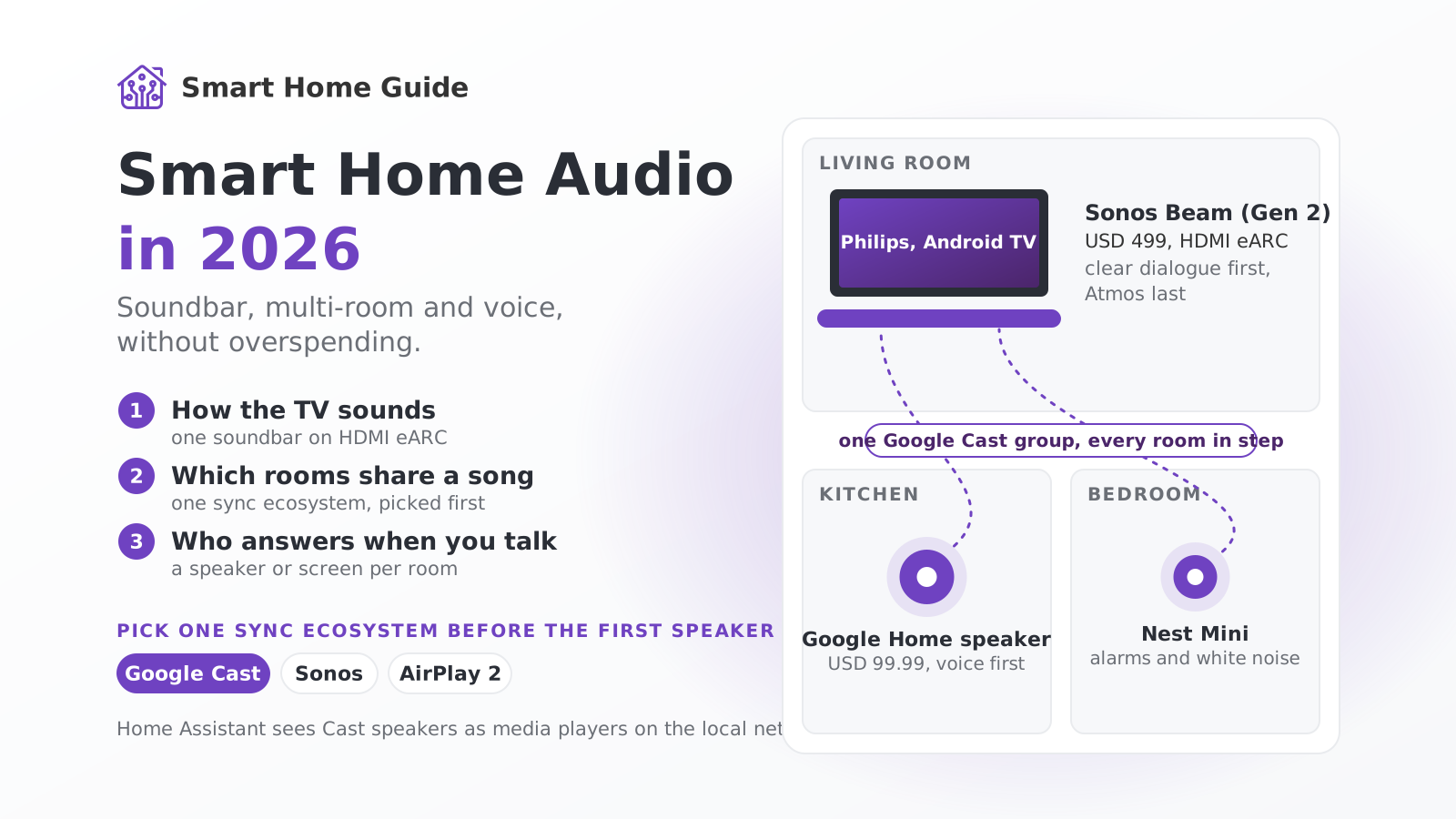
A smart audio setup is three decisions: how the TV sounds, which speakers share a song across rooms, and who answers when you talk. Here's how to make each one without buying a system you'll regret.
Most advice about smart home audio starts with a shopping list. I'd rather start with three questions, because the answers decide what you buy: how should the TV sound, which rooms should share music, and what do you talk to when you want something played?
A note on what's first-hand here. In the flat I use a Google Nest Mini and a Nest Hub Max, I'm happy with both, and they're moving to the house, where the plan is a speaker or screen in every room for voice control. The TV there is a Philips running Android TV. I haven't built a Sonos or AirPlay 2 system, so those parts are research from published specs and prices, and I say so where it matters.
Which Sync Ecosystem Should You Commit To?
Pick this before the first speaker. Multi-room groups generally work inside one ecosystem, so mixing them leaves you juggling apps and rooms that can't play together.
- Google Cast and Google Home: Nest speakers and displays group freely, and Google lists the Nest Mini and Nest Hub Max as compatible with its multi-room feature. Fits Android households and anyone who wants voice control on the cheap.
- Sonos: a closed, polished system with its own app and a full lineup from soundbars to subs. The best multi-room experience if you accept one vendor.
- AirPlay 2: the natural choice for iPhone households, supported by Apple speakers and many third-party brands.
I chose Google because the voice layer matters more to me than the speaker brand, and because Home Assistant can see Google Cast devices on the local network. Your answer may differ. If everyone in the house uses an iPhone, AirPlay 2 is the sane pick.
How Should the TV Sound?
Start with the TV, since that's where most listening hours go. A soundbar fixes thin built-in speakers, and a good one does it with one cable.
Current Sonos US prices give a feel for the ladder: Beam (Gen 2) at $499, Beam Ultra at $699 and Arc Ultra at $1,099, with the Sub Mini at $399 as a bass add-on. Those are list prices as reported in 2026, and they get discounted often, so check before you pay.
Look for three things in any soundbar. HDMI eARC, so the TV's remote controls the volume. Clear dialogue, which matters more than bass. And room calibration, if the model offers it. Atmos is nice for films, but I'd rank it last. Would I pay $400 extra for upward-firing drivers in a small living room? No. I'd put that money into rear speakers or a sub.
The same advice applies if your TV runs Android TV, as ours does: check that the TV platform is one Home Assistant handles well locally before comparing panels or speakers.
Where Does Multi-Room Audio Pay Back?
Not where people expect. The kitchen earns more hours than the living room, because you spend them with wet hands, a podcast and a pan on the stove. A single speaker on the worktop with voice control beats an elaborate install.
Google's new Google Home speaker went on sale on June 25, 2026 at $99.99. Reports say it replaces the Nest Mini and the Nest Audio, and that the best Gemini features sit behind a subscription. The older Nest Mini and Hub Max keep working in multi-room groups, which is exactly why I'm not rushing to replace mine.
Bedrooms need less than you think: one small speaker for alarms and white noise. Bathrooms are the one place to pay for a waterproof model, and steam is a good reason to skip a plug-in speaker with exposed ports.
What About In-Ceiling Speakers?
Only if you're building or renovating. Cable in a closed ceiling costs a weekend and a lot of dust, while the same cable in an open ceiling costs nothing. In-ceiling speakers need an amplifier somewhere, for example a Sonos Amp or a multi-zone receiver, and they leave with the house when you move.
For a house under construction like ours, the cheap move is to run speaker cable to the kitchen and living room before the plasterboard goes up and decide on the hardware later. Cable is almost free in that phase. Retrofitting it isn't.
How Do You Wire Audio into Home Assistant?
Home Assistant adds Google Cast devices through the local Cast integration, which finds them on your network and exposes each as a media player. That means automations can set volume, start a stream or play an announcement, and a Nest Hub Max can even show a Home Assistant dashboard.
A few automations worth building:
- Movie scene: when the TV starts playing, dim the lights and lower the speaker volumes in the neighboring rooms.
- Announcements: a washing machine finishing or a leak sensor firing speaks through the nearest speaker instead of buzzing a phone nobody is holding.
- Wake-up: a gentle volume ramp on a bedroom speaker alongside the lights.
Keep each rule on one system. If Google Home routines and Home Assistant automations both react to the same trigger, you'll spend an evening finding out which one turned the music off. The Home Assistant guides linked below explain how to split the work.
What Does a Sensible Setup Cost?
Using the prices above, a restrained start looks like this. A Beam (Gen 2) soundbar at $499 and one Google Home speaker at $99.99 come to roughly $600 for the TV and a kitchen. Add a second speaker for the bedroom and you're near $700. Stepping up to an Arc Ultra at $1,099 plus a Sub Mini at $399 takes the living room alone past $1,500.
That's a fine budget if you watch a lot of films. It's overspending if you mostly stream music and podcasts, because speech and music need far less hardware than cinema does. Match the spend to your habit, and treat the numbers as a snapshot: audio prices move with every sale.
Which Mistakes Cost the Most?
Three show up again and again. Buying across ecosystems, then discovering the kitchen and the living room can't share a song. Buying surrounds before living with the soundbar for a month. And leaving speaker cable out of a build, which turns a free job into a costly one.
I'd also avoid pairing a speaker with a subscription you haven't priced. Google Home Premium costs $10 or $20 a month after the trial, and without it some of the new assistant features stay locked, so check what you get before you commit to the hardware.
Which Order Should You Build It In?
Slowly. Audio gear gathers dust faster than anything else in a smart home when you overbuy on day one.
- The TV first. A soundbar changes daily life more than any other purchase here.
- One kitchen speaker second. It's cheap and it proves whether you'll actually use voice and music.
- Rooms three and four only after a month of use. If the first speakers don't get used, more won't help.
- Surrounds and a sub last, and only if you watch a lot of films.
That's the whole plan, and it fits in a single weekend of setup spread over a few months. Nothing here needs a custom installer. Buy for the habit you have, not the one you imagine, and keep the rest of the budget for something that works every day, without any setup.
Frequently Asked Questions
What is the cheapest realistic smart audio setup?
One smart speaker per room you actually use, plus a soundbar for the TV. The new Google Home speaker lists at $99.99, and a Sonos Beam (Gen 2) soundbar is $499. Start with the TV and one kitchen speaker, then add rooms only after you've used the first two for a few weeks.
Does Dolby Atmos in a soundbar make a difference?
For films, usually yes, for music much less. Atmos soundbars bounce sound off the ceiling to suggest overhead effects, which works best in rooms with a flat, reasonably low ceiling. Treat it as a bonus and judge the soundbar on dialogue clarity and bass first.
How does multi-room sync work?
Each speaker receives the same audio stream and plays it at a coordinated time, so rooms stay in step. Google Cast groups, Sonos and AirPlay 2 all do this. Mixing brands inside one group usually isn't possible, which is why you pick one sync ecosystem before the first purchase.
Can Home Assistant control smart speakers?
Yes. Google Cast devices such as Nest speakers and displays show up as media players through the local Cast integration, so you can start music, change volume or play announcements from automations. Basic control stays on your network, while streaming services still need the internet.
Should I choose in-ceiling or visible speakers?
Visible speakers install in seconds and move with you. In-ceiling speakers look cleaner but need cable run through the ceiling void and an amplifier. Renters should buy visible. If you're building a house, run the speaker cable before the ceilings are closed.