Kasa Smart Plug EP10 Review: Compact Wi-Fi Plug, No Hub
Product Details
🏭 Manufacturer: TP-Link
🆔 Model Number: EP10
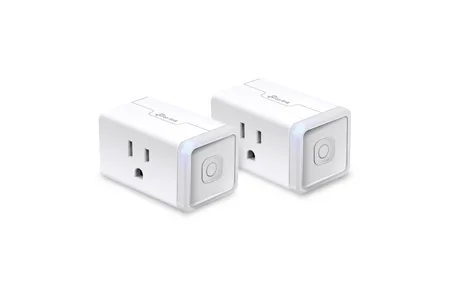
The TP-Link Kasa Smart Plug EP10 is a compact single-outlet Wi-Fi smart plug that adds on/off scheduling and voice control to any standard US outlet. It requires no hub, connects to 2.4GHz Wi-Fi, and works with Alexa and Google Home; retailer listings also mention Samsung SmartThings. At around $10-13, it's one of the lowest-cost ways to make a dumb appliance smart.
A note on sourcing: this review is researched, not hands-on, because I haven't run Kasa plugs at home. My own setup is built around Home Assistant and Zigbee, so this page is based on TP-Link's spec sheet, the Kasa support pages and owner reports. Treat the reliability remarks below as what owners report, not as my long-term test.
Setup in Under 5 Minutes
Plug it in, open the Kasa app, tap the plus button to add a device, and follow the prompts. The app walks you through connecting the plug to your Wi-Fi network. Plan on a few minutes, plus the app download if you're new to Kasa.
One common snag: the EP10 only supports 2.4GHz Wi-Fi, not 5GHz. If your phone is currently on a 5GHz network, you'll need to temporarily switch to 2.4GHz during setup. This is a one-time step and doesn't affect how the plug works afterward.
Scheduling and Automation
The Kasa app supports schedules based on a custom time or on sunrise and sunset, with an offset you can set. You can have a lamp turn on at sunset and off at 11 PM automatically. Away mode randomly toggles the connected device to simulate presence.
The EP10 also works as a target in Alexa routines and Google Home automations. If you say "Alexa, good morning," it can turn on the coffee maker plug as part of that routine. This is where smart plugs become genuinely useful rather than just a novelty.
Power Limit
Kasa lists the EP10 at 15A with a 1800W maximum for general-use resistive loads, on a 100-120V supply. That covers lamps, fans, small appliances and humidifiers. Space heaters are the edge case: a 1500W unit sits close to the limit, so don't run anything that draws more than 1800W continuously.
Reliability
Kasa plugs have a solid reputation compared with no-name alternatives. One caveat on cloud dependence: TP-Link's own schedule page says multi-device schedules use automations and need the devices connected to the internet. Single-plug schedules are generally described as living on the plug itself, but the support page doesn't spell that out, so if you need a schedule to survive an outage, test it once by unplugging your router.
The EP10 is the smart plug to recommend when someone asks for a cheap, no-nonsense option. Not the most feature-rich plug on the market, but it does the basic job.
What Owners Report After Long Use
The mini form factor is the quiet win. It's designed to leave the second socket of a duplex outlet free, which bulkier plugs from a few years ago couldn't do. Owners generally describe schedule execution as dull in the good sense: sunset-on, bedtime-off routines just fire.
What the EP10 does and doesn't do:
- On/off control via Kasa app, Alexa and Google Home (SmartThings per retailer listings)
- Time and sunrise/sunset schedules plus away mode
- 15A / 1800W maximum load on a single socket
- Mini footprint that leaves the second wall outlet free
- No energy monitoring (step up to the KP115 if you need wattage data)
- No 5GHz Wi-Fi support, 2.4GHz only
The most common nitpick is the small manual button on the side. You'll use the app or voice for everything anyway, but guests hunting for a physical switch may find it awkward. At $10-13, that's not a dealbreaker.
Behavior after power outages is worth checking because it's where cheap plugs usually fail. Retail listings say the EP10 remembers its settings and reconnects to Wi-Fi when power returns, keeping schedules and automations. Whether the plug comes back on or off after an outage is worth confirming with a lamp before you rely on it for anything that matters.
The Kasa app handles multiple plugs gracefully too. Each plug gets its own name and icon, and you can group several into a room so "turn off the bedroom" hits the lamp, the fan, and the diffuser in one command. For a lamp or fan where wattage is constant, how long it was on multiplied by the device's rated draw gets you a decent cost estimate without the pricier KP115.
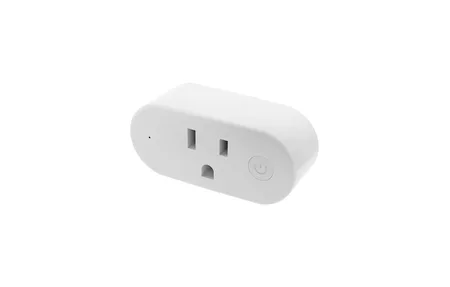
One safety note: resist the temptation to put a 1500W space heater on any smart plug long-term, even though the EP10's 15A rating technically allows it. Sustained high loads warm the plug body, and heaters are among the most common causes of melted smart plugs in user reports. Lamps, fans, humidifiers, and coffee makers are the sweet spot. High-draw heating appliances belong directly in the wall. The Sonoff Smart Plug-in Unit is another Wi-Fi outlet controller with energy monitoring.
Review Verdict
Taken together, the specs and owner reports make the EP10 an easy plug to recommend for lamps, fans, and other low-draw gear. It does the basics well: schedules with sunrise and sunset triggers, away mode, voice control through Alexa and Google Home, and a footprint that leaves the second socket free. What it doesn't do is just as clear. There's no energy monitoring, no 5GHz Wi-Fi, and no local-only mode that TP-Link documents, so anyone who wants wattage data or cloud-free control should look at the KP115 or at a Zigbee plug on Home Assistant instead. If those limits don't matter to you, this review ends where most owner reports do: it's a small, cheap plug that gets out of the way.
Frequently Asked Questions
Does the Kasa EP10 support energy monitoring?
No, the EP10 does not include energy monitoring. If you need to track wattage and electricity usage, look at the Kasa EP40A or Kasa KP115, which include energy monitoring in a similar form factor. The EP10 focuses on on/off scheduling and voice control at a lower price point without the energy tracking hardware.
Will the Kasa EP10 block the second outlet on a wall socket?
The EP10 is designed to fit a standard US duplex outlet without blocking the second socket. The compact body stays within the plug footprint of the outlet. That said, outlet covers and face plate designs vary, so in rare cases a protruding outlet cover can partially block access. For power strips, the EP10 typically leaves adjacent outlets accessible.
Can I set schedules on the Kasa EP10 without the app?
No. You need the Kasa app (iOS or Android) to create schedules and automate the EP10. Once a schedule is saved, it keeps running when your phone is off or away. The Kasa app does not require a paid subscription. Alexa routines and Google Home routines can also trigger the EP10 as part of broader automations.