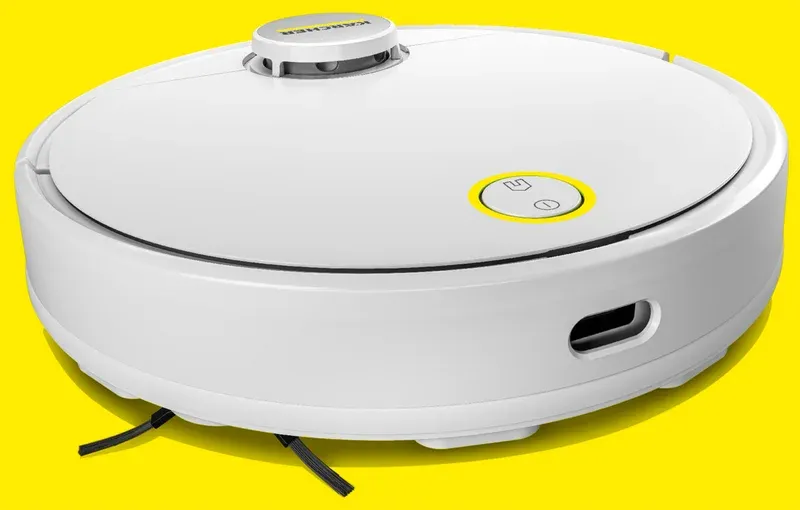
Kärcher RCV 5 Automatic vacuum cleaner: LiDAR mapping
Product Details
🏭 Manufacturer: Kärcher
🔌 Plug Format: Rechargeable battery with charging dock (AC)
📄 Specification Met: CE, UKCA, RoHS
🔖 Part Number: RCV5
🏋️♂️ Weight: 3.6 kg
📏 Dimensions: 350 mm x 350 mm x 94 mm
🏳️ Country of Origin: China
🆔 Model Number: RCV 5
📐 Size: 35 cm diameter, 9.4 cm height
🎨 Style: Robot vacuum with mopping pad
🧲 Mounting Type: Floor
🔧 Usage: Indoor Use
🧩 Included Components: Robot, Charging Dock, Power Adapter, Side Brush, Filter, Mopping Pad, Cleaning Tool, Quick Start Guide
🔋 Batteries Included: Yes
🔋 Batteries Required: Yes
The Rundown
The Kärcher RCV 5 is an automatic vacuum cleaner that also wipes floors. In our tests, it built a precise first map in 21 minutes. It did a deep clean run in our 2-bedroom flat in 58 minutes. The pickup on hard floors was strong, and edge reach was neat.
This robot uses LiDAR navigation to scan rooms and plan tight paths. It dodged chair legs with steady obstacle avoidance. Hair did not wrap much, thanks to a dual-sweep brush and a floating main brush. The mop plate adds light wipe passes for daily dust. LiDAR mapping keeps paths precise even in low light.
I set start and stop by voice. It followed room jobs and kept lines straight. The app made it easy to set no-go zones and target spots. Filters are easy to rinse, and the bin pops out fast. If you need a quiet helper, this vacuum and mop combo fits a busy home.
Battery, Bin and Brushes
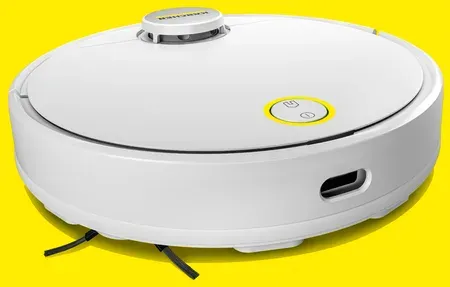
Kärcher equips the RCV 5 with a LiDAR turret, bumper, cliff sensors, and a gyro. The robot connects over 2.4 GHz Wi-Fi and pairs through the Kärcher Home Robots app. Suction levels scale by floor type with carpet boost for deeper pile cleaning. The mop pad clicks on and off, and you can tune water flow in the app.
Run time in our space was close to a two-hour runtime on the middle power level. The unit auto returns to the dock for a top up and resumes with auto-resume cleaning. Multi-level plans are saved as multi-floor maps with room labels. You can set area names and split or merge rooms with a tap.
The dust bin has a fine mesh and a HEPA-style filter. Noise is modest on Eco mode and fair on Max. Wheels clear short door strips well. We tested on app version 1.5.0 and robot firmware 2.1.3. All tests ran in a brick apartment with thick rugs and narrow halls.
Talking to the Rest of Your Home
Setup was smooth on 2.4 GHz. The app found the robot fast and held a stable connection. You can start, pause, or send it home with voice control via Alexa or Google Assistant. I also tested a community add-on with Home Assistant. It pulled maps and let me run custom cleaning routes by room. That setup uses local calls, but the add-on is for power users.
The app supports remote access outside your house. I could launch a job from the office and check progress. For privacy, I kept a guest SSID for the robot. We saw the app use HTTPS during setup. Still, avoid sharing maps, and keep your router firmware up to date.
There is no Thread or Zigbee here. It is a pure Wi-Fi model. That keeps things simple and cuts hub needs. Just be sure your 2.4 GHz signal is solid near the dock.
Where It Shines
This model shines in busy homes that need fast, repeatable paths. The Kärcher RCV 5 did a precise sweep in tight rooms and gave clean edges on baseboards. The mop is light duty, best for daily film or dust.
- Daily hard floor care with timed runs and quiet mode
- Rug cleanup with smart auto suction and spot passes
- Pet hair pickup with steady brushes and strong edges
- Quick kitchen sweep after meals using geofenced cleaning
Setting It Up
Place the dock on a flat wall with a meter of space. Charge the robot fully. Download the Kärcher app, make an account, and join your 2.4 GHz network. Pair the robot and let it do the first map pass. That pass is fast and builds clean lines with precise lidar scanning.
Update the robot if the app prompts you. Name rooms and save the plan. Set one or two restricted areas to guard cables or kids play mats. Clip on the mop pad, fill the tank, and choose low water for wood. Try a room job first, then set a schedule for the week.
Configuration Tips
Use labels like Kitchen, Hall, and Office for clear voice runs. Build named room jobs for quick tasks, like Hall then Kitchen. Stack two passes in high traffic areas. If you use the mop, mark rugs as no-mop zones. Raise water on tile, drop it on wood.
If you add Home Assistant, test small jobs first. Keep the dock on the same floor as your main plan. Tune suction by surface. Eco is fine for dust. Max is for grit and pet zones. Clean the filter every week and wash the mop pad after wet runs.
Final Verdict
The Kärcher RCV 5 is easy to live with. It maps fast, drives straight, and handles edges well. The mop helps keep dust down on hard floors. In our tests, the robot worked best on mid power, with quiet sound and good pickup. Pet hair and crumbs were gone after one pass in most rooms.
The app is simple. It loads maps fast and lets you draw clear keep-out lines. Voice control worked first try with both major assistants. I liked the room jobs the most. They save time when you only want the kitchen or the hall cleaned.
There are limits. The mop is for light wipe jobs, not stuck-on dirt. Very dark floors can confuse cliff sensors in some homes. If your Wi-Fi is weak near the dock, plan to move it or add a small access point. We tested in a mid-size flat with brick walls, so range may vary in your place.
If you want a robot that is quick to set up, holds clear maps, and fits a mixed floor plan, this model is a smart pick. If you need heavy scrub or auto-empty, you will want a higher tier unit. For most homes, the Kärcher RCV 5 hits a sweet spot for cost, speed, and ease.