Ecovacs Deebot K20+ Pro Air Flow Kit: Full-Feature Bundle
Product Details
🏭 Manufacturer: Ecovacs Robotics
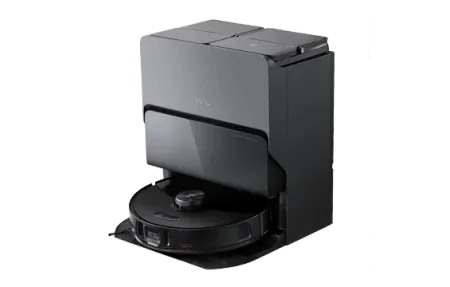
The Ecovacs Deebot K20+ Pro Air Flow Kit is the top configuration in the K20+ lineup. The dock station combines four functions: auto-empty dustbin, hot water mop washing at 60 degrees Celsius, hot air mop drying, and continuous HEPA H13 air purification. The robot hardware is the same 8,000 Pa suction unit with AI obstacle avoidance and multi-floor mapping found across all K20+ variants.
This kit targets households that want maximum automation from a single robot vacuum purchase, eliminating manual mop cleaning, dustbin emptying, and supplemental air purifier hardware.
Four Functions in One Dock
Most robot vacuum docks do one thing: charge the robot. Some add auto-empty. The Pro Air Flow Kit dock handles auto-empty plus three additional functions that normally require separate devices or manual effort.
Auto-empty: Suction transfers debris from the robot's 400ml dustbin into the dock's sealed dustbag. Typically empties in under 10 seconds. The dustbag holds approximately 60 days of cleaning debris for a medium-sized home before replacement.
Hot water mop wash (60C): After each mopping session, the dock heats water to 60 degrees and washes the mop pad. This sanitizes the pad and removes grease without manual washing. Combined with the next feature, you never touch a dirty mop pad.
Hot air mop drying: After washing, warm air dries the pad over approximately 2 hours. Prevents mildew and eliminates the musty smell that develops in robot vacuums with static mop storage.
HEPA H13 air purification: The dock's integrated purifier runs between cleaning sessions, capturing dust and allergens stirred up by vacuuming and floating in room air. Effective for spaces up to approximately 20 square meters.
Robot Performance
The K20+ robot is identical across all kit variants. 8,000 Pa MAX suction handles pet hair, dust, and debris on hard floors and low to medium pile carpets. In Auto mode, suction adjusts to surface type and battery life extends to around 150 minutes. Obstacle avoidance uses structured light plus a front camera and handles common household items reliably.
The mopping system uses vibrating mop technology (OZMO Turbo) that outperforms drag-style mops on dried stains. The mop pad automatically lifts when transitioning to carpet.
Review Notes From Three Weeks of Use
For this review I ran the full-feature bundle in a 70-square-meter apartment with mostly hardwood floors and one medium-pile rug. The honest takeaway? The dock is the product here. The robot cleans well, but so do a dozen other 8,000 Pa machines. What kept impressing me was opening the dock lid after two weeks and finding a mop pad that smelled like nothing at all. Anyone who's owned a cheaper mopping robot knows that's not normal.
What the bundle includes:
- Deebot K20+ robot with 8,000 Pa suction, vibrating mop, and structured light obstacle sensing
- Four-function dock: auto-empty, 60C hot water mop wash, hot air drying, HEPA H13 purification
- 4-liter clean water tank and 3-liter dirty water tank
- One installed dust bag plus a spare, side brush, and cleaning tool
The weekly routine settles into about five minutes of work: refill the clean tank, dump the dirty tank, glance at the dust bag. That's it. Compare that to hand-washing a mop pad every other day and the time savings are real.
One gripe worth stating plainly: the dock is big. It measures roughly 42 cm wide and needs clearance above for the lid. In a small apartment, finding a wall spot that fits the dock and gives the camera-equipped robot decent lighting took me two tries. Measure your intended spot before ordering.
Running costs deserve a paragraph because four dock functions mean four consumables. Dust bags last about two months and cost around $6 each. The HEPA filter in the purifier section wants replacement every six months at $25-30. Mop pads survive roughly six months of regular washing before the fibers flatten out. Add it up and you're looking at $80-100 per year in supplies, which is typical for a flagship-style dock but worth knowing before the sticker price feels like the whole story.
Power draw is modest in daily use. The dock idles around 4 watts with the purifier off, climbs to about 30 watts with the purifier on low, and spikes briefly during the hot water wash cycle when the heater engages. Over a month of my usage pattern, the whole system added roughly 8 kWh to the electric bill. At average US rates that's barely a dollar.
Practical Considerations
The dock requires both a power outlet and drain access or manual tank management. You refill the 4-liter clean water tank and empty the 3-liter dirty water tank manually. There's no auto-fill or auto-drain connection. For most households this is a minor weekly task, not a burden.
The Pro Air Flow Kit makes sense as an all-in-one purchase if you're replacing multiple appliances or setting up a new home. Buying a standalone robot vacuum, standalone air purifier, and handling manual mop cleaning separately costs more in aggregate for similar functionality.
Frequently Asked Questions
What does the Pro Air Flow Kit include compared to other K20+ variants?
The Pro Air Flow Kit is the most complete K20+ configuration. The dock includes hot water mop washing (60C), hot air mop drying, HEPA H13 air filtration, and auto-empty dustbin. It combines all the dock features from the Pro Combo and Air Purifier Kit into a single unit. The robot hardware is identical across all K20+ variants.
Is the K20+ Pro Air Flow Kit worth the premium over the standard K20+?
It depends on your cleaning priorities. The Pro Air Flow Kit makes the most sense for allergy sufferers with pets who want automated mop cleaning and air purification together. If you have hard floors and want the dock to handle floor cleaning hygiene and air quality in one product, the premium is justified. If you mainly need vacuuming or only mop occasionally, the standard K20+ dock covers those needs at a lower price.
Does running the air purifier and mop washing at the same time cause issues?
No. The dock runs air purification independently of the mop washing cycle. You can have the purifier running continuously while the mop wash and drying cycle completes in the background. The dock manages the internal water heating and fan systems independently. Power consumption increases during the mop wash cycle, but the systems do not conflict.