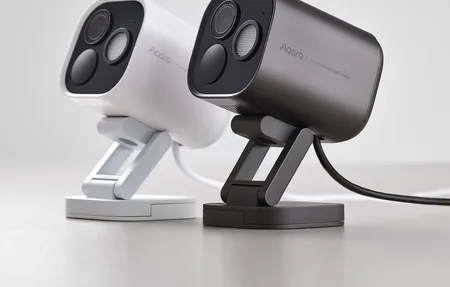
Arlo Pro 4 Spotlight Camera: 2K HDR Wire-Free Security
Product Details
🏭 Manufacturer: Arlo
🆔 Model Number: VMC4050P
The Arlo Pro 4 Spotlight Camera (model VMC4050P) is a wire-free outdoor security camera that shoots 2K HDR video and records in color at night. At roughly 150-180 EUR per camera, it sits in the mid-to-upper range for wire-free cameras. No hub is required out of the box - it connects directly to your home Wi-Fi, which makes the initial install faster than earlier Arlo generations.
One disclosure up front, because it should change how you read the rest. I don't run Arlo. Every camera on my property is Reolink over PoE: an E1 Outdoor on the wall, a pan-and-tilt E330 inside, and a PoE video doorbell with its chime. I made the opposite call to the one this camera is built around. So what follows is a specification and documentation review of the VMC4050P, plus an honest comparison against the wired path I actually chose.
What Does the Arlo Pro 4 Include?
The VMC4050P packs a lot into a small enclosure. Resolution is 2K (2560x1440), and HDR is enabled by default, which keeps highlights from blowing out on sunny mornings. The 160-degree field of view covers a wide driveway or full porch from a single mount point.
Color night vision is the biggest upgrade versus the older Pro 3. Rather than switching to black-and-white infrared, the Pro 4 uses its built-in spotlight to capture full-color footage in complete darkness. You can set the spotlight to trigger automatically on motion or keep it off and rely on the ambient infrared sensor. Arlo's claim is that someone approaching at night lands in recognizable color rather than infrared grey, and that is the main reason to pick this generation over the Pro 3 at all.
The built-in siren runs at 100 dB. It's loud enough to be disorienting from three meters away. You can trigger it manually from the app or set it to activate on specific alert types.
Key specs at a glance
- Resolution: 2K HDR (2560x1440), 160-degree diagonal field of view
- Night vision: Color with integrated LED spotlight
- Audio: Two-way with noise cancellation
- Power: Built-in rechargeable battery or direct-wire (weatherproof)
- Weather resistance: IP65 rated (-20 to 45 degrees C operating range)
- Connectivity: Wi-Fi 2.4 GHz and 5 GHz, no SmartHub required for basic use
- Local storage: Built-in microSD slot (card sold separately)
- Cloud storage: 7-day free tier; Arlo Secure from around 8 EUR/month per camera
[IMAGE: Arlo Pro 4 Spotlight Camera VMC4050P mounted outdoors on white wall (search terms: arlo pro 4 spotlight camera outdoor mount white)]
How Does Setup and Wi-Fi Performance Work?
Setup is straightforward. Open the Arlo app, tap "Add Device," and follow the on-screen pairing sequence. The camera broadcasts a temporary network during setup so your phone connects to it directly before handing off to your home router. No QR codes to scan, no manual password entry on a small keypad. Arlo puts the whole flow at under ten minutes per camera, and nothing in the sequence suggests otherwise.
Both 2.4 GHz and 5 GHz bands are supported. That matters in apartments or dense neighborhoods where 2.4 GHz is congested. A 5 GHz connection also reduces live-view latency, though the difference is subtle in practice. The camera needs a consistent signal, and anything weaker than -70 dBm tends to cause buffering on live streams and delayed alerts. This is where I'd push back on the wire-free premise. My cameras sit on a separate IoT VLAN on Ubiquiti gear, reached through a U6-LR access point, with their traffic visible in the UniFi statistics instead of blended into shared home WiFi. A battery camera dropped onto the main network is a device you can't see and can't easily contain. Giving cameras their own VLAN is the cheapest thing you can do for a WiFi camera of any brand, and it costs an evening once.
The Arlo SmartHub (VMB4540, sold separately) is optional. Add one later if you want local Ethernet-based recording or full HomeKit Secure Video. Without it, the VMC4050P uses the built-in microSD card and cloud storage.
This is the fork in the road, and I took the other branch. PoE cameras carry power and data on one cable, which means no battery to charge, no hub to buy, no subscription tier to weigh up, and no recharge window where the camera is off the wall doing nothing. The cost is that somebody has to pull cable, which is easy while a house is being built and miserable afterwards. If your walls are already closed, the Arlo argument is a strong one. If you're standing in a house with the walls still open, run the cable and never think about batteries again.
Battery Life and Power Options
Arlo rates the Pro 4 at up to 6 months per charge under typical conditions - roughly 5 motion events per day. That's achievable at a low-traffic side gate or rear yard. A busy front door with delivery traffic and passing cars cuts that down sharply, because every wake, spotlight, and upload spends charge.
The battery pack is removable and charges via the included magnetic USB cable. A second battery pack means you can swap rather than wait three to four hours for a recharge. The Arlo solar panel accessory connects to the same magnetic port and keeps the camera topped up in any location that gets a few hours of direct sun per day.
The magnetic mount makes battery swaps simple. Pop it off, charge indoors, snap it back on. No screwdriver needed.
Smart Alerts and Storage
The free Arlo plan gives you 7 days of cloud recording for up to five cameras. You get motion alerts and live view, but not AI-powered classification. Without a subscription, every motion event fires a generic alert regardless of whether it was a person, a vehicle, or a passing cat.
An Arlo Secure subscription (around 8 EUR/month per camera, or roughly 13 EUR/month for unlimited cameras) unlocks person, vehicle, package, and animal detection and extends cloud storage to 30 days. For a front door camera where you actually care what triggered an alert, the subscription is worth it. For a secondary low-traffic camera, the free tier is probably enough.
Local microSD recording works without any subscription. Clips go directly to the card without cloud connectivity, so you have a local backup even if your internet is down during an event. The card is not included with the camera.
[IMAGE: Arlo app showing motion detection activity zones on smartphone screen (search terms: arlo app activity zone motion detection smartphone)]
HomeKit, Alexa, and Google Home
The Pro 4 works with all three major platforms. Alexa and Google Home don't need the SmartHub at all. Link the Arlo skill in the Alexa app or Google Home app and you can pull up a live stream on a smart display with a voice command. My displays are Google: Nest Mini speakers and a Nest Hub Max, the one product category I've been happy enough with to keep buying more of. There's no Echo in this house and no Alexa account behind it, so the Google path is the one I'd test first and the Alexa side is documentation to me.
Apple HomeKit Secure Video requires the Arlo SmartHub (VMB4540). You can add the camera to the Home app via a direct integration for basic live view, but end-to-end encrypted recording stored in iCloud depends on the hub. If HomeKit Secure Video is your priority, budget an extra 80-100 EUR for the hub.
Activity zones and smart alerts work well once they're configured. Drawing a tight zone around the approach and excluding the street is what stops passing traffic from generating alerts all evening. Zone customization requires the Arlo Secure subscription.
Who Should Buy the Arlo Pro 4?
The VMC4050P is the right camera if you want wire-free installation without running new cables and need color night vision that actually works. It's also the only wire-free Arlo camera at this price that supports both 2.4 GHz and 5 GHz Wi-Fi, which helps in homes with congested bands.
It isn't the right pick if you need continuous 24/7 recording on battery - that isn't possible without the direct-wire kit or a solar panel. And if Apple HomeKit Secure Video is non-negotiable, factor in the SmartHub cost before you compare prices.
For most users who want reliable outdoor coverage with solid smart home integration and a genuinely wire-free setup, the Arlo Pro 4 Spotlight Camera delivers what it promises without unusual setup friction.
Need a cellular camera for a site with no Wi-Fi? The Arlo Go 2 covers that. Want to spend less on a secondary position? The Arlo Essential Spotlight drops to 1080p. See how all of them compare in our roundup of the best smart security cameras.
Frequently Asked Questions
Does the Arlo Pro 4 require a subscription to work?
No subscription is required for basic live view and motion alerts. The free plan covers 7-day cloud clip storage for up to five cameras. Arlo Secure starts at around 8 EUR/month per camera and unlocks person, vehicle, and package detection plus 30-day storage. Local microSD recording works without any subscription.
Does the Arlo Pro 4 work without the SmartHub?
Yes. The VMC4050P connects directly to your 2.4 GHz or 5 GHz Wi-Fi router without a SmartHub. However, Apple HomeKit Secure Video requires an Arlo SmartHub (model VMB4540), sold separately. Alexa and Google Home integrations both work hub-free.
What is the difference between the Arlo Pro 3 and Pro 4?
The Pro 4 adds direct Wi-Fi (the Pro 3 needs a SmartHub for full function), a wider 160-degree field of view vs 130 degrees on the Pro 3, a built-in microSD slot for local storage, and 5 GHz Wi-Fi support. Both shoot 2K HDR and include a built-in spotlight and siren.