How to Set Up a Smart Lighting System That Actually Works

This post may contain affiliate links. As an Amazon Associate we earn from qualifying purchases. Disclosure.
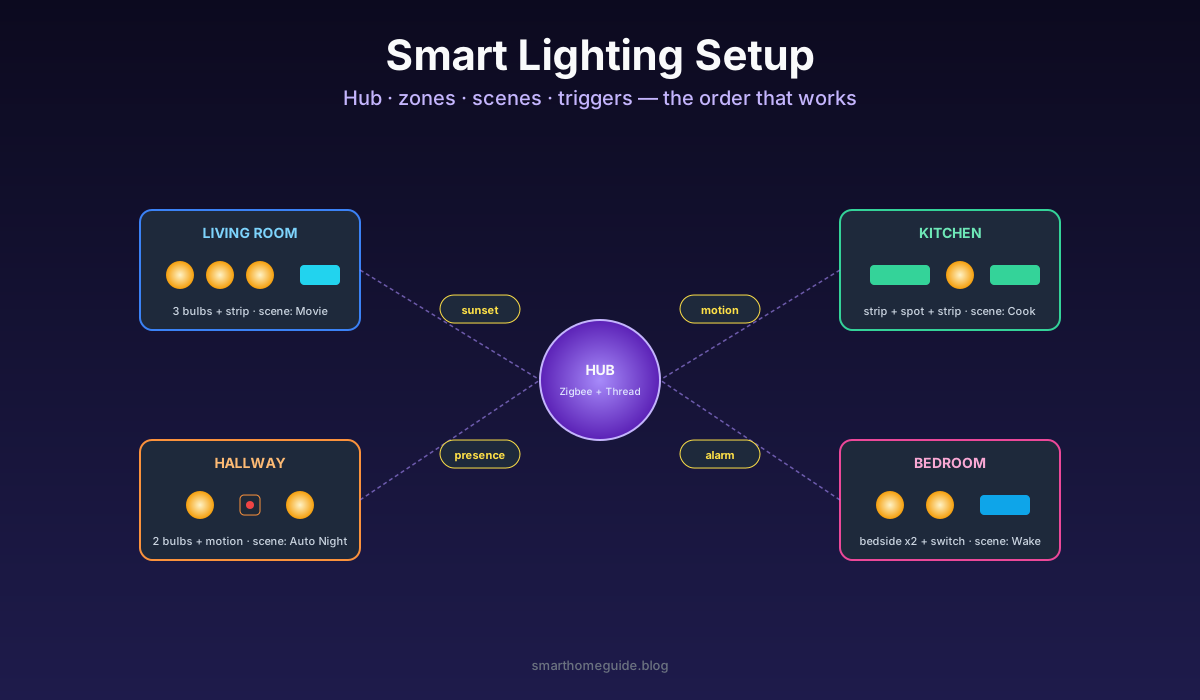
Bulbs in boxes don't make a smart lighting system. You need a hub decision, zones that match how you actually move through the house, three working scenes, and triggers that fire without you reaching for a phone. Here's the order I install in, every time.
Bulbs in boxes don't make a smart lighting system. You need a hub decision, zones that match how you actually move through the house, three working scenes, and triggers that fire without you reaching for a phone. Here's the order I install in, every time.
I've set up smart lighting in roughly twenty homes since 2019, friends, family, two AirBnBs, and one rental I shouldn't have touched. The order below is what stops me re-buying half the kit when I get it wrong. For the wider set of lighting guides, brands, scenes, and seasonal builds, see the smart lighting hub.
This guide is about system design, the hub, zones, scenes, and triggers that make lighting feel smart. If you need the physical side first, wiring, neutral wires, and screwing in bulbs safely, start with the smart lighting installation guide, then come back here.
Step 1: Pick the Hub Before the First Bulb
The biggest mistake is buying bulbs and then choosing a hub. I've watched people fill an Amazon basket with Wi-Fi bulbs from four brands, install them, and end up with four cloud apps that don't talk to each other. The fix is to pick the controller first.
For most readers in 2026 the right answer is one of these three:
- Home Assistant on a Raspberry Pi or N100 mini PC, plus a Zigbee USB stick and a Thread border router
- Apple Home with a HomePod mini or Apple TV serving as Matter controller and Thread router
- Philips Hue Bridge Pro if you want a closed but very reliable Zigbee-only system
I run Home Assistant at home because I want local control and dashboards. The HomePod path is the cleanest for non-technical households. Hue Bridge is the easiest if you only ever want Hue products and a guaranteed support timeline.
Decide once, then every bulb you buy lives within that ecosystem. The Matter specification has made cross-vendor pairing real, so a Matter-Thread bulb usually shows up in any modern controller without per-brand apps.
Step 2: Map the House into Zones
A zone is one or more bulbs you'll always control as a single unit. The mistake here is to model zones after walls. Real zones match how people behave.
A typical three-bedroom layout breaks down like this:
- Living room ceiling
- Living room accent (TV strip, lamp)
- Kitchen worktop
- Kitchen overhead
- Hallway path
- Bathroom mirror
- Bathroom ceiling
- Bedroom ceiling
- Bedside left
- Bedside right
- Outdoor entrance
That's eleven zones for a typical house. Stop counting bulbs and start counting moments. The bedside zones get used independently every evening, so they cannot share a group with the ceiling.
Name zones consistently. I always use "Room Name Function" format, "Bedroom Bedside Left" rather than "Lamp 3". When you later build automations or speak to a voice assistant, predictable names save real time.
Step 3: Build Three Working Scenes
Scenes are the payoff. A scene captures every bulb's state, on/off, brightness, colour temperature, hue, so you can recall a known good lighting layout in one tap or voice command.
Start with exactly three scenes and live with them for a week:
- Day: every interior zone at 80-100% brightness, neutral 4000K
- Evening: 40-60% brightness, warm 2700K, accents on
- Night: 5-10% brightness on hallway and bathroom only, everything else off
The temptation is to build twenty scenes on day one. Don't. Three scenes covering 95% of waking moments is the right starting point. After a week you'll know which extra scene you actually need, usually Movie or Cooking, and you'll build it from real usage rather than guessing.
Step 4: Add Triggers That Fire Without You
Manual scenes are useful. Automatic ones are what makes the system feel smart. Three triggers that pay back daily:
Time triggers: Day scene at 7 AM, Evening at sunset, Night at 11 PM. Tie sunrise and sunset to your timezone, not a hard-coded clock, the seasons drift.
Motion triggers: Bathroom and hallway only. Living-room motion triggers are usually a mistake, people sit still on a sofa and the lights drop. Add a 60-second linger and a brightness floor of 5% at night so the bulbs never blast at 3 AM.
Presence triggers: If your phone joins or leaves the home Wi-Fi, fire Welcome or Goodbye scenes. This single automation eliminates more "I left the lights on" mornings than any other.
Each trigger needs a guardrail to avoid being annoying. Motion that runs at full brightness at night ruins sleep. Presence that fires Welcome when guests are home and you're not creates weird moments. Test for two weeks before scaling up.
Step 5: Troubleshoot Flicker, Lag, and Drops
Every smart lighting system has bad days. The diagnostic order I use:
- Reboot the hub before assuming anything else. Solves about 40% of issues.
- Check 2.4GHz Wi-Fi congestion. Wi-Fi bulbs lag when your router has 30+ devices on the band.
- Add a Zigbee mains-powered repeater per floor. Battery sensors don't repeat. A smart plug in a hallway socket fixes mesh holes.
- Replace any bulb older than three years that flickers. LED drivers age out.
- Move the hub central rather than leaving it next to the router cupboard. Range matters.
Most "the lights aren't working" calls I get trace to one of those five. The hub-central fix alone covers maybe a quarter of long-term reliability problems in big houses.
Once the zones work, the fun is in tiny targeted setups. A closet is a perfect first project: here's my walkthrough for motion-activated wardrobe lighting that uses a single sensor and one automation.
Step 6: What I Actually Run in 2026
For transparency, here's the lighting stack at my own home this year. Home Assistant Yellow as the hub, with a Zigbee2MQTT configuration driving 18 zones across a three-bedroom flat. Twelve Hue White bulbs at 800 lumens each, four Nanoleaf Essentials GU10 in the bathroom (CRI 90), one Govee M1 strip behind the TV, two Hue Outdoor Spot fixtures on the entrance, and a Philips Hue Dimmer Switch beside the front door for guests.
The system runs eight automations: time-of-day scene shifts, hallway motion at night, bathroom motion always-on, TV strip sync when films play, sunrise wake-up in the master bedroom, presence-based welcome, an away mode that randomises a bedroom lamp on holiday, and a panic-button dimmer combo that switches every interior zone to 100% if I tap it four times in a row.
Energy Saving Trust data suggests the LED swap alone shaves around 15% off domestic electricity use compared with halogen fixtures. The automation layer probably adds another small slice through automated turn-off, though it's hard to measure precisely without separate metering.
Which Order Stops You Re-Buying?
If I had to compress this into a single workflow it would be: hub first, zones second, three scenes third, three triggers fourth, troubleshoot only the issues that show up. Skip any step and the next one breaks. Most people skip step one and end up with a smart lighting system that works only when the cloud is healthy and only inside one brand's app.
The whole system should fit in an afternoon's worth of setup for a three-bedroom flat once the kit is on the shelf. The bulb purchase is the easy bit. The thinking is everything.
Real Examples From Recent Installs
To make all of this less abstract, let me walk through three recent installs and what each one taught me. The first was a 2-bedroom rental in West London where the tenant couldn't change wiring. The second was a 4-bedroom semi in Manchester with parents who refused to use an app. The third was a studio flat in Berlin with a single user who wanted full automation.
In the West London rental we built everything from smart bulbs and Hue dimmer switches stuck to the wall with 3M command strips. No rewiring meant no landlord conversations. Eight Hue White bulbs across the living, bedroom, and bathroom, plus two dimmer switches mounted next to the existing dumb wall switches. Total install time around three hours including pairing and scene setup. The dimmer switches solved the "guests flip the wall toggle" problem because anyone reaching for the wall hit the smart dimmer first. This guide-by-doing approach saved roughly 250 GBP versus a full smart-switch installation that would have required an electrician anyway.
The Manchester semi installation taught me the value of voice control as a fallback. The parents in their late 60s tried the Hue app exactly twice and gave up. Adding an Amazon Echo Dot in the living room and a second one in the master bedroom changed the experience completely. "Alexa, dim the lights" turned out to be the only interface they actually used. Six months on, the app sits unopened on a phone and the lights work fine. Voice was the missing piece that turned a technical-feeling system into something that worked for everyone in the house.
The Berlin studio install was the most automation-heavy of the three. Single tenant, no roommates, full Home Assistant install with 14 automations. The Wake scene shifts from cold daylight to warm white over 30 minutes starting at 06:30 on weekdays only. The Movie scene dims the ceiling, brightens the TV strip, and pauses notifications. The Bathroom Night automation runs at 3% red light between midnight and 6 AM to preserve melatonin. Every one of these is documented in the Home Assistant dashboard so the tenant can adjust them without breaking anything. After two months the only automation that needed tweaking was the Wake scene start time on weekends.
What Is Maintenance Like Six Months In?
Smart lighting systems are not install-and-forget. Six months after rollout you'll need to do three things. First, prune scenes that nobody uses. Second, update firmware on the hub and the bulbs (usually quarterly). Third, replace any failed bulb with the same model, mixing brands in a single zone changes the colour balance even if both are labelled "warm white 2700K".
The maintenance is light, maybe an hour a quarter, but skipping it leads to drift. Old firmware causes lag. Forgotten scenes clutter the voice control responses. Mismatched bulbs make scenes look uneven. A 15-minute monthly check pre-empts most issues.
Plan the first system around the rooms where lighting changes how you actually live, the bedside in the master bedroom, the worktop in the kitchen, the entrance you walk through every night. Those are the zones that earn back the install effort within two weeks. Everywhere else, smart switches with dumb bulbs handle the job at a fraction of the cost.
Frequently Asked Questions
What should I set up first in a smart lighting system?
Always pick the hub or controller first. Buying bulbs before deciding whether you need a Zigbee, Matter-Thread, or Wi-Fi controller almost always means re-buying half the bulbs in three months. With the hub decision settled, every bulb purchase becomes a known-good pairing and you never have to repair the entire house when something fails.
How many zones should I create in my smart lighting system?
Match the number of zones to how people actually use rooms, not to the physical wall layout. Most homes need 6-10 zones covering living, kitchen, hallway, bedroom, bathroom, and outdoor areas. Open-plan rooms often need two zones (cooking versus dining) and bedrooms benefit from separate bedside zones so each person controls their own bulb without disturbing a partner trying to sleep.
Do I need a separate hub for Matter and Zigbee?
No. Home Assistant with a USB Zigbee stick like the Sonoff ZBDongle-E plus a Thread border router from an Apple HomePod mini or Nest Hub can drive both protocols from a single controller. Branded hubs from Hue or Aqara work too but lock you into their app. The best long-term setup uses one open controller (Home Assistant) and adds protocol radios as needed rather than stacking vendor hubs.
How do I stop motion-triggered lights from being annoying?
Three rules cure most motion annoyance: dim the lights at night (set 5% between 11 PM and 6 AM), use a 60-second turn-off delay so the lights don't drop while you're standing still, and limit motion automations to genuinely dark conditions using a lux sensor or sunrise/sunset times. Without those guardrails motion lighting either blasts your eyes at 3 AM or keeps shutting off mid-shower.
Why do my smart lights lag, flicker, or drop offline?
Wi-Fi bulbs lag when the 2.4GHz band is saturated by too many devices. Zigbee bulbs drop when the mesh has no powered repeaters between distant bulbs and the hub. Flicker on dimming usually means a dimmer-incompatible driver in the bulb. Move the hub to the middle of the house, add one always-on Zigbee plug as a repeater per floor, and replace any flickering bulb that's older than three years before assuming a hub fault.
Sources & References
- Connectivity Standards Alliance - Matter Specification
- Energy Saving Trust - Home Lighting Advice