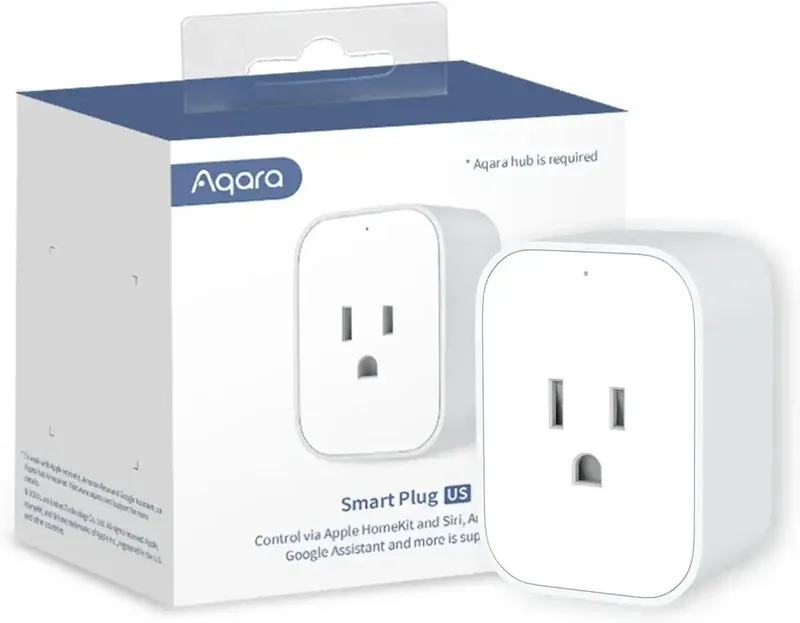
Aqara Smart Plug: Remote Power Control & Monitoring
As an Amazon Associate we earn from qualifying purchases. Disclosure.
Check Price on Amazon →Product Details
🏭 Manufacturer: Aqara
🔌 Plug Format: US plug (NEMA 5-15), Zigbee
📄 Specification Met: FCC, Zigbee
🔖 Part Number: ZNCZ12LM
🏋️♂️ Weight: 86 g (3 ounces)
📏 Dimensions: 67 x 47 x 35 mm (2.6 x 1.9 x 1.4 inches)
🏳️ Country of Origin: China
🆔 Model Number: ZNCZ12LM (US version)
📐 Size: Standard
🎨 Style: Minimalist
🧲 Mounting Type: Plug-In
🔧 Usage: Indoor
🧩 Included Components: Aqara Smart Plug, user manual
The Aqara Smart Plug (US version, model ZNCZ12LM) gives you remote control and energy monitoring for any plugged-in device. The detail that matters most: it's a Zigbee plug, not a Wi-Fi one. It has no Wi-Fi or Bluetooth radio, so you need an Aqara hub (or another supported Zigbee coordinator) before it does anything. In return you get a plug that also acts as a Zigbee router and strengthens your mesh.
Key features start with remote control and timers from the Aqara Home app, and energy monitoring that records power consumption daily and monthly. Overload protection cuts power automatically above 1875W (15A at 100-125V), and Aqara adds overheat and surge protection plus flame-resistant V0-rated material. Voice control works through Alexa, Google Assistant, or Siri via Apple HomeKit, all routed through the hub, and local automation through the hub keeps working when the internet doesn't.
Aqara's own FAQ spells out the trade-off: if the external network goes down, app control stops, while local control and links with your other Aqara devices carry on. That's the Zigbee advantage in one sentence.
Specs at a Glance
The short version:
- Model ZNCZ12LM, US plug, Zigbee only
- 1875W maximum, 15A at 100-125V
- Needs an Aqara hub or another supported Zigbee coordinator
- Works as a Zigbee router, with daily and monthly energy records
SmartHomeCompared lists the plug at roughly 67 x 47 x 35 mm and 86 g, which is small enough for most outlets, though a review warns the housing can block a neighbouring socket. Aqara's page doesn't print dimensions, so treat those as third-party figures. There's no USB port and no weather rating, so keep it indoors. SmartHomeCompared also notes Matter exposure only through an Aqara hub, which fits how Aqara's bridge works for its other Zigbee devices.
One thing worth saying about the numbers: they're a ceiling, not a target. A 1875W rating means a space heater at full tilt sits right on the line, and a plug that runs hot under sustained heavy load is a risk you don't want to test. Keep continuous loads comfortably below the limit, and use a dedicated heater controller for anything that heats a room.
The EU plug is a separate product (model SP-EUC01, rated 2300W at the higher European voltage), so don't mix the two up when you compare specs or load limits.
Which Hub Do You Need?
Any Aqara Zigbee hub works as the bridge, and SmartHomeCompared lists the Aqara Hub M3 and Zigbee2MQTT as options for this plug. If you run Home Assistant, a Zigbee dongle plus Zigbee2MQTT or ZHA talks to it directly, and then Apple Home, Google Home, and Alexa aren't involved at all. If you want Apple Home without Home Assistant, the Aqara hub is what exposes the plug to HomeKit, since the plug can't speak to your phone or router on its own. That's the practical decision: the plug costs about $30, and the hub is the real purchase if you don't own one.
Energy Savings and Efficiency
In addition to convenience, the plug helps with energy management. Tracking energy consumption shows which appliances use the most power, so you can schedule a space heater or a dehumidifier to turn off at peak hours. It won't cut a bill on its own. A plug that simply logs standby power is a measuring tool, and the savings come from what you do with the numbers.
Combining the plug with other Aqara smart devices lets you build routines that cut waste, like switching off a lamp circuit when a presence sensor sees an empty room.
Mesh Network Connectivity
Because it's mains powered, the plug acts as a Zigbee router. When you pair it with other Aqara Zigbee devices, each plug extends your coverage, and the mesh gets sturdier as you add more. That helps battery sensors in far rooms reach the hub. Aqara's hub documentation says repeater devices such as plugs and neutral wall switches are what let a hub reach its full device count, which is why a few plugs scattered around the house are a cheap way to firm up a Zigbee network.
Setup and Installation
Plug the Aqara Smart Plug into any standard 120V outlet. Open the Aqara Home app, tap Add Device, and choose Smart Plug. Hold the button on the plug until the LED flashes, then follow the prompts to join it to your Aqara hub. Once paired, name the device, assign it to a room, and build schedules or automations in the app. Avoid plugging it into an extension cord, since that can weaken the Zigbee link and removes the overload margin you wanted.
If the plug goes offline, check how far it sits from the hub or the nearest router device. A neighbouring plug or wall switch between them usually fixes it. For overload trips, make sure the appliance draws under 15A (1875W). If energy readings look off, remove the plug from the app and pair it again. Remember that this plug works only with a Zigbee hub, so if you'd prefer Wi-Fi with energy readings and no hub, the Kasa EP25 is a single-outlet Wi-Fi plug with energy monitoring that doesn't need one.
Adorama lists the US SKU (AQAP003USW01) as discontinued, while Aqara's US product page still carries a Buy Now link, so stock depends on the retailer. SmartHomeCompared shows a list price of $32.99, with $29.99 on Prime. Check the current price before buying.
Final Verdict
Buy the Aqara Smart Plug if you already run an Aqara hub and want a cheap, mains-powered router with energy readings. It's a poor pick if you want a no-hub Wi-Fi plug, because without the hub it does nothing. The small, plain design is its strength, and the hub dependency is its weakness.
Frequently Asked Questions
Does the Aqara Smart Plug require an Aqara hub?
Yes. The US plug (model ZNCZ12LM) is Zigbee only, with no Wi-Fi or Bluetooth radio, so it needs an Aqara hub or another supported Zigbee coordinator. Aqara's FAQ says that if your internet drops, app control stops but local control and automations with other devices keep working.
Does the Aqara Smart Plug work with Apple HomeKit?
Yes, through an Aqara hub, which acts as the HomeKit bridge. Once paired, the plug appears in the Apple Home app with on/off control, schedules, and automations.
What is the maximum load the Aqara Smart Plug supports?
Aqara rates the US plug for 1875W, which is 15A at 100-125V. It doesn't support appliances above 15A, and it cuts power automatically when the connected load goes over the limit.
Can I use the Aqara Smart Plug with Google Home and Alexa?
Yes, Aqara lists Google Assistant, Amazon Alexa, and Apple HomeKit as supported, and all of them go through an Aqara hub. Home Assistant supports the plug too, for example through Zigbee2MQTT.
Does the Aqara Smart Plug track energy consumption?
Yes. Aqara says the plug records power consumption on a daily and monthly basis in the Aqara Home app. Treat the numbers as a guide to what your appliances draw, not as billing-grade data.
Video Review
As an Amazon Associate we earn from qualifying purchases. Disclosure.
Check Price on Amazon →