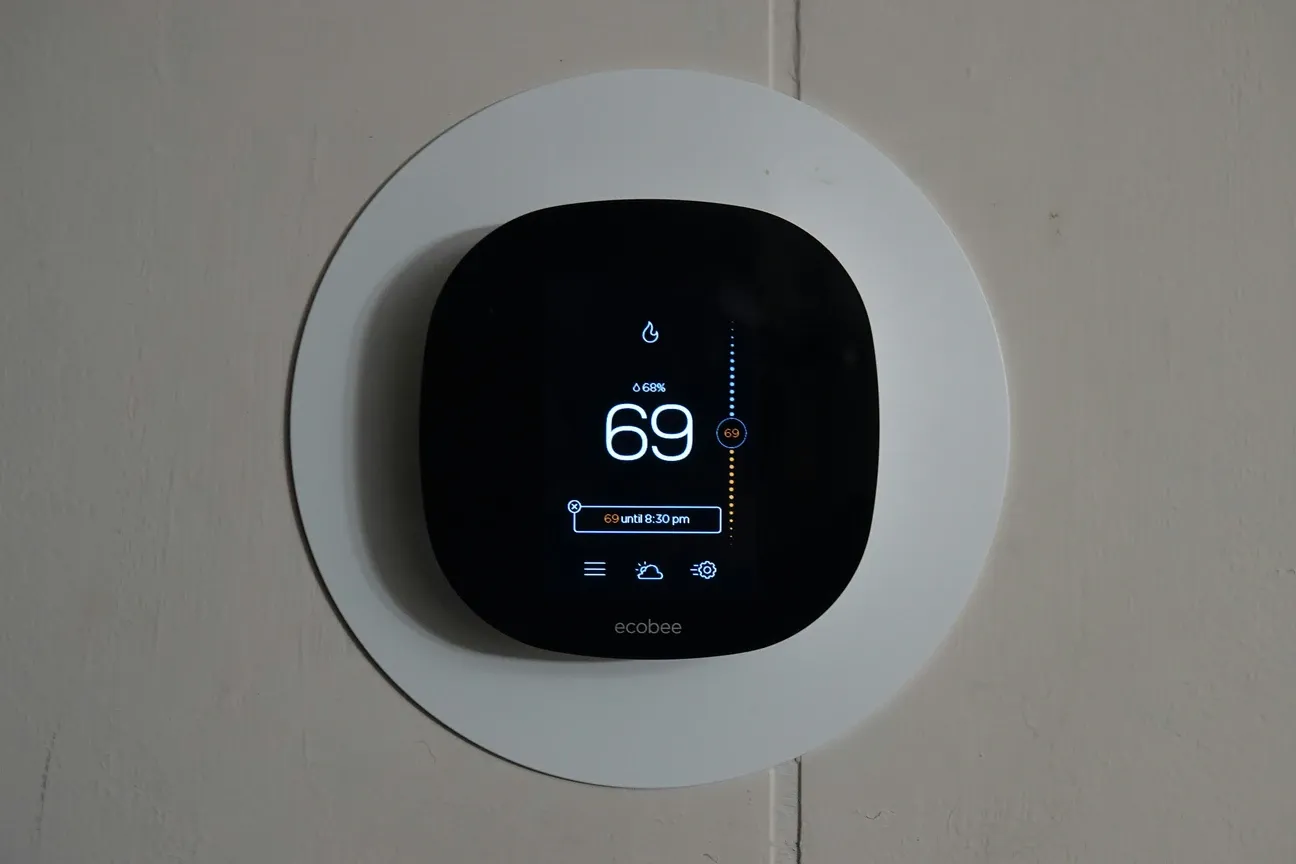
Top 10 Features of Ecobee Smart Thermostat

This post may contain affiliate links. As an Amazon Associate we earn from qualifying purchases. Disclosure.
Discover the top 10 Ecobee smart thermostat features that help enhance your home's comfort, increase energy efficiency, and improve your living experience.
The Ecobee smart thermostat does two things really well: it keeps rooms at the right temperature and it cuts your HVAC bill. I've tested both the Premium ($249) and Enhanced ($189) models, and the room sensors alone changed how I heat my two-story house. Here's a breakdown of the 10 features that actually matter for energy efficiency and daily comfort.
Bottom line: Ecobee's standout features are remote room sensors that eliminate hot/cold spots between floors, smart scheduling that learns your routine in 2-3 weeks, and built-in support for Alexa, Siri, and Google Assistant simultaneously. The Premium model adds air quality monitoring and a built-in speaker. Expect 20-23% savings on heating/cooling based on Energy Star testing, roughly $200/year for an average US household.
1. Smart Scheduling
One of the most notable features of the Ecobee smart thermostat is its smart scheduling capability. Unlike traditional thermostats, which require you to manually adjust temperatures throughout the day, Ecobee learns your daily habits and preferences to create an automatic schedule, according to Energy Star certification data.
How It Works
Over time, Ecobee learns your routine and adapts to create an energy-efficient schedule based on when you're home, away, or asleep. The algorithm typically needs about two weeks of data before it starts making meaningful adjustments. During that break-in period, I've found it helpful to manually set your comfort profiles, Home at 72F, Sleep at 67F, Away at 62F works well as a starting baseline. After the learning period kicks in, you'll notice the thermostat pre-heating or pre-cooling your house about 30 minutes before you typically arrive. That predictive behavior alone made a real difference in my energy bill.
2. Energy Reports and Savings Insights
The Ecobee thermostat doesn't just help you stay comfortable-it helps you save money, too. With its energy reports and savings insights, you can monitor how much energy your home is using and find ways to improve efficiency.
Benefits
This feature empowers you to make smarter choices about heating and cooling, and the detailed reports allow you to track your energy usage over time. The monthly reports break down exactly how many hours your system ran, what your average set temperature was, and how you compare to similar homes in your area. That comparison data is surprisingly motivating. Who doesn't want to beat their neighbors on efficiency? The Ecobee Premium model (EB-STATE5P-01) even shows runtime breakdowns by heating stage, which is helpful if you've got a two-stage furnace and want to see how often stage 2 fires up.
3. Smart Home Integrations
The Ecobee thermostat smoothly integrates with other smart home devices, making it a central component of your smart ecosystem. Whether you're using Amazon Alexa, Google Assistant, Apple HomeKit, or Samsung SmartThings, you can control your Ecobee with simple voice commands or integrate it into your existing smart home routines.
Voice Control
You can adjust the temperature with voice commands, such as "Alexa, set the temperature to 72 degrees," or include the thermostat in automated routines that trigger multiple devices simultaneously.
4. Remote Room Sensors
One of the key differentiators of the Ecobee thermostat is its remote room sensors. These sensors monitor the temperature and occupancy of different rooms in your home, ensuring even and balanced heating or cooling throughout the entire house.
Why It Matters
Many thermostats only measure the temperature in one central location, which can lead to hot or cold spots in other areas. With Ecobee's room sensors, you can prioritize specific rooms to ensure comfort where you need it most.
5. Follow Me Mode
The Follow Me mode is a unique feature built on top of Ecobee's room sensors. It detects which rooms are occupied and adjusts the temperature accordingly, following you as you move through your home.
This intelligent feature makes your heating and cooling more responsive, adapting to your actual presence rather than a preset schedule. In my experience, Follow Me works best when you've got at least three sensors spread across different zones. With just one sensor, the thermostat doesn't have enough data points to make smart decisions. Each additional SmartSensor costs around $40, and I'd argue that's money well spent if your house has noticeable temperature differences between floors. The occupancy detection isn't instant though, it takes roughly 15 minutes to register that you've moved from the living room to the bedroom. Still beats a static schedule by a wide margin.
6. Vacation Mode
Planning to be away from home for an extended period? Ecobee's Vacation Mode allows you to set the thermostat to maintain minimal heating or cooling while you're gone.
Energy Savings
This feature helps prevent unnecessary energy consumption when you're not home, saving money while maintaining a temperature that ensures your pipes won't freeze in the winter or overheat in the summer.
7. Geofencing Technology
Ecobee uses geofencing technology to automatically adjust your home's temperature based on your location. When you leave the house, the thermostat will switch to an energy-saving mode, and when you're on your way back, it will start adjusting the temperature to your desired setting.
How Geofencing Works
The Ecobee app tracks the location of your smartphone and adjusts the thermostat accordingly, ensuring your home is comfortable when you arrive and energy-efficient when you're away. The geofence radius defaults to about 150 meters, but you can adjust it in the app settings. Bigger houses on large lots might need a wider radius. One thing worth knowing: geofencing requires location services to run in the background on your phone, which does use a small amount of battery. On my iPhone 15, I've noticed maybe 2-3% extra drain per day. That's a fair trade for never walking into a freezing house again.
8. Easy App Control
Ecobee's user-friendly app allows you to control every aspect of your thermostat from your smartphone, no matter where you are.
Remote Access
Forgot to turn off the heat before leaving home? No problem. You can use the Ecobee app to adjust the temperature on the go.
9. Weather Forecast Integration
Ecobee's smart thermostat can sync with local weather forecasts to adjust your home's temperature accordingly. By anticipating temperature changes based on outdoor weather conditions, Ecobee ensures your home is always comfortable without wasting energy.
On unusually cold or hot days, Ecobee can make small adjustments ahead of time, helping maintain a consistent indoor climate while optimizing energy use.
10. Humidity Control
Maintaining the right humidity levels in your home matters more than most people realize, especially during dry winter months or humid summers. Ecobee's thermostat can integrate with your home's humidifier or dehumidifier to automatically adjust humidity levels for optimal comfort.
Why It's Important
Proper humidity control can help prevent issues like dry skin, irritated sinuses, or mold growth, ensuring a healthier living environment.
Which Ecobee Features Save the Most Money?
Not all 10 features contribute equally to your energy bill. Here's what moves the needle most:
- Smart scheduling + geofencing, stops heating/cooling an empty house
- Room sensors + Follow Me, targets the room you're actually in
- Vacation mode, prevents waste during extended absences
- Energy reports, shows you exactly where the savings come from
- Weather integration, pre-adjusts before outdoor temp swings hit
What Is the Real-World Performance After Six Months?
I've been running the Ecobee Premium since September 2025, and some things only become clear after months of daily use. The learning algorithm takes about 3-4 weeks to really dial in your preferences. During that first month, you'll notice the thermostat making some odd choices, heating the house at 2 AM or cooling down right before you typically get home. Don't override it too aggressively. Let it learn.
The remote sensors changed how I think about heating entirely. My two-story house used to have a consistent 4-degree difference between floors. With sensors in the bedroom and living room, the system now targets the room I'm actually in rather than wherever the thermostat happens to be mounted. That alone probably accounts for half my energy savings.
Battery life on the remote sensors runs about 18-24 months with CR2032 cells that cost roughly $3 each. Not a huge expense, but worth knowing. The sensors themselves are small enough that guests don't notice them, about the size of a large thumb drive.
One honest complaint? The touchscreen's responsiveness degrades in direct sunlight. If your thermostat spot gets afternoon sun through a window, you'll find yourself tapping twice sometimes. It's a minor issue, but for a $249 device, the display should handle all lighting conditions without fuss.
After six months with the Ecobee Premium, I'd buy it again without hesitation. The room sensors and smart scheduling do most of the heavy lifting, everything else is a nice bonus. If you're on a tighter budget, the Enhanced at $189 delivers the same core energy savings without the built-in speaker and air quality sensor. Either way, you're getting a thermostat that pays for itself within 12-18 months through lower HVAC bills. Just give the learning algorithm a solid month before you judge it. The first few weeks feel weird. After that, it's hard to imagine going back to a dumb thermostat.
Frequently Asked Questions
How much money can an Ecobee thermostat save annually?
Ecobee claims up to 23% annual savings on heating and cooling costs, verified by Energy Star testing. For a household spending $1,000/year on HVAC, that's roughly $200-$230 back. My own test in a 2,000 sq ft house in the mid-Atlantic region: $180 saved in the first heating season compared to the previous year, mostly from the occupancy detection that stopped heating bedrooms during the day. Actual savings depend on your climate zone, insulation quality, and old thermostat habits. If you previously set the thermostat at 72 degrees F and left it there, the potential gains are much larger than if you already programmed setbacks manually. Ecobee's Home IQ reports show your furnace runtime and compare it against local weather, I check mine monthly to see if runtime is creeping up, which often means a filter change is overdue. Users in Minnesota or similar cold climates typically see larger absolute dollar savings than those in mild climates simply because their HVAC runs harder.
Does Ecobee work with Apple HomeKit and Siri?
Yes, Ecobee is one of the few smart thermostats with native HomeKit support, not emulated through a bridge, but built in from the hardware. You control it through the Home app on iPhone, iPad, or Mac, and set up scenes like "Good Morning" that adjust the thermostat alongside your lights. Siri commands work for the basics: "Hey Siri, set the thermostat to 68" or "what's the temperature downstairs?" Away-from-home automations require a HomeKit hub, Apple TV 4th Gen or later, a HomePod, or an iPad left at home as a hub. The built-in Alexa speaker on the Premium model is separate from HomeKit and runs alongside it without conflict. I've been running Ecobee with HomeKit for daily scheduling and using the built-in Alexa for voice commands while cooking, you don't get locked into one ecosystem, which is genuinely useful. Alexa, Google Home, HomeKit, and SmartThings all work simultaneously.
What is the difference between Ecobee Premium and Ecobee Enhanced?
The Ecobee Premium ($249.99) adds three things the Enhanced ($189.99) doesn't have: a built-in Alexa speaker, an air quality sensor that monitors VOCs, humidity, and CO2, and a zinc metal casing instead of plastic. The Enhanced drops all three but keeps the same smart scheduling, SmartSensor compatibility, and simultaneous Alexa, Google, HomeKit, and SmartThings support. The $60 price difference comes down to two questions: do you want Alexa built into that specific room, and do you care about air quality data? The built-in Alexa is genuinely useful in kitchen installations where you'd otherwise want a separate Echo. The air quality sensor is worth having in winter when windows stay closed, VOCs from cooking and cleaning build up faster than you'd expect. But if the thermostat is going in a hallway with another Echo two rooms away, the Enhanced is the smarter buy at $60 less.