Wyze Basic Security Camera Starter Kit Review

This post may contain affiliate links. As an Amazon Associate we earn from qualifying purchases. Disclosure.
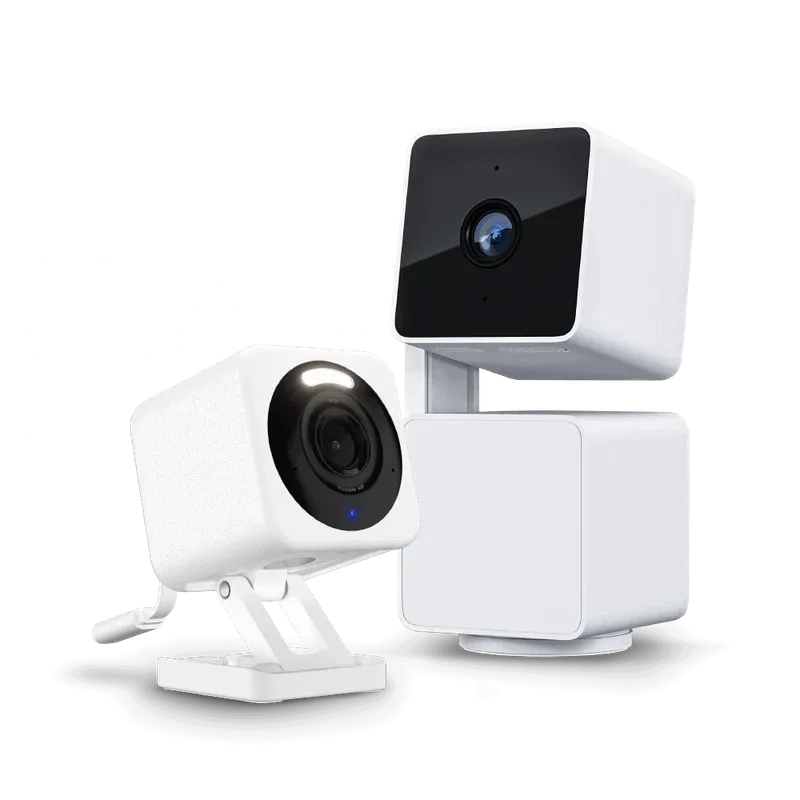
Wyze bundles its Cam v4 and Cam Pan v3 into a $74.98 starter kit. Here's what's actually in the box, how the two cameras split indoor and outdoor duty, and where the kit falls short of a full security system.
Wyze sells its two most popular cams together for less than either would cost stacked separately, and the pairing is deliberate: one fixed camera for a doorway or driveway, one pan-and-tilt camera for a room or backyard that needs to cover more ground than a fixed lens can see.
What's Actually in the Box?
The Wyze Basic Security Camera Starter Kit costs $74.98, down from $89.96 if you buy the two cameras separately, a 16% discount for buying them as a pair. You get:
- Wyze Cam v4: fixed-position camera, 2.5K QHD resolution, color night vision, built-in motion-activated spotlight and siren
- Wyze Cam Pan v3: 360-degree pan and 180-degree tilt camera, 2.5K QHD resolution, standard (non-color) night vision, smart motion tracking
Both connect over Wi-Fi 6 and record locally to a microSD card, up to 512GB, sold separately. Neither camera ships with a card in the box, and neither ships with the outdoor power adapter the Pan v3 needs for exterior mounting. Both units run on the current Wyze app and firmware branch, so pairing takes the same QR-code scan flow as every other recent Wyze camera, roughly two to three minutes per camera if your phone is already signed into a Wyze account.
How Should You Split the Two Cameras?
The Cam v4's wired, always-on design and built-in spotlight make it the better choice for a fixed chokepoint: a front door, a driveway entrance, a side gate. Point it once, leave it alone. The spotlight triggers automatically on detected motion at night, which is a meaningful deterrent difference from a plain infrared camera that only sees in the dark without announcing that it's watching.
The Cam Pan v3 earns its keep in a room or yard that's too wide for one fixed angle. Smart motion tracking lets it follow a person or pet across a room instead of just flagging when something crosses a static frame. That makes it a stronger fit for an open living room, a garage interior, or a backyard with more than one entry point than for a narrow hallway where a fixed camera already sees everything. The tradeoff is that a panning camera can only actively track one moving subject at a time, so a yard with kids and a dog running in different directions will still miss whichever one it isn't currently following.
What's the Catch on Outdoor Use?
Both cameras are IP65-rated, which covers rain and dust when mounted somewhere with partial cover, like under an eave. The Cam v4 ships ready to plug into a standard indoor outlet. The Cam Pan v3 doesn't: running it outdoors safely requires Wyze's separate Outdoor Power Adapter with an L-shaped MicroUSB connector, an extra purchase the starter kit's product page doesn't make obvious until you're already checking out.
If your plan is two outdoor cameras, budget for that adapter before you order, and check the cable run length too. The stock USB cable on both cameras is short, roughly 6 feet, which is fine for an indoor outlet but often too short to reach a garage or shed outlet from a good mounting height without an extension cable rated for outdoor use.
What Do You Give Up Without Cam Plus?
Free-tier Wyze cameras still do the basics: live view, motion detection, two-way audio, and person/vehicle shape recognition on the camera itself. What you don't get without a Cam Plus subscription is AI-refined detection that cuts down false alerts from moving branches or passing cars, cloud video history beyond a 12-second clip per event, and continuous cloud recording.
Cam Plus currently runs about $2 to $3 per camera per month depending on the plan length, or a flat unlimited-camera plan for households running more than a couple of units. For a kit this size, running both cameras on local SD storage without a subscription is a reasonable starting point. If false alerts from a busy street or a windy backyard become a problem, that's the point to reconsider Cam Plus rather than buying it upfront. A 128GB microSD card in the Cam v4, recording continuously at 2.5K, holds roughly five to seven days of footage before the oldest clips get overwritten, so plan card size around how long you actually need local history, not just what fits your budget.
How Does This Compare to Buying the Cameras Separately?
Buying a Cam v4 alone runs about $45.99 and a Cam Pan v3 alone runs about $42.99, a combined $88.98 before any sale pricing. At $74.98, the starter kit saves roughly $14, which is a real but modest discount rather than a steep bundle markdown. The math only favors the kit if you actually want one of each camera type. If your household needs two fixed cameras or two pan cameras instead of one of each, buying individually or looking at Wyze's other bundles is cheaper than forcing this particular pairing.
Compared to the budget smart home cameras we've tested from other brands in this price range, the Wyze pairing wins mainly on the pan-and-tilt option. Most sub-$50 cameras from competing brands are fixed-lens only, so getting one camera with active tracking bundled into a starter kit at this price is a genuine differentiator, not just a repackaged deal.
How Does Video Quality Actually Hold Up?
2.5K QHD sounds like a marketing number until you compare it against the 1080p most budget cameras still ship with. In practice, the extra resolution matters most when you're zooming into a recorded clip after the fact, reading a license plate on a car in the driveway, or confirming a package label on the porch. At native viewing size on a phone screen, the difference between 1080p and 2.5K is subtle. When you pinch to zoom into a corner of the frame, the extra detail the Cam v4 and Cam Pan v3 capture becomes the difference between a usable clip and a blurry mess.
Color night vision on the Cam v4 is the more noticeable upgrade day to day. Traditional infrared night vision renders everything in grayscale, which makes it harder to describe what you saw to a neighbor or, if it comes to that, a police report: was it a dark green car or a black one, a red jacket or a maroon one. The Cam v4's built-in spotlight switches on with detected motion and lets the sensor capture in color instead, at the cost of announcing the camera's presence to whoever triggered it. The Cam Pan v3 doesn't get this feature, its night vision stays standard infrared grayscale, which is one more reason to point the v4 at the spot you most need color detail after dark.
What Does Setup Actually Involve?
Both cameras pair through the Wyze app using the same QR-code flow Wyze has used for several camera generations: power on the camera, scan the blinking QR code displayed on your phone screen with the camera's lens, and confirm your Wi-Fi credentials. Neither camera supports 5GHz Wi-Fi, both need a 2.4GHz network or a dual-band router broadcasting both bands under compatible settings, worth checking before setup if your router is configured to hide the 2.4GHz SSID or force band-steering. Once paired, both cameras show up in the same app timeline as any other Wyze device, so if you're adding this kit to an existing Wyze setup, there's no separate app or account step required.
Is This Kit a Full Security System?
No, and it isn't trying to be. There's no hub, no door or window sensors, no siren beyond the Cam v4's built-in one, and no professional monitoring. What you get is two cameras that cover a fixed point and a wide-angle point for under $75, a reasonable starting layer for a first-time buyer who wants coverage on two problem spots before deciding whether a fuller smart home security buildout is worth the cost.
If you already own other Wyze cameras or sensors, adding this kit slots into the same app and automations without extra setup, and both cameras will show up alongside your existing devices in one event timeline. If you're starting from zero, treat it as the first two cameras in a system, not the whole system. According to the FTC's guidance on smart home security devices, pairing any internet-connected camera with a strong, unique account password and two-factor authentication matters more for real-world security than the camera's resolution or feature list, worth doing on setup day rather than treating it as optional.
Should You Buy It? Our Review Verdict
If you want two cameras covering different problem spots, an entry point and a wider room or yard, this kit is a sensible way to get both for less than buying them one at a time. If you specifically need two of the same camera type, or you're planning full outdoor coverage from day one, price out the individual cameras plus the outdoor power adapter before assuming the kit is the cheaper path. For a first step into home security cameras without committing to a subscription or a hub ecosystem, it's a reasonable, low-risk starting point.
Frequently Asked Questions
What is included in the Wyze Basic Security Camera Starter Kit?
The kit bundles one Wyze Cam v4 and one Wyze Cam Pan v3, both recording at 2.5K QHD resolution. It doesn't include a microSD card, so local storage means budgeting an extra $10 to $20 for one separately (up to 512GB supported). Neither camera comes with a base station or hub, both connect directly to your Wi-Fi network.
Does the Wyze Basic Security Camera Starter Kit work outdoors?
Both cameras carry an IP65 weather rating, so they can handle rain and dust if mounted under some cover. The catch is power. The Cam v4 ships with a standard indoor USB adapter, and the Cam Pan v3 needs Wyze's separate Outdoor Power Adapter with an L-shaped MicroUSB connector to run outside safely, neither is included in the kit. Budget an extra $15 to $20 if you plan to mount either camera outdoors.
Do I need a Wyze subscription to use this starter kit?
No. Both cameras record locally to a microSD card without any subscription, and live view, motion alerts, and two-way audio all work on the free tier. Wyze's Cam Plus subscription adds person and vehicle detection with fewer false alerts, 14-day cloud video history, and unlimited event recording length. Without it, free-tier cloud clips are capped at 12 seconds per event, and continuous local recording is SD-card only.