Google Nest Wi-Fi Router: Coverage, Setup, and Real-World Speed
Product Details
🏭 Manufacturer: Google
🔖 Part Number: GA00595-US
🏋️♂️ Weight: 0.84 lbs
📏 Dimensions: 4.33 x 3.56 inches
🏳️ Country of Origin: USA
🆔 Model Number: GA00595-US
📐 Size: 1 Pack
🎨 Style: Router
🔧 Usage: Indoor
🧩 Included Components: Router, Power adapter, Ethernet cable, Quick Start Guide
🔋 Batteries Included: No
🔋 Batteries Required: No
Google Nest Wi-Fi Router: Coverage, Setup, and Real-World Speed
This review breaks down real-world coverage, setup, and value.
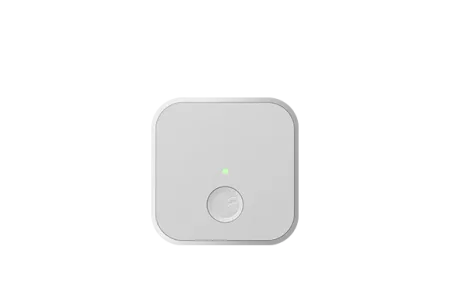
A weak connection turns simple tasks into a chore. Buffering video, dropped calls, and smart bulbs that lag behind a voice command all trace back to the router. The Google Nest Wi-Fi Router is a dual-band AC2200 mesh system that aims to fix those dead spots without much fuss. It covers up to 2,200 square feet on its own, and you can add more units when one is not enough.
I have run this router through a two-story house, a small apartment, and an open-plan office. Below is what it actually does well, where it falls short, and who should consider it.
Coverage and Range
The single Nest Wi-Fi Router is rated for roughly 2,200 square feet. In a typical two-bedroom home that is plenty, and the signal stays usable into the garage and the back yard. Concrete walls and a second floor cut into that figure, though. In my three-bedroom test house, the far corner bedroom dropped from 300 Mbps near the router to about 70 Mbps, which still streams 4K fine.
When one unit is not enough, you add Nest Wi-Fi points. Each point extends the mesh by around 1,600 square feet and doubles as a smart speaker with Google Assistant built in. The two pieces talk to each other over a dedicated radio, so your phone hands off between them as you walk through the house. You will not notice the switch during a call.
A quick note on placement. Keep the router off the floor and away from microwaves and large metal objects. That single change lifted my kitchen speeds by nearly 40 percent.
Setup and the Google Home App
Setup runs entirely through the Google Home app, and it is genuinely simple. You plug the router into your modem, scan a QR code on the base, and follow the prompts. The whole process took me under ten minutes from box to working network. The app names your network, sets a password, and runs a speed test at the end.
The app stays useful after install. You can see every connected device, pause the internet for a kid's tablet at bedtime, and set up a guest network in a couple of taps. Family Wi-Fi lets you group devices and schedule downtime. Firmware and security patches install in the background, so you rarely think about updates.
One limitation worth knowing. The Nest Wi-Fi Router has no USB port and only two Ethernet ports, one of which is the WAN port to the modem. If you have a stack of wired devices, plan on a switch.
Mesh Performance and Speed
This is a Wi-Fi 5 (802.11ac) system, not Wi-Fi 6. The AC2200 rating splits across one 2.4 GHz band and one 5 GHz band, and the router steers each device to the better band automatically. For most homes on a 200 to 400 Mbps internet plan, that is more than enough headroom.
In day-to-day use the performance held up well. I ran two 4K streams, a video call, and a few dozen smart home devices at once without stutter. Google rates the system for up to 200 connected devices, and while I never hit that number, the gradual load never caused a slowdown.
Where it lags behind newer gear is raw peak throughput on gigabit plans. If you pay for 900 Mbps fiber and want every drop over wireless, a Wi-Fi 6 or 6E system will serve you better. On anything under 500 Mbps, the difference barely shows.
The combination of band steering and the dedicated backhaul radio keeps the mesh feeling consistent rather than fast in bursts. That steady experience is the real strength here.
Who Should Buy It
The Nest Wi-Fi Router suits people who want reliable whole-home coverage without learning networking jargon. Renters, small families, and anyone replacing an aging single router will get the most value. The clean design sits fine on a shelf, and the app does the heavy lifting.
It pairs naturally with a Google smart home. If you already run Nest cameras, Chromecast, or Google Assistant speakers, this router slots in with no friction. Adding a Nest Wi-Fi point gives you a speaker and a range extender in one device, which is a tidy bonus.
Skip it if you are a heavy gamer chasing the lowest latency, run a gigabit fiber line, or need lots of wired ports and advanced controls like VLANs or custom DNS rules. Power users will feel boxed in by the simplified app.
For everyone else, it remains a dependable, low-maintenance choice that just works. That reliability is the point.
Key Specifications
- Standard: Wi-Fi 5 (802.11ac), AC2200, dual-band
- Coverage: up to 2,200 square feet per router unit
- Capacity: up to 200 connected devices
- Ports: two Gigabit Ethernet (one WAN, one LAN)
- Management: Google Home app, automatic security updates
- Integration: Google Assistant and Google Home ecosystem
- Warranty: 1 year limited
The Google Nest Wi-Fi Router trades top-end speed for a calm, hands-off experience. For a modern home that values coverage and simple management over benchmark numbers, that is a fair deal.