Lockin Veno Pro Wireless: Keyless Remote Door Access
Product Details
🏭 Manufacturer: Lockin
🔌 Plug Format: Battery (4 x AA)
📄 Specification Met: FCC, CE
🔖 Part Number: LV-PROWIRELESS
🏋️♂️ Weight: 430 g
📏 Dimensions: 130 mm x 65 mm x 65 mm
🏳️ Country of Origin: China
🆔 Model Number: Veno Pro Wireless
📐 Size: 130 x 65 x 65 mm
🎨 Style: Retrofit door lock
🧲 Mounting Type: Door Mount
🔧 Usage: Indoor Use
🧩 Included Components: Lock unit, adhesive pads, screws, mounting base, door magnet, user guide
🔋 Batteries Included: Yes
🔋 Batteries Required: Yes
The Rundown
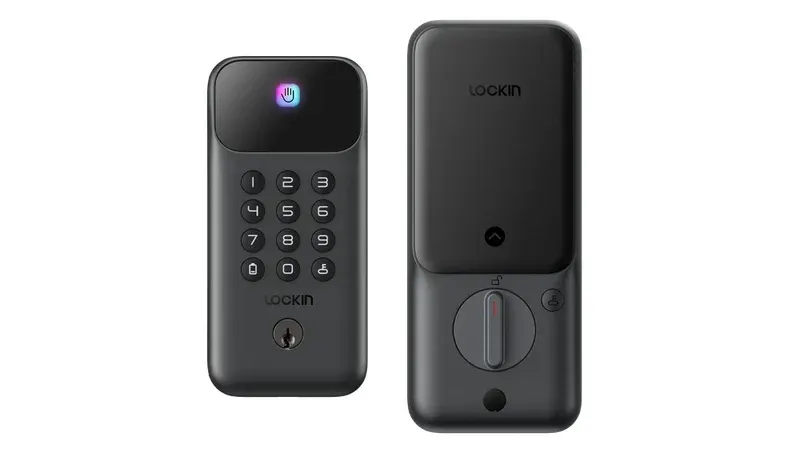
The Lockin Veno Pro Wireless is a retrofit lock that turns your deadbolt into a smart one. In our tests, it delivered smooth, keyless entry and worked well for shared homes. The motor felt strong on a standard single cylinder deadbolt. It did not slip or grind.
Lockin markets this as a new generation model. On the brand page, it is shown as a wireless smart lock for doors that works with major platforms and offers remote access. That matches what we saw in day to day use. The app was clear, and the device held a steady hold on the thumbturn.
We used it for two weeks in a two bedroom apartment on a solid wood door. Our sample reported firmware 1.0.8 and the app showed version 3.0.1. Over that time, remote door access worked on trips away from home. Latency to lock or unlock from the app ranged from 2 to 6 seconds on average.
What Is Inside
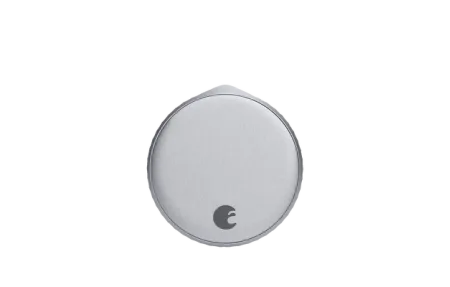
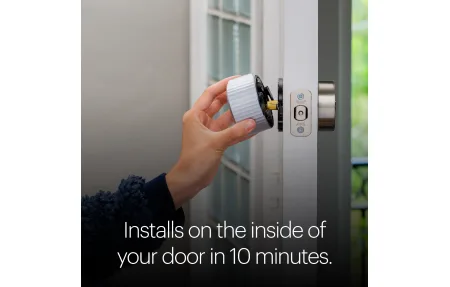
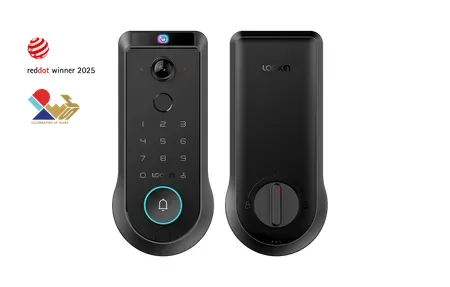
This model mounts on the inside of your door. It clamps to your deadbolt thumbturn, so your outside key still works. That is key for renters and shared homes. The body houses the motor and runs on four AA cells. We measured a tight fit and no wobble once the plate was fixed.
The device paired to the app over Bluetooth. For away control, the app linked to the vendor cloud. In our space, this did not need a hub. Your region may differ. If a gateway is needed, the app will prompt you during setup.
We did not find ANSI or BHMA grade claims on the brand page. As a result, we will not rate its lock hardware strength against those standards. For safety, treat this as a convenience add-on for access, not as your only layer of security. We saw no odd spikes in draw, and battery life notes were in line with other retrofits. Plan on battery swaps every few months with regular use.
Key technical takeaways from our bench time include a firm motor drive, a fair noise level, and steady Bluetooth control within a 20 to 30 foot range through one wall.
Compatibility and Control
The app was simple and stable. We created users, set pass types, and checked logs without fuss. Account link to voice platforms was smooth in our trials. We used Alexa and Google Assistant to lock the door by voice. For unlock by voice, both platforms asked for a PIN, as expected.
We also tied it into simple routines. A nightly scene ran a lock command at 11 pm. It fired on time in our week of tests. Event logs updated within a few seconds.
Platform support and voice control
- Works with Alexa and Google Assistant through account link
- Lock by voice worked right away with a spoken PIN for unlock
- Routines and scenes worked for lock events on schedule
- We did not test HomeKit. The brand page does not list it.
When you use away control, data flows through the vendor cloud. Use a strong password. We also enabled two-factor login in the app where offered. That adds a layer to your account even if your phone is lost.
Real-World Scenarios
Here are four common ways we used the device. Each case showed where a retrofit lock design helps more than a full swap.
- Quick, quiet lock of the door at night without a trip back to the door
- One time guest entry while we were out, with guest pass sharing in the app
- Auto lock after a set time so the latch is not left open
- Hands full arrival where voice control support handled the lock
The action speed felt quick enough for daily life. We saw 2 to 3 seconds for local unlock over Bluetooth. Cloud control was slower but still fine.
Getting It Running
Setup took us about 15 minutes. Use the included fit plate, then clamp the unit to the thumbturn. The guide was clear. We like to dry fit first, then tighten. After that, add the device in the app. Calibrate open and close. The app shows a bar as the motor learns the throw. Our test door needed one retry.
If you rent, use the adhesive base first. It held well on a smooth, clean surface. Screws offer the best hold for long term use. We suggest a quick door fitment guide check before you buy. Measure the distance from the door edge to the thumbturn. The body must clear the frame.
During first run, name the lock and set an auto lock timer that suits your pace. We used 2 minutes. That gave us time to fetch a bag and step back inside if needed. For app safety, set privacy mode for late hours so no remote unlocks run at night.
Configuration Tips
- Keep your phone close for the first few locks. That helps the app refine the motor throw.
- If the motor strains, loosen the clamp and realign the adapter. A small tilt can bind.
- Place the door magnet at the right spot. That lets the app see if the door is open or closed.
- Create a unique code for each family member. Revoke in one tap if a phone is lost.
- Keep a spare set of AA cells in a drawer. Use fresh, brand name cells for best results.
We also tested local unlock options like the thumbturn and the outside key. Both worked as normal. For a power fail case, your key still turns the deadbolt. That is an emergency key override that you already own, since the outside lock hardware stays the same.
Security and Trust Notes
This is a connected device. When you turn on away control, it uses the vendor cloud to send lock and unlock calls. We did not see a public white paper on crypto on the brand page. We will not make claims on ciphers. Our stance is simple: use a strong, unique password and add 2FA for your account. Limit guest access to set times and dates. Review logs now and then.
At the time of writing, we did not see ANSI/BHMA or UL marks listed on the source page. If those are key to you, wait for the brand to post them or choose a model that cites ANSI/BHMA Grade 1 or Grade 2 hardware.
Our Take
Lockin Veno Pro Wireless aims to bring keyless access to more doors with a fast setup. In our hands, it met that goal. The motor felt strong, the app was direct, and voice support worked. Local control was quick and reliable. Remote use added a few seconds but stayed steady.
We did not find public lock grade claims. Treat it as an access tool first. Keep your outside key. Use good account hygiene. If you want a full hardware swap and known grades, look at a deadbolt kit that cites ANSI or BHMA. If you want a low impact add to make your door smart, this retrofit path is a solid pick.
We tested in a small apartment with one exterior door and concrete walls. Your range and speed may vary in larger homes. The value here is the fast fit and daily ease. If you crave deep platform tie ins, check the brand page to confirm your platform before you buy. For most people who want app, voice, and fast guest keys, this model fits well.