August Lock Pro 4th Gen: Built-In Wi-Fi, DoorSense, Z-Wave Plus
Product Details
🏭 Manufacturer: August
🆔 Model Number: AUG-SL04-M02-G0X
🔧 Usage: Indoor Use
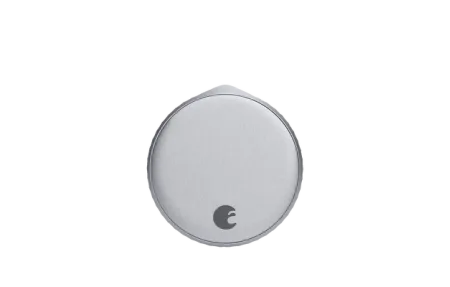
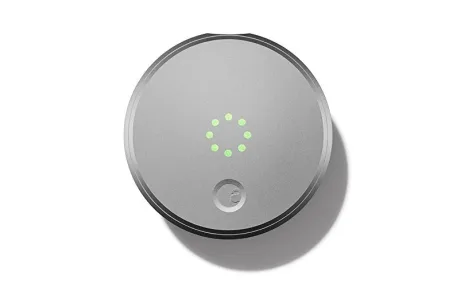
Built-in 2.4 GHz Wi-Fi and Z-Wave Plus in the same retrofit body is what sets the August Lock Pro 4th Gen (model AUG-SL04-M02-G0X) apart from every other August lock. No bridge, no separate hub for SmartThings or Ring Alarm. It still sits entirely on the inside of your door, clipped over the interior thumb-turn with an included adapter, so your exterior cylinder and physical keys never change. Install runs about 10 to 15 minutes with a screwdriver. This review covers the setup, daily use, and where the retrofit design falls short.
This fourth-generation model builds on the older Wi-Fi Pro with a cleaner housing, an improved Z-Wave Plus radio, and refined DoorSense detection. At $229 it's August's flagship retrofit, aimed at households that want full smart home integration without pulling out the whole deadbolt.
What's Different About the 4th Gen
The headline change from earlier August Wi-Fi models is Z-Wave Plus alongside built-in Wi-Fi. Previous Pro versions had one or the other. The 4th Gen ships with both radios active, which means you can connect it directly to SmartThings, Wink, or Ring Alarm through Z-Wave without a separate hub, and still get remote access through Wi-Fi and the August app.
DoorSense is included in the box. The magnetic sensor mounts on the door frame with double-sided tape and detects physical door position independently from the deadbolt. It's a small but practical feature: a door that swings ajar in a breeze won't trigger auto-lock and throw the bolt into an open frame.
Key Specs at a Glance
- Retrofit design: fits over existing interior thumb-turn, no drilling required
- Connectivity: 2.4 GHz Wi-Fi + Bluetooth + Z-Wave Plus
- Voice assistants: Alexa, Google Assistant, Siri via HomeKit
- Smart home platforms: Apple HomeKit, SmartThings, Ring Alarm, Wink, Google Home
- DoorSense: door open/closed detection included, sensor in box
- Battery: 4x AA (approximately 6 months typical use)
- Guest access: time-limited virtual keys via the August app
- Price: $229
Installation and Setup
Installation starts with removing the existing interior thumb-turn assembly and choosing the correct August adapter for your deadbolt. August ships adapters for the most common American deadbolt configurations, and the app walks through each step with illustrated instructions.
Wi-Fi pairing runs through Bluetooth first. The lock pairs to your phone via Bluetooth, then you select your 2.4 GHz network and enter the password in the August app. 5 GHz is not supported, which is standard for battery-powered smart home hardware. The full process from unboxing to remote access typically takes under 20 minutes.
Z-Wave Plus pairing is separate and optional. If you use SmartThings or Ring Alarm, you put your hub in inclusion mode and hold the August button as directed. August's official setup guide walks through both pairing methods in detail.
App Experience and Guest Access
The August app covers everything: lock, unlock, view the activity log, manage guest keys, and configure auto-lock timing. Guest access is one of the strongest parts of the experience. You send a virtual key from the app, set the date range and time window (a specific weekend, every Monday 9-11 AM, or permanent access), and the guest receives a notification to download August and accept the key. You revoke access instantly without touching the lock.
The activity log shows every lock and unlock event with timestamp and who triggered it, whether that's a family member's app, a guest key, auto-lock, or a voice assistant command. This audit trail is genuinely useful for households with multiple people coming and going.
Auto-Lock and Auto-Unlock
Auto-lock engages the deadbolt after a delay you set in the app, from 30 seconds to 30 minutes. DoorSense integration means auto-lock only fires when the door is fully closed. That combination prevents the deadbolt from engaging while the door is partially open, which would damage the strike plate.
Auto-unlock uses phone geofencing combined with Bluetooth proximity detection. The app triggers when your location crosses a boundary around your home, then waits for Bluetooth confirmation at close range before unlocking. The two-step approach reduces false unlocks from driving or walking past the house.
Smart Home Integrations
Z-Wave Plus and SmartThings
Z-Wave Plus is the standout addition on the 4th Gen. SmartThings users can pair the August lock directly and include it in SmartThings automations, routines, and scenes alongside other Z-Wave or Zigbee devices. Ring Alarm works the same way through its Z-Wave hub. Lock and unlock events feed into Ring's dashboard and can trigger Ring camera recording or alarm responses.
Apple HomeKit
HomeKit integration is native. Add the lock to the Home app by scanning the HomeKit code on the packaging, then control it with Siri, include it in HomeKit automations, and check status in Control Center. Households with multiple iOS devices get the most out of this: the lock appears in everyone's Home app once added to the home.
Home Assistant
Two integration paths exist. The cloud-based August integration connects through your August account and surfaces lock state and activity in Home Assistant. For local control, pair the lock to a Z-Wave JS USB stick and use the Z-Wave JS integration. Local Z-Wave gives faster response, no cloud dependency, and keeps all lock activity on your local network.
What Works and What Does Not
What works well:
- Retrofit design leaves exterior hardware completely unchanged
- Z-Wave Plus covers SmartThings and Ring Alarm without an extra hub
- DoorSense prevents auto-lock mishaps with an open door
- Guest access management is clean and practical
- Works with HomeKit, Alexa, Google Home, and Home Assistant
What to know before buying:
- At $229, it's the most expensive retrofit option in its class
- No Matter support as of mid-2026; August has not confirmed a timeline
- 2.4 GHz only; 5 GHz networks require a 2.4 GHz band to be active
- Retrofit approach means physical security depends on your existing deadbolt grade
Who Should Buy the August Lock Pro 4th Gen
This lock makes sense for renters who can't modify door hardware, homeowners in historic properties with non-standard exterior hardware, and households already using SmartThings or Ring Alarm who want Z-Wave integration without adding another hub. It's the right fit if you need guest access management, want HomeKit, Alexa, and Google Home under one lock, and prefer not to swap out your existing deadbolt assembly.
If you want a keypad or fingerprint reader on the exterior, or if ANSI/BHMA Grade 1 certification matters to you, look at full-replacement options from Schlage or Yale. The August retrofit approach is a deliberate trade-off: flexibility and reversibility in exchange for keeping your current exterior hardware as-is. One honest gripe at this price: there's still no Matter support in mid-2026, so if you're building a Matter-first home, that $229 stings a little.
Frequently Asked Questions
Does the August Lock Pro 4th Gen require a hub or bridge?
No. The 4th Gen has built-in 2.4 GHz Wi-Fi, so you don't need the August Connect bridge or any separate hub for remote access. Previous August models required the $80 Connect bridge to get remote locking from outside the house. With the 4th Gen you connect directly through the August app over your home network. Z-Wave Plus is also built in for SmartThings and Ring Alarm integration.
What is DoorSense and why does it matter?
DoorSense is a magnetic sensor that mounts on the door frame and detects whether the door is physically open or closed, separate from the deadbolt position. This matters for auto-lock: if the door is ajar, the lock won't engage the bolt into an open frame. The status shows in the August app and you can set alerts if the door is left open beyond a time you choose.
Does the August Lock Pro 4th Gen work with Home Assistant?
Yes, through two paths. The Z-Wave JS integration in Home Assistant works after pairing via a Z-Wave USB stick. The August integration (cloud-based) also works and pulls lock state and activity into Home Assistant. Z-Wave JS gives local control with no cloud dependency, which most Home Assistant users prefer for reliability and privacy.
How many batteries does the August Lock Pro 4th Gen use?
The lock runs on 4 AA batteries. August rates life at around 6 months with typical use. Lithium AAs extend that in cold climates. Low battery push notifications go through the August app well before the lock stops responding, typically giving a week or more of warning. The 2.4 GHz Wi-Fi radio draws more power than Bluetooth; the lock uses Bluetooth for proximity operations to save battery.
Can I still use a physical key with the August Lock Pro 4th Gen?
Yes. The 4th Gen is a retrofit lock that mounts over the interior thumb-turn of your existing deadbolt. Your exterior hardware, key cylinder, and physical keys are completely unchanged. This is the core retrofit advantage: you can remove the August unit and the door returns to normal, which makes it suitable for rental apartments.