August Smart Lock 2nd Gen: Bluetooth Retrofit Deadbolt Review
Product Details
🔧 Usage: Indoor Use
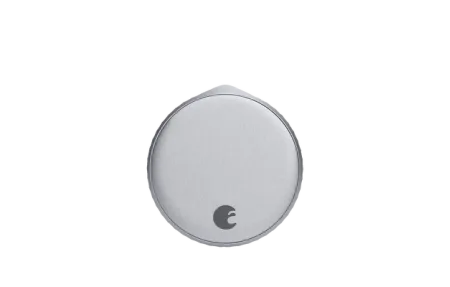
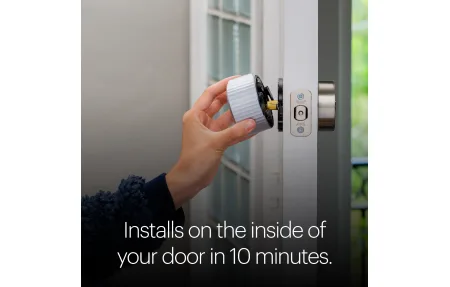
The August Smart Lock 2nd Gen is a Bluetooth retrofit deadbolt that clips over your existing deadbolt's interior thumb-turn. You keep your current keys, your current door hardware, and your current lock cylinder, and August just replaces what's on the inside. Installation takes under 10 minutes with a screwdriver.
This review covers the 2nd generation model (ASL-02), which introduced a cleaner design and improved Bluetooth range compared to the original. It doesn't have built-in Wi-Fi, which matters for your setup decision. Remote access requires the separate August Connect bridge.
The 2nd Gen sits below the August Smart Lock Pro in the lineup. The Pro adds built-in Wi-Fi and DoorSense (door ajar detection) directly. The 2nd Gen is the more affordable entry point for households that only need Bluetooth control or plan to add the Connect bridge later.
What Does It Actually Do?
The 2nd Gen lock handles the core smart lock workflow: auto-unlock when you approach (using your phone's location), auto-lock after a configurable delay, and manual locking through the August app. It logs every lock and unlock with timestamp and source (who did it: app, keypad, or manual).
The retrofit design is the main selling point. If you rent, own a historic home with non-standard hardware, or just don't want to replace your entire deadbolt assembly, this approach works where most smart locks don't. The lock attaches to the existing thumb-turn mechanism using a mounting adapter included in the box.
Bluetooth range in practice is around 25-30 feet through a standard interior door. Auto-unlock triggers when your phone gets within range, with a slight delay for security confirmation. I've found auto-unlock reliable when the phone is in a pocket or bag, and less reliable if the phone's Bluetooth radio is under load from other devices.
What Stands Out
- Retrofit install: attaches to existing deadbolt, no locksmith required
- Auto-unlock: uses phone geofencing + Bluetooth proximity detection
- Auto-lock: configurable timer from 30 seconds to 30 minutes
- Access sharing: send virtual keys to guests via the August app
- Activity log: every lock/unlock timestamped with user identity
- DoorSense: NOT included on 2nd Gen; door open/closed sensing requires August Smart Lock Pro
- Apple HomeKit: supported with August Connect bridge (sold separately)
- Alexa/Google Home: voice commands for lock and status check, bridge required
Remote Access and the August Connect Bridge
Without the August Connect Wi-Fi bridge ($79 separately), this lock is Bluetooth-only. That means you can only lock or unlock when you're physically near the door with your phone. No remote checking whether you left it unlocked. No locking from the office.
The Connect bridge plugs into a wall outlet near the door and communicates with the lock via Bluetooth, then relays commands through your home Wi-Fi to the August cloud. Once connected, you get full remote access through the app, push notifications for every lock event, and voice assistant integration through HomeKit, Alexa, or Google Home.
If remote access is important to you, factor the bridge cost into your purchase decision. The August Smart Lock Pro includes Wi-Fi built-in and DoorSense, which makes more sense for most buyers who want the full feature set without separate accessories.
Auto-Lock Configuration
Auto-lock is one of the 2nd Gen's most useful features. Set a time delay in the August app, anywhere from 30 seconds to 30 minutes, and the lock engages automatically after every unlock. You can also require confirmation that the door is fully closed before auto-lock fires, though this requires the Connect bridge for the backend logic.
Auto-unlock works through a combination of geofencing (leaving and returning to your home location) and Bluetooth proximity detection when you're close enough. The app handles both steps, so you don't need to open anything; the lock fires on its own as you walk up.
Access Management
Guest access is handled through virtual keys in the August app. You can send time-limited access (a specific date range), recurring access (weekday mornings only), or permanent access. Guests download the August app and get a notification when a key is shared. You revoke access instantly from the app without changing physical keys or calling a locksmith.
This is the practical reason most people upgrade to a smart lock. Letting a housesitter in for a week, giving a contractor one-day access, or adding a family member without duplicating keys. All of it works through the app in under 30 seconds.
Should You Buy It
The August Smart Lock 2nd Gen is a solid retrofit Bluetooth lock for renters or anyone who doesn't want to replace their existing deadbolt hardware. Auto-unlock and auto-lock both work reliably, access sharing is straightforward, and installation is genuinely as simple as advertised. The missing pieces are remote access (bridge required) and DoorSense (not available on this model). For Bluetooth-only local control with a clean interface, the 2nd Gen still does the job.
Frequently Asked Questions
Does the August Smart Lock 2nd Gen work without Wi-Fi?
The 2nd Gen lock connects via Bluetooth only. You can lock and unlock it from your phone when you're within Bluetooth range (roughly 30 feet) without any Wi-Fi or hub. For remote access from anywhere, you need the optional August Connect Wi-Fi bridge, which plugs into a nearby outlet and connects the lock to your home network.
Does the August Smart Lock 2nd Gen work with Apple HomeKit?
Yes. The 2nd Gen supports Apple HomeKit when paired with the August Connect bridge. Without the bridge, Bluetooth-only operation is not HomeKit compatible. Once you add the Connect, you can control the lock through the Home app, use Siri voice commands, and set up HomeKit automations tied to arrival and departure.
How long does the battery last on the August Smart Lock 2nd Gen?
August rates the 2nd Gen at about 3 months on two CR123A batteries with typical use (around 8-10 lock/unlock cycles per day). Heavy usage with frequent auto-lock activity or lots of Bluetooth handshakes will drain batteries faster. The August app sends a low-battery alert when charge drops below 20%, which gives you enough time to get replacement batteries.